
Google Sheets Habit Tracker Template: Stop 66-Day Streaks
This google sheets habit tracker template gives you 7 automated tabs — streaks, a monthly heatmap and 66-day milestones — so one missed tick never quietly breaks your progress. Works the same whether you’re logging habits in the US, the UK or Australia, since it’s just a spreadsheet with no timezone or locale settings to fight.

⏱ 9 min read
Most people don’t quit a habit on purpose. They miss one day, tell themselves they’ll catch up, then miss a second — and the streak they’d built quietly resets without anyone noticing until weeks later. This google sheets habit tracker template exists to stop that exact failure point: it ticks over automatically, flags a slipping streak before it fully breaks, and never asks for more than a single daily tap.
After reading through hundreds of threads on r/getdisciplined, r/habittracking and r/productivity, one complaint came up more than any other: trackers that demand heavy daily input get abandoned inside two weeks. This google sheets habit tracker template fixes that by design — one tick per habit, and every other tab (Dashboard, Streaks, Monthly Heatmap, Weekly Review, Progress) updates itself.
Copy this google sheets habit tracker template to your Drive and you’re tracking in under three minutes, from anywhere — the US, the UK, Australia, or wherever your Gmail account happens to be logged in. No timezone settings, no region lock, no app store availability to check first.
- 7 fully automated tabs — Setup, Daily Tracker, Dashboard, Streaks, Monthly Heatmap, Weekly Review, Progress
- Track up to 10 habits at once with a single daily tick per habit
- Automatic streak milestones — Just Starting → Building Up → On a Roll → Habit Formed at 66 days
- Monthly heatmap — pick any month, the grid rebuilds instantly
- 52-week auto-graded review — Excellent / Good / Average / Needs Work
- Works on mobile — Google Sheets app, roughly 30 seconds a day
- 100% free, no sign-up, no account required beyond a Google login
📋 Table of Contents
- All 7 Tabs in This Habit Tracker Google Sheets Template
- How to Set Up Your Google Sheets Habit Tracker Template
- Your Daily Routine — 30 Seconds on Your Phone
- Streak Tracker & Never Missing Twice
- How Long Does It Take to Form a Habit? The 66-Day Science
- Monthly Heatmap in This Google Sheets Habit Tracker
- Google Sheets Habit Tracker vs. Notion, Excel & Apps
- 5 Tips to Actually Stick With This Template
- Frequently Asked Questions
All 7 Tabs in This Habit Tracker Google Sheets Template
You only ever type in one place in this google sheets habit tracker template — the Daily Tracker tab. Every other tab reads from it and updates on its own. Nothing to recalculate, nothing else to fill in by hand.
Setup Tab
Fill in once — your name, up to 10 habit names with categories, and a daily target. Every tab in this google sheets habit tracker template pulls from here automatically.
Daily Tracker
The only tab you touch daily. Tick ✅ or ❌ for each habit. 365 days pre-filled. Built for mobile — one tap per habit, no scrolling hunt.
Dashboard
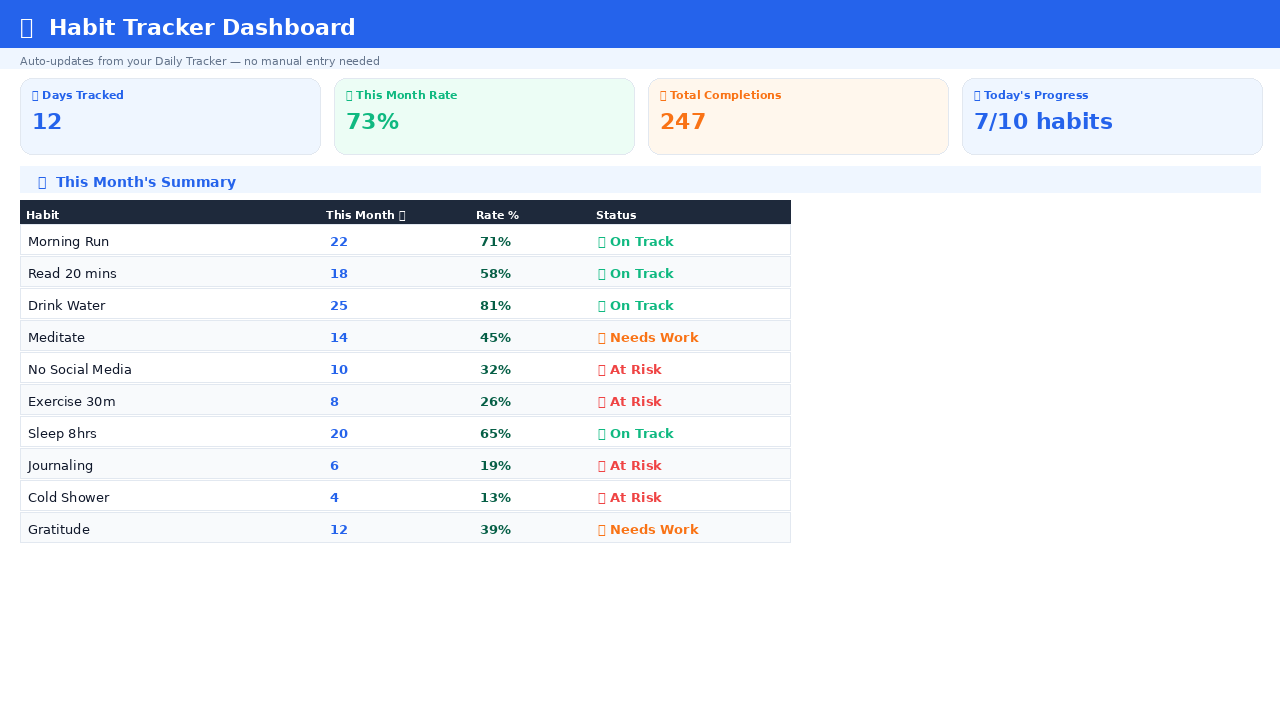
4 live KPI cards — days tracked, this month’s completion rate, total completions, today’s progress. A habit summary flags On Track / Needs Work / At Risk per habit.
Streaks
Total and monthly completions per habit. Milestone badges update automatically — Just Starting, Building Up, On a Roll, Habit Formed at day 66.
Monthly Heatmap
Pick any month — see ✅/❌ for every habit, every day, in one grid. Total completions per habit for that month calculated for you.
Weekly Review
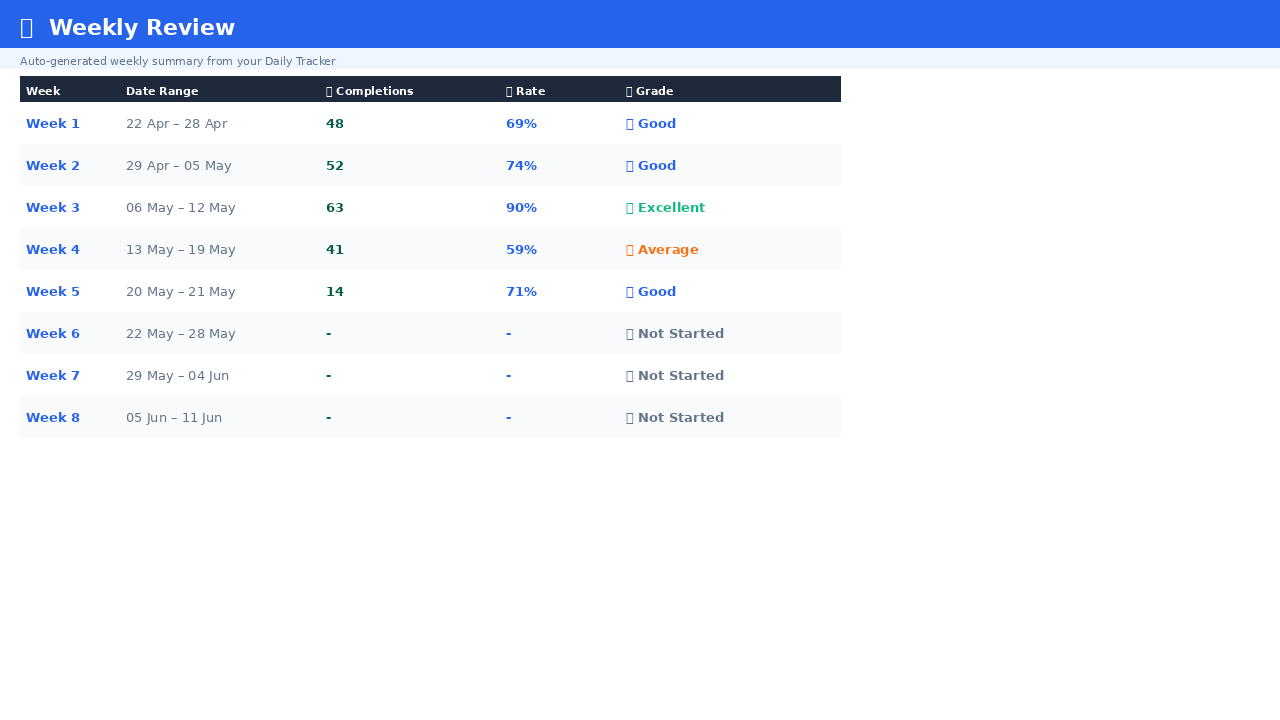
All 52 weeks auto-summarized. Completion count, rate and a grade — Excellent / Good / Average / Needs Work — per week, all year.
Progress
Monthly completion percentage per habit across all 12 months, colour-scaled red to green — see which habits are climbing and which are slipping.
Works on Mobile
Open Google Sheets on your phone → Daily Tracker tab → tap a cell → pick ✅ or ❌. Done in 30 seconds — no laptop required.
Building a full daily system, not just one habit? This google sheets habit tracker template pairs naturally with Notion Life OS for tasks, goals and notes, or the free personal CRM Notion template for relationship follow-ups. Track the daily consistency here, manage the rest wherever it fits best.
How to Set Up Your Google Sheets Habit Tracker Template
Download & Copy the Google Sheets Habit Tracker Template
Click the download button below. The google sheets habit tracker template opens in your browser. Go to File → Make a Copy to save it into your own Google Drive.
Always make a copy first. Editing the original template directly means your changes won’t save — this is the single most common setup mistake people report.
Fill in the Setup Tab — Takes 2 Minutes
Open the ⚙️ Setup tab. Fill in the yellow cells only — your name, each habit name, category, and your daily target (how many habits counts as a good day). Every other tab in this google sheets habit tracker template reads from here automatically.
| Yellow Cell | What to Enter | Example |
|---|---|---|
| Your Name | First name or nickname | Alex |
| Start Date | Today’s date | 2026-08-28 |
| Daily Target | How many habits = a good day | 8 out of 10 |
| Habit Names | Up to 10 habits | Morning Run, Read 20 mins… |
| Category | Pick from dropdown | Fitness, Learning, Health… |
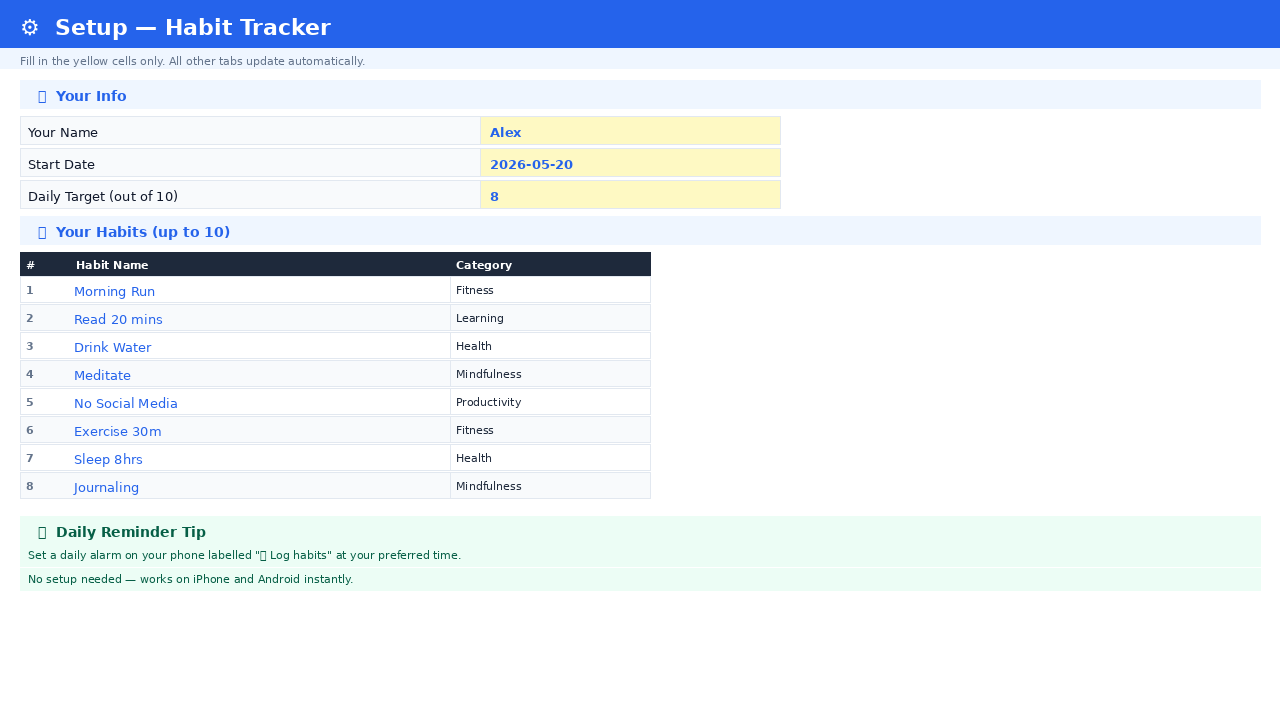
Habit names flow everywhere automatically. Rename a habit in Setup and it updates across the Daily Tracker, Dashboard, Streaks, Monthly Heatmap and Progress tabs instantly — no re-linking, no broken formulas.
Set a Phone Reminder — No App Needed
Set a daily alarm labelled “Log habits” — evening before bed usually works best. No extra app, no account, no notification permissions to grant. Your phone’s built-in alarm is the only trigger this system needs.
Your Daily Routine With This Google Sheets Habit Tracker Template — 30 Seconds on Your Phone
Once it’s set up, this google sheets habit tracker template takes about 30 seconds a day:
- Open the Google Sheets app on your phone
- Go to the 📅 Daily Tracker tab
- Find today’s row — it’s highlighted automatically
- Tap each habit cell → choose ✅ (done) or ❌ (missed)
- Close the app
That’s the entire daily workflow. Dashboard, Streaks, Monthly Heatmap and Progress all update from those ticks on their own — you never open any other tab unless you’re checking in on progress.
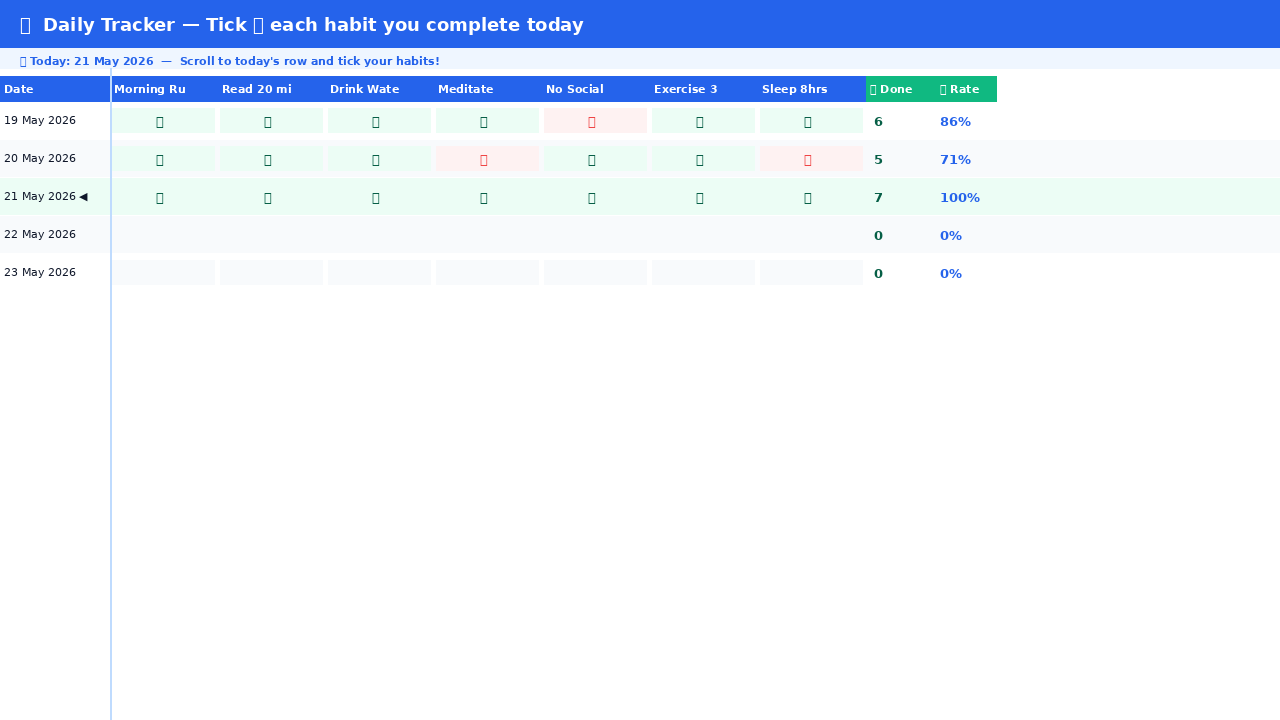
Mobile shortcut: Add the file to your phone’s home screen — open it, tap the three dots, then Add to Home Screen. One tap and you’re straight into the Daily Tracker of your google sheets habit tracker template.
Streak Tracker in This Habit Tracker Google Sheets Template — Stop Missing Streaks
The 🔥 Streaks tab is the reason for the title of this post. Most habit tracker google sheets templates only show you a running total — they don’t warn you when a streak is one missed day from resetting. This one shows total completions and this month’s count per habit, plus milestone badges that move automatically:
🌱 Just Starting
💪 Building Up
🔥 On a Roll
🏆 Habit Formed!
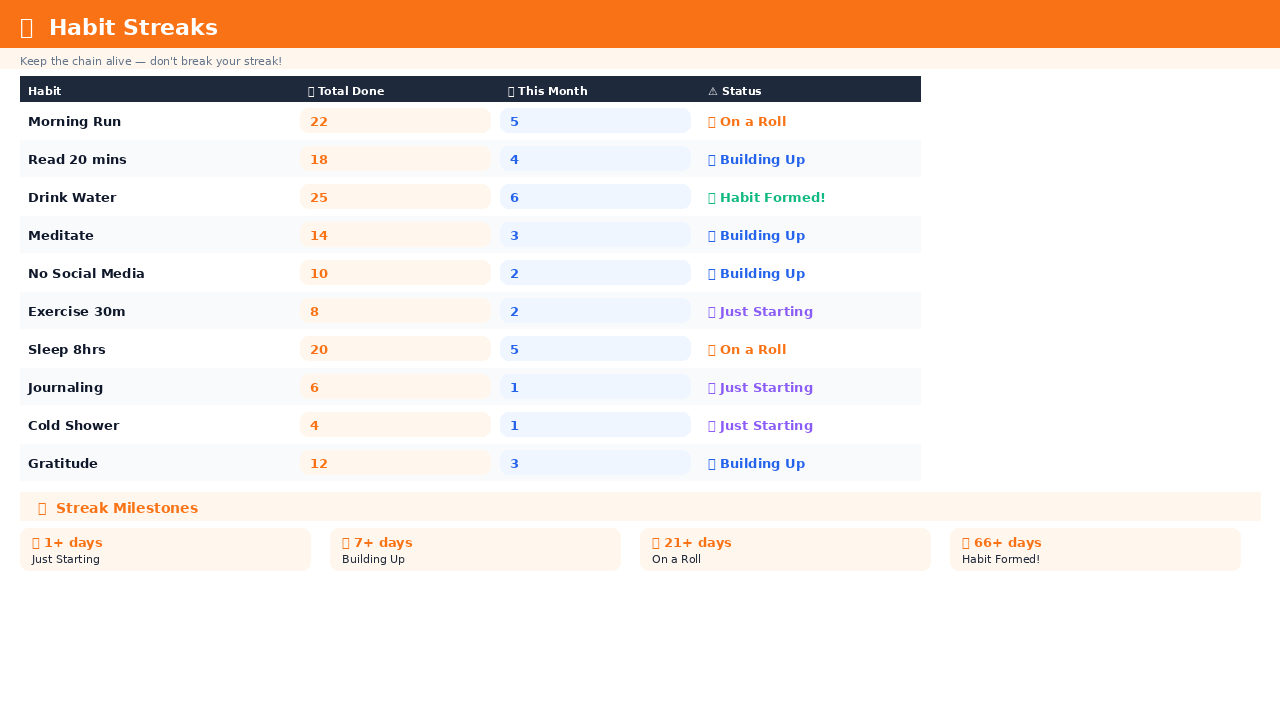
The single rule worth remembering: missing one day barely moves the needle. Missing two days in a row is what actually resets momentum. This google sheets habit tracker template tracks streaks specifically — not just lifetime totals — because that’s the number that reflects whether a habit is actually sticking.
How Long Does It Take to Form a Habit? The 66-Day Science
How long does it take to form a habit? On average, 66 days — not the widely repeated “21 days,” which has no real research behind it. A 2010 study by Phillippa Lally at University College London tracked 96 people forming new habits and found times ranging from 18 to 254 days, averaging 66, depending on how complex the habit was.
This google sheets habit tracker template is built around that 66-day reality rather than the popular myth. Here’s roughly what happens across those days:
- Days 1–7 — hardest stretch. Motivation is high but the routine isn’t set yet. Most people quit here.
- Days 8–21 — friction starts easing. The habit feels less forced.
- Days 22–66 — the habit is actively forming. Consistency matters more than perfection.
- Day 66+ — largely automatic. The tracker becomes a maintenance tool, not a motivator.
Counter-intuitive finding from Lally’s research: a single missed day had no measurable effect on habit formation. It’s consecutive misses that reset progress — which is exactly why this google sheets habit tracker template surfaces streaks front and centre instead of burying them in a lifetime total.
Monthly Heatmap in This Google Sheets Habit Tracker
The 📈 Monthly View in this google sheets habit tracker shows a full grid — every habit against every day of the selected month. Change the month and the whole heatmap rebuilds in under a second.
- ✅ — habit completed that day
- ❌ — habit missed that day
- · — future date, not logged yet
- Total column — completions per habit for that month
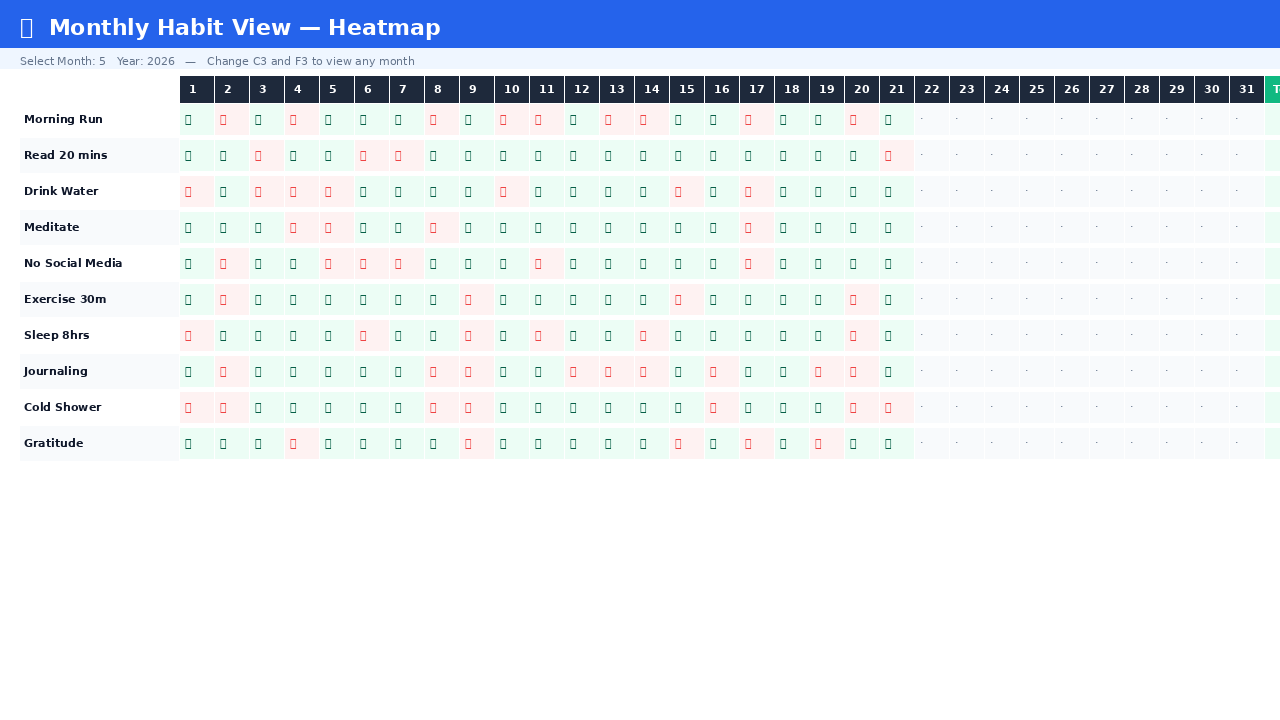
Change month: Monthly View tab → cell C3 → type a month number (1–12) → cell F3 → type the year. The whole heatmap in your google sheets habit tracker template updates instantly, no matter what year it is.
Google Sheets Habit Tracker vs. Notion, Excel & Apps
Most competing habit tracker templates fall into one of two traps: either they’re decorative — colour-coded weekly grids, plant-growing animations, reward badges — and slow to update daily, or they’re bare-bones checkbox grids with no automation at all, meaning you’re manually tallying streaks yourself every week. A google sheets habit tracker template sits between those two extremes when it’s built right.
| Option | Daily Effort | Auto Streaks | Works Offline-ish |
|---|---|---|---|
| This google sheets habit tracker template | 1 tap per habit | ✓ | ✓ (Sheets app caches recent edits) |
| Notion habit tracker | 1–2 taps per habit | Depends on build | Limited without wifi |
| Decorative/printable templates | Manual colouring or printing | — | ✓ (paper) |
| Habit apps | 1 tap, but another app to open | ✓ | Varies |
If you already live in Notion for tasks and notes, the Notion Habit Tracker template gives you the same daily-tick philosophy inside your existing workspace instead of a separate spreadsheet. Neither is objectively “better” — it’s whichever tool you already open every day, since the tool you forget to open is the one that fails.
5 Tips to Actually Stick With This Google Sheets Habit Tracker Template
1. Start with 2–3 habits, not 10
This google sheets habit tracker template supports 10 habits, but launching with all of them at once is the fastest way to quit within a week. Pick your 2–3 highest-value habits first. Add more once the daily tick feels automatic, not like a chore.
2. Use habit stacking
Attach your new habit to one you already do without thinking. “After I brush my teeth, I open my google sheets habit tracker template.” The existing habit becomes the trigger for the new one — far more reliable than willpower or a phone alarm alone.
3. Never miss twice
Lally’s research backs this up directly: one missed day doesn’t derail a habit. Two missed days in a row starts a new pattern entirely. James Clear calls this avoiding the second mistake — and if there’s one rule that separates people who actually build the habit from people who quietly stop, it’s this one.
4. Make the habit stupidly easy to start
“Morning run” is vague and easy to talk yourself out of. “Put on running shoes at 7am” is specific and hard to argue with. Reduce the activation energy to almost nothing — momentum takes over once you’ve actually started moving.
5. Let the heatmap do the motivating
A full row of green across 20 days creates what James Clear calls the “don’t break the chain” effect. The monthly heatmap in this google sheets habit tracker template isn’t just a data view — it’s visual accountability. Nobody wants to be the one who adds a red mark to a strong run.
Tracking daily job applications as a habit? The free job search tracker Google Sheets template logs every application, interview and follow-up in detail, while this google sheets habit tracker template keeps the daily consistency streak visible.
Building financial habits too? Pair this with the free budget tracker Google Sheets template — track the habit of checking in on spending here, and let the budget tracker handle the actual numbers.
📥 Download the Free Habit Tracker Google Sheets Template
Make a copy to your Google Drive and start your 66-day run today.
✓ Up to 10 habits
✓ Monthly heatmap
✓ 66-day tracker
✓ Free forever
⚡ Habit Tracker Pro — Streak deeper with 15 habits, AI insights & annual progress
The free version of this google sheets habit tracker template tracks up to 10 habits. Habit Tracker Pro tracks up to 15, adds a full Annual Progress view across all 12 months, a Last 7 Days column on the Dashboard, and three AI-powered insights from Gemini — from the same single daily tick.
✓ Annual Progress — 12 months
✓ Dashboard Last 7 Days column
✓ 3 AI insights via Gemini
✓ Year-agnostic — works every year
✓ One-time purchase, no subscription
✅ Instant Google Sheets copy. One-time purchase — $9.90. No subscription, no recurring charges, no account required beyond Google Sheets.
✅ 15% off for Tools Without Code readers. The discount applies automatically when you click the button below — no code to enter.
⚡ Get Habit Tracker Pro — $9.90
| Feature | Free | Pro |
|---|---|---|
| Habits tracked | Up to 10 | Up to 15 |
| Daily Tracker | ✓ | ✓ |
| Dashboard with KPI cards | ✓ | ✓ |
| Streaks & 66-day milestones | ✓ | ✓ |
| Monthly Heatmap | ✓ | ✓ |
| Weekly Review (52 weeks) | ✓ | ✓ |
| Annual Progress (12 months) | — | ✓ |
| Dashboard Last 7 Days column | — | ✓ |
| AI insights (Gemini) | — | ✓ 3 reports |
| Year-agnostic (change year in Setup) | — | ✓ |
| Price | Free | $9.90 one-time |
Google Sheets Habit Tracker Template — Frequently Asked Questions
What is the best google sheets habit tracker template?
The best google sheets habit tracker template combines a single daily tick with automatic streak tracking, a monthly heatmap and a weekly review, without requiring manual entry beyond one checkbox per habit per day.
- Daily input: ✅ or ❌ per habit — about 30 seconds on mobile
- Auto-calculated: Streaks, dashboard KPIs, monthly heatmap, 52-week review
- No apps or paid tools: Runs entirely inside Google Sheets
- 66-day milestone tracking: Based on Lally’s UCL habit formation research
Is there a free habit tracker Google Sheets template with automatic streaks?
Yes — this is a free habit tracker Google Sheets template with fully automatic streak formulas, milestone badges and a monthly heatmap included at no cost, no email or account required beyond a standard Google login.
- Streak milestones: Just Starting, Building Up, On a Roll, Habit Formed at 66 days
- No manual counting: streaks calculate themselves from your daily ticks
- Upgrade path exists but isn’t required — the free tier is fully functional on its own
How long does it take to form a habit?
According to Phillippa Lally’s 2010 University College London study, habits take an average of 66 days to form, not the commonly repeated 21 days, which has no research basis behind it at all.
- Minimum: 18 days for very simple habits, like drinking a glass of water
- Average: 66 days across a wide range of habit types
- Maximum: 254 days for genuinely complex habits, like a full exercise routine
- Key insight: a single missed day had no measurable effect — consecutive misses are what actually matter
Is this google sheets habit tracker template really free?
Yes — completely free, forever. No email required, no sign-up, no hidden paid tier. Click download, make a copy to your Google Drive, and start tracking today. Google Sheets itself is also free with any Gmail account, anywhere in the world.
How do I tick habits on my phone using this google sheets habit tracker template?
Install the free Google Sheets app on iOS or Android. Open the file, tap the Daily Tracker tab, tap a habit cell, and a dropdown appears — select ✅ (done) or ❌ (missed). The whole process takes about 30 seconds a day.
Does the date update automatically in this habit tracker google sheets template?
Yes — the Daily Tracker has 365 days pre-filled from your start date. Every day’s row is already there, and today’s row is highlighted automatically. You never add rows or dates by hand.
Can I track more than 10 habits in this google sheets habit tracker template?
The free tier is built for up to 10 habits. Habit Tracker Pro supports up to 15 plus Annual Progress and AI insights. Research consistently shows tracking too many habits at once lowers overall success — start with 3–4 and build from there.
Can I share this google sheets habit tracker template with an accountability partner?
Yes. In Google Sheets, click Share → enter their email → set permission to Viewer (they see your progress without editing) or Editor (they can log their own habits in the same file). Shared accountability measurably improves habit success rates.
How does the monthly heatmap work in this google sheets habit tracker template?
Go to the Monthly View tab, type the month number (1–12) in cell C3, and the year in cell F3. The full grid rebuilds automatically from your Daily Tracker data in under a second.
Can I rename habits after I’ve already started tracking?
Yes — go to the Setup tab and change the habit name in the yellow cell. The new name updates across the Daily Tracker headers, Dashboard and Streaks automatically. Your historical data stays intact either way.
Is my habit data private in this google sheets habit tracker template?
Yes — the file lives entirely in your own Google Drive. Nobody else can see it unless you explicitly share it. We never have access to your data at any point, in any country.
Can I use this habit tracker google sheets template alongside a job search tracker?
Absolutely. If daily job applications are one of your tracked habits, the free job search tracker Google Sheets template handles every application, interview and follow-up in detail, while this google sheets habit tracker template keeps the daily consistency streak visible.