
Personal CRM Notion Template: Stop Losing Touch (Free 2026)
This personal CRM Notion template flags overdue contacts, tracks birthdays, and logs every conversation, so you stop losing touch with the people who matter. Duplicate it free, delete the six sample contacts, and add your own.

⏱ 15 min read
- Contacts database with name, company, role, email, phone, LinkedIn, relationship type, and priority
- Auto follow-up formula that calculates the next check-in date from the frequency you set per contact
- Reach Out Status showing 🔴 Reach out now, 🟡 Reaching soon, or 🟢 On track, recalculated every time you open it
- Birthday reminder that flags any contact with a birthday in the next 30 days
- Interaction Log for every call, meeting, email, and message, linked to the contact
- Latest Interaction rollup that pulls the most recent logged date per contact
- 5 smart views named All, Follow-up Now, Coming Up, Birthdays, and Inactive
- Dashboard that puts everything on one page
A personal CRM Notion template tells you which people you’re overdue to contact, so you stop relying on memory. This one runs on four formulas, five filtered views, and an Interaction Log, all on Notion’s free plan. You log your conversations and the Reach Out Status updates itself.
Most contact lists store names and nothing else. A plain spreadsheet can’t sort by “days since I last called” unless you build that logic yourself, so the work of deciding who to contact stays in your head. This template moves that decision into formulas you never have to touch.
It works the same for readers in the US, UK, and Australia, because nothing in it depends on a region.
It recalculates on every visit. There’s no manual sorting and no reminders to set. If you want the same automatic approach for tasks, goals, and habits too, the Notion Life OS template applies it across your whole workspace.
📋 Table of Contents
- What is a personal CRM Notion template?
- How to set it up in 3 steps
- The Dashboard
- The Contacts database
- How the auto follow-up formulas work
- 5 smart filtered views
- The Interaction Log
- Notion vs Google Sheets vs paid apps
- 10-minute weekly routine
- How to customize it safely
- Keeping your overdue list manageable
- Frequently Asked Questions
What Is a Personal CRM Notion Template?
A personal CRM Notion template is a set of linked Notion databases that tracks the people in your life instead of sales leads. Each contact gets a check-in frequency and a last-contacted date, and formulas calculate who is overdue for a message and whose birthday is coming up.
Unlike personal CRM software you subscribe to, a Notion CRM template lives in your own workspace. You control the data and the structure, so you can rename a field, add a column for where you met someone, or delete a view you never open. It works as a personal relationship manager and a networking tracker, and it’s a free CRM template you can edit.
This template uses two databases, Contacts and an Interaction Log, plus a Dashboard and five filtered views. The setup stays small on purpose. A Notion personal CRM works best when the whole system depends on one habit: after you talk to someone, update their date and log what you discussed.
How to Set Up This Personal CRM Notion Template in 3 Steps
Setup takes under 5 minutes, needs no formulas from you, and works on Notion’s free plan.
Duplicate the personal CRM Notion template
Use the download button below, then click Duplicate in the top-right corner. Notion copies every database, formula, view, and the Dashboard into your workspace. Pick the workspace you open every day, since the Dashboard only helps if you see it.
Delete the sample data in the personal CRM Notion template
The template ships with 6 sample contacts and 6 sample interactions so you can watch the formulas work before you add your own. Select all rows in the Contacts database and delete them, then do the same in the Interaction Log. Clear both, because each sample interaction links to a sample contact.
Add your first 10 contacts to the personal CRM Notion template
Start with the 10 people you most want to stay in touch with. For each one, set Relationship Type, Check-in Frequency, and Last Contacted. If you can’t remember your last conversation, enter a rough date that puts them in the red, so your first week doubles as a catch-up list.
After step 3, open Follow-up Now. If nobody shows red, your Last Contacted dates are too recent, so back-date a few and watch the status change. That’s the fastest way to see the formulas work.
Keep this personal CRM Notion template small at first. Add 10 to 15 contacts, run the weekly routine below for a month, then add more. You can track the weekly check-in itself as one recurring habit in the Google Sheets habit tracker template.
The Dashboard in This Personal CRM Notion Template
The Dashboard is the first page you open. It shows four live sections, and each one reads from the Contacts database, so there’s nothing to refresh.
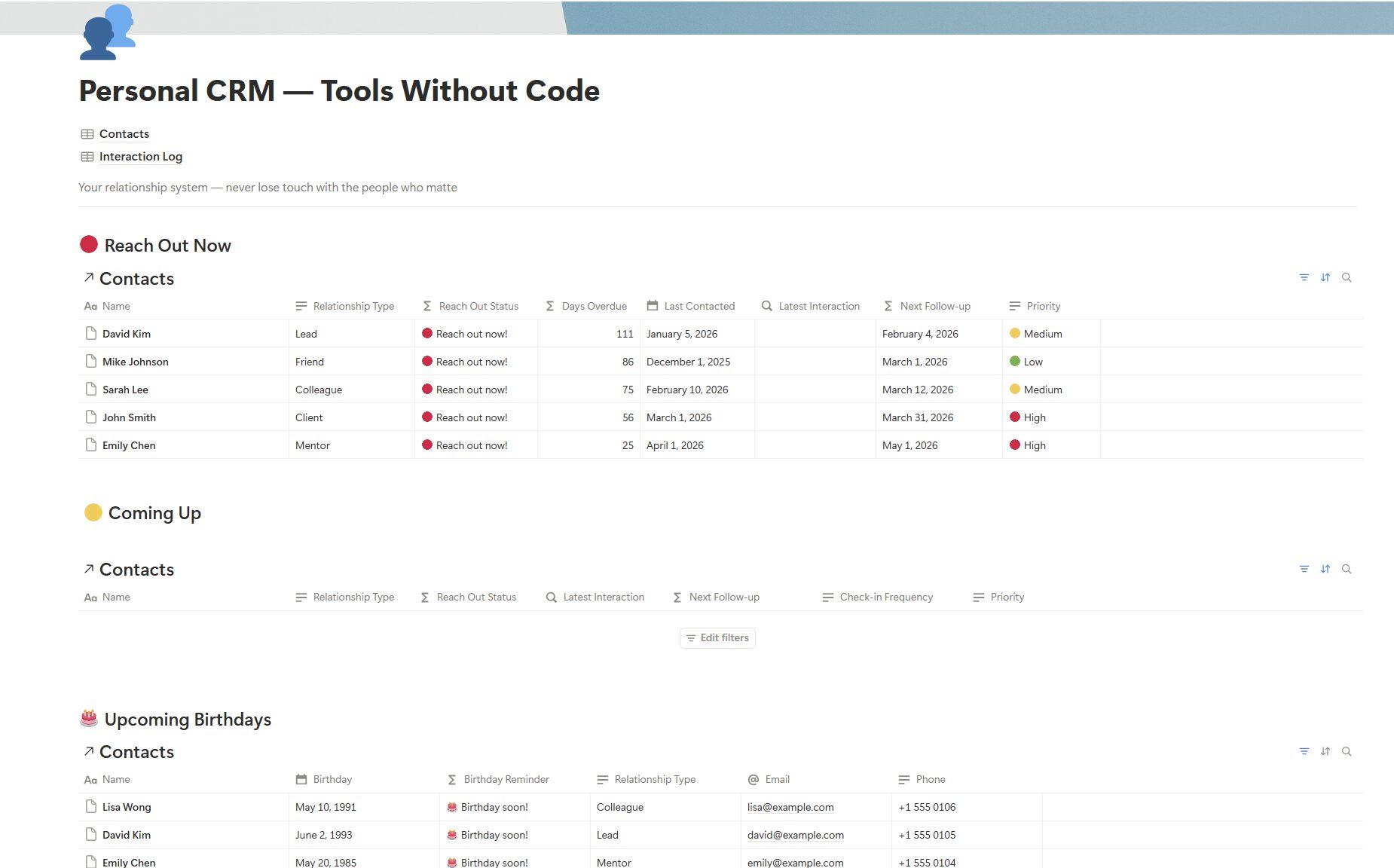
- 🔴 Reach Out Now lists contacts past their follow-up date, most overdue first
- 🟡 Coming Up lists contacts due for a check-in within the next 7 days
- 🎂 Upcoming Birthdays flags anyone with a birthday in the next 30 days, with email and phone visible
- 📝 Recent Interactions shows your last few logged conversations
Read the Dashboard top to bottom. Clear Reach Out Now first, glance at Coming Up to see what lands next, check Upcoming Birthdays, and finish with Recent Interactions to remember what you promised.
The Contacts Database in This Personal CRM Notion Template
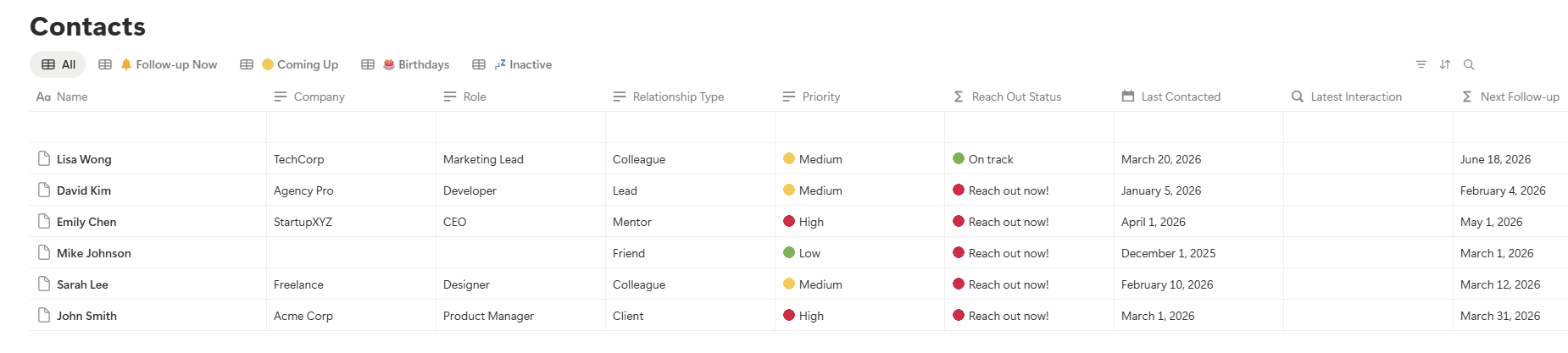
Every person gets one row in this personal CRM template. Five fields drive the formulas, and they decide who needs attention. The other fields, such as company, role, email, phone, and LinkedIn, hold reference details.
| Field | What to enter |
|---|---|
| Relationship Type | Friend, Client, Mentor, Colleague, or Lead. It drives filtering and prioritisation. |
| Priority | 🔴 High, 🟡 Medium, or 🟢 Low. Give High to the people you’d regret losing touch with. |
| Last Contacted | The last date you actually spoke. Update it after every conversation. |
| Check-in Frequency | Weekly, Monthly, Quarterly, or Yearly. It drives the auto follow-up formula. |
| Birthday | Optional. It powers the 30-day birthday reminder. |
Fill in Check-in Frequency honestly. If you set everyone to Weekly, Follow-up Now floods on day one and you learn to ignore the red. Start at Quarterly when you’re unsure and tighten it later.
Birthday is a standard Notion date property. You can set its display format to month/day/year for the US or day/month/year for the UK and Australia in the property settings, and the reminder works either way.
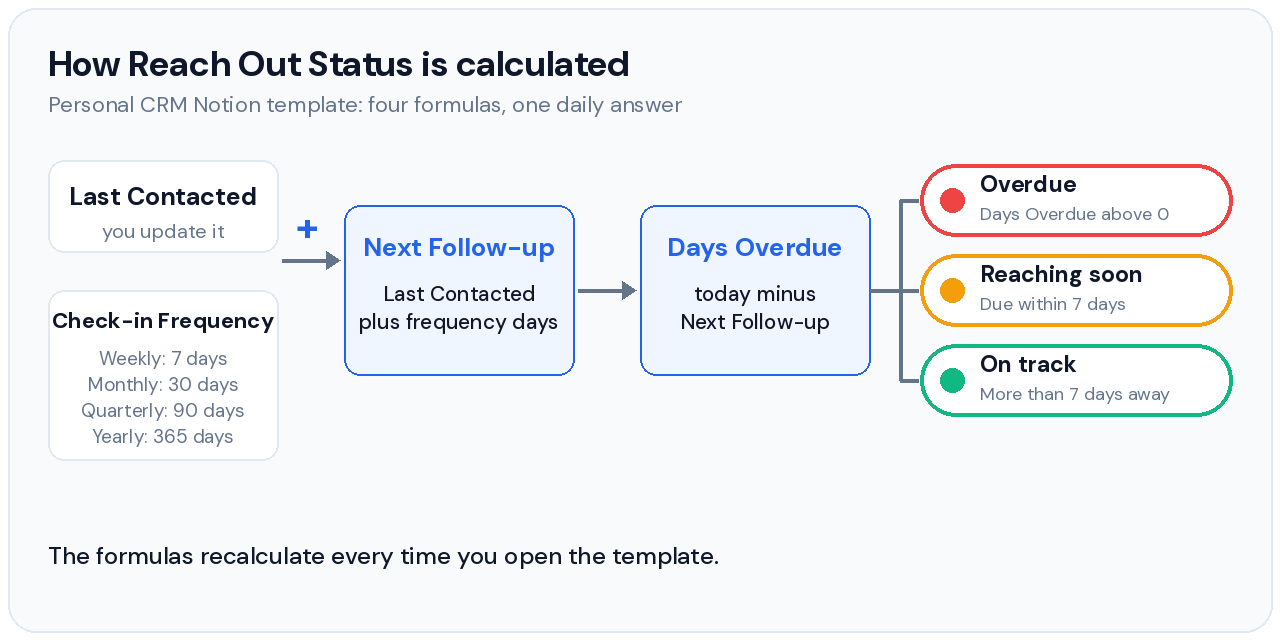
How the Auto Follow-Up Formulas in This Personal CRM Notion Template Work
Four formulas run in the background and decide who needs your attention. Notion’s formula engine handles all of it on the free plan, so you never open the formula editor. If you want to adapt the logic, Notion documents the syntax in its official formula guide.
Next Follow-up
Adds your Check-in Frequency in days to the Last Contacted date. It updates the moment you change either field.
Days Overdue
Subtracts the follow-up date from today. A negative number means you’re still on track, and a positive number means you’re overdue.
Reach Out Status
Turns Days Overdue into 🔴 Reach out now, 🟡 Reaching soon, or 🟢 On track. This drives the Dashboard and all five views.
Birthday Reminder
Shows 🎂 Birthday soon! for anyone with a birthday in the next 30 days. It accounts for the current year automatically.
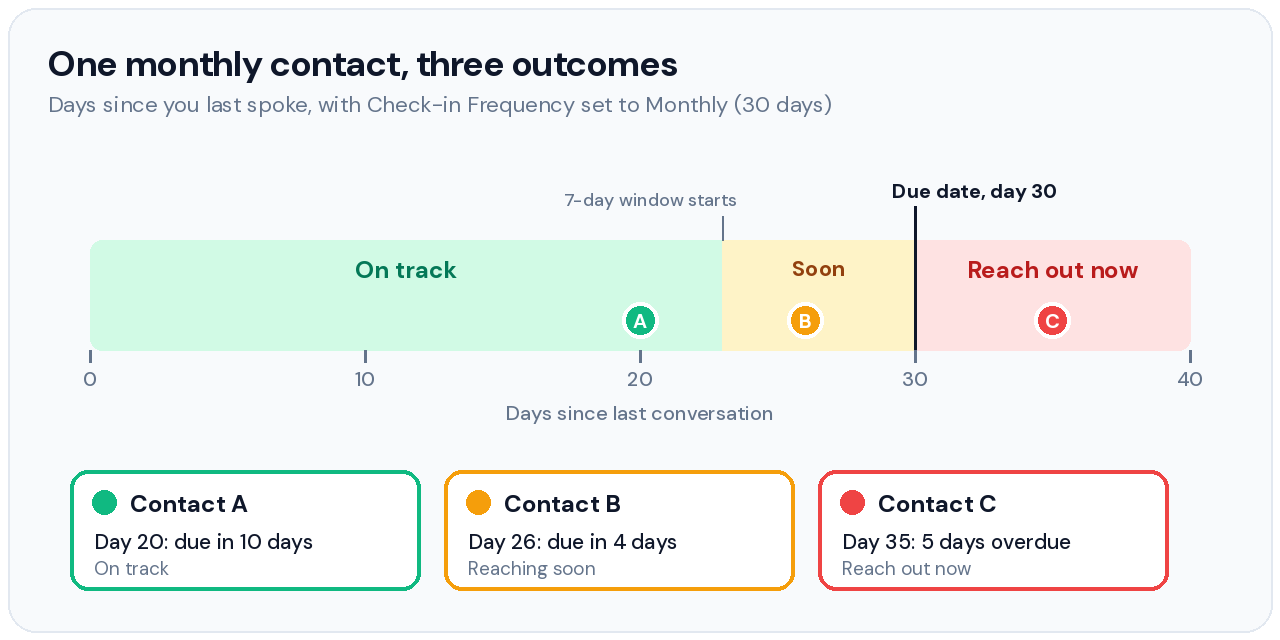
A Monthly contact shows how the thresholds behave. At 20 days since your last conversation you’re on track, at 26 days you’re inside the 7-day window, and at 35 days you’re five days overdue.
| Check-in Frequency | Days since you last spoke | Next Follow-up | Reach Out Status |
|---|---|---|---|
| Monthly (30 days) | 20 | In 10 days | 🟢 On track |
| Monthly (30 days) | 26 | In 4 days | 🟡 Reaching soon |
| Monthly (30 days) | 35 | 5 days overdue | 🔴 Reach out now |
| Quarterly (90 days) | 64 | In 26 days | 🟢 On track |
Monthly means 30 days, not a calendar month. This personal CRM Notion template adds a fixed number of days (7, 30, 90, or 365), so a contact you spoke to on Jan 31 comes due on Mar 2, not Feb 28.
Logging a conversation doesn’t reset the clock. Next Follow-up reads the Last Contacted date you update by hand, and the Latest Interaction rollup sits beside it. When the two dates disagree, you forgot to update Last Contacted.
5 Smart Filtered Views in This Personal CRM Notion Template
The Contacts database has five views, and each one filters and sorts for a single decision. Start your day in Follow-up Now and skip the full list unless you’re adding someone.

| View | What it shows | When to use it |
|---|---|---|
| 🗂️ All | Every contact in the database | Browse, search, or add a new contact |
| 🔴 Follow-up Now | Overdue contacts, most overdue first | Your daily action list each morning |
| 🟡 Coming Up | Contacts due within 7 days | Plan ahead so nobody tips into overdue |
| 🎂 Birthdays | Birthdays in the next 30 days | Check weekly and message a day early |
| 💤 Inactive | Contacts marked Inactive | Park people you no longer track actively |
The Interaction Log in This Personal CRM Notion Template
Log every call, meeting, message, and email here. Each entry links back to a contact, so you build a conversation history per person. It works like a communication log template attached to your contact list, and it’s what separates a personal CRM template from a static address book.
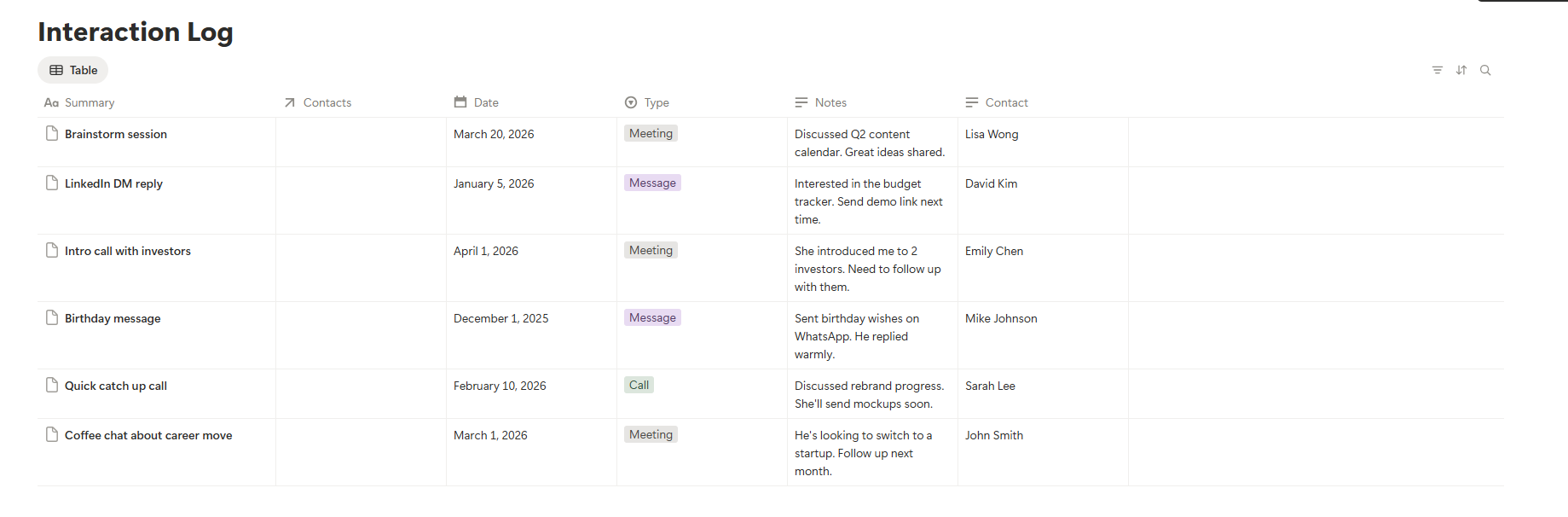
- Summary holds a short description, such as “Coffee chat about new role”
- Contact links to the contact row in the Contacts database
- Date records when the interaction actually happened
- Type is Call, Meeting, Message, Email, or Other
- Notes capture what you discussed and any follow-up actions
A useful note answers three questions: what they told you, what you promised, and what to ask next time. One example reads: considering a product move, promised an intro by Friday, ask how the interviews went. That note makes your next conversation easy to start.
Keep notes factual and respectful, since you might share the page or lose a laptop. Skip sensitive details such as health or finances, and write only what you’d be comfortable seeing on a screenshot.
Latest Interaction rollup. The Latest Interaction column in the Contacts database pulls the most recent log date per contact. You see when you last logged a conversation, separate from the Last Contacted date you update by hand.
Personal CRM Notion Template vs Google Sheets vs Paid Apps
The right tool depends on where your contacts already live and how much typing you’ll tolerate. The table compares this template with a Google Sheets CRM, a paid personal CRM app, and a free business CRM.
| Option | Best for | Strengths | Real drawbacks | Cost |
|---|---|---|---|---|
| This personal CRM Notion template | People who already work in Notion and track under about 200 relationships | Linked contact and conversation databases, formula-driven follow-ups, and your data stays in your own workspace | You enter every contact and conversation by hand, with no email or LinkedIn sync | Free |
| Google Sheets CRM | Number-heavy tracking such as budgets and expenses | Fast, flexible, and familiar | No native relations or rollups, so linking a contact to a conversation history needs VLOOKUP-style formulas | Free |
| Dex (paid personal CRM app) | Networkers whose contacts live in LinkedIn and email | Syncs LinkedIn, Gmail, Outlook, and calendars, and alerts you to job changes | Subscription, plus you connect your accounts, and Premium syncs up to 2,500 LinkedIn connections | Premium $12 a month billed yearly, Professional $20 a month |
| HubSpot Free CRM | Sales pipelines and deal stages | Pipeline tools for teams | Built around deals, so personal relationships fight its structure | Free tier |
Dex lists its pricing and sync limits on its own site and blog, and prices change, so check Dex’s pricing page before you decide.
- Where your contacts live decides the effort. If most sit in LinkedIn and email, a syncing app saves hours of typing, and if they sit in your head and phone, manual entry costs seconds.
- How many relationships you track matters. Under about 200 suits a manual system, and past that the logging habit gets harder to keep.
- Who sees the data differs. A Notion template keeps contact details in your own workspace, while a syncing app needs access to the accounts it reads.
Pick this template if you live in Notion and want to own your data without a subscription. Pick Dex if your network sits in LinkedIn and email and you’d rather pay than type. Skip HubSpot for personal use, and keep Google Sheets for numbers.
Use Notion for relationships and Sheets for numbers. The free budget tracker for Google Sheets covers the money side, and the Notion Budget Tracker template does the same inside Notion. If you’re job hunting while you network, the free job search tracker keeps applications in one place and this personal CRM Notion template keeps the people.
A 10-Minute Weekly Routine for Your Personal CRM Notion Template
Any Notion CRM template only works if you use it, so the routine stays small. It takes under 10 minutes a week.
Clear Follow-up Now in your personal CRM Notion template
Open the Dashboard or Follow-up Now and work through the 🔴 list. Send a message, make a call, or book a catch-up, then update Last Contacted so the status recalculates. If the list is longer than you can clear in 10 minutes, handle High priority first and let the rest roll to next Monday.
Log every meaningful conversation in your personal CRM Notion template
Add one row to the Interaction Log after any conversation worth remembering. It takes 30 seconds. If daily logging is the hard part, the Notion Habit Tracker template uses the same daily-log approach to make a habit stick.
Check Birthdays and Coming Up in your personal CRM Notion template
Scan the 🎂 Birthdays and 🟡 Coming Up views. Message birthday contacts a day early. Reach out to anyone in Coming Up before the weekend so they don’t tip into overdue by Monday.
Once a month, spend 20 minutes on maintenance. Open All, check that High priority still means high, move stale people to Inactive, and loosen any frequency that keeps landing in Follow-up Now. Then add two or three new contacts, so the list grows at a pace the routine can absorb.
Update Last Contacted right away. That single action keeps all four formulas accurate. The Personal Finance OS follows the same rule, because any tracker you stop updating stops being useful.
How to Customize the Personal CRM Notion Template Without Breaking It
Adding properties to a Notion CRM template is safe here, because the four formulas only read Last Contacted, Check-in Frequency, and Birthday. Open the Contacts database, click the + at the end of the header row, and add a plain property such as Text or Select. Leave the formula properties alone unless you’ve read Notion’s formula guide.
- Where we met as a Text property gives you an opener the next time you reach out
- Topics as a Multi-select property lets you filter everyone who cares about, say, hiring or design
- City as a Text property helps when you travel and want to see who lives nearby
- Introduced by as a Relation to the same database shows how your network connects
Add a new view the same way. Click + next to the existing view tabs, choose Table, then add a filter such as Relationship Type is Mentor. Duplicating a view and editing its filter is quicker than building one from scratch, and it leaves the five built-in views untouched.
How to Keep Your Personal CRM Notion Template From Becoming a Guilt List
A Notion personal CRM fails when the red list grows faster than you can clear it. Fix the settings first, because ignoring red contacts trains you to ignore the Dashboard.
| Relationship | Starting Check-in Frequency | Starting Priority |
|---|---|---|
| Close friend | Monthly | High |
| Client you work with now | Monthly | High |
| Mentor | Quarterly | High or Medium |
| Former colleague | Quarterly or Yearly | Low |
| Acquaintance or lead | Yearly | Low |
These are starting points, so adjust them after a month of real use.
- Loosen before you delete. If Follow-up Now holds more names than you can clear in a week, move Low-priority contacts from Monthly to Quarterly.
- Cap High priority. Keep it to roughly 15 people so the Reach Out Now section stays something you can finish.
- Use Inactive for pauses. Move contacts you’ve deliberately stopped tracking to Inactive and they leave your daily views.
- Split clients from friends. If you need project and client tracking for freelance work, the Notion Freelancer CRM template is built for that, and this one keeps the relationship side.
📥 Get the Free Personal CRM Notion Template
Duplicate the personal CRM Notion template to your workspace in one click. It works on Notion’s free plan, so you don’t need a paid subscription.
✓ All formulas pre-built
✓ Works on Notion’s free plan
✓ No coding needed
Frequently Asked Questions
Is this personal CRM Notion template really free?
Yes, this personal CRM Notion template is free to duplicate, with no email required. Click the link, duplicate it to your workspace, and start using it.
Do I need a paid Notion plan to use this personal CRM Notion template?
No, this personal CRM Notion template runs on Notion’s free plan. The databases, relations, rollups, and formulas all work without an upgrade.
Do I need to build any formulas in this personal CRM Notion template?
No, every formula, view, and the Dashboard in this personal CRM Notion template is pre-built. Delete the sample data, add your contacts, and you’re done.
How is a personal CRM Notion template different from a business CRM like HubSpot?
A personal CRM Notion template tracks relationships, while a business CRM tracks deals and revenue. This one is built to keep you connected with people who matter, and it has no sales pipeline to clutter the view.
Can I use this personal CRM Notion template on my phone?
Yes, install the free Notion app for iOS or Android and this personal CRM Notion template syncs to your phone. You can log interactions, update Last Contacted dates, and check Follow-up Now in under a minute.
How do I add a new contact to this personal CRM Notion template?
Open the Contacts database, click New, and fill in Name, Relationship Type, Check-in Frequency, and Last Contacted. The template calculates Next Follow-up, Days Overdue, and Reach Out Status from there.
Can I share this personal CRM Notion template with someone else?
Yes, you can share this personal CRM Notion template by clicking Share on the CRM page and inviting people by email. Notion’s free plan caps guests at 10 at the time of writing, so check Notion’s pricing page before you invite a larger group.
People Also Ask About the Personal CRM Notion Template
Can you use Notion as a personal CRM?
Yes, Notion works as a personal CRM when you link a Contacts database to an Interaction Log and add formulas that calculate follow-up dates. A personal CRM Notion template packages that setup so you don’t build it yourself.
- Relations connect each conversation to the contact it belongs to
- Formulas turn the last contact date into a due date and a status
- Filtered views show only the people who need you today
- Free plan covers all of it, though sync with email and LinkedIn is manual
Is Notion better than Google Sheets for a personal CRM?
Notion is better than Google Sheets for a personal CRM because native database relations connect a Contacts database to an Interaction Log without lookup formulas. Google Sheets needs VLOOKUP-style logic to link the same records.
- Notion wins on linked conversation history and no-code filtered views
- Sheets wins on numeric tracking. See the free budget tracker template for where it fits
- Bottom line is Notion for relationships and Sheets for numbers
How does the auto follow-up formula work in a personal CRM Notion template?
The auto follow-up formula adds your Check-in Frequency in days to the Last Contacted date, then compares that Next Follow-up date to today to produce a Reach Out Status. A personal CRM Notion template recalculates it every time you open the page.
- Next Follow-up equals Last Contacted plus 7, 30, 90, or 365 days
- Days Overdue equals today minus Next Follow-up, so negative means on track
- Reach Out Status shows 🔴 when overdue, 🟡 within 7 days, and 🟢 otherwise