
Cash Flow Forecast Template: Which Free One Is Best? (2026)
A cash flow forecast template test for freelancers and small teams in the US, UK, and Australia. Four free types, five checks, and a worked 13-week example with nine invoices.

17 min read
What’s in this post: A cash flow forecast template comparison of four free types, a five-check test you can run on any sheet, and a 13-week example. It also covers the formulas that add invoice odds and low-balance flags, a weekly reserve for lumpy bills, a 20,000-schedule simulation, and the free and Pro versions of our template for Google Sheets and Excel.
- The short answer
- What a forecast has to answer
- Four free types compared
- Five checks for any template
- 13-week example with nine invoices
- Build the weighted version in 10 minutes
- 13 weeks or monthly?
- Sinking funds and the weekly reserve
- How often a forecast gets it wrong
- Five mistakes to stop
- Who should use it
- Free vs Pro
- Common questions
- FAQ
Which Cash Flow Forecast Template Is Best? The Short Answer
The best free cash flow forecast template for freelancers and small teams paid by invoice is a weekly one that tracks dates and discounts uncertain invoices. A monthly 12-month grid suits lender packs and annual plans better. Test any template with the five checks below before you trust its balance.
The gap is the same in all four types. As far as their own pages show, none of them ships invoice odds or low-balance alerts in the free version, ours included. Both take one extra column, and the formulas sit in the build section.
| Your situation | Best free pick |
|---|---|
| Invoice income, bills due on set dates, 4 to 13 week horizon | Weekly ledger |
| Lender pack, annual budget, steady monthly income | Monthly 12-month grid |
| Steady revenue with six or more months of history | FORECAST-function sheet |
| Retirement or life-event planning over years | Long-horizon scenario sheet (needs a Tiller trial) |
What a Cash Flow Forecast Template Has to Answer
A cash flow forecast template answers one question. Will your balance stay above a safe floor on every specific day, not just at month-end? Profit cannot answer it.
That is the whole cash flow vs profit gap. A profit and loss statement adds up totals, so a business can show profit while the account is empty the week rent clears. Cash flow vs profit comes down to timing, and a forecast tracks timing.
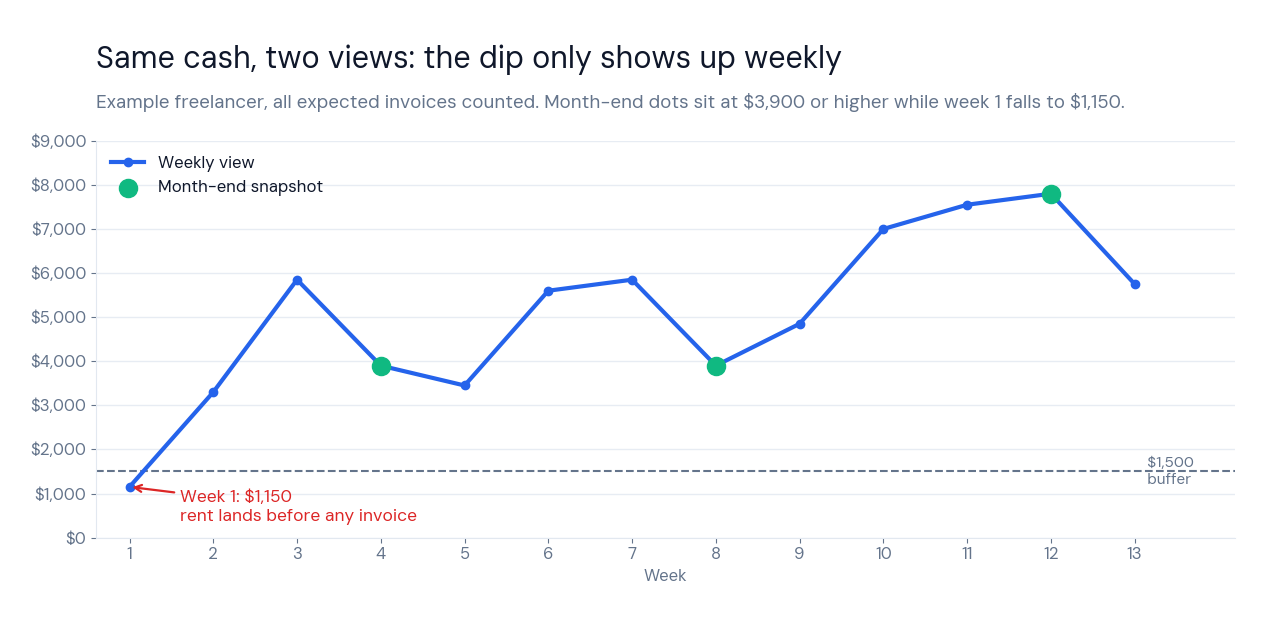
Look at the chart. The example freelancer closes week 4 at $3,900, which reads as comfortable in a monthly cash flow template. Week 1 closed at $1,150 because rent left before the first invoice arrived, and no month-end snapshot shows it.
The calendar around a forecast changes by country. US freelancers pay estimated tax quarterly, the UK tax year ends on 5 April, and Australia’s ends on 30 June. A weekly sheet ignores all three, because it only asks what leaves your account and when.
Invoices are the other half of this cash flow forecast template. Our freelance invoice tracker shows which clients pay late, and those habits decide whether you label an invoice Confirmed, Likely, or Possible below.
Four Free Cash Flow Forecast Template Types, Compared
These four types cover the templates that showed up for this search on October 25, 2026. Every pro and con below comes from the template’s own page, and I link each source so you can check it.
Monthly 12-Month Grid Cash Flow Forecast Template
Spreadsheet Daddy’s free 12-month cash flow template puts January to December in columns on one sheet. Income and Expenses sections feed Opening Balance, Net Cash Flow, and Closing Balance rows.
- Prints on one page. A lender or accountant can read it without a tour.
- Starts blank. You choose the line items, and it downloads for Google Sheets, Excel, or PDF.
- Monthly buckets hide dips. A week-1 low disappears inside a January total, as the chart above shows.
- One number per month. The page describes no field for invoice odds, so every entry counts as certain.
FORECAST-Function Cash Flow Forecast Template
The Coupler.io post on a cash flow forecast Google Sheets template links daily, weekly, and 12-month versions. Each has a copy that uses the FORECAST function to project the next period from past data.
- Daily and weekly versions exist. That makes it the only third-party option here with short windows.
- It automates trends. Steady rent and subscription revenue project well.
- It draws a straight line. The post says the function rests on linear regression, so a $3,000 invoice in month 2 and none in month 3 produce a meaningless trend.
- It needs history. The post calls two months of data unreliable and warns against trusting the function alone.
Long-Horizon Scenario Cash Flow Forecast Template
Tiller’s Cash Flow Forecast template for Google Sheets projects years ahead. You switch life events on and off, set growth rates, and compare scenarios in a chart and a table.
- Scenario toggles. College costs or retirement are easy to test.
- Chart plus table output. Both update when a toggle changes.
- Needs a Tiller trial or subscription. The page says you need one to try it.
- Built for years. The page frames it as a long-range sheet, so Friday’s rent payment never gets its own row.
Weekly Ledger Cash Flow Forecast Template
Our free file is a weekly cash flow template, a ledger with a running balance and a 4-week lookahead. It works as a Google Sheets cash flow template and as an Excel file, and it exists because the other three types skip the week.
- Weekly buckets. Rent day and payday land in separate rows.
- Running balance. Each week starts from the last one.
- Manual entry. You type every invoice and bill yourself.
- No invoice odds in the free file. Confidence weighting and the 13-week rolling forecast are Pro.
For invoice income the weekly ledger wins, but only after you add the two missing columns below. For a lender pack, use the monthly grid and skip the rest of this post.
Five Checks for Any Cash Flow Forecast Template
Run these on any cash flow spreadsheet template before you enter real numbers. Each pass condition takes about two minutes to test.
- Weekly buckets. Pass if the sheet groups cash by week, so Monday’s rent sits beside Friday’s invoice.
- Rolling start date. Pass if week 1 moves with today’s date. A fixed January to December header fails by February.
- Invoice odds. Pass if every expected payment carries a certainty value. Our Pro file defaults to 100% Confirmed, 75% Likely, and 40% Possible, and you can edit all three.
- Lumpy bills. Pass if annual and quarterly bills sit in the exact week they leave or become a weekly reserve.
- Low-balance flag. Pass if the sheet colors any week under your buffer without you scanning numbers.
| Check | Monthly grid | FORECAST function | Long-horizon | Weekly ledger (free) |
|---|---|---|---|---|
| Weekly buckets | No | Weekly copy exists | No | Yes |
| Rolling start date | No, fixed columns | Not stated | Not stated | Manual (automatic in Pro) |
| Invoice odds | Not stated | Not stated | Scenario toggles only | No (Pro adds it) |
| Lumpy bills | Manual row | An “Other” reserve | Life events | Manual row (Pro automates) |
| Low-balance flag | Not stated | Not stated | Not stated | No (Pro adds it) |
Not stated means the page does not describe it, so the feature may exist. On invoice odds and low-balance flags, every free option here needs an upgrade, ours included. The build section adds both to any sheet.
Cash Flow Forecast Example: 13 Weeks, Nine Invoices
This cash flow forecast example uses invented numbers for a freelancer who starts with $3,200 and keeps a $1,500 buffer. Everyday costs run $650 a week, rent is $1,400 in weeks 1, 5, 9, and 13, and a contractor costs $1,300 in weeks 4, 8, and 12. Insurance is $1,500 in week 7, and a quarterly tax payment of $2,400 lands in week 11.
| Week | Client | Amount | Confidence | Counts in weighted at |
|---|---|---|---|---|
| 2 | A | $2,800 | Confirmed | $2,800 |
| 3 | B | $3,200 | Likely | $2,400 |
| 5 | E | $1,600 | Confirmed | $1,600 |
| 6 | A | $2,800 | Confirmed | $2,800 |
| 7 | C | $2,400 | Possible | $960 |
| 9 | B | $3,000 | Likely | $2,250 |
| 10 | A | $2,800 | Confirmed | $2,800 |
| 11 | D | $3,600 | Possible | $1,440 |
| 12 | C | $2,200 | Possible | $880 |
| Total | $24,400 | $17,930 |
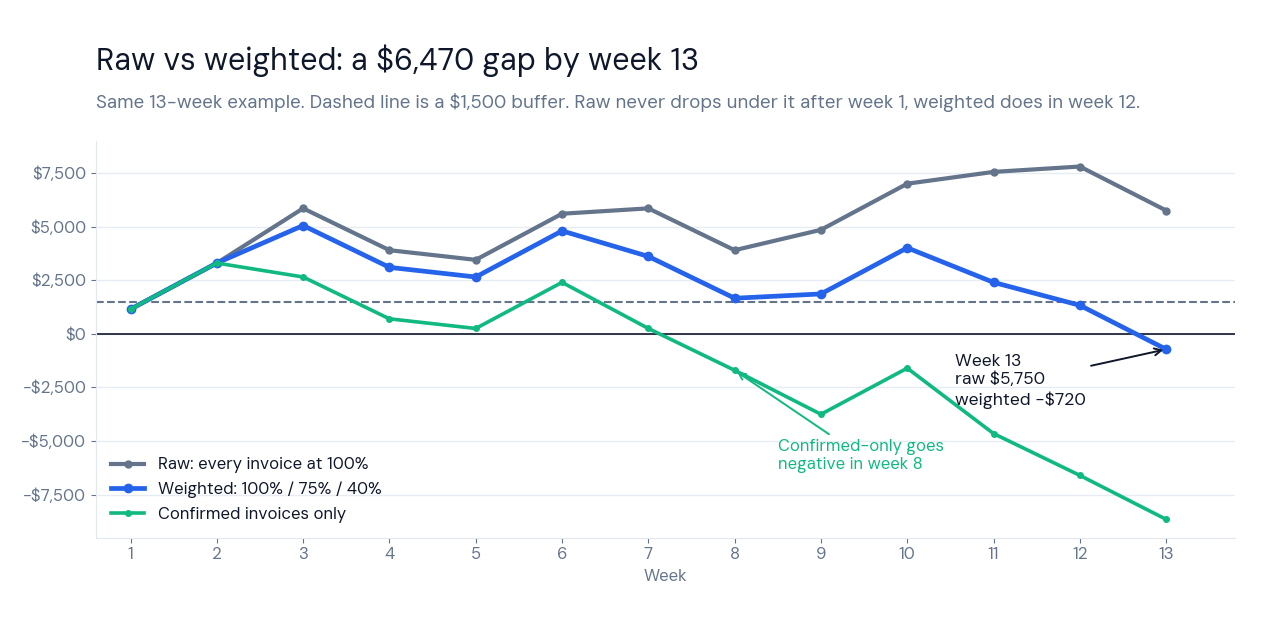
The raw line looks safe. After week 1 it never drops below $3,300, and week 13 ends at $5,750. The weighted line slips under the buffer in week 12 at $1,330 and ends week 13 at -$720.
A confirmed-only forecast, the harshest reading, drops under the buffer in week 4 and goes negative in week 8. It ends at -$8,650. The real range is $5,750 down to -$8,650, and a single raw line hides all of it.
The $6,470 gap between raw and weighted is the unconfirmed invoices counted at full value. Likely invoices overstate cash by $1,550 and Possible invoices by $4,920. This cash flow projection example shows why the label on each invoice matters more than the total.
Build a Weighted Cash Flow Forecast Template in 10 Minutes
This is how to forecast cash flow in a spreadsheet when invoices are uncertain. Add four pieces to any free forecast sheet, whether it is a cash flow Google Sheets file or an Excel workbook, because they use only IF, SUMIFS, WEEKDAY, and TODAY. The layout assumes a Weekly tab with week start in column A, Money In in B, Money Out in C, and Balance in D, with the opening balance in D7 and the first week in row 8.
Anchor week 1 to today
Put =TODAY()-WEEKDAY(TODAY(),2)+1 in one helper cell, such as B1, to return this Monday. Enter =B1 in A8 and =A8+7 in A9, then copy A9 down 12 rows. One TODAY() call keeps the sheet fast.
Tag every invoice with odds
On an Invoices tab, use A for client, B for expected date, C for amount, and D for confidence. Add a dropdown in D with Confirmed, Likely, and Possible. In E2 enter =IF(D2="Confirmed",1,IF(D2="Likely",0.75,IF(D2="Possible",0.4,0))) and in F2 enter =IF(C2="","",C2*E2).
Start with 100%, 75%, and 40%. After 10 or more invoices at one level, set that weight to the share that paid in the expected week, so 0.6 if 6 of 10 Likely invoices did.
Sum each week and roll the balance
In B8 enter =SUMIFS(Invoices!F:F,Invoices!B:B,">="&A8,Invoices!B:B,"<"&A8+7), and build C8 the same way from a Bills tab. In D8 enter =D7+B8-C8 and copy all three down. Full-column ranges mean new rows never fall outside the formula.
Flag any week under the buffer
Type your buffer in G1. Select D8:D20, open conditional formatting, choose a custom formula, and enter =$D8<$G$1 with a red fill. Test it by setting G1 to 99999, because every row should turn red.
In Excel the same rule lives under Home, Conditional Formatting, New Rule, Use a formula.
The example numbers come from a Python model, not from this sheet. Treat it as a cash flow forecasting example to copy, then enter the nine invoices from the table above and check that week 13 shows -$720 in weighted mode. If it does not, a range or a weight is off.
13 Week Cash Flow Forecast Template or a Monthly One?
A 13 week cash flow forecast covers one quarter. That is long enough to see rent, tax, and payroll cycles land, and short enough that invoice dates still mean something. A 13 week cash flow model usually rolls forward, so week 14 appears when week 1 ends.
Any cash flow forecasting model works the same way, with a start balance, dated money in and out, and a balance after each period.
| Window | Best for | Weak spot |
|---|---|---|
| 4 weeks | Tight cash, the free lookahead | Misses quarterly tax and annual bills |
| 13 weeks | Invoice income, a quarter of bills | Needs a weekly update |
| 12 months | Lender packs, annual budgets | Hides dips inside each month |
A 13 week cash flow forecast template suits invoice income, and a monthly cash flow template suits steady pay. Think of a weekly cash flow forecast as a cash flow calendar. Each Monday row shows what lands and what leaves, and a weekly cash flow projection is just that calendar run forward.
Sinking Funds in a Cash Flow Forecast Template
A sinking fund spreads a lumpy bill across the weeks before it is due. Divide an annual amount by 52, or a quarterly amount by 13, and treat the result as a weekly cost.
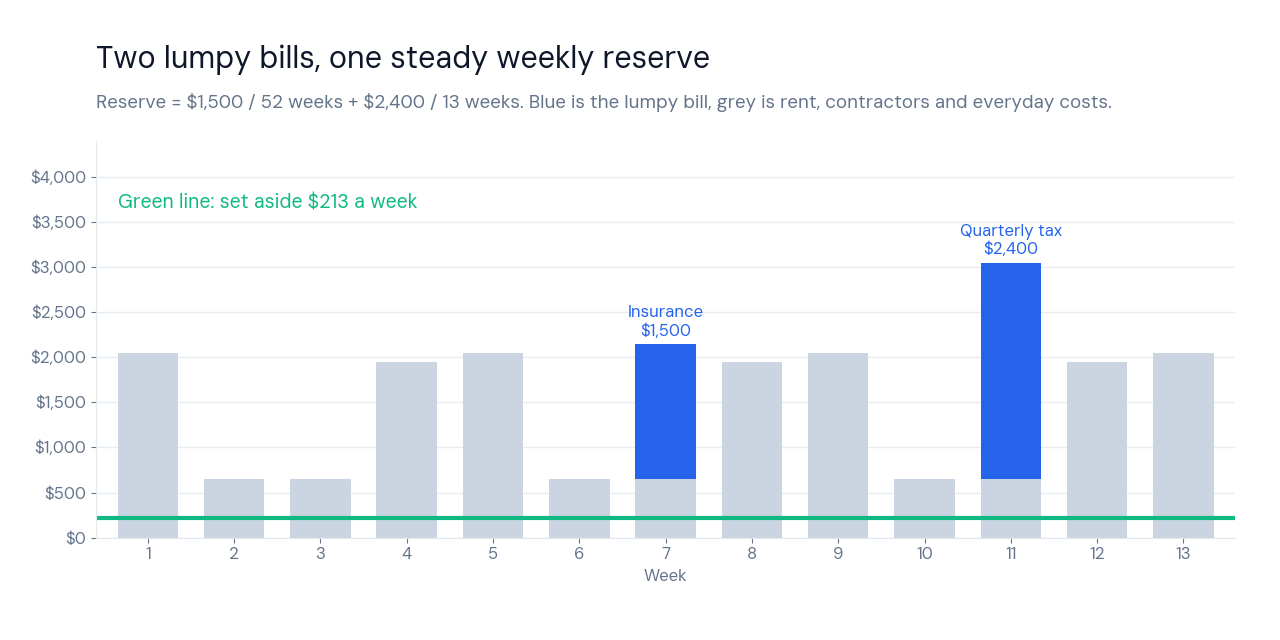
In the example, $1,500 of insurance becomes $28.85 a week and the $2,400 tax payment becomes $184.62 a week. Together that is $213.46, so the lumpy bills stop arriving as shocks in weeks 7 and 11. A sinking fund calculator does the same division, and a sinking fund spreadsheet is one Reserve row in Money Out.
Pick one view. Either show each bill in its due week, which matches your bank balance, or show the weekly reserve, which is a safe-to-spend view. Showing both counts the bill twice.
Pro’s Sinking Funds tab sets aside one twelfth of an annual bill each month. The weekly version above divides by 52 instead, which fits a weekly ledger. If your pay swings from month to month, FinCompareLab has a guide to budgeting on irregular income that pairs well with this approach.
The $2,400 tax payment is an invented example, not advice. Your real estimated payments depend on your income and location, so confirm them with the IRS or a tax professional before you add a reserve to your cash flow forecast template.
How Often a Cash Flow Forecast Template Gets It Wrong
I ran 20,000 random 13-week schedules through a Python model to test the weighting idea. Each started with $2,000 to $6,400, then added 7 to 11 invoices of $1,200 to $4,400, rent, a contractor cost, and two lumpy bills. Both forecasts raised an alert when the lowest balance fell under a $1,500 buffer.
Then I let reality play out under three payment worlds. In one the 100%, 75%, and 40% weights are right, in another clients pay better, and in the third they pay worse. These worlds are my assumptions, not field data.
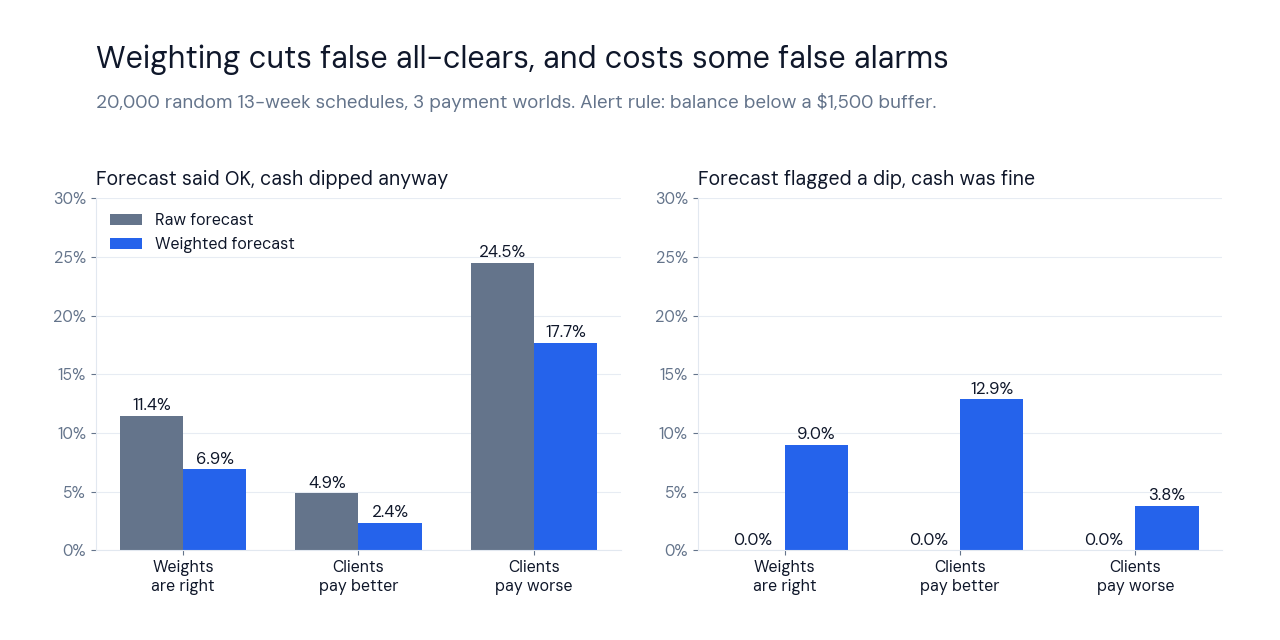
When the weights are right, the raw forecast said everything was fine in 64.4% of schedules, and 11.4% of those still dipped under the buffer. The weighted forecast said fine in 57.1%, and only 6.9% of those dipped. That is about a 40% cut in false all-clears.
| Payment world | Cash actually dipped | Raw false all-clear | Weighted false all-clear | Weighted false alarms |
|---|---|---|---|---|
| Weights are right | 42.9% | 11.4% | 6.9% | 9.0% |
| Clients pay better | 38.7% | 4.9% | 2.4% | 12.9% |
| Clients pay worse | 51.3% | 24.5% | 17.7% | 3.8% |
Weighting costs something. It raises more alerts, and 3.8% to 12.9% of the schedules it flagged ended fine. The raw forecast has no false alarms in this test, because any alert from the most optimistic view is real.
Even weighted forecasts missed 17.7% of dips when clients paid worse. So the buffer is the second line of defense. Start near one average week of outflows, which was about $1,680 in the example, and raise it when invoices are large or clients are slow.
Five Cash Flow Forecast Template Mistakes to Stop
- Counting every invoice as Confirmed. In the example that adds $6,470 of cash that never arrives on schedule.
- Logging the purchase date. A card bill leaves your account on its due date, so forecast the payment date. Log the purchases themselves in an expense tracker.
- Setting the buffer at zero. A zero floor warns you after you are already overdrawn.
- Skipping lumpy bills. Week 11 in the example costs $3,050, nearly five times the $650 baseline, because tax lands there.
- Skipping the Monday bank check. Compare the running balance with your bank each Monday. Any gap means a missing entry.
Card minimums and loan payments belong in Money Out, and the debt payoff calculator shows what they will be. Category-level spending lives in the budget tracker, which feeds the weekly cost line here.
Who Should Use This Cash Flow Forecast Template
Use it when income arrives by invoice and bills leave on fixed dates. Skip it if one retainer pays the same amount every month, because a simple cash flow template or a plain budget does that job. Freelancers and small teams both fit, since a small business cash flow forecast only adds payroll and vendor rows.
Business expenses belong in the freelance expense tracker, and the deals that become Possible invoices live in a pipeline such as the Notion Freelancer CRM. If you track personal money too, the Personal Finance OS keeps that side apart from this one.
Cash Flow Forecast Template or Cash Flow Projection Template?
They are the same tool. A cash flow projection template and a cash flow forecast template both list expected money in and out by period with a running balance, and search results use the two names interchangeably.
Searches for a cash flow projection template Excel file, a cash forecast template Excel file, or a cash flow forecasting template Excel file all land on the same sheets as a cash flow forecast template Excel search. A query like projection google sheet template for the future lands there too.
Cash Flow Forecast Template vs Software, Statements, and Apps
A cash flow forecast template is a sheet you update, and cash flow forecasting software connects to your accounts. Past-tense reporting is a different job, covered by the cash flow statement template and a cash flow statement example. If you are weighing Sheets against an app, the Google Sheets budget tracker vs apps comparison covers the trade-off, and Notion users can start from the Notion budget tracker.
Free vs Pro Cash Flow Forecast Template
Both versions work on their own. The free file is a manual ledger, and Pro adds the automation described above for $9.90 one time. The Google Sheets and Excel versions use the same tabs.
Cash Flow Forecast Template Pro: Weighted Invoices and a Rolling 13 Weeks
Pro adds the invoice odds, reserve math, and low-balance flags from this post, already wired in.
✓ One-time payment, no subscription
✓ Confidence-weighted invoicing
✓ Automatic rolling 13-week forecast
✓ Sinking Funds reserves
✓ Runway flags: OK, Low, Negative
✓ Instructions built in
Get Cash Flow Forecast Tracker Pro →
| Feature | Free | Pro |
|---|---|---|
| Weekly ledger with running balance | ✅ | ✅ |
| 4-week lookahead | ✅ Manual | ✅ Automatic |
| Confidence-weighted invoicing | ❌ | ✅ |
| Automatic 13-week rolling forecast | ❌ | ✅ |
| Sinking Funds automation | ❌ | ✅ |
| Runway flags | ❌ | ✅ |
Cash Flow Forecast Template Free
The manual version, with a weekly ledger, running balance, and 4-week lookahead for Google Sheets and Excel. The build section above adds the missing pieces.
✓ Weekly ledger with running balance
✓ 4-week lookahead
Cash Flow Forecast Template Questions
What Is a Cash Flow Forecast Template?
A cash flow forecast template is a sheet that lists expected money in and out by date and shows your balance after each period. It tells you whether cash lasts until the next invoice lands.
- Money In covers invoices and other expected payments
- Money Out covers rent, tools, contractors, and tax
- The running balance shows the lowest point, not just the end
How Do You Do a Cash Flow Forecast?
To do a cash flow forecast, enter your opening balance, list every expected payment and bill by date, then add money in and subtract money out week by week. That is how to do a cash flow forecast in four moves, and the template does the adding for you.
- Start with the bank balance on a Monday
- Tag each invoice Confirmed, Likely, or Possible
- Enter lumpy bills in their due week or as a weekly reserve
- Check the lowest balance against your buffer
What Is the Difference Between Cash Flow and Profit?
Profit is what remains after expenses over a period, and cash flow is the timing of money entering and leaving your account. A cash flow forecast template tracks the second one.
| Measure | Asks | Hides |
|---|---|---|
| Profit | Did income beat costs? | When each payment lands |
| Cash flow | Is there money on this date? | Long-run earnings |
Profit vs cash flow shows up in week 1 of the example, when rent leaves before any invoice arrives.
Cash Flow Forecast Template FAQ
Is there a free cash flow forecast template for Google Sheets?
Yes, our free cash flow forecast template for Google Sheets is a weekly ledger with a running balance and a 4-week lookahead. Spreadsheet Daddy and Coupler.io also publish free Sheets versions, and Tiller’s version needs a Tiller trial.
Is there a cash flow forecast template Excel users can download?
Yes, the cash flow forecast template Excel file ships alongside the Google Sheets file with the same tabs. The formulas in the build section use only IF, SUMIFS, WEEKDAY, and TODAY, so they work in both apps.
What is a cash flow projection template?
A cash flow projection template is another name for a cash flow forecast template. Both list expected money in and out by period with a running balance.
How far ahead should a cash flow forecast template look?
A cash flow forecast template for invoice income should look 13 weeks ahead, because that covers a quarter of rent, tax, and payroll cycles. Use 4 weeks when cash is very tight and 12 months for lender packs.
What buffer should a cash flow forecast template use?
Start the buffer in a cash flow forecast template near one average week of outflows, which was about $1,680 in the example. Raise it when invoices are large or clients pay late.
Do I need the Pro cash flow forecast template?
No, the free cash flow forecast template works on its own as a manual ledger. Pro adds weighted invoicing, the automatic 13-week forecast, Sinking Funds, and runway flags for $9.90 one time. The build section adds weighting to the free file.
How do I use a cash flow forecast template with irregular income?
Tag every expected payment Confirmed, Likely, or Possible in the cash flow forecast template and read the weighted balance. In the example that removes $6,470 of cash that raw totals count as certain.
Is a weekly cash flow forecast template better than a monthly one?
A weekly cash flow forecast template is better for invoice income because rent day and payday get separate rows. A simple cash flow forecast template with one row per month is fine when pay is steady.
How often should I update a cash flow forecast template?
Update the cash flow forecast template once a week, on Monday, and compare the running balance with your bank. Add new invoices when you send or promise them.
Is a cash flow forecast template the same as a budget or cash flow statement?
No, a cash flow forecast template looks forward by week, a budget plans spending by category, and a cash flow statement reports what already happened. Our cash flow statement template covers the past-tense version.
Alex builds no-code Google Sheets and Notion templates at Tools Without Code, for people who’d rather run their business than debug a spreadsheet formula.