
Notion Habit Tracker Template: Achieve Effortless Habits
A notion habit tracker template with AM/PM routine split, monthly heatmap, and a weekly reflection journal, built to run entirely on Notion’s free plan. Used by habit builders across the US, UK, and Australia who want a system that survives past week two.

14 min read
What is a notion habit tracker template?
Quick answer: A notion habit tracker template is a pre-built Notion system that logs your habits without you designing the formulas yourself. You duplicate it, swap in your own habits, and start logging that day. The version on this page adds an AM/PM split and flexible weekly targets most free templates skip entirely.
Most notion habit tracker template options online give you a flat checkbox grid: days across the top, habits down the side, done. That works for a week. Then real life adds a habit, drops another, and the grid needs manual surgery to keep up.
Whether you typed “notion habit tracker template” or “notion habits tracker” to land here, you’re looking at the same problem from two angles: which template actually holds up past week two.
This notion habit tracker template is built differently. The free version splits your habits into Morning, Evening, and Anytime sections, something almost no other free habit tracker notion template does out of the box. The Pro version adds a monthly heatmap, an analytics dashboard, and a weekly reflection journal tied directly to your habit data.
If you’ve tried a habit tracker notion template before and dropped it inside a week, the problem usually isn’t discipline: it’s friction. A flat list of boxes with no visual momentum gives your brain nothing to react to, and Wood, Quinn and Kashy’s research on daily behavior (Duke University, 2002) found a large share of what people do each day runs on habit rather than active decision-making. A system that shows you momentum, even on an imperfect week, works with that wiring instead of against it.
Building a full life system around your habits? Our Notion Life OS Template combines habits, tasks, projects, and goals into one free-plan-friendly workspace, so your habit data sits next to the rest of your week instead of living in isolation.
Why use a notion habit tracker template instead of a blank workspace?
You’re probably already in Notion for notes, projects, or planning. Adding a notion habit tracker template here means no second app to open, and one fewer app is one fewer excuse to skip your check-in.
This notion habit tracker template setup also scales with you. As your routine changes, the same Habit Settings database absorbs new habits without touching the Daily Log or the formulas behind it.
Notion also gives you something a dedicated app can’t: full ownership of the data. No subscription, no feature gate, no risk of an app shutting down and taking three years of streaks with it. Your habits live in your own workspace.
Three things make Notion genuinely good for this: one database powering several views (daily log, weekly gallery, monthly heatmap), formulas that recalculate automatically as you log, and the option to sit your habits next to your notes, goals, and finances in the same place. That’s the system built here, and the free tier works without a paid Notion account.
Does Notion Have a Built-In Habit Tracker?
No. Notion ships as a blank canvas with databases, formulas, and views, but no pre-built habit system. You either build one from the primitives yourself or duplicate a notion habit tracker template that’s already wired the formulas for you.
Prefer a spreadsheet over a workspace tool? Our Habit Tracker Google Sheets template runs the same daily-logging workflow inside Google Sheets instead.
Whether you’re building a morning routine in the US, tracking fitness habits in the UK, or working on consistency goals in Australia, this notion habit tracker template behaves identically across devices and time zones. Notion’s free plan is available worldwide.
Free notion habit tracker template — download now
The free version of this notion habit tracker template is deliberately narrow. Five active habits, AM/PM split, one-tap daily logging, and a weekly progress gallery. It’s fast to set up and fast to use every day, which is the entire point.
Every notion habit tracker template on the market makes some trade-off between depth and simplicity. This one leans toward simplicity on the free tier and saves the depth for Pro.
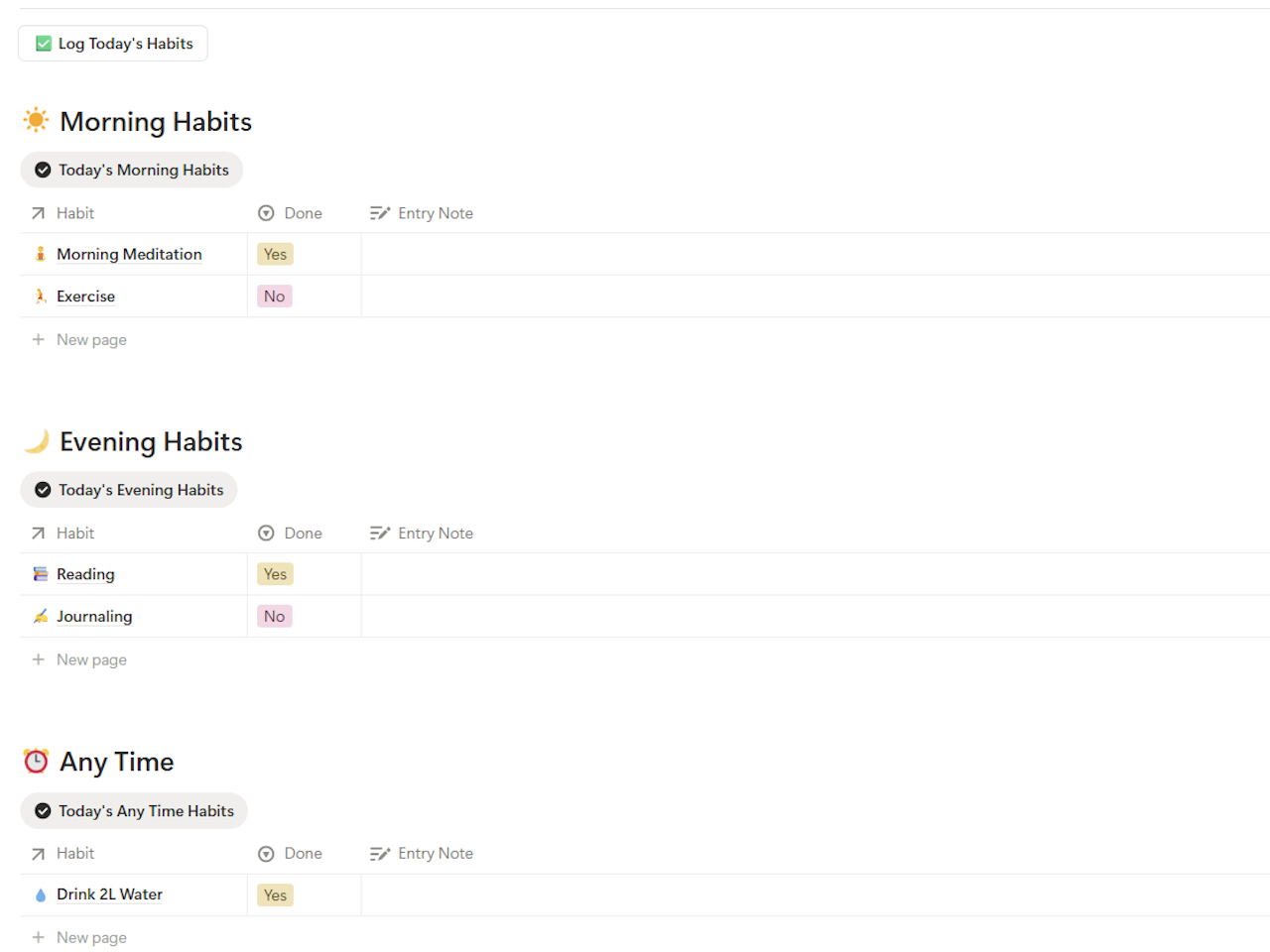
The template works the moment you duplicate it. Sample habits are pre-loaded across morning, evening, and anytime categories. Swap them for your own in under two minutes, then click “Log Today’s Habits” to begin.
Building something bigger than habits? Pair this with our Notion Budget Tracker Template or Personal CRM Notion Template, both built on the same free-plan-first approach.
What’s inside the free notion habit tracker template
Here’s exactly what ships in this notion habit tracker templates lineup, free and Pro, and why each piece earns its place.
AM/PM Routine Split
Habits split automatically into Morning, Evening, and Anytime sections on the dashboard. You see only what’s relevant right now, not a wall of unchecked boxes at 6am with your evening habits buried underneath.
One-Tap Daily Logging
Click “Log Today’s Habits” once. All five habits appear instantly with a Done toggle each. No manual row creation, no typing, and the daily check-in on this notion habit tracker template takes under 30 seconds.
This Week’s Progress Gallery
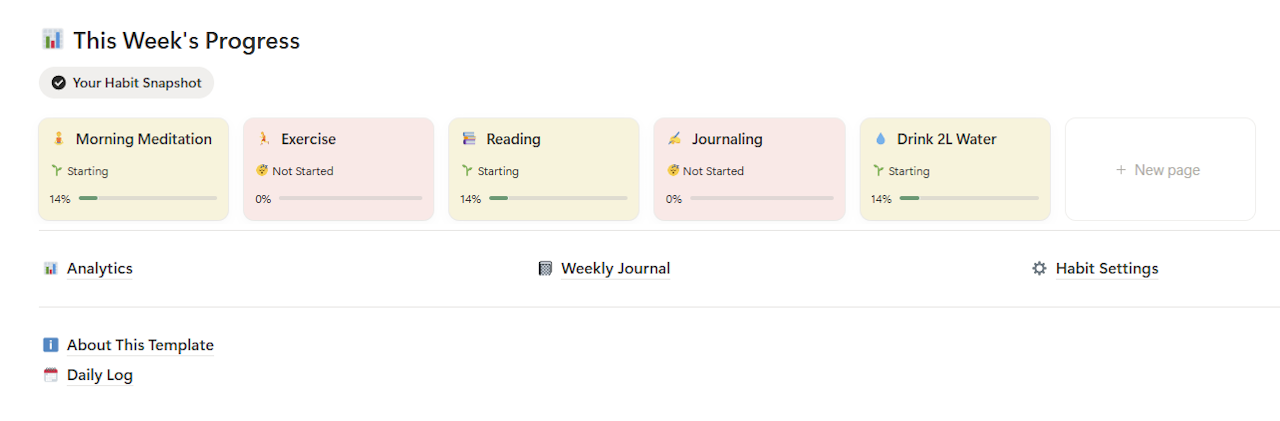
A gallery of habit cards below the log shows weekly status: Starting, Building, or Not Started, next to a progress bar against your weekly target. One glance tells you where you stand.
Flexible Habit Frequency
Not every habit is daily. Set each one to Daily, Weekdays, Weekends, 3x per week, or 2x per week. Weekly targets calculate per habit, so Exercise at 3x per week shows 33% after one session, not a misleading 100%.
This is the piece most DIY tutorials skip. A hard-coded rollup like round((Total Checked / 6) * 100), the kind you’ll find in generic step-by-step videos, breaks the moment you add a sixth habit. Every habit in this template carries its own target, so adding one doesn’t touch the math for the rest.
About Page and Quick Start Guide
An in-template guide walks through setup in five steps. The About page also documents known limitations honestly, so you know what the template can and can’t do before building a routine around it.
How to set up your notion habit tracker template
Setup takes under five minutes. Here’s the exact process.
Duplicate the template
Click the download link below. Notion opens the template in your browser. Click “Duplicate” in the top right and the whole notion habit tracker template copies to your workspace instantly, no account creation or email required.
Open Habit Settings
Navigate to Habit Settings inside the template. Sample habits are pre-loaded. Edit each one: name, icon, category (Health, Learning, Mindfulness, Productivity, Self-Care), and Time of Day (Morning, Evening, or Any Time).
Set your frequency and weekly target
Choose how often you want each habit. A daily habit gets a Weekly Target of 7, while Exercise at 3x per week gets a target of 3. These targets drive every progress bar and completion rate in the template.
Return to the Dashboard and log today
Back on the Dashboard, click “Log Today’s Habits.” Habits appear split across Morning, Evening, and Any Time. Click Done, then Yes, for everything you completed. That’s the daily interaction, and it takes about 15 seconds.
Review weekly progress every Sunday
Check the This Week’s Progress gallery every few days. Cards in pink need attention, cards in green are working. Use this view to adjust the system, not to judge yourself.
Pro tip: Start with three habits, not ten. Both BJ Fogg’s Tiny Habits research and James Clear’s Atomic Habits framework land on the same conclusion: fewer habits tracked consistently beats more habits tracked sporadically. Build the logging habit first, then add more once you’ve held two weeks of consistent check-ins.
Build a notion habit tracker template yourself, or download one?
How Long Does It Take to Build a Notion Habit Tracker From Scratch?
Roughly 45 to 90 minutes for a basic version with checkboxes and one rollup, based on the step counts in most public tutorials. Add AM/PM sections, per-habit weekly targets, and a monthly heatmap, and that climbs past 3 to 4 hours once you’re debugging formulas that reference the wrong property.
Most public tutorials walk through the same shape: two databases (one for habits, one for daily stats), a relation connecting them, and a rollup that counts checked boxes against a fixed number. That’s a reasonable 45-minute build for a single flat list.
The time cost shows up later, not during setup. The fixed rollup denominator has to be hand-edited every time you add or drop a habit, the AM/PM split has to be built as a second filtered view once you realize the flat list doesn’t separate morning from evening, and the heatmap usually means a second pass with a formula most tutorials don’t cover at all. None of that is difficult in isolation, but it adds up to an afternoon.
Downloading a notion habit tracker template that already has the flexible targets and the AM/PM filters built in skips that afternoon entirely. Whether the build-it-yourself route or a ready notion habit tracker templates option is the better use of your time depends on whether you’d enjoy the formula work or just want the daily habit of logging to start today.
Notion Habit Tracker Pro — full analytics and journal
The free version of this notion habit tracker template keeps you consistent. The Pro version of the same notion habit tracker template shows you why you’re succeeding or slipping, and gives you a weekly reflection system to act on it.
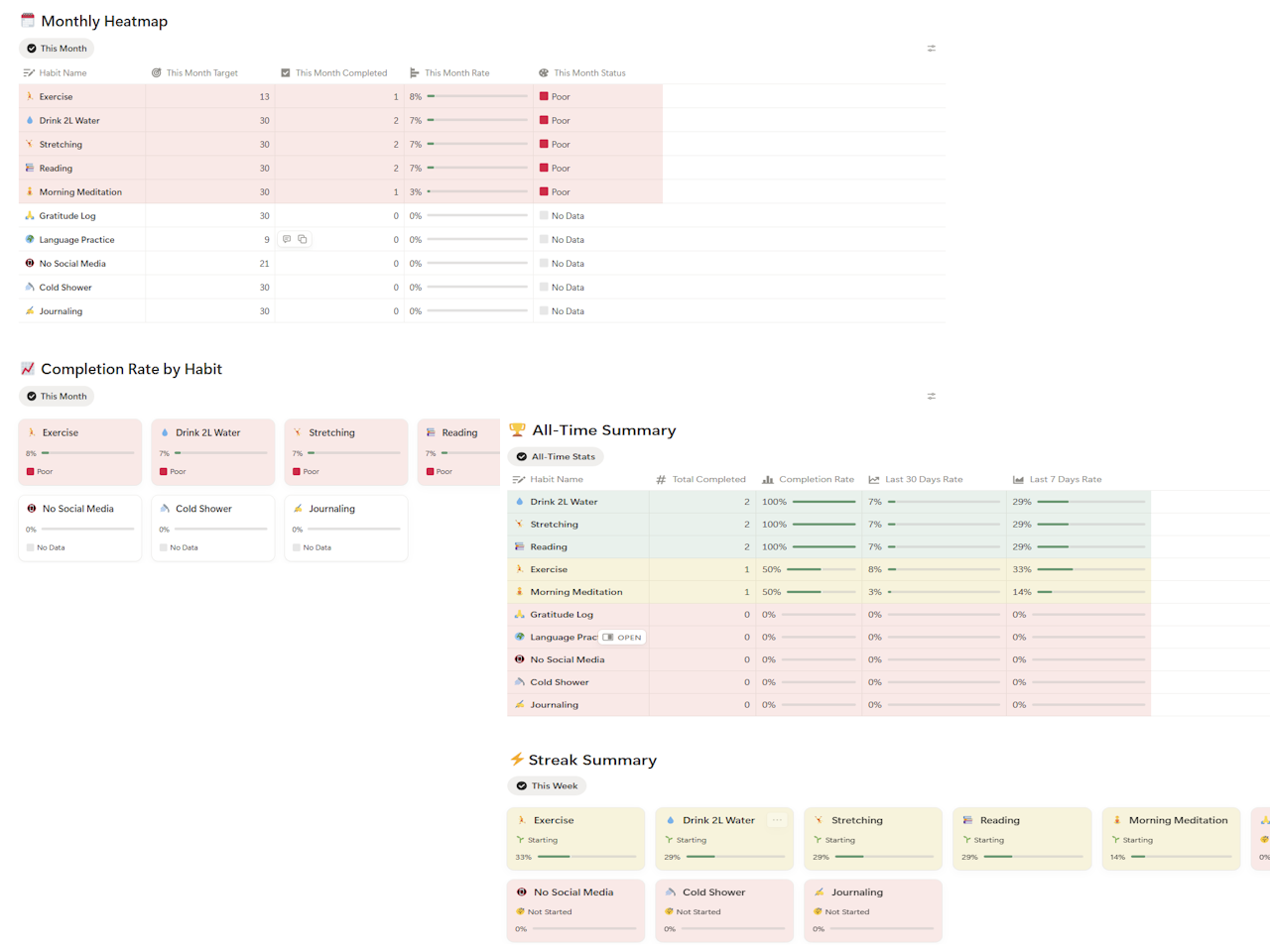
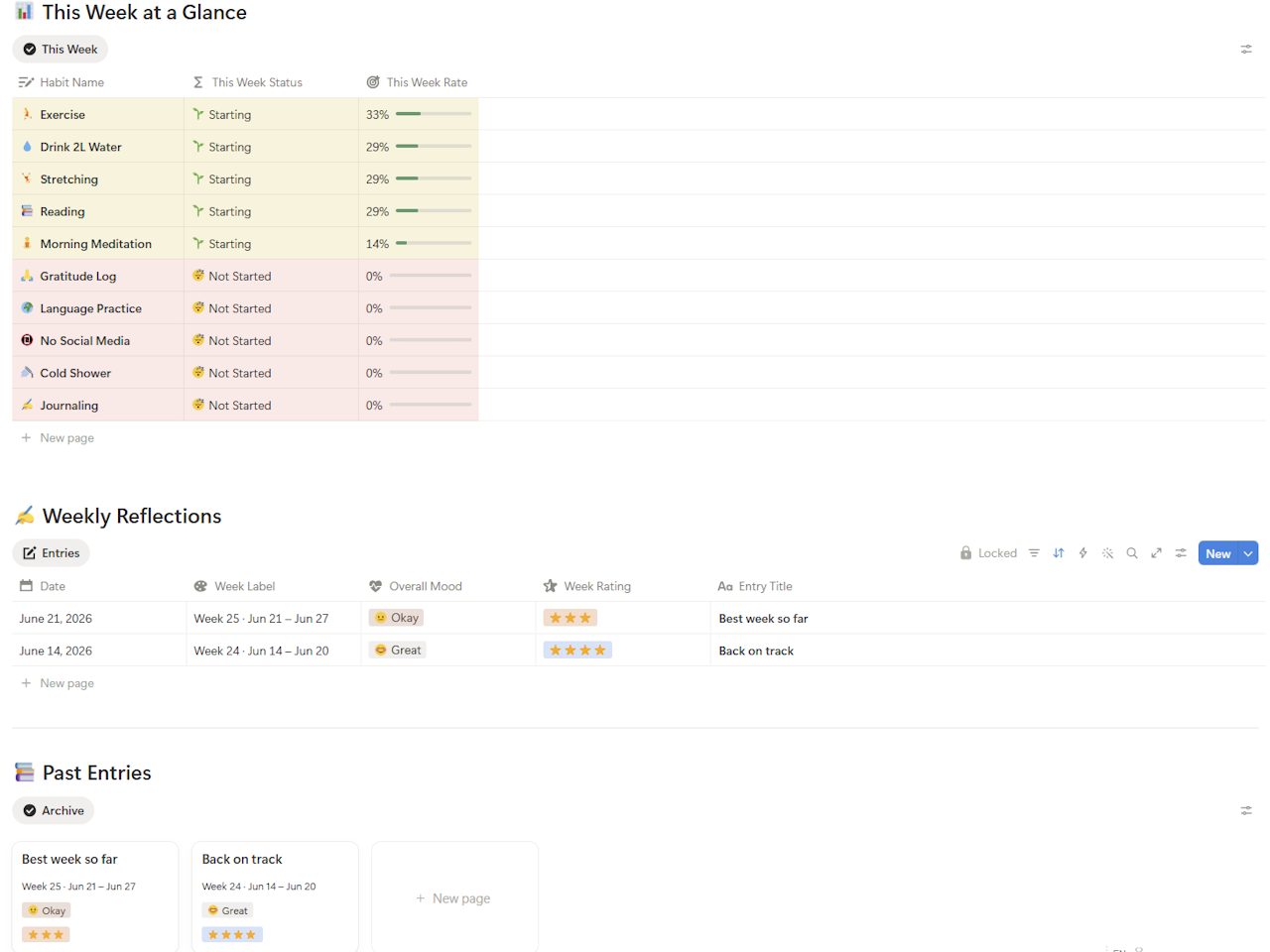
No other habit tracker notion template under $10 combines all five of these features in one system. Already building a full Notion workspace? This Pro template pairs naturally with our Notion Freelancer CRM Template for client-facing routines, or the Notion Budget Tracker Template for money habits, each sold separately and each fully documented.
Notion Habit Tracker Pro
The complete habit tracking system for Notion: monthly heatmap, AM/PM split, analytics dashboard, weekly journal, and flexible frequency. All on Notion’s free plan.
✓ AM/PM routine split — morning and evening sections
✓ Analytics dashboard — completion rates and all-time stats
✓ Weekly reflection journal — linked to your habit data
✓ Flexible frequency — daily, weekdays, 3x per week
✓ Up to 20 active habits
✓ Log a Past Day — catch up on missed days
✓ Works on Notion free plan
🎯 One-time purchase, yours forever. 15% off with code TWC15, effective price $8.42. Auto-applies at checkout.
| Feature | Free | Pro |
|---|---|---|
| Active habits | 5 | Up to 20 |
| AM/PM routine split | ✅ | ✅ |
| One-tap daily logging | ✅ | ✅ |
| Weekly progress gallery | ✅ | ✅ |
| Flexible habit frequency | ✅ | ✅ |
| Monthly heatmap | ❌ | ✅ |
| Completion rate by habit | ❌ | ✅ |
| All-time analytics summary | ❌ | ✅ |
| Streak summary dashboard | ❌ | ✅ |
| Weekly reflection journal | ❌ | ✅ |
| Log a Past Day page | ❌ | ✅ |
| Up to 6 habit categories | ❌ | ✅ |
✓ Works on Notion free plan
✓ AM/PM split included
✓ Duplicate in one click
Free vs Pro — which notion habit tracker template is right for you?
Quick answer: Start free if you’re new to habit tracking or you’ve abandoned trackers before. The free notion habit tracker template stays fully functional for five habits, permanently. Upgrade to Pro once you want to see monthly trends, not just this week’s status, since that’s what the analytics and journal are built for.
The free tier is the right starting point for most people. If you’re new to a habits tracker notion workflow, or you’ve dropped one before, start there and build the daily logging habit first.
Move to Pro when you want answers the free version can’t give: is your completion rate improving month over month, which habits are consistently weak, and what should you adjust after a slipped week. The Pro analytics and journal exist specifically for those questions.
If your goal reaches beyond habits, say tracking net worth alongside your routines, our Net Worth Tracker Google Sheets template and Debt Payoff Calculator follow the same free-plus-Pro model. For freelancers juggling client work on top of daily habits, the Freelance Invoice Tracker Google Sheets template and Freelance Expense Tracker Google Sheets template cover the business side.
The Pro version is a one-time purchase of $9.90. It does not require a paid Notion subscription, everything runs on Notion’s free plan. After purchase you get a Notion duplicate link, and the template is yours permanently.
5 proven tips for staying consistent with your notion habit tracker template
A notion habit tracker template handles the structure. Here’s how to actually use it.
Pin the Dashboard to your Notion sidebar
Right-click the Habit Tracker page in your sidebar and pin it. Every time you open Notion, the Dashboard is one click away. Visibility drives consistency, and if you have to navigate to find your tracker, you won’t open it daily.
Log at a fixed time, not when you remember
Tie your daily log to an existing anchor. Open Notion with morning coffee, then log evening habits right before closing the laptop. The “Log Today’s Habits” button takes 15 seconds, so the habit is opening Notion, not the logging itself.
Never miss twice
One missed day is fine, but two consecutive missed days is a pattern. The moment you notice two blank days in your weekly progress, that’s the signal to reset. Progress matters more than perfection.
Review your weekly progress every Sunday
Five minutes every Sunday in the This Week’s Progress gallery tells you everything you need. Which habits are Not Started, which are On Fire. One adjustment per week, not ten, compounds into real change over months.
Use the weekly journal to find patterns (Pro)
The Pro Weekly Journal pre-populates your completion data for the week. Open a fresh entry, see your stats already loaded, and answer three questions: what worked, what slipped, what are you adjusting. That ten-minute Sunday reflection outperforms any streak counter.
Building consistency isn’t limited to habits. If your bigger goal for the year touches your finances too, the same 3-to-5-habit starting principle applies to budgeting, and FinCompareLab’s roundup of budgeting apps for young adults covers tools built around that exact same idea of starting small.
Notion habit tracker template vs. dedicated habit apps
Before committing to a notion habit tracker template, it’s worth asking whether a dedicated app serves you better. The honest answer depends on what you’re already using Notion for, and what happens to your data if the app disappears.
Dedicated apps like Habitica or Streaks are built for one job, and they do it well. Push notifications, native mobile widgets, and gamified streak mechanics are genuinely harder to replicate inside a notion habit tracker template. If notifications are the one feature that keeps you consistent, that’s a real trade-off worth weighing against everything a notion habit tracker template gives you back in ownership.
Is a Notion Habit Tracker Template Better Than a Habit App?
Neither wins outright. A notion habit tracker template wins on data ownership, no subscription, and the ability to sit next to your tasks and notes. A dedicated app wins on native push notifications and gamified streak mechanics that Notion can’t replicate without a workaround.
Most habit apps lock your history behind a subscription. If the company shuts down or changes pricing, your streak data goes with it. A notion habit tracker template lives in your own workspace, with no subscription to cancel and no risk of losing years of completion data to a startup pivot.
| Factor | Notion Habit Tracker Template | Dedicated Habit App | Paper Journal |
|---|---|---|---|
| Cost | Free, or $9.90 one-time for Pro | Often $30-60/year subscription | Free |
| Data ownership | Fully yours, exportable anytime | Locked to the app’s servers | Fully yours, but not searchable |
| Push notifications | Not native, needs a workaround | Built-in and reliable | None |
| Combines with tasks/notes/goals | Yes, in the same workspace | Rarely, usually siloed | No |
| Analytics and trends | Pro version: heatmap + completion rate | Varies by app, often paywalled | Manual only |
| Setup time | Under 5 minutes to duplicate | 2-3 minutes to install | Instant |
If reminders matter above everything else, keep a dedicated app for that one function and treat a notion habit tracker template as your system of record instead, the place where weekly and monthly patterns actually live. Most people who’ve tried both end up doing exactly that: notifications from an app, reflection and analytics in Notion.
3 mistakes that sink most notion habit tracker templates
A notion habit tracker template fails for predictable reasons. Here’s what actually causes people to abandon theirs, and how this notion habit tracker template avoids each.
Tracking too many habits on day one
The single biggest reason a habit tracker notion template gets abandoned is starting with 10 to 15 habits instead of 3 to 5. Every unchecked box adds friction. This template defaults to 5 active habits on the free tier specifically to force a realistic starting point.
No visual feedback loop
A checkbox list with no progress bar or trend view gives you nothing to react to. You either did it or you didn’t, with no sense of momentum. That’s why this notion habit tracker template puts a weekly progress gallery front and center on the Dashboard, not buried three clicks deep.
Rebuilding the system every time a habit changes
Most home-built setups break the moment you add or remove a habit. Formulas point to the wrong rows, and views need re-filtering. This template’s Habit Settings database is decoupled from the Daily Log, so adding a new habit takes 30 seconds and touches nothing else.
Frequently asked questions
Is there a free notion habit tracker template?
Yes, this notion habit tracker template is free to duplicate instantly. It supports up to 5 habits with AM/PM split, one-tap daily logging, and weekly progress tracking, with no Notion paid plan and no email address required.
What is the best notion habit tracker template in 2026?
The best notion habit tracker template in 2026 combines AM/PM routine split, monthly completion tracking, analytics, and a weekly reflection system in one place. Most free templates offer only basic checkboxes with no progress visibility, and this Pro version is the only one under $10 that includes all four.
Can I track more than 20 habits with this notion habit tracker template?
The Pro version of this notion habit tracker template caps at 20 active habits by design, not a technical limit. Behavior research consistently favors fewer habits tracked well over many tracked loosely, so past 20 you’re better served splitting into a second workspace section than cramming more rows into one dashboard.
Building free and Pro no-code templates for Google Sheets and Notion at toolswithoutcode.com. Every template is tested, documented, and designed to work on free plans.