
Notion Budget Tracker Template: Essential 2026 Secrets
This notion budget tracker template resets itself every month, tags every expense against the 50/30/20 rule, and tracks income, subscriptions, and savings goals automatically. No spreadsheet. No monthly app fee. Just Notion.

11 min read
- Why a notion budget tracker template beats a spreadsheet or app
- The free notion budget tracker template: what’s inside
- Notion budget tracker Pro: full feature breakdown
- How this notion budget tracker template actually works
- How this notion budget planner handles the 50/30/20 rule
- Notion budget tracking for freelancers
- Notion budget template vs. Easlo, Notionery, and paid options
- What people get wrong with a notion budget tracker template
- Set up your notion budget tracker template in 5 minutes
- Common questions before you start
- Frequently asked questions
Why a notion budget tracker template beats a spreadsheet or app in 2026
Most budgets die in the first two weeks. Not from a lack of willpower. The tracking method itself gets abandoned because it takes too much upkeep for too little payoff.
A spreadsheet needs manual formula fixes every time a category changes. A budgeting app runs $10 to $15 a month, forever, for a job a free tool can do. And most free notion budget tracker template options online show all-time totals instead of what actually matters: this month’s spending.
This notion budget tracker template fixes those three problems in one build. Your data stays inside Notion, the app you already use for notes, tasks, or a wiki. There’s no subscription. And the This Month Spent formula filters to the current calendar month on its own, so the number on your dashboard is never stale.
It runs entirely on Notion’s free plan. No paid Notion account required, no bank connection, no browser extension. For someone who wants to see where their money goes without adopting a whole new app, that trade-off is worth it.
The free notion budget tracker template: what’s inside
The free version strips the notion budget tracker template down to two databases and one dashboard. It’s built for someone who wants working numbers in under ten minutes, not a full finance system.
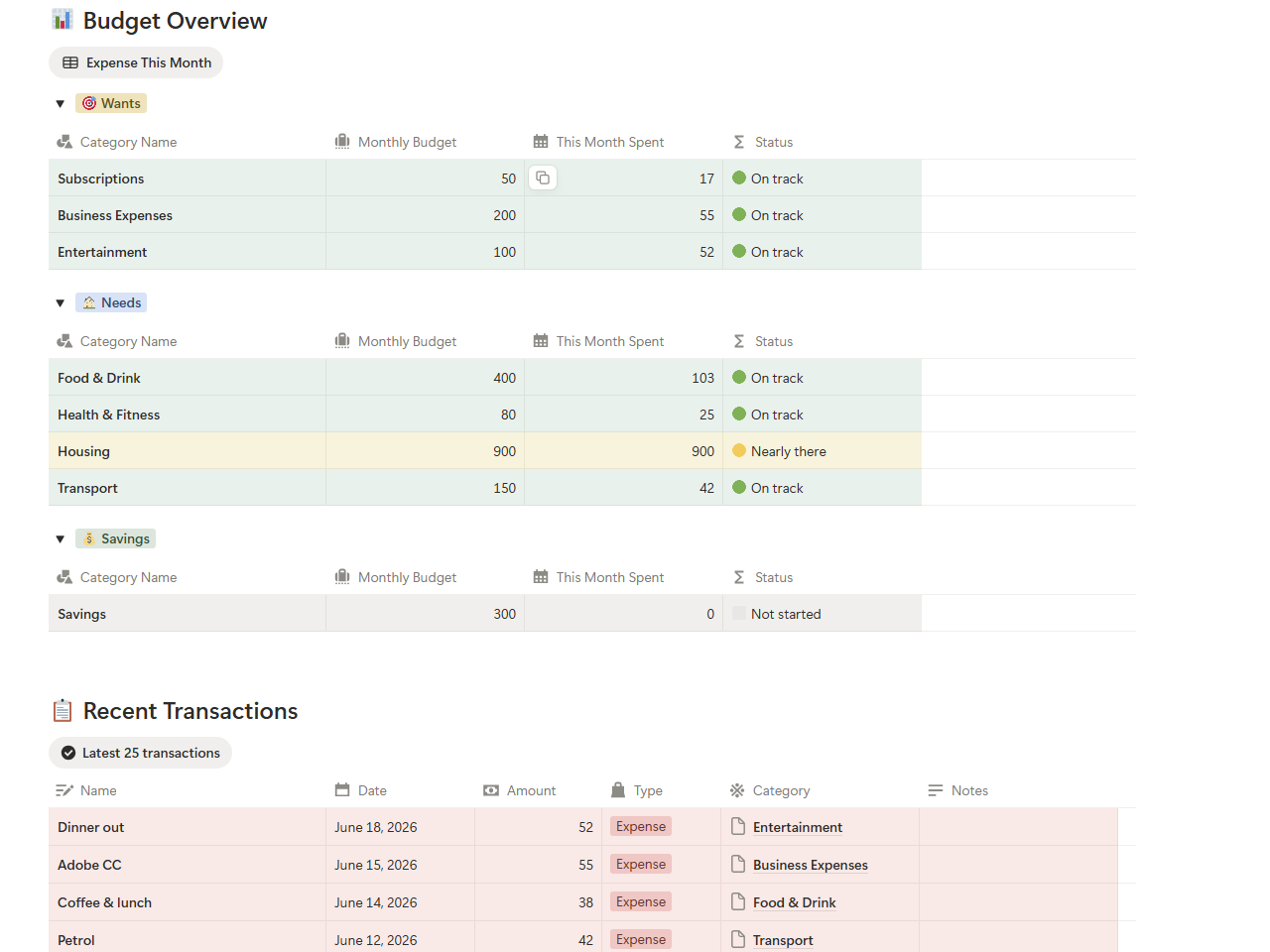
Transactions is where every dollar gets logged: name, date, amount, type, and category. Budget Categories holds your monthly spending target per category and calculates This Month Spent without any manual input from you.
Every category shows a status color based on how close you are to your limit. Green means room to spend. Yellow means slow down. Red means you’re over. That’s the whole feedback loop, and it needs zero setup beyond entering your own numbers.
Free notion budget tracker template includes:
- Transactions database logs income and expenses with date, amount, type, and category.
- Budget Categories sets monthly targets and tracks This Month Spent automatically.
- Status indicators show 🟢 on track, 🟡 nearly there, and 🔴 over budget.
- Budget Overview dashboard groups everything by Needs, Wants, and Savings.
- Recent Transactions view sorts the latest entries by date.
- Works on Notion’s free plan, no paid account needed.
Get the Free Notion Budget Tracker Template
No sign-up. No email required. Duplicate it straight into your workspace.
✓ Auto status indicators
✓ Works on free Notion plan
Notion budget tracker Pro: full feature breakdown
The Pro notion budget tracker template adds four databases: income tracking, a subscription tracker with upcoming renewals, savings goals with progress bars, and the 50/30/20 framework baked into every category. It closes the gap most free templates leave open, without the bloat of a full finance operating system.
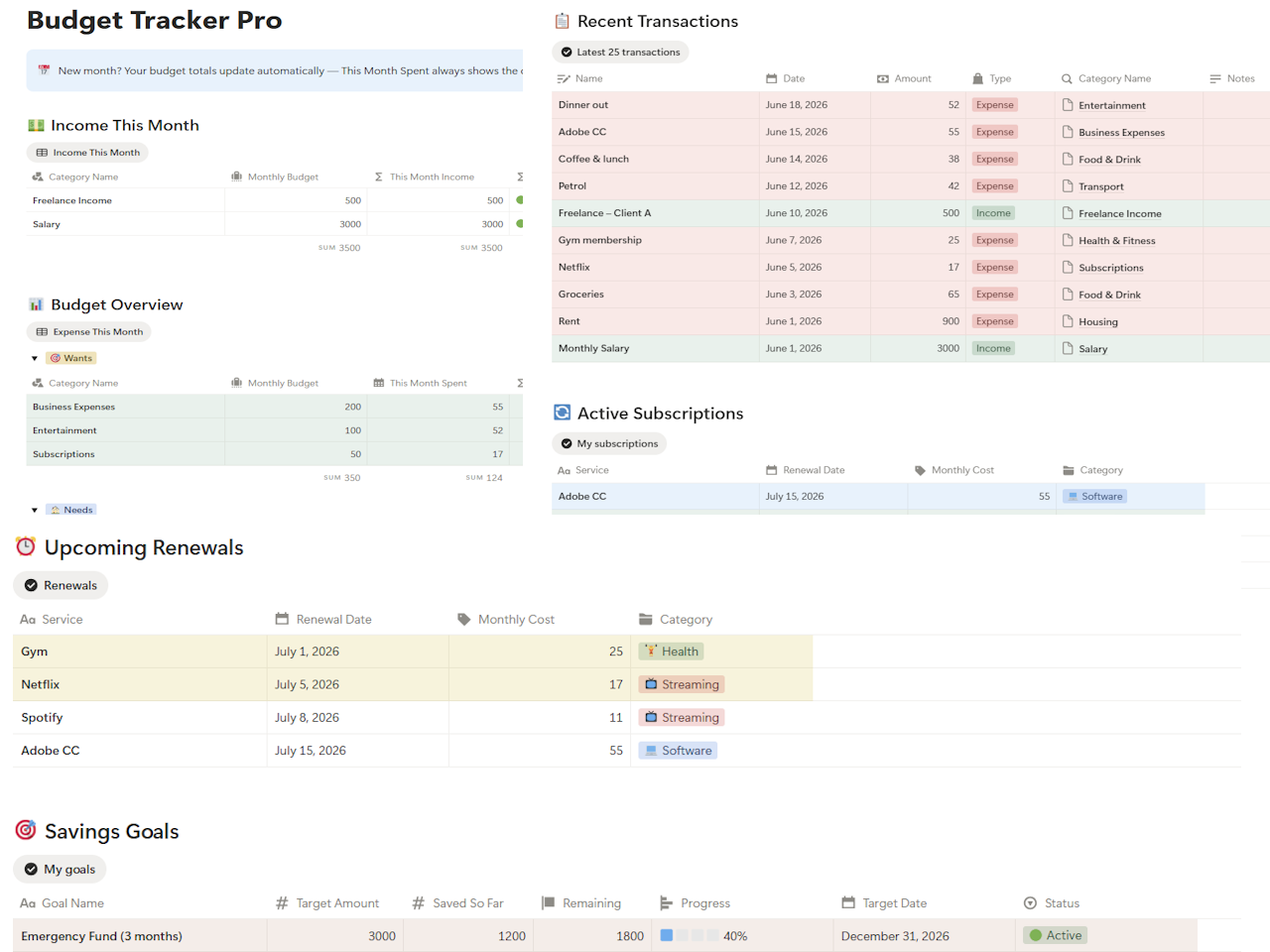
Here’s the technical difference that actually matters: This Month Spent runs on Notion Formulas 2.0 and filters transactions to the current calendar month without you touching a filter. Most notion budget template builds in this price range still rely on a manual date-range filter someone forgets to reset.
Pro version includes everything in the free notion budget tracker template, plus:
- Income tracking splits Salary and Freelance Income into separate categories with their own targets and status.
- Subscriptions database holds every recurring bill with Monthly Cost, Renewal Date, and Category.
- Upcoming Renewals view sorts subscriptions by next billing date.
- Savings Goals database tracks a target with a visual progress bar and marks it done.
- 50/30/20 Rule Tags label every category Needs, Wants, or Savings.
- Freelance income tagging uses an Income Type property to separate Salary, Freelance, and Other.
- How to Use page walks through setup directly inside the template.
Get Notion Budget Tracker Pro
One-time purchase. Lifetime access. Runs on Notion’s free plan.
✓ Auto current-month totals via Formulas 2.0
✓ Income tracking for salary and freelance
✓ Subscription tracker with upcoming renewals
✓ Savings goals with visual progress bars
✓ 50/30/20 budgeting framework built in
✓ Works on Notion’s free plan
| Feature | Free | Pro |
|---|---|---|
| Transactions database | ✅ | ✅ |
| Budget Categories | ✅ Basic | ✅ Full |
| Auto current-month totals | ✅ | ✅ |
| Status indicators | ✅ | ✅ |
| Income tracking | ❌ | ✅ |
| 50/30/20 Rule Tags | ❌ | ✅ |
| Subscriptions tracker | ❌ | ✅ |
| Upcoming Renewals view | ❌ | ✅ |
| Savings Goals database | ❌ | ✅ |
| Freelance income tagging | ❌ | ✅ |
| How to Use guide | ❌ | ✅ |
| Price | Free | $9.90 |
How this notion budget tracker template actually works
The whole notion budget tracker template runs on one relationship: Transactions feeds Budget Categories, and Budget Categories feeds the Dashboard. Everything else is a view of that same data.
Open Transactions and add a row. Name, date, amount, type (Income or Expense), and a category like Housing or Food & Drink. That’s the entire entry, no extra fields to fill.
The This Month Spent formula uses Notion Formulas 2.0 to sum expense transactions from the current calendar month only. No filter to reset. No manual math. It reflects today’s data every time you open it.
Linked views from all four databases sit on one page: income against budget, expenses grouped by 50/30/20 tag, upcoming subscription renewals, and savings goal progress side by side.
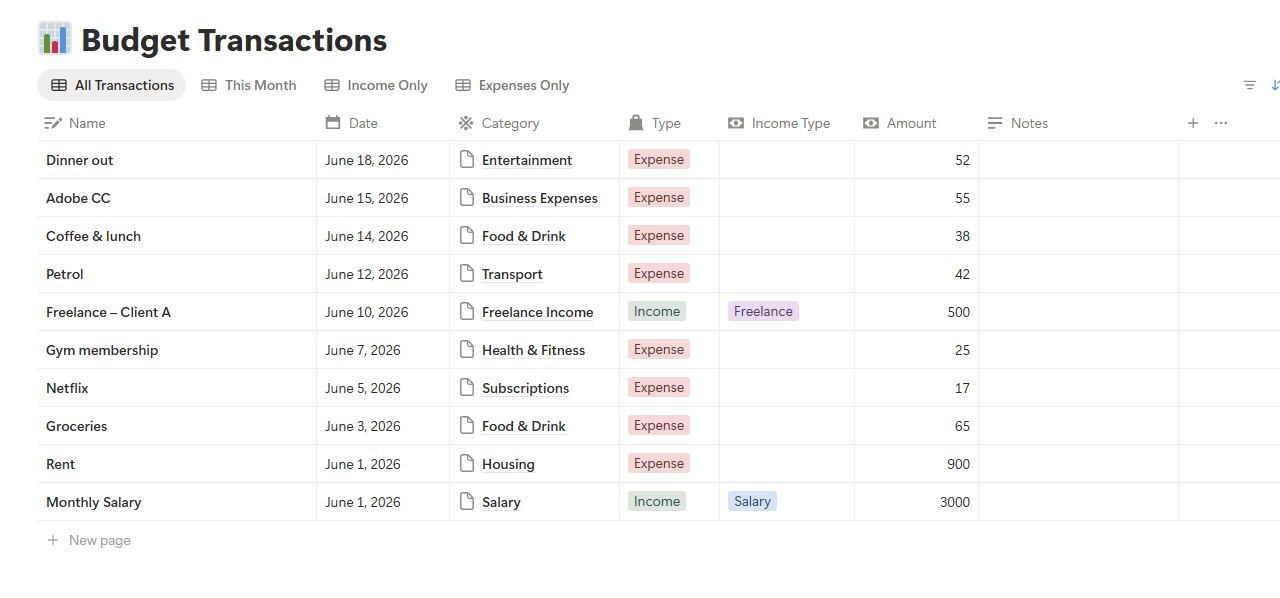
Every transaction carries a Month formula property, built as formatDate(prop("Date"), "MMMM YYYY"), which outputs a plain text string like “September 2026.” That string is what lets every linked view on the Dashboard filter by current month without a rollup or a manual date range.
Want last month’s numbers? Filter the Transactions view by Month. Your current-month Budget Categories keep working in the background, untouched.
How this notion budget planner handles the 50/30/20 rule
Most notion budget planner options hand you a flat list of categories with zero structure behind them. This one is built around the 50/30/20 rule, still one of the most tested frameworks in personal finance because it forces a decision instead of a guess.
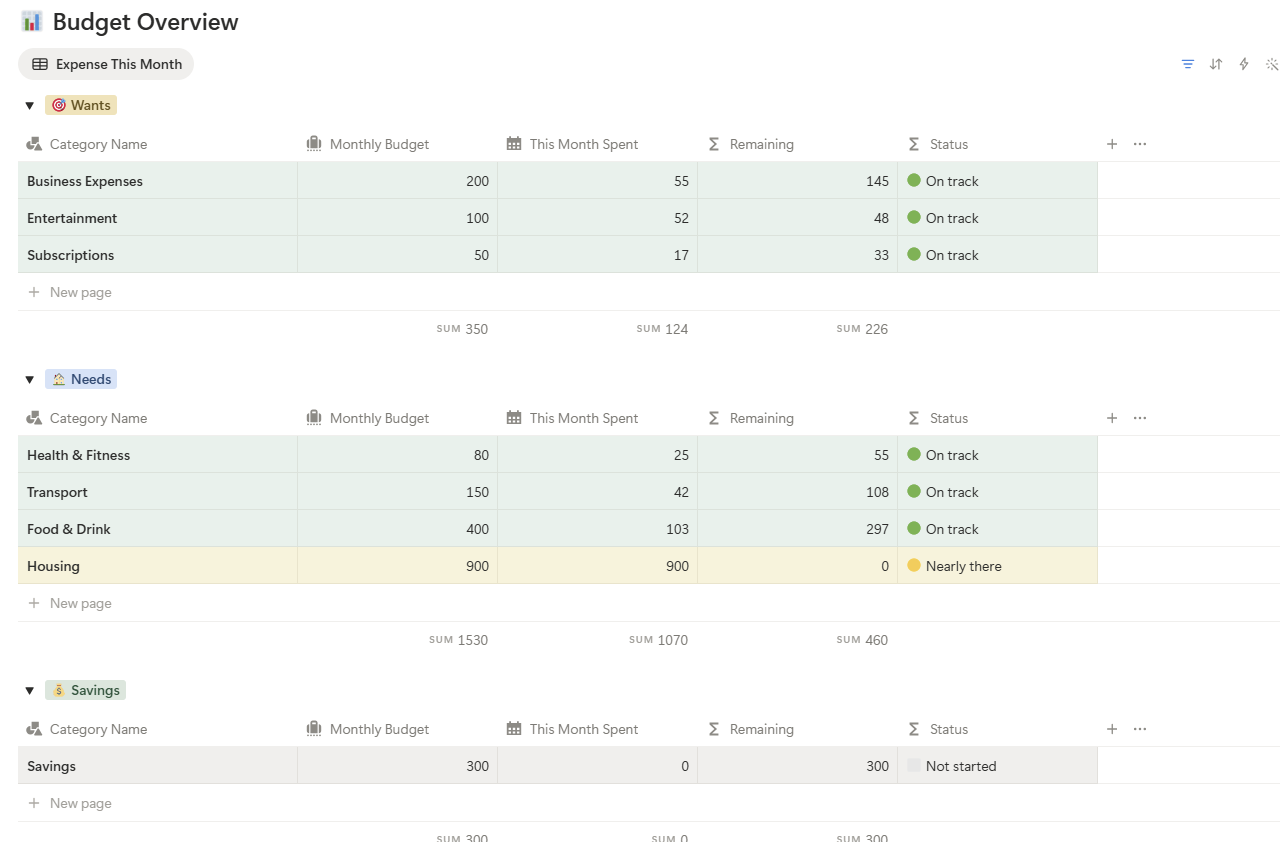
Every expense category in this notion budget tracker template carries a Rule Tag:
- Needs (50%) covers housing, food, transport, and health, the costs you can’t skip.
- Wants (30%) covers entertainment, subscriptions, dining out, and business tools, the spending you choose.
- Savings (20%) covers savings transfers, emergency fund deposits, and investment contributions.
The Budget Overview groups every category by Rule Tag automatically, so you can see in one glance whether Needs is creeping past 50% or Savings is quietly underfunded month after month.
This is one of the pieces missing from most notion budget tracker template options at this price. Easlo’s Budget Tracker skips it. Notionery skips it too. Building it yourself in Notion means writing a rollup and a formula from scratch, which is exactly the kind of setup work this template exists to remove.
How much does a notion budget tracker template cost compared to budgeting apps?
A notion budget tracker template is a one-time purchase, usually $5 to $15, versus $10 to $15 a month for apps like YNAB or Monarch. Over a single year, a paid app costs 8 to 36 times more than a template that does the same core job.
The trade-off is bank sync. Apps pull transactions automatically. A notion budget tracker template requires manual entry every time. For someone who already checks their accounts weekly, that gap matters less than the recurring bill. For a comparison of what each paid app actually includes, FinCompareLab’s roundup of free budgeting apps is a useful second opinion.
Notion budget tracking for freelancers with irregular income
Notion budget tracking for a freelancer looks different from a salaried employee’s setup, since income arrives in uneven chunks instead of a predictable paycheck. The Pro notion budget tracker template includes an Income Type property on every transaction: Salary, Freelance, or Other. That single field lets freelancers separate client income from a day job or side income without running two databases side by side.
Budget Categories ships with two income categories pre-built: Salary and Freelance Income, each with its own monthly target and status indicator. Hit your freelance income goal mid-month and the status flips to on track. Fall behind and it shows exactly how far.
Business expenses are pre-tagged as Wants, so software subscriptions or a coworking membership land in the right part of your 50/30/20 breakdown instead of skewing your Needs category. For expenses tied specifically to client work, the Freelance Expense Tracker for Google Sheets adds tax categories and mileage logging that this template doesn’t attempt to replicate.
Freelancers managing client relationships alongside their budget often pair this notion budget tracker template with the Notion Freelancer CRM Template, since both live in the same workspace and share the habit of checking numbers weekly.
Seasonal freelance work needs a slightly different setup. Someone doing tax prep or event photography might earn 60% of their yearly freelance income in a three-month window. Setting one flat monthly target against that pattern guarantees eight or nine months of red status indicators for no useful reason. A better approach: set the Freelance Income target to a twelfth of last year’s total freelance earnings, then treat any month above that number as a Savings opportunity rather than a bonus to spend immediately.
Notion budget template vs. Easlo, Notionery, and paid alternatives
There are dozens of Notion budget templates on the market. Here’s an honest look at how this one stacks up against the most-recommended paid options at similar price points.
| Feature | TWC Pro | Easlo Budget ($5–$9) | Notionery ($15) | Easlo Finance ($39) |
|---|---|---|---|---|
| Income tracking | ✅ | ❌ | ✅ | ✅ |
| Auto current-month totals | ✅ | ❌ | ❌ | ✅ |
| Status indicators | ✅ | ❌ | ❌ | ❌ |
| 50/30/20 framework | ✅ | ❌ | ❌ | ❌ |
| Subscription tracker | ✅ | ❌ | ❌ | ✅ |
| Upcoming Renewals view | ✅ | ❌ | ❌ | ❌ |
| Savings Goals | ✅ | ❌ | ❌ | ✅ |
| Freelance income tagging | ✅ | ❌ | ❌ | ❌ |
| Works on free Notion plan | ✅ | ✅ | ✅ | ✅ |
| One-time price | ✅ | ✅ | ✅ | ✅ |
At $9.90, this notion budget tracker template beats Easlo’s Budget Tracker on every dimension in the table and matches Easlo’s $39 Finance Tracker on core budgeting functionality. The $39 version adds multiple account tracking and account-to-account transfers, features most personal budgets never touch.
Notionery’s $15 template leans on visual polish over formula automation, so you’re paying for layout more than function. The Notion Habit Tracker Template follows the same build philosophy as this one: real automation beats aesthetics at this price point, every time.
Run the math over three years and the gap widens fast. A $9.90 one-time template stays at $9.90. A $12.99 monthly app like YNAB runs close to $468 across the same three years. Even Easlo’s $39 Finance Tracker, the priciest one-time option in the table, still costs $429 less than three years of a typical subscription app. That gap alone is why a one-time notion budget tracker template makes sense for anyone not relying on automatic bank sync.
Can freelancers use a notion budget tracker template for irregular income?
Yes, and it handles irregular income better than most paid apps built for salaried employees. The Pro version’s Income Type field and rolling-average target approach (covered above) both exist specifically for freelance income that changes every month.
What people get wrong with a notion budget tracker template
Three mistakes show up over and over in support messages about Notion budget setups, and none of them are about the template itself.
Setting targets from an ideal budget instead of a real one. A category target that assumes zero takeout and zero impulse buys gets ignored within a week. Pull your last three months of actual spending from a bank statement first, then set the target 10% below that as a stretch goal.
Skipping the sample data deletion. Every notion budget tracker template ships with placeholder rows so the dashboard looks populated on first open. Leaving them in place inflates This Month Spent and makes every status indicator wrong until you clear them out.
Logging savings as a separate tracker instead of a transaction. A savings transfer that never appears in Transactions never counts against the Savings category, which quietly breaks the entire 50/30/20 split without any error message telling you why.
Fixing all three takes under fifteen minutes and solves the majority of “this budget tracker doesn’t work” complaints that have nothing to do with the formulas underneath.
A real month inside this notion budget tracker template
Numbers make this easier to picture than another feature list. Take a household bringing in $4,200 a month after tax, split roughly along the 50/30/20 rule this notion budget tracker template is built around.
| Category | Rule Tag | Target | Actual (this month) | Status |
|---|---|---|---|---|
| Housing | Needs | $1,400 | $1,400 | 🟢 On track |
| Groceries | Needs | $500 | $540 | 🟡 Nearly there |
| Transport | Needs | $210 | $180 | 🟢 On track |
| Dining out | Wants | $250 | $310 | 🔴 Over budget |
| Subscriptions | Wants | $120 | $118 | 🟢 On track |
| Savings transfer | Savings | $840 | $840 | 🟢 On track |
The Dining Out category running $60 over doesn’t sink the month on its own. What matters is the Budget Overview grouping: Needs sits at 49.5% of income, Wants at 30.7%, Savings holds exactly 20%. The overshoot in one Wants category gets absorbed by a slight underspend elsewhere in the same group, which is the entire point of tagging by group instead of watching each line item in isolation.
A spreadsheet would need a manual formula rewrite to reflect the current month once March rolls into April. This notion budget tracker template just shows April’s numbers the moment a transaction with an April date gets logged, because the Month formula and Formulas 2.0 filter handle the reset without anyone touching a setting.
Set up your notion budget tracker template in 5 minutes
Click the download link below, then click Duplicate in the top-right corner of the page it opens. You need a free Notion account, nothing paid.
Open Budget Categories and update the Monthly Budget column for each category using your actual last three months of spending, not an aspirational number.
Clear out the placeholder transactions before logging anything real. Skipping this step is the single most common setup mistake covered above.
Add a row in Transactions with today’s date, an amount, Type set to Expense, and a category. Open the Dashboard and confirm Budget Overview updates immediately.
Five minutes every Sunday, checking Budget Overview, upcoming renewals, and savings progress, is enough to keep a notion budget tracker template running for months instead of weeks.
Common questions before you start
Is there a truly free notion budget tracker template with no catch?
Yes. The free notion budget tracker template linked on this page requires no email, no sign-up, and no trial period that reverts to paid. It stays free permanently and includes a working Transactions and Budget Categories database.
For a broader system that combines budgeting with net worth and savings tracking in one place, the Personal Finance OS spreadsheet takes a similar real-numbers-first approach. And if the goal is paying down debt alongside the budget, the Debt Payoff Calculator for Google Sheets pairs the Savings category here with an actual payoff timeline.
Get the Free Notion Budget Tracker Template
Start tracking your budget in Notion today. Free, no sign-up needed.
✓ Status indicators built in
✓ Works on Notion free plan
Tracking spending is only half the picture. Pairing this notion budget tracker template with the Net Worth Tracker for Google Sheets shows whether your monthly budgeting is actually moving your overall finances forward, not just keeping spending in line. For a wider view of app-based alternatives, the Google Sheets vs. Budgeting App comparison breaks down where a template wins and where a paid app still makes sense. And for daily habits beyond money, the Notion Life OS Template extends the same Notion-first approach to tasks, goals, and notes.
Frequently Asked Questions
Does the notion budget tracker template work on the free Notion plan?
Yes, both the free and Pro versions of this notion budget tracker template run entirely on Notion’s free plan. No paid Notion account is needed. The only Notion features this template avoids are Charts and AI, both of which require a paid plan, and status indicators replace charts here.
Does the notion budget tracker template support multiple currencies?
The notion budget tracker template uses plain numbers with no currency symbol locked in. Enter amounts in USD, EUR, GBP, SGD, or any currency you budget in, and every formula works identically since nothing is hardcoded to a specific symbol.
How does the notion budget tracker template handle a new month?
The This Month Spent formula uses Notion Formulas 2.0 to filter transactions to the current calendar month automatically. When the month changes, budget totals reset with no action needed from you. Keep logging transactions and the Dashboard stays current.
Can I track subscriptions separately from regular expenses?
Yes, the Pro notion budget tracker template includes a dedicated Subscriptions database. Add each recurring bill once with its cost, renewal date, and category, and the Upcoming Renewals view sorts them by next billing date automatically. Log the actual payment as a Transaction too if you want it counted in your monthly totals.
What’s the difference between the free and Pro notion budget tracker template?
The free notion budget tracker template covers expense tracking and budget categories with status indicators. Pro adds income tracking, the 50/30/20 framework, a subscription tracker, savings goals, and freelance income tagging for a one-time $9.90 payment with no recurring fees.
Is my data private in a notion budget tracker template?
Your financial data stays inside your own Notion workspace, the same place your notes and tasks already live. Nothing in this notion budget tracker template sends data to an external server, since every formula runs natively inside Notion’s own database engine.
Building free and Pro no-code templates for Google Sheets and Notion. Every template at Tools Without Code is tested, documented, and built to actually work, not just look good in a screenshot.