
Freelance Expense Tracker Google Sheets: Essential Guide (2026)
This freelance expense tracker Google Sheets template logs every business expense, auto-calculates your deductible amount per category, tracks mileage at the 2026 IRS rate, and gives you a 12-month annual view, free with no email required. 5 tabs, 471 formulas, built for US freelancers, UK sole traders, and Australian contractors alike.

14 min read
✨ What’s inside this freelance expense tracker Google Sheets template
- Setup tab: business name, 2026 IRS mileage rate, 15 expense categories with deductible % each, and client names, configured once to drive everything
- Expense Log tab: log every expense with category dropdown, type (Business / Personal / Mixed), and auto-filled deductible status
- Mileage Tracker tab: date, origin, destination, business purpose, miles; IRS deduction auto-calculates at the rate from Setup
- Dashboard tab: month + year selectors show expenses, business total, deductible amount and mileage for any period
- Annual View tab: all 12 months side by side with Q1–Q4 totals, deductible amounts per category, mileage and estimated tax as reference
- 471 formulas, zero errors: works in Google Sheets and Excel 2019+
📋 Table of Contents
- What is a freelance expense tracker Google Sheets template?
- Who needs this self employed expense tracker Google Sheets template?
- What’s inside the 5 tabs?
- Step 1: Setup tab
- Step 2: Expense Log tab
- Step 3: Mileage Tracker tab
- Step 4: Dashboard tab
- Step 5: Annual View tab
- How deductible % works per category
- 5 habits that make this freelance expense spreadsheet work
- Freelance expense tracker Google Sheets vs paid software
- People also ask
- FAQ
What is a freelance expense tracker Google Sheets template?
A freelance expense tracker Google Sheets template is a free spreadsheet that logs business expenses, calculates your deductible amount per category using an IRS-aligned percentage, and tracks mileage at the standard rate, inside your own Google Drive, with no subscription, no bank connection, and no email gate. It separates what you spent from what you can actually claim.
Most people searching for a expense tracker Google Sheets template are looking for personal budgeting: categorized spending, savings goals, maybe a debt payoff plan. A freelance expense tracker Google Sheets template solves a different problem entirely. Business expenses carry deductibility rules a personal tracker was never built to handle.
Phone and internet are only partially deductible. Client meals are capped at 50%. Mileage to a client’s office needs a contemporaneous log with a business purpose, not a lump-sum guess in April.
This freelance expense tracker Google Sheets template handles all three automatically, so the number in your Annual View tab is the number you can actually put on Schedule C, not just a total of receipts. US freelancers, UK sole traders tracking business costs against HMRC rules, and Australian solopreneurs billing clients internationally can all use it, since this freelance expense tracker Google Sheets template adapts to any currency with a single Setup cell.
The most missed deduction in freelancing is mileage. At the 2026 IRS rate of $0.725/mile, 1,000 business miles = $725 in deductions you can claim, yet most freelancers log the fuel receipt and forget to log the miles it represents. This freelance expense tracker Google Sheets template fixes that with a dedicated mileage log that auto-calculates every trip, with no year-end reconstruction and no guessing.
Who needs this self employed expense tracker Google Sheets template?
This freelance expense tracker Google Sheets template, also searched for as a self employed expense tracker Google Sheets template, is built for four groups, each hitting a different pain point with generic spreadsheets:
- Freelancers and independent contractors: anyone receiving 1099 income (US) or equivalent who needs clean business deductions without hiring a bookkeeper
- Self-employed sole proprietors: one-person businesses that want organized expense records without the overhead of QuickBooks or Wave
- Side hustlers: people earning freelance income alongside a day job who need business and personal spending cleanly separated in the same bank account
- Privacy-conscious freelancers: anyone who doesn’t want to hand bank credentials to a third-party app just to categorize a coffee receipt
Freelance expense tracker vs. a business expense tracker Google Sheets template
A business expense tracker Google Sheets template is usually built for a small team or an established company: think multiple employees, reimbursement workflows, and department-level cost centers. A freelance expense tracker Google Sheets template is built for exactly one filer, one Schedule C, and one set of quarterly estimated tax payments. That distinction matters more than it sounds: a business expense tracker Google Sheets setup often skips the mileage-and-deductible-% logic freelancers need, because a company car fleet has an entirely different accounting treatment than a freelancer driving their own car to a client meeting.
If you’re running a business with staff and reimbursable expenses, a generic business expense tracker Google Sheets template, or our own general-purpose expense tracker Google Sheets template, is the better fit. If you’re a solo freelancer filing Schedule C, this freelance expense tracker Google Sheets template is purpose-built for that narrower, more common case.
It also pairs naturally with the Freelance Invoice Tracker: that template manages what clients owe you, while this one tracks where your business money goes. Together they cover both sides of your freelance finances, and if you also want a forward-looking view of upcoming cash gaps between invoices, the Cash Flow Forecast Tracker connects the two into a month-by-month runway view.
US freelancers: this freelance expense tracker Google Sheets template’s 15 categories align with IRS Publication 535 business expense categories. Update the deductible % in Setup to match your actual usage, especially Phone & Internet and Home Office.
What’s inside this google sheets expense tracker for freelancers: 5 tabs explained
📊 5 tabs, each with a clear job
Compare that to the free Budget Tracker, which is built for personal income planning, savings goals and debt payoff, not business deductions. If your freelance income also needs a personal-side plan, running both templates side by side (this one for the business, the Budget Tracker for the household) is the setup most solo freelancers land on within their first year.
Step 1: How to set up this freelance expense tracker Google Sheets template
Open the Setup tab first. You configure it once, and every other tab pulls from here automatically. You never need to return unless you rename a category or the IRS updates the mileage rate mid-year.
Enter your business details
Type your business name in C5 and currency symbol in C6: $, £, €, or whatever you bill in. Your name appears in the Dashboard header automatically. Set your tax year in C8, which the Annual View uses to filter your transactions to the right period.
Set the IRS mileage rate
The 2026 rate of $0.725/mile is pre-filled in C13. This is the only cell that needs updating when the IRS announces a new rate. Every trip in the Mileage Tracker recalculates the instant you change it, with no manual edits to individual rows.
Review expense categories and deductible %
15 pre-built business expense categories sit in column B (rows 23–37) with their deductible % in column C, and most default to 100%. Client Entertainment and Meals & Entertainment default to 50% per IRS rules. Phone & Internet also defaults to 50%; update it to your actual business-use percentage if it’s higher or lower.
Enter your client names
Add up to 5 client names in column B rows 42–46. These power the Client dropdown in the Expense Log so you can filter and identify client-specific spending for reimbursement or project costing, a step most self employed expense tracker Google Sheets templates skip entirely.
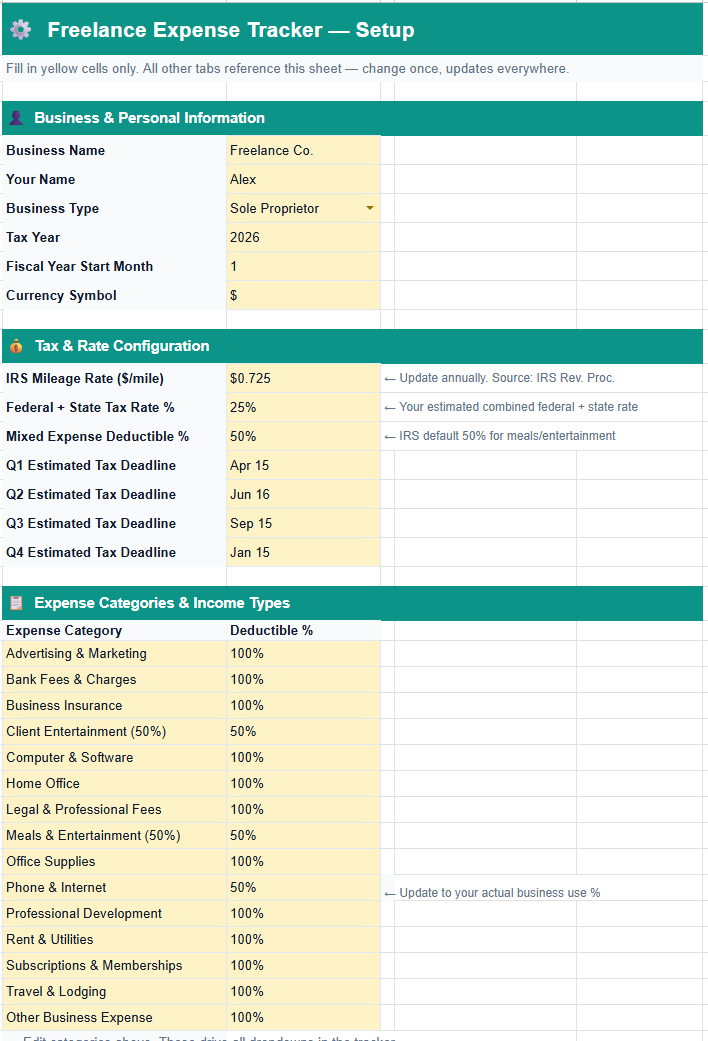
Phone & Internet defaults to 50% deductible. The IRS requires you to claim only the business-use portion, so if you use your phone 80% for work, change C32 in Setup to 0.80. Every affected cell in the Annual View of this freelance expense tracker Google Sheets template updates instantly, with no need to touch the Expense Log rows themselves.
Step 2: How to log expenses in this freelance expense spreadsheet
The Expense Log is the only tab you touch regularly in this freelance expense spreadsheet. Every business expense gets one row. Category and Client are dropdowns tied to Setup: no free typing, no mismatches that silently break your Annual View totals.
Enter date, description and category
Type the date in column B and a description in column C. Click column D, and a dropdown with all 15 categories from Setup appears, and you should always select from it. If you type a category manually and it doesn’t match exactly, that transaction is invisible to the Dashboard and Annual View, and your deductible total will quietly understate reality.
Enter amount and select type
Type the amount in column E, then select the type from column G dropdown: Business, Personal, or Mixed. Business applies 100% of the category’s deductible %, while Mixed applies that % proportionally. Personal is excluded from every tax calculation entirely, which keeps a stray grocery run from inflating your business numbers.
Watch the Deductible? column fill itself
Column H fills automatically: Yes for Business, No for Personal, 50% (Mixed) for Mixed (or whatever % you set in Setup). You never touch this column. It’s a formula reading your type selection and the category’s deductible % from Setup, the same logic used across every tab in this freelance expense tracker Google Sheets template.
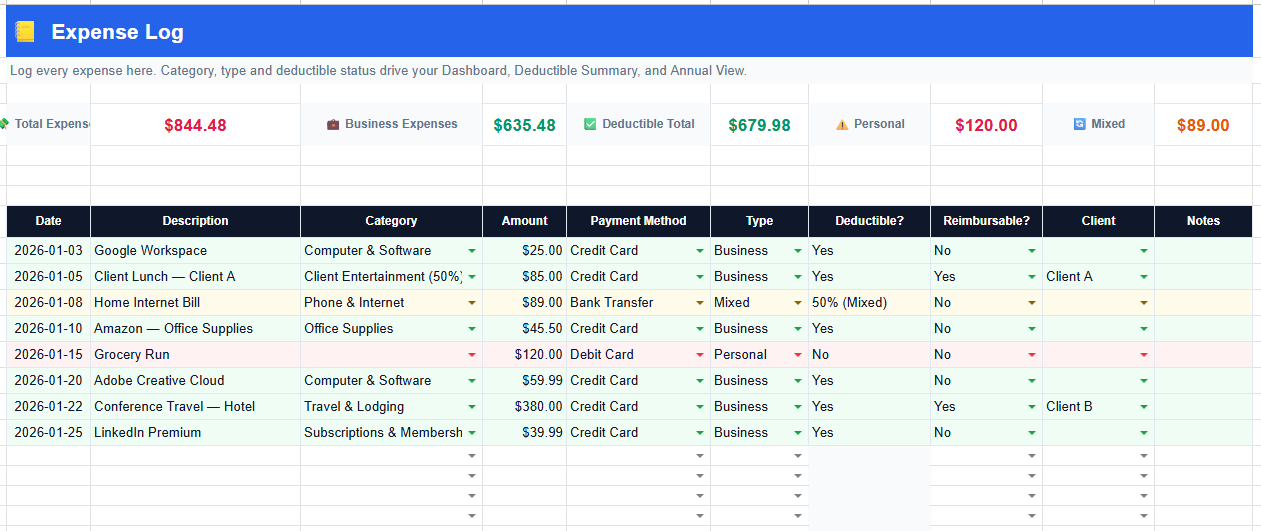
Always use the category dropdown, never type manually. The Annual View uses exact category name matching. A manually typed “computer software” instead of “Computer & Software” means that transaction never appears in your deductible totals in this freelance expense tracker Google Sheets template.
Step 3: How to track freelance expenses with the Mileage Tracker
The Mileage Tracker is what separates this freelance expense tracker Google Sheets template from a generic option. The IRS requires a contemporaneous log (date, origin, destination, business purpose, and miles) for every business trip. This tab gives you exactly that structure, with automatic deduction calculation built in.
Log every business trip
Enter the date, where you drove from, where you drove to, the business purpose (“Client A meeting” is sufficient for IRS purposes), and one-way miles. Select Yes for Round Trip, and the miles double automatically with no mental math required.
The deduction calculates itself
The Deduction column multiplies total miles × the IRS rate from Setup cell C13. Change the rate in Setup once and every trip in this tab updates instantly. The KPI row at the top shows total miles YTD, total deduction YTD, this month’s miles and the current IRS rate, all live.
Mileage tracker spreadsheet vs. a paper log: why the spreadsheet wins
A paper mileage log or a notes-app entry technically satisfies the IRS’s contemporaneous-record requirement, but it fails you at tax time. You still have to add every trip by hand, and one missed page of a notebook means a real deduction quietly disappears. A mileage tracker spreadsheet does the arithmetic the moment you type the miles, keeps a running YTD total visible at all times, and rolls straight into the Annual View without a second data-entry pass.
The trade-off: a spreadsheet needs a device in hand at the time of the trip, where a sticky note in the glovebox doesn’t. In practice, most freelancers open the template on their phone in the client’s parking lot. The 60 seconds that takes is still faster than reconstructing four months of trips from memory in March.
Mileage log template Google Sheets: what the IRS actually requires
A compliant mileage log template Google Sheets setup needs five fields per trip, not just a mileage total: date, starting location, destination, business purpose, and miles driven. The Mileage Tracker tab in this freelance expense tracker Google Sheets template captures all five, plus a Round Trip toggle so you don’t have to double the miles by hand.
According to IRS Publication 463, a written record made at or near the time of the expense is the gold standard for vehicle deduction documentation. A log reconstructed after the fact, even an accurate one, carries more audit risk than one built trip-by-trip.
Printable mileage log template for self employed drivers who skip spreadsheets
Not every trip happens near a phone or laptop. If you’d rather keep a printable mileage log template for self employed use in the glovebox (a physical page you fill in with a pen after each drive), that works too, as long as you transfer the entries into the Mileage Tracker tab weekly rather than letting a stack of paper build up. The IRS doesn’t care whether the record started on paper or in a cell; it cares that the record was made close to the time of the trip and eventually lands somewhere you can total it up.
A printable log plus a weekly 5-minute transfer session into this freelance expense tracker Google Sheets template gives you the best of both worlds: capture flexibility in the field, and automatic deduction math once it’s in Sheets.
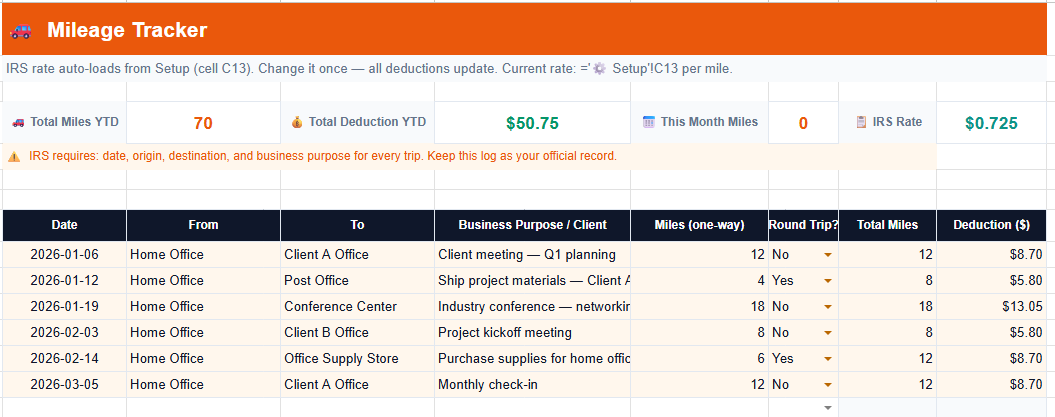
Log trips at the time they happen, not at year end. Reconstructing trips from memory in March is non-compliant and raises audit risk. 60 seconds per trip at the time is all this freelance expense tracker Google Sheets template asks of you.
Step 4: How the Dashboard works in this google sheets expense tracker for freelancers
The Dashboard gives you an instant snapshot of any month in your google sheets expense tracker for freelancers. Change the month number in C3 and the year in E3, and every KPI and every category row updates immediately. No recalculation, no waiting.
Select your month and year
Type a month number (1–12) in cell C3 and a year in E3. The display cell shows the full month name and year automatically: “January 2026,” “May 2026.” You can jump to any historical period instantly without scrolling or filtering.
Read your KPI row
Six KPI cards show total expenses, business expenses, deductible total, profit margin, mileage deduction and deductible %. All filtered to the selected month and year, with no year-to-date noise mixed in. If you also track invoices in the Freelance Invoice Tracker, comparing the two dashboards side by side for the same month gives you a true profit picture, not just a spend total.
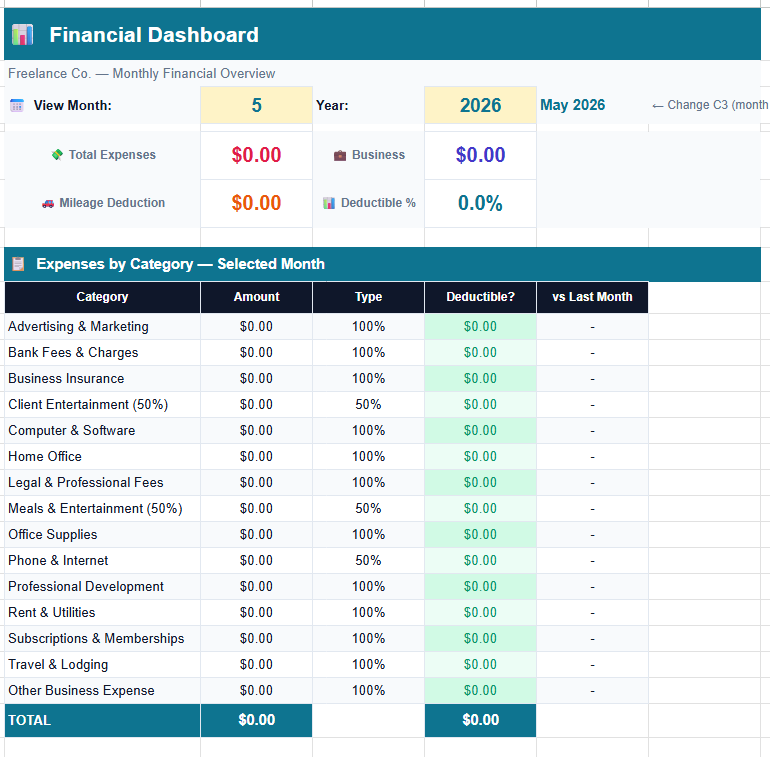
Check the Dashboard before each quarterly tax payment. IRS estimated tax deadlines for 2026: April 15 (Q1), June 16 (Q2), September 15 (Q3), January 15 2027 (Q4). Switch to the month before each deadline and verify your deductible total in this freelance expense tracker Google Sheets template is tracking where you expect.
Step 5: Reading the Annual View to track freelance expenses google sheets-wide
The Annual View is the most powerful tab for tax planning, and the clearest reason to use this freelance expense tracker Google Sheets template over a basic log. It shows all 12 months side by side with Q1–Q4 quarterly totals. Every category row shows the deductible amount, not gross spend.
Change the year in cell E2
Type any year directly into E2: 2026, 2025, 2024. All 12 months, all categories, all quarterly totals rebuild instantly. Your entire expense history is one cell change away.
Read deductible amounts, not gross spend
Each category row multiplies actual spend by the deductible % from Setup. A $89 phone bill at 50% shows as $44.50, the amount you can actually claim, and Client Entertainment at 50% shows half the gross.
This is what separates a proper freelance expense tracker Google Sheets template from a plain list of transactions. It’s the same principle a well-built Net Worth Tracker applies to assets versus liabilities, showing you the real number, not the raw one.
Use the Additional Information block for tax planning
Below the expense table, two reference rows sit in a separate block: 🚗 Mileage Deduction (from your Mileage Tracker, by month) and 💰 Est. Tax (total deductible × your tax rate from Setup). The tax estimate is a planning figure only, so use it alongside your quarterly payments and not as a final tax calculation.
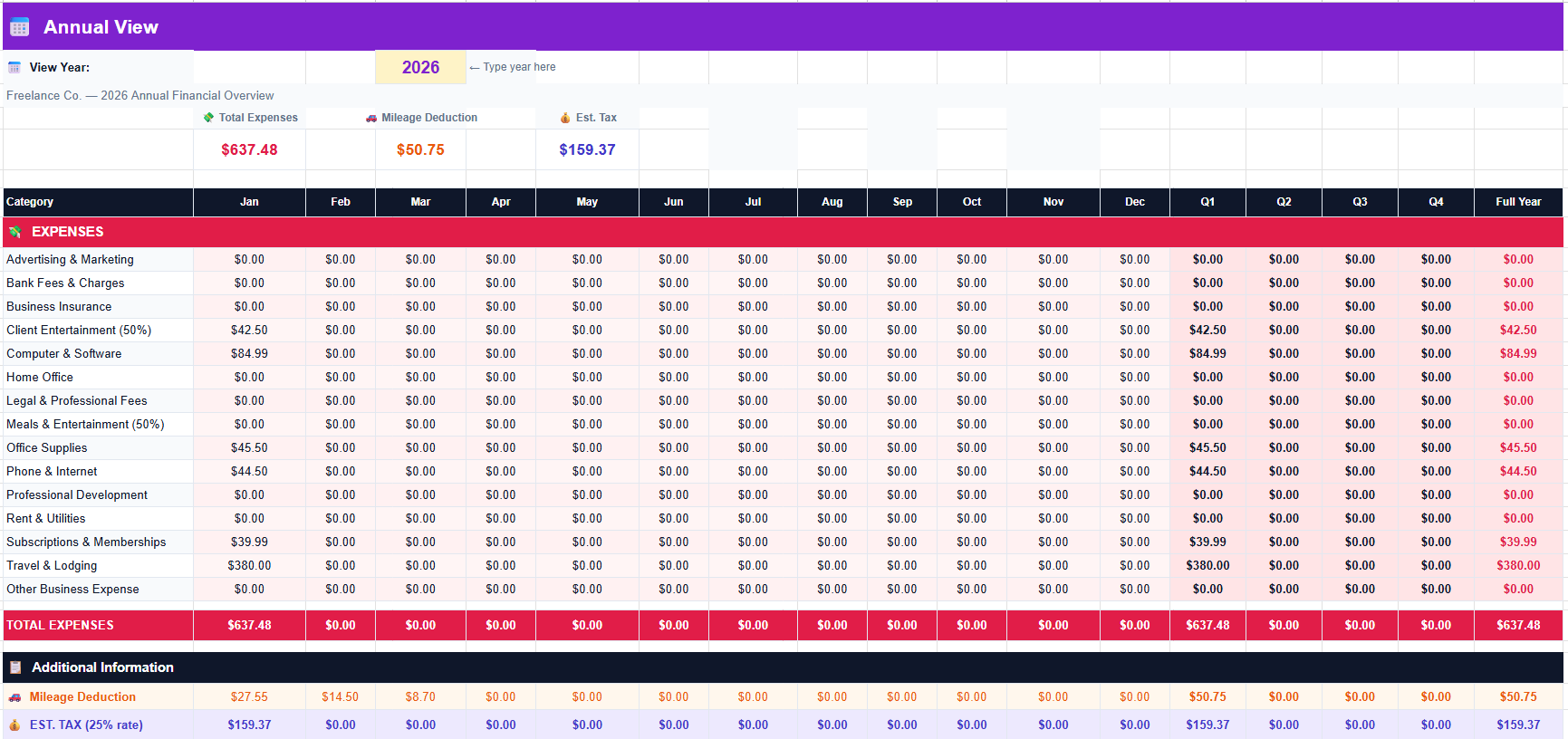
Deductible amounts update live. Change any deductible % in Setup and every month in the Annual View recalculates instantly. If the IRS changes the mileage rate mid-year, update one cell in Setup and the entire Mileage row corrects itself across all 12 months automatically.
How deductible % works per category in this freelance expense tracker Google Sheets template
Not every business expense is 100% deductible. Most generic trackers ignore this, which means their deductible totals are overstated before you even start. This freelance expense tracker Google Sheets template handles it at the category level in Setup, so the numbers you see are honest and defensible if a return ever gets a second look.
| Category | Default Deductible % | IRS Rule |
|---|---|---|
| Client Entertainment | 50% | IRS limits entertainment deductions to 50% |
| Meals & Entertainment | 50% | IRS limits business meals to 50% |
| Phone & Internet | 50% | Business-use portion only; update to your actual % |
| Computer & Software | 100% | Fully deductible if used for business |
| Home Office | 100% | Set to your sq ft ratio (office ÷ total home) |
| Travel & Lodging | 100% | Business travel fully deductible |
| Professional Development | 100% | Courses, books, conferences; fully deductible |
Home Office deduction: calculate your percentage once (office sq ft ÷ total home sq ft) and set that as the deductible % for the Home Office category in Setup. Apply it to rent, utilities and internet consistently throughout the year. For full guidance, see IRS Home Office Deduction guidance.
5 habits that make this freelance expense spreadsheet actually work
A freelance expense spreadsheet only delivers value if you build a consistent routine around it. These five habits cut the friction to near zero.
Log expenses weekly, not monthly
Pick one time per week (Friday afternoon or Sunday evening) and log everything from your bank and card statements. Weekly takes 10 minutes; monthly takes an hour and you’ll forget half the context. This freelance expense tracker Google Sheets template is designed for quick weekly entry, not year-end marathons.
Log mileage on the day of the trip
Open the template on your phone in the car park, add one row, and it takes 60 seconds. The IRS requires contemporaneous records, and reconstructing trips from memory at year end is non-compliant and stressful. Log it at the time and the problem disappears permanently.
Never type a category, always use the dropdown
The entire deductible calculation in this freelance expense tracker Google Sheets template depends on exact category name matches. If Setup says “Computer & Software” and you type “software” in the Expense Log, that transaction is invisible to the Annual View. Dropdowns prevent this entirely.
Update Phone & Internet % to your actual usage
The default is 50%, which is conservative. Track your actual usage for a month and update the % in Setup: the difference between 50% and 80% on a $100/month bill is $360 extra deduction per year. At a 25% tax rate, that’s $90 back in your pocket for a 30-second change.
Check the Annual View before each quarterly payment
Before each IRS deadline, open the Annual View, check the Q total for the quarter just ended, and cross-reference the Est. Tax row against what you’re planning to pay. It won’t replace your accountant, but it stops the “I had no idea I owed that much” moment before it happens. Pair this with the Net Worth Tracker or the Debt Payoff Calculator if a slow quarter means a card balance needs a plan.
Freelance expense tracker Google Sheets vs paid accounting software: honest comparison
Most freelancers starting out don’t need $50/month accounting software. Here’s where this freelance expense tracker Google Sheets template wins, where it falls short, and how to know which camp you’re in.
| Feature | This template (free) | QuickBooks Self-Employed | Basic expense sheet |
|---|---|---|---|
| Cost | Free forever | $15–$35/month | Free |
| Deductible % per category | ✅ | ✅ | ❌ |
| IRS mileage log | ✅ | ✅ (auto GPS) | ❌ |
| Annual view with Q totals | ✅ | ✅ | ❌ |
| Dashboard by month/year | ✅ | ✅ | ❌ |
| Bank connection required | No | Yes | No |
| Your data stays private | ✅ | ❌ | ✅ |
| Auto bank import | ❌ (Pro only) | ✅ | ❌ |
| Schedule C export | ❌ | ✅ | ❌ |
The honest verdict: if you bill under $5k/month and don’t need automatic bank imports, this freelance expense tracker Google Sheets template covers everything for free. If you’re billing $10k+/month across multiple clients and want automatic bank reconciliation and Schedule C export, QuickBooks Self-Employed earns its fee. If your priority right now is comparing budgeting apps generally rather than a dedicated freelance tool, FinCompareLab’s roundup of the best free budgeting apps is a useful side-by-side starting point.
⚡ Freelance Expense Tracker Pro: $9.90
The free freelance expense tracker Google Sheets template covers expense logging, mileage and deductible tracking. The Pro version adds income tracking, bank CSV import with Gemini AI auto-categorization, a quarterly Deductible Summary, Reimbursables tracker and 3 AI-generated financial audit reports.
✓ Income Log + invoice tracking
✓ Deductible Summary with quarterly tax breakdown by category
✓ Reimbursables tracker, flags client-billable expenses separately
✓ Bank CSV import + Gemini AI auto-categorization
✓ 3 AI-generated financial audit reports
✓ One-time payment, no subscription, yours forever
15% off for Tools Without Code readers. The discount applies automatically when you click the button below, no code to enter.
| Feature | Free | Pro: $9.90 |
|---|---|---|
| Expense logging | ✅ | ✅ |
| IRS mileage log | ✅ | ✅ |
| Deductible % per category | ✅ | ✅ |
| Dashboard + Annual View | ✅ | ✅ Enhanced |
| Income Log | ❌ | ✅ |
| Deductible Summary (quarterly) | ❌ | ✅ |
| Reimbursables tracker | ❌ | ✅ |
| Bank CSV import | ❌ | ✅ |
| AI auto-categorization | ❌ | ✅ |
| AI financial reports | ❌ | ✅ 3 reports |
📥 Download the Free Freelance Expense Tracker Google Sheets Template
Make a copy to your Google Drive in one click. All 471 formulas pre-built, IRS mileage auto-calc included, with no setup beyond the yellow cells.
✓ 5 tabs, 471 formulas, zero errors
✓ IRS mileage auto-calculation
✓ Deductible % per category + Annual View
People Also Ask
How do I track freelance expenses in Google Sheets?
Use a freelance expense tracker Google Sheets template with one row per expense: date, category dropdown, amount, type (Business/Personal/Mixed), and a deductible amount column that calculates automatically from each category’s deductible % in Setup. This gives you honest deductible totals, not just a raw spend list.
- Column essentials: Date, Description, Category (dropdown), Amount, Type, Deductible?, Client
- Deductible formula: multiplies amount × category deductible % × 1 if Business, 0 if Personal
- Mileage: a separate tab with date, from, to, business purpose, miles; IRS deduction auto-calculates
- Fastest start: download this free freelance expense tracker Google Sheets template, all formulas pre-built
What is the best free self employed expense tracker Google Sheets template?
The best self employed expense tracker Google Sheets template combines a categorized expense log, an IRS-compliant mileage tab, a period dashboard and a 12-month annual view showing deductible amounts, not just gross spend. A generic business expense tracker Google Sheets setup skips this deductibility logic entirely, which is why it matters to pick a template built for the freelance case specifically.
- This freelance expense tracker Google Sheets template: 5 tabs, 15 IRS-aligned categories, deductible %, mileage auto-calc, free forever
- QuickBooks Self-Employed: $15–35/month, best if you need auto bank import and Schedule C export
- Wave: free, good for invoicing and basic expense tracking but no mileage log built in
- Verdict: for freelancers billing under $5k/month who track manually, the free Google Sheets template is the right starting point
What expenses can freelancers deduct on their taxes?
Freelancers filing Schedule C (US) can deduct ordinary and necessary business expenses: costs directly related to running their freelance business. A freelance expense tracker Google Sheets template with category-level deductible % ensures none of these get missed or overstated.
- 100% deductible: Computer & Software, Professional Development, Advertising, Office Supplies, Professional Fees, Travel & Lodging
- 50% deductible: Client Entertainment, Meals & Entertainment (IRS rule), Phone & Internet (business-use portion)
- Percentage-based: Home Office (office sq ft ÷ total home), Vehicle (standard mileage rate OR actual expenses)
- IRS reference: IRS Publication 535: Business Expenses covers all deductible categories in full detail
Frequently Asked Questions
Is this freelance expense tracker Google Sheets template really free?
Yes, completely free, forever, with no email required and no trial period. Click the download button, make a copy to your Google Drive, and it’s yours. The file lives in your own account, and we never see your data.
What is the 2026 IRS standard mileage rate?
The 2026 IRS standard mileage rate for business use is $0.725 per mile. This is pre-filled in the Setup tab of this freelance expense tracker Google Sheets template. If the IRS updates the rate during the year, change that one cell and every mileage deduction across all trips updates automatically.
Can I use this for a side hustle or 1099 work?
Yes, it’s designed for exactly this. Anyone receiving 1099 income, doing contract work, running a side business or self-employed can use this freelance expense tracker Google Sheets template. The expense categories, mileage log and deductible calculations all apply to Schedule C filers in the US.
How does the deductible % work for mixed expenses?
Each category in Setup has its own deductible % in column C, and the Annual View multiplies each category’s actual spend by that percentage. A $89 phone bill at 50% shows as $44.50 in the deductible column. You can set any percentage from 0% to 100% per category in this freelance expense tracker Google Sheets template.
Does this freelance expense tracker Google Sheets template work in Excel?
Yes, all 5 tabs use standard functions compatible with Excel 2019 and later. Google Sheets is recommended since it’s where the template was built and tested, and all dropdowns and formulas are optimised for Google Sheets.
Can I add more than 15 expense categories?
The freelance expense tracker Google Sheets template supports 15 categories in Setup rows B23–B37. You can rename any category to match your business. Adding more rows requires adjusting formula ranges in the Annual View, which is possible but beyond the no-code scope of this freelance expense tracker Google Sheets template.
What’s the difference between the free and Pro version?
The free freelance expense tracker Google Sheets template covers expense logging, mileage tracking, deductible calculations, dashboard and annual view. The Pro version adds an Income Log, Deductible Summary with quarterly tax breakdown, Reimbursables tracker, Bank CSV import with Gemini AI auto-categorization, and three AI-generated financial audit reports, a one-time payment of $9.90. See the Pro version →
Is my financial data private?
Yes, this freelance expense tracker Google Sheets template lives in your own Google Drive, and we have no access to it. No bank credentials are shared, and no data is sent to any external server. Your financial information stays entirely within your Google account, protected by your own account security.
Can I use this alongside the Invoice Tracker?
Absolutely, they’re designed as a pair. The Freelance Invoice Tracker manages what clients owe you, while this freelance expense tracker Google Sheets template manages what you spend to run your business. Together they give you a complete picture of freelance income and costs in two separate, focused spreadsheets.
Is this the same as a business expense tracker Google Sheets template?
Not quite. A business expense tracker Google Sheets template is usually sized for a company with employees and reimbursement workflows. This freelance expense tracker Google Sheets template is built for one filer, one Schedule C, and the specific deductible-% and mileage rules that apply to solo freelancers.