
Net Worth Tracker Google Sheets: Is Your Data Safe? (2026)
This net worth tracker Google Sheets template keeps every balance in your own Google Drive, with no bank login and no outside server in the middle. You get 5 tabs, a debt to asset ratio and a 12-month trend chart, plus a short checklist for locking the file down. Readers in the US, UK and Australia can copy it free in about a minute.

⏱ 9 min read
A net worth tracker Google Sheets file is safe when you control who can open it. This template asks for no bank login, no email address and no card number, and your copy sits in your own Google Drive. The one setting that decides your risk is General access, and checking it takes 30 seconds.
Most free trackers wave this away with a vague line about your data staying in your Drive. This guide shows where the file lives, what can still go wrong and the five settings worth changing today. Then you get the full 5-tab walkthrough.
Net worth is assets minus liabilities, and the sheet does that math for you. The part most templates skip is the edge cases that quietly distort the number, like a double-counted mortgage, a stale valuation or a pre-tax retirement balance. Those are covered below too.
✨ What’s in this net worth tracker Google Sheets guide
- Where your data lives and who can see it, in plain terms
- Five settings that lock your copy down, including 2-Step Verification
- Honest trade-offs against bank-linked apps such as Empower
- A 5-tab walkthrough with the edge cases that distort net worth
- Debt to asset ratio math with a worked example
- Pro version privacy, including what the AI buttons do
📊 At a glance
📋 Table of Contents
- Is a net worth tracker Google Sheets template safe? The short answer
- 5 settings that lock down your net worth tracker Google Sheets copy
- Net worth tracker Google Sheets vs bank-linked apps
- Net worth tracker Google Sheets vs a net worth spreadsheet you build yourself
- What’s inside the 5 tabs
- Step 1: Set up your template
- Step 2: Log your monthly snapshot
- Step 3: Read the debt to asset ratio
- Step 4: Build the 12-month history
- Step 5: Read the trend chart
- 5 habits that keep the numbers accurate
- People also ask
- Frequently asked questions
Is a Net Worth Tracker Google Sheets Template Safe? The Short Answer
Short answer: Yes, a net worth tracker Google Sheets template is safe when your copy stays private. The file lives in your own Google Drive, needs no bank login and sends nothing to an outside server. Your real exposure is the sharing setting, so keep General access on Restricted and switch on 2-Step Verification for your Google account.
When you click the free template link, Google asks you to make a copy. A google sheet net worth template copy is a new file owned by your account, so I can’t open it and neither can anyone you haven’t added.
Google still hosts the file with the same protections as the rest of your Drive. That makes your Google account and your sharing settings the real security question, not the template. Our privacy policy covers what this website itself collects.
| Risk | What it looks like | Your fix |
|---|---|---|
| Link sharing left on | You sent the sheet to a partner by link and forgot. Anyone holding the URL can open it. | Set General access to Restricted and add people by email. |
| Account takeover | Someone phishes or guesses your Google password and opens every file in Drive. | Turn on 2-Step Verification and run Google’s Security Checkup. |
| Shared or unlocked device | A family laptop stays signed in to your Google account. | Sign out on shared machines and use a screen lock. |
| Over-detailed entries | You type full account numbers into cell names or notes. | Enter balances only. Nicknames like Main Checking are enough. |
| Forgotten access | A former editor still has access months after you stopped needing them. | Review the people list every quarter and remove stale names. |
| Accidental overwrite | A formula cell gets typed over, and the totals quietly break. | Protect formula ranges and use version history. |
No setup removes risk entirely. These steps lower the odds of the most common mistakes in any copy, and they follow how Google documents its own sharing options. Treat them as a baseline, then add anything your situation calls for.
5 Settings That Lock Down Your Net Worth Tracker Google Sheets Copy
Do these once, in this order. The whole routine takes about 5 minutes.
Confirm you’re in your own copy
Check the file title and the Share button. If the template link prompted you to make a copy, you’re in your own file. If you opened a view-only link instead, use File, then Make a copy, before typing a single balance.
Set General access to Restricted
Click Share and look at General access. Restricted means only people you add can open the file, while Anyone with the link lets anyone holding the URL open it without signing in, as Google’s sharing help explains.
Turn on 2-Step Verification
Open your Google Account, go to Security and switch on 2-Step Verification. Then run the Security Checkup, which reviews recent sign-ins and connected apps. Your Google password is the front door to every file in Drive, so do this before the first balance goes in.
Limit what partners can do
If you share with a partner or advisor, give them Viewer access. In the Share settings, untick the box that lets viewers and commenters download, print and copy. Take their access away when you’re done, because old editors stay on the list until you remove them.
Protect the formulas
Select the white and grey formula cells, open Data, then Protect sheets and ranges, and restrict editing to you. That guards the 171 formulas against an accidental overwrite. Version history under File is your undo for anything else.
Version history is automatic. Your copy saves earlier versions without any setup, so a bad paste is recoverable. Open File, then Version history, then See version history to roll back.
Net Worth Tracker Google Sheets vs Bank-Linked Apps: What You Trade Away
Apps like Empower sync balances for you, which is a real advantage if typing about 10 numbers a month sounds like a chore. The cost is an outside company holding a connection to your accounts. This template reverses the deal: you type everything, and nothing connects to anything.
| Question | This template | Free linked app (Empower) | Paid linked app (Monarch) |
|---|---|---|---|
| Needs a bank login | No | Yes | Yes |
| How balances update | You type them, about 5 minutes a month | Automatically | Automatically |
| Where the data sits | Your own Google Drive | The provider’s servers | The provider’s servers |
| Cost | Free | Free dashboard | Subscription |
Plenty of free net worth tracker options exist, so pick the one that matches your comfort with linking accounts. If you want to compare apps feature by feature, FinCompareLab’s guide to the best net worth tracking apps covers them. For the cost and automation side of the choice, our Google Sheets vs budgeting apps comparison goes deeper.
Linked apps aren’t unsafe by default. Many offer multi-factor authentication and are built with security in mind. With this net worth tracker Google Sheets template, though, there is no connection to secure in the first place.
Net Worth Tracker Google Sheets vs a Net Worth Spreadsheet You Build Yourself
A DIY net worth spreadsheet takes an evening to build and years to trust. The failures are quiet because the totals still add up. They just add up wrong.
Double-counting your home
The asset list has a Real Estate equity line, so enter equity there and leave the Mortgage liability line at 0. If you would rather show the full home value, rename that asset line and keep the mortgage balance in liabilities. Both methods give the same net worth, but mixing them counts the loan twice.
Typing debts as negatives
Enter every debt as a positive number in the red cells. The net worth formula already subtracts liabilities, so a negative entry would add the debt back and inflate the result.
Mixing valuation dates
A brokerage balance from March in an October snapshot hides real movement. Refresh every line on the same day, using the payoff amount from your lender’s statement for loans.
Ignoring tax on retirement accounts
A $100,000 401(k) isn’t $100,000 of spendable cash if you withdraw early. The template records the face value, so note the after-tax figure separately if early withdrawals are possible.
A net worth spreadsheet tells you where you stand, while the free budget tracker Google Sheets template explains the monthly cash flow behind that position. The cash flow statement template then shows how cash moved between two snapshots, and this cash flow statement example walks through a worked case.
Some free net worth spreadsheet downloads are a single sheet with no history or chart. A net worth tracking spreadsheet earns its keep once it logs month after month, which is why this one has a History tab and a trend chart built in.
Free Net Worth Tracker Google Sheets Template: What’s Inside the 5 Tabs
Each tab has one job, and only one of them takes monthly input.
| Tab | You type | It calculates |
|---|---|---|
| Setup | Name, currency, goal and category names | Labels used by every other tab |
| Snapshot | This month’s balances | Totals, net worth, debt to asset ratio, goal progress |
| Dashboard | Nothing | 5 KPI cards and a line-by-line breakdown |
| History | Month, assets and liabilities | Net worth, change, % change and a summary row |
| Chart | Nothing | Trend lines for assets, liabilities and net worth |
People search for this file under many names, including net worth Google Sheets, net worth Google Sheets template, Google Sheets net worth tracker and net worth tracking sheet. They all describe the same thing: a monthly balance log with a net worth formula on top.
Why this Google Sheets net worth template has one input tab
Only Snapshot takes monthly input in this Google Sheets net worth template, and every other tab reads from it. That limits where a typo can hide. It also keeps privacy simple, because you can share a screenshot of Dashboard without exposing the per-account balances on Snapshot.
Step 1: Set Up Your Net Worth Tracker Google Sheets Template
Setup is the only tab you configure, and it takes about 2 minutes. You won’t come back to it unless your accounts change.
Enter your name and currency symbol
Type your name in C12 and your currency symbol in C13, such as $, £ or €. The name appears in the Dashboard header.
Set your net worth goal
Enter a target in C14. Pick your next milestone, like $50,000 or $100,000, rather than a lifetime number. The Dashboard shows progress as a live percentage.
Rename the categories
The template ships with 10 asset categories (Checking/Savings, Brokerage, Retirement, Real Estate equity and more) and 10 liability categories (Credit Card, Student Loans, Mortgage and more). Rename any of them in the blue cells to match your accounts, using nicknames instead of account numbers.

Type only in blue cells. Every white and grey cell in the net worth tracker Google Sheets file is formula-driven. If you overwrite one by accident, press Ctrl+Z (Cmd+Z on Mac) straight away.
Step 2: Log Your Monthly Snapshot in the Net Worth Tracker Google Sheets
Snapshot is your monthly input hub. Open it on the 1st, enter current balances and you’re done.
Update the Snapshot Month
Type the current month in cell C4, for example Oct 2026. That label flows to the Dashboard and the History log.
Enter your asset balances
Sign in to each account and type today’s balance into the green cells. Use current market value for investments and property, such as a recent Zillow estimate for a home, and leave unused lines at 0.
Enter your liability balances
Type the payoff amount from your latest statement into the red cells, not the original loan amount. Credit cards use the statement balance plus anything posted since.
Check the results at the bottom
Scroll down to see Total Assets, Total Liabilities, Net Worth, the debt to asset ratio and Progress to Goal. All five calculate on their own.
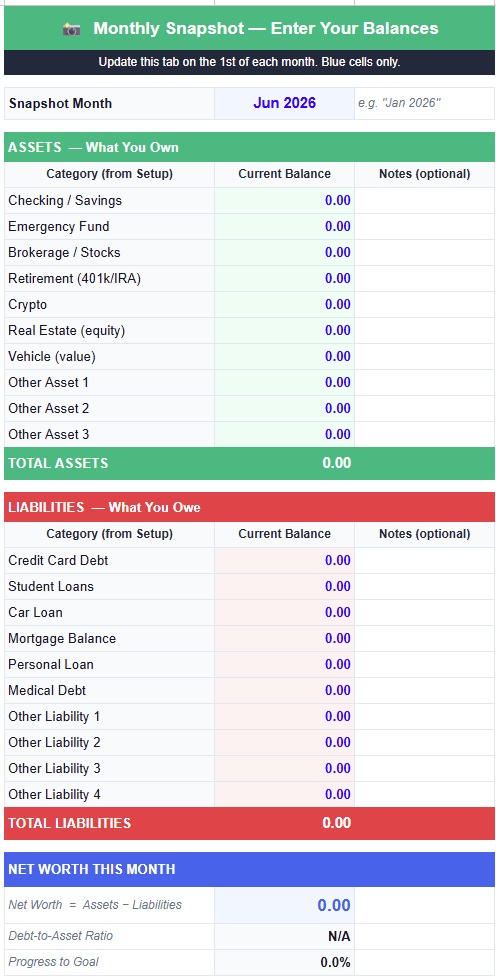
The Copy to History box. At the bottom of Snapshot, the Month, Total Assets and Total Liabilities appear in large type. Those are the exact numbers to carry into History each month, with no hunting around.
A net worth template Google Sheets can finish in 5 minutes a month
The monthly routine is short: open Snapshot, update every balance, then copy three numbers into History. Any net worth template Google Sheets offers is only useful if you keep using it, so this one is built to finish in under 5 minutes once your account list is set. Choosing one fixed day matters more than being precise to the dollar.
Step 3: Read the Debt to Asset Ratio on Your Net Worth Tracker Google Sheets Dashboard
The Dashboard updates the moment Snapshot is complete. Five KPI cards sit at the top: Net Worth, Total Assets, Total Liabilities, debt to asset ratio and Goal Progress.
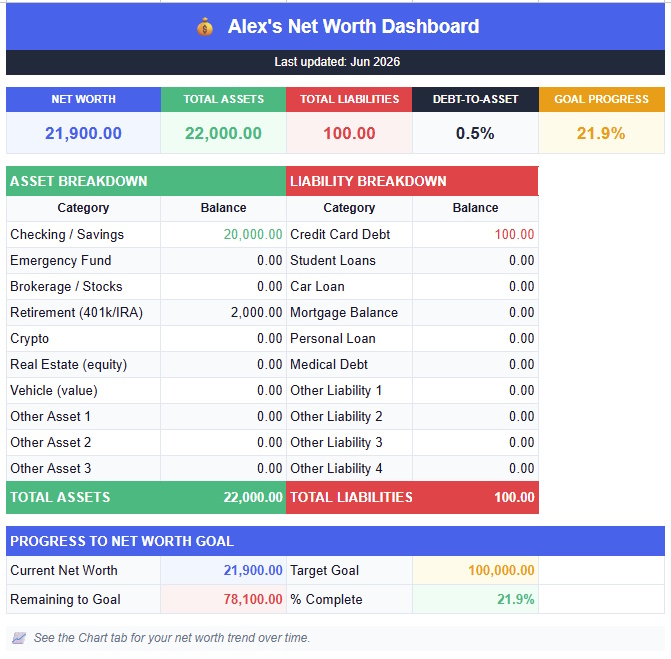
The debt to asset ratio is total liabilities divided by total assets. With $62,000 in liabilities and $180,000 in assets, the ratio is 34.4%. Think of the sheet as a debt to asset ratio calculator that never needs the formula typed.
These are rough rules of thumb, not advice. Under 50% means assets cover debts at least twice, and the Dashboard flags anything above that. Past 70% deserves a closer look, though a recent mortgage can push the ratio high without signaling trouble.
Watch the trend rather than one reading. A mortgage-funded home purchase adds the same amount to assets and liabilities, so net worth stays flat while the ratio jumps. If the ratio keeps climbing for other reasons, the free debt payoff calculator Google Sheets template shows how fast each debt can shrink.
Goal tip. Set a milestone you can hit within a year, since 100% of a $50,000 goal feels better than 12% of a $500,000 one. You can change the target in Setup at any time.
Step 4: Build the 12-Month History in Your Net Worth Tracker Google Sheets
History is where the value builds. Each month takes about 30 seconds, and after 6 months you’ll see a trajectory no single snapshot can show.
Find the next empty row
History has 12 pre-formatted rows, one per month. Columns B, C and D are the only cells you type in.
Carry over the 3 numbers
Type the month in column B, then enter Total Assets in column C and Total Liabilities in column D. Net Worth, Change and % Change calculate themselves.

Step 5: Read the Trend Chart in Your Net Worth Tracker Google Sheets
The Chart tab needs zero setup. It reads History and plots Assets in green, Liabilities in red and Net Worth in blue.
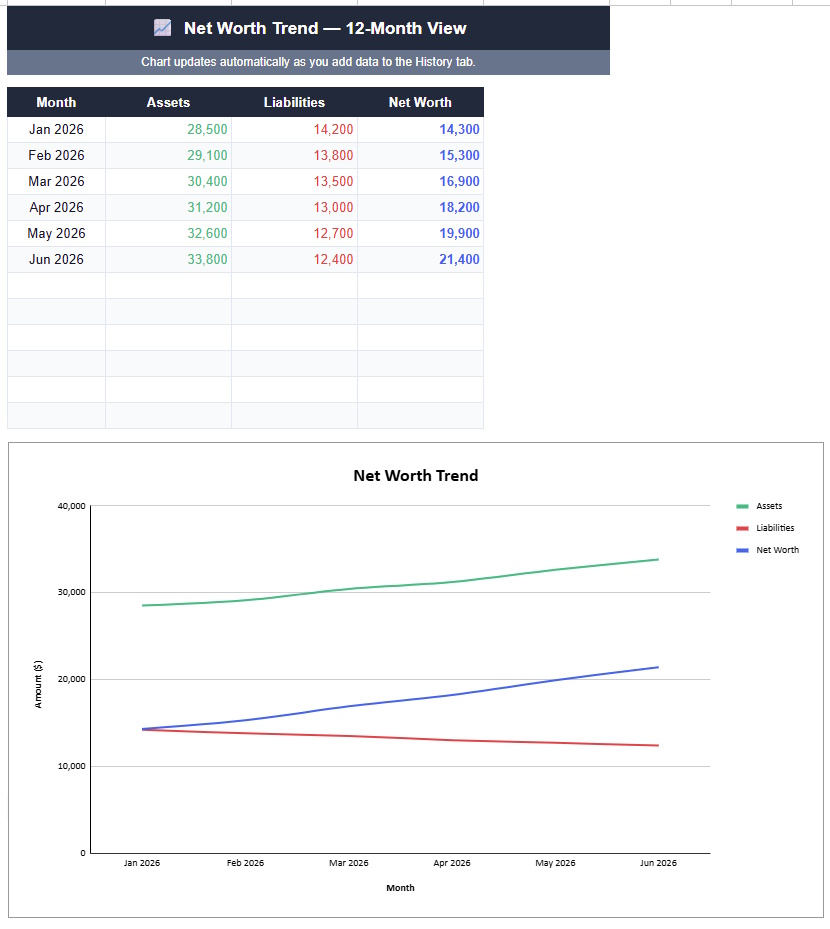
The chart needs 2 months of data. One data point has no trend. Log this month, return next month, and the lines in your net worth tracker Google Sheets start to move.
5 Habits That Keep Your Net Worth Tracker Google Sheets Accurate
Pick one fixed date
Update on the same day every month. A snapshot taken on the 1st each time beats one taken whenever you remember.
Use market value, not purchase price
Investments, property and vehicles belong at today’s value. Your brokerage statement and a home value estimate take seconds to check.
Count retirement accounts
401(k), IRA and pension balances are assets. Leaving them out drastically understates the real number.
Ignore single-month dips
A rough month in the markets lowers net worth temporarily. The 6-month and 12-month trend tells you more than any one snapshot.
Connect it to the rest of your system
Income swings change what you can add to the sheet. If you freelance, the freelance expense tracker and the freelance invoice tracker keep the numbers feeding your snapshot clean. Between jobs, the free job search tracker Google Sheets template keeps the search organized while you log a snapshot each month.
Day-to-day spending lives in the expense tracker Google Sheets template, and the cash flow forecast template projects the months ahead. If you want a recurring reminder, add a monthly line to the habit tracker Google Sheets template.
Want everything in one place? The Personal Finance OS Google Sheets template combines net worth, budgeting, debt payoff and investments in one connected system. It is the next step up from this net worth tracker Google Sheets once your monthly habit is locked in.
If goals and projects matter as much as money to you, the Notion Life OS template keeps a net worth target next to everything else you’re working toward. Prefer Notion for monthly spending? The Notion budget tracker template covers it, and the free and Pro tools library has the rest.
⚡ Net Worth Tracker Pro: FIRE Planner, Asset Allocation & AI Insights
The free template tracks your net worth. Pro adds a FIRE Planner, Coast FI calculator, sensitivity table, asset allocation, milestone bars and two Gemini AI insight buttons. Those buttons call Google’s Gemini API when clicked, so the figures they analyze leave the sheet at that moment, while everything else runs inside your own copy.
✓ Sensitivity Table: see which lever moves your FI date most
✓ Asset Allocation: actual vs target with status indicators
✓ Milestone Tracker: progress bars toward $100K, $500K and $1M targets
✓ 1,000-row History with one-click saves via Apps Script
✓ AI Insights: Analyse My Net Worth and Am I on Track?
✓ 9 tabs, Excel compatible, one-time payment
One-time payment of $9.90 with 15% off applied at checkout, so the effective price is $8.42. No subscription and no renewal. Delivered as a Google Sheets copy link right after purchase.
Get Net Worth Tracker Pro for $8.42 →
| Feature | Free | Pro |
|---|---|---|
| Monthly snapshot + net worth calculation | ✅ | ✅ |
| Dashboard with KPI cards | ✅ | ✅ Enhanced |
| History log | 12 months | 1,000 rows |
| Trend chart | ✅ | ✅ |
| Asset allocation vs target | ❌ | ✅ |
| FIRE Planner + Coast FI | ❌ | ✅ |
| Sensitivity table (48 scenarios) | ❌ | ✅ |
| Milestone progress bars | ❌ | ✅ |
| AI insights (Gemini) | ❌ | ✅ |
| Save to History button (Apps Script) | ❌ | ✅ |
| Price | Free | $9.90 once |
📥 Get the Free Net Worth Tracker Google Sheets Template
Copy the net worth tracker Google Sheets template free into your own Google Drive in one click. All 171 formulas are pre-built, and no email is required.
✓ 5 tabs, auto-calculated
✓ 12-month history + trend chart
✓ Copy lives in your own Drive
Net Worth Tracker Google Sheets: People Also Ask
Is a net worth tracker Google Sheets template safe to use?
Yes, a net worth tracker Google Sheets template is safe to use when your copy stays on Restricted access and your Google account has 2-Step Verification. The template needs no bank login, so there is no linked account to compromise.
Google documents three access levels for any Drive file, and only the first is right for financial data:
- Restricted means only people you add can open the file.
- Anyone with the link means anyone holding the URL can open it without signing in.
- Public means anyone can find the file through Google search. Details are in Google’s file sharing help.
How does a net worth tracker Google Sheets calculate net worth?
A net worth tracker Google Sheets adds every asset balance, subtracts every liability balance, and returns the difference. The net worth formula is total assets minus total liabilities.
That is how to calculate your net worth by hand, too. With $180,000 in assets and $62,000 in liabilities, net worth is $118,000. The Snapshot tab does this subtraction the moment you type the last balance.
What net worth should a net worth tracker Google Sheets compare you to?
A net worth tracker Google Sheets can’t tell you what is typical, but the Federal Reserve’s 2022 Survey of Consumer Finances can: median US family net worth was about $193,000. The mean topped $1 million, because a few very wealthy households pull the average up.
Use the median as your yardstick, since half of families sit above it and half below. Your own 12-month trend matters more than any benchmark. The Fed’s 2019 to 2022 family finances report has the full tables.
Net Worth Tracker Google Sheets: Frequently Asked Questions
How often should I update this net worth tracker Google Sheets template?
Update this net worth tracker Google Sheets template once a month, on the same day each time. Daily entries add noise from market swings, while a monthly snapshot shows the real trend. The 1st of the month works well because statements have just closed.
Does this net worth tracker Google Sheets work in Excel?
Yes, this net worth tracker Google Sheets works in Excel 2019 or later as a downloaded .xlsx file, so it also serves as a net worth tracker Excel version. All 171 formulas use standard functions. If you want an Excel net worth tracker with no add-ins, this covers it, though the Pro Apps Script buttons run only inside Google Sheets.
Can the creator see my numbers in this net worth tracker Google Sheets?
No, the creator of this net worth tracker Google Sheets can’t see your copy. Making a copy creates a new file owned by your Google account, and only people you add can open it. Google still hosts the file, so a strong account password and 2-Step Verification matter.
What should I never type into a net worth tracker Google Sheets?
Never type account numbers, passwords, PINs or Social Security numbers into a net worth tracker Google Sheets. The formulas only need balances, and nicknames like Main Checking are enough. Rounding each balance to the nearest $100 is fine if you want extra distance from the exact figures.
Should I include my home in a net worth tracker Google Sheets?
Yes, include your home in a net worth tracker Google Sheets, using equity or using value plus the mortgage, never both. Equity is market value minus the mortgage balance, so a $400,000 home with a $310,000 mortgage adds $90,000. Entering equity as an asset and the mortgage as a debt counts the loan twice.
What’s the difference between net worth and savings in a net worth tracker Google Sheets?
In a net worth tracker Google Sheets, savings is one asset line while net worth is everything you own minus everything you owe. You can hold $50,000 in savings and still have a negative net worth if debts outweigh all your assets.
Is a net worth tracker Google Sheets better than a paid app?
A net worth tracker Google Sheets beats a paid app on privacy and cost, and loses on automation. You type about 10 balances a month and keep the file in your own Drive, with nothing to cancel. Apps sync for you but need a linked connection to your accounts.
Can I share my net worth tracker Google Sheets with a partner safely?
Yes, share your net worth tracker Google Sheets by email address with Viewer access, never by public link. Untick the download, print and copy option for viewers, and remove access when you’re done. When you only need to show totals, send a screenshot of Dashboard instead of the whole file.
What does the Pro version of this net worth tracker Google Sheets change for privacy?
The Pro version of this net worth tracker Google Sheets keeps the same private-copy model, with one addition. Its two AI insight buttons call Google’s Gemini API when you click them, so the figures being analyzed leave the sheet at that moment. Skip those buttons if that bothers you.
What if I also want to track debt payoff alongside this net worth tracker Google Sheets?
Pair this net worth tracker Google Sheets with the free debt payoff calculator Google Sheets template. It models the Snowball and Avalanche methods side by side with a month-by-month timeline, so you can see how faster payoff lifts your net worth.