
Debt Payoff Calculator Google Sheets: 2 Proven Secrets
This free debt payoff calculator Google Sheets template runs Snowball and Avalanche on one fixed monthly budget, then shows your debt-free date, your total interest and the month each debt clears. The worked examples below use US dollars and APR, the way US card statements quote it.

21 min read
✨ What’s inside this free debt payoff calculator Google Sheets template
- Setup tab takes up to 10 debts, each with a balance, an APR and a minimum payment.
- Extra payment field shows how a bigger monthly budget moves your debt-free date.
- Snowball tab sorts debts smallest balance first and builds a month-by-month plan.
- Avalanche tab sorts debts highest rate first and builds its own plan.
- Compare tab sets both methods side by side with a plain-English verdict and the price of your first win.
- Dashboard opens with one sentence on what to pay this month, then lists the payment for every debt.
- Input checks flag an APR typed as 2199% or a minimum that does not cover the monthly interest.
- 120-month schedule covers 10 years of payments.
- Freed payment rollover moves a cleared debt’s payment to the next debt automatically.
📋 Table of Contents
- What this template is and does
- Debt Snowball vs Avalanche on 3 worked debt sets
- How to get started
- Step 1: Enter your debts in the Setup tab
- Step 2: Your Snowball payoff plan
- Step 3: Your Avalanche payoff plan
- Step 4: Compare both methods side by side
- The extra payment field
- Why a schedule runs past 120 months
- Snowball vs Avalanche: the honest verdict
- Templates that find your extra payment
- People also ask
- FAQ
What is a debt payoff calculator Google Sheets template?
A debt payoff calculator Google Sheets template is a spreadsheet that takes each debt’s balance, APR and minimum payment, applies one fixed monthly budget, and returns your debt-free date and total interest. This free version runs the Snowball and Avalanche methods side by side across 120 months, so you compare both on your own numbers.
A basic online calculator gives you one number. This template is a debt payoff spreadsheet that gives you the full month-by-month schedule for both methods, with the interest, the minimum, the extra payment and the remaining balance on every debt.
You enter your debts once in the Setup tab. The Dashboard, Snowball, Avalanche and Compare tabs update at once, and there is nothing to build or subscribe to. If you searched for a free debt calculator, a debt snowball calculator or a debt roll up calculator, this free debt payoff calculator Google Sheets covers all three.
Secret 1 is the freed payment in this debt payoff calculator Google Sheets. When a debt clears, its minimum rolls to the next debt, which is why both methods beat paying minimums alone. Secret 2 is the extra payment field, where the first $100 buys as many months as the next $200 in the example further down.
Debt Snowball vs Avalanche on 3 worked debt sets in this debt payoff calculator Google Sheets
I made up three debt sets and ran each through a separate Python simulation, so you have numbers to check against your own sheet or any debt snowball calculator. Every run uses one fixed monthly budget (your minimums plus the extra payment) and monthly interest at APR divided by 12. Card issuers often compound interest daily, according to the CFPB, so your statements will differ from these figures by a few dollars.
| Set | Debt | Balance | APR | Minimum |
|---|---|---|---|---|
| A | Card A | $2,400 | 19.99% | $70 |
| A | Card B | $4,100 | 21.49% | $95 |
| A | Card C | $6,800 | 22.99% | $150 |
| B | Medical plan | $1,400 | 0% | $70 |
| B | Personal loan | $3,200 | 9.49% | $105 |
| B | Car loan | $7,800 | 6.99% | $240 |
| B | Credit card | $11,500 | 24.99% | $290 |
| C | Store card | $1,900 | 26.99% | $55 |
| C | Card | $5,200 | 21.49% | $130 |
| C | Loan | $9,500 | 11.99% | $230 |
The extra payment is $200 for Set A, $300 for Set B and $200 for Set C. That makes the fixed monthly budgets $515, $1,005 and $615.
| Set | Method | Months to debt-free | Total interest | First debt cleared |
|---|---|---|---|---|
| A | Snowball | 36 | $5,032 | Month 10 |
| A | Avalanche | 36 | $4,788 | Month 25 |
| B | Snowball | 31 | $6,380 | Month 4 |
| B | Avalanche | 29 | $4,647 | Month 20 |
| C | Snowball | 34 | $3,807 | Month 9 |
| C | Avalanche | 34 | $3,807 | Month 9 |
I also typed each set into this template, and its months and interest match the table to the dollar.
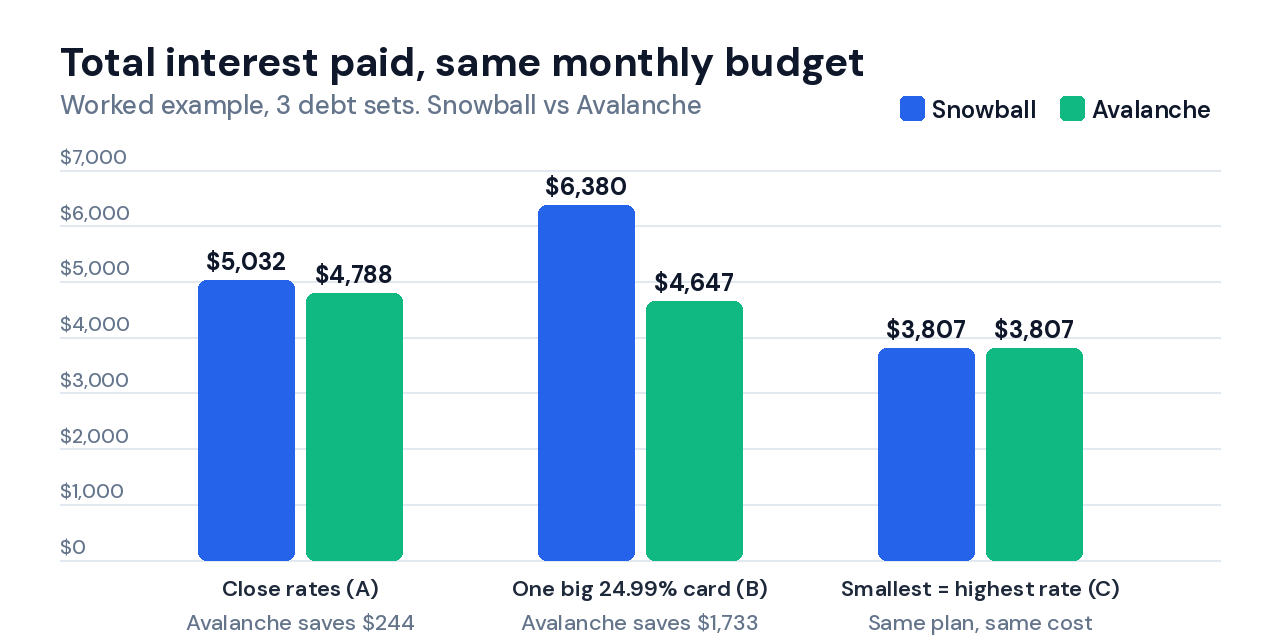
Set A has three cards within 3 points of each other. Avalanche saves $244 in interest and both methods finish in month 36, so the gap is real but small.
Set B holds one 24.99% card next to a 0% medical plan and two cheap loans. Snowball clears the medical plan in month 4 and leaves the card collecting interest on a balance that barely moves, which costs $1,733 more interest and 2 more months.
Set C is the edge case most guides skip. The smallest debt also carries the highest rate, so both methods pick the same order and produce identical plans. Check the order in your own debt snowball spreadsheet before you debate methods, because if the two orders match, the debate is over.
I also ran 19,780 random debt sets (2 to 6 debts, balances from $500 to $25,000, APRs from 0% to 28.99%) through the same model. Avalanche never finished later than Snowball and never paid more interest. The two methods separate on interest and on how long you wait for your first cleared debt.
That wait is easy to see in Set B. Snowball hands you a cleared debt in month 4, while Avalanche makes you wait until month 20, because the 0% medical plan only clears on its own minimum payments.
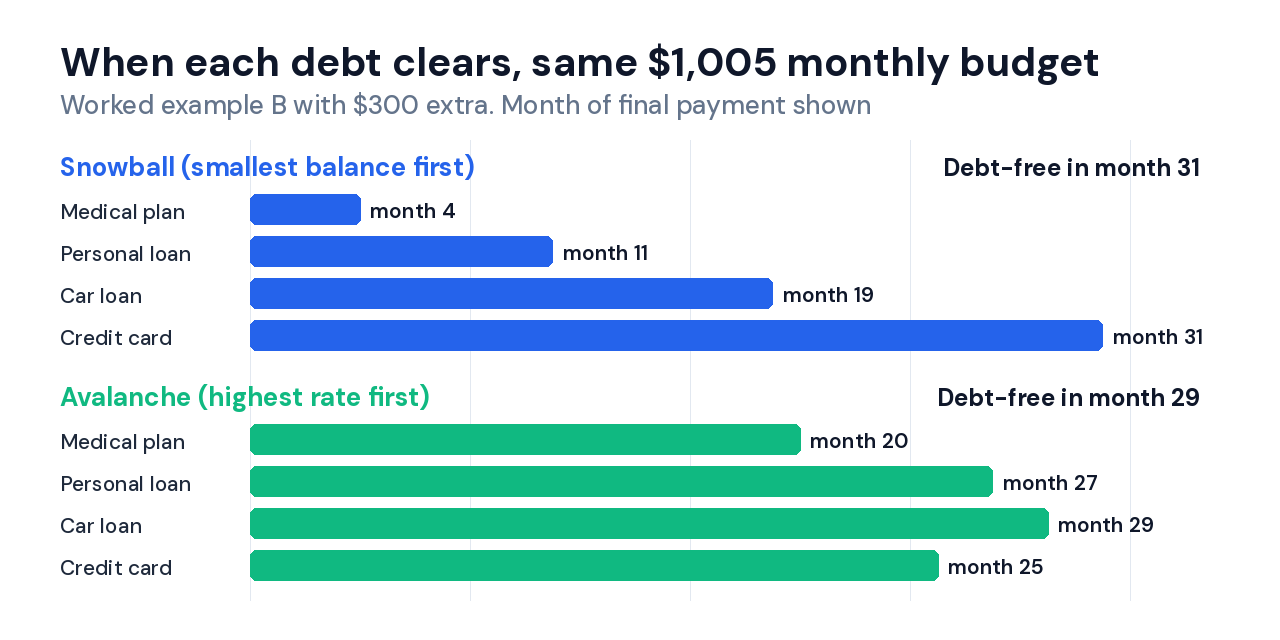
Both plans spend the same $1,005 every month. The order is the only variable, which is why the comparison is fair.
How to get started with this free debt payoff calculator Google Sheets
This free template is ready in three steps. You link no accounts and set nothing up.
Make a copy in Google Drive
Open the link to this debt payoff spreadsheet template, then click File and Make a copy. The copy lands in your Google Drive with every tab and formula in place.
Enter your debts in the Setup tab
Replace the sample data with your real debts. Add each balance, APR and minimum payment, then set an optional extra monthly payment. The template takes up to 10 debts.
Read the Dashboard, then check the Compare tab
The Dashboard tells you what to pay this month. The Compare tab shows both methods side by side with a one-line verdict, and the Snowball and Avalanche tabs hold the full month-by-month schedules.
After step 2, the Dashboard of this debt payoff calculator Google Sheets answers the first question in one sentence. It then lists what to pay on each debt this month.
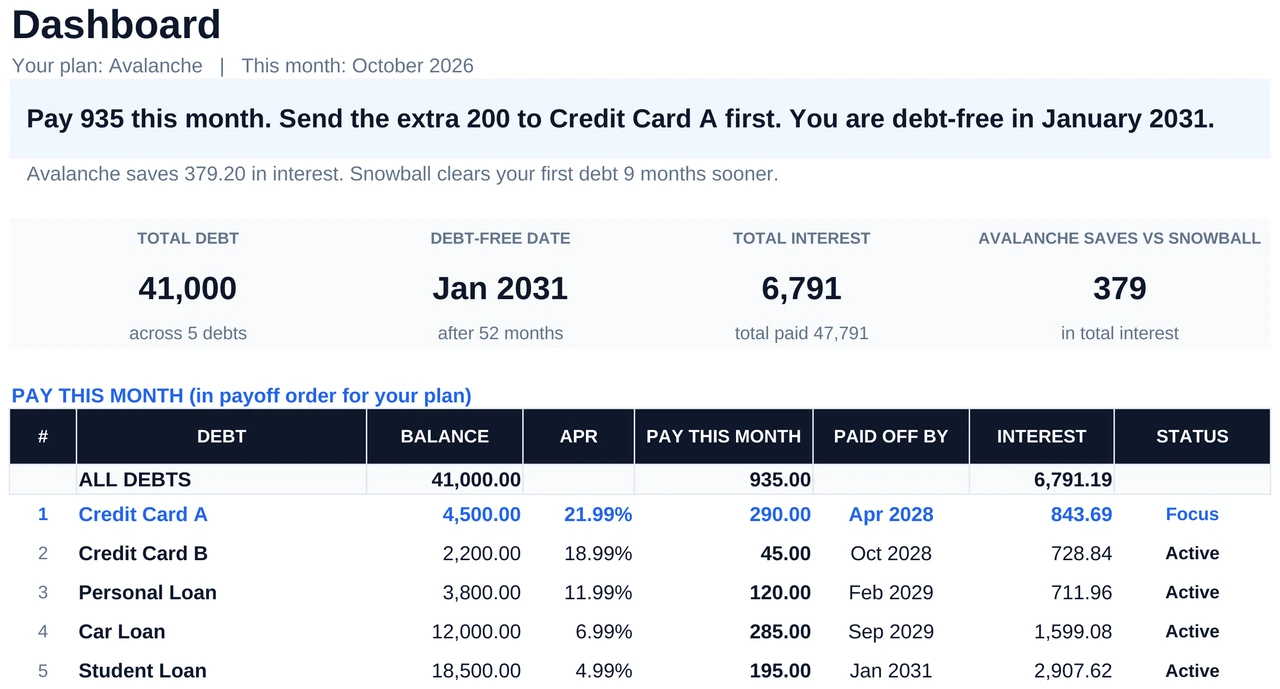
Step 1: Enter your debts in the Setup tab of this debt payoff calculator Google Sheets
The Setup tab is the only tab you edit. Every other tab calculates from it.
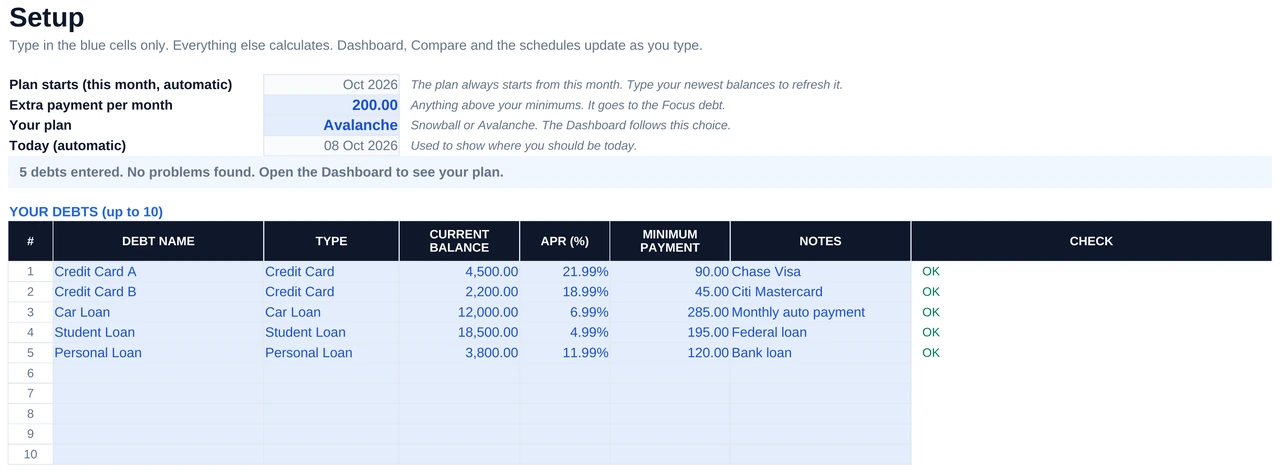
| Field | What to enter | Example |
|---|---|---|
| Debt Name | Any name you recognise | Store card, Car loan |
| Type | Pick from the dropdown | Credit Card, Car Loan, Student Loan |
| Current Balance | What you owe today | 4,500 |
| APR | Annual rate with the % sign | 21.99% |
| Minimum Payment | Required minimum each month | 90 |
| Extra Payment per Month | Any amount above the minimums | 200 |
| Your Plan | Snowball or Avalanche, for the Dashboard | Avalanche |
Type APR with the % sign. 21.99% goes in as 21.99%, and a 0% promo or payment plan goes in as 0%. The Check column turns red if a rate looks wrong, such as 2199%. Use today’s balance from your lender portal, not last month’s statement balance, so the interest posted since then counts in this free debt payoff calculator Google Sheets.
Your plan always starts from the current month. Retype your balances each month and the plan restarts from your real numbers.
Step 2: Your Snowball payoff plan in this debt payoff calculator Google Sheets
The Snowball tab of this free debt payoff calculator Google Sheets sorts your debts from smallest balance to largest and builds a full month-by-month plan. Your extra payment attacks the first debt every month until it is gone, then that freed payment rolls into the next debt.
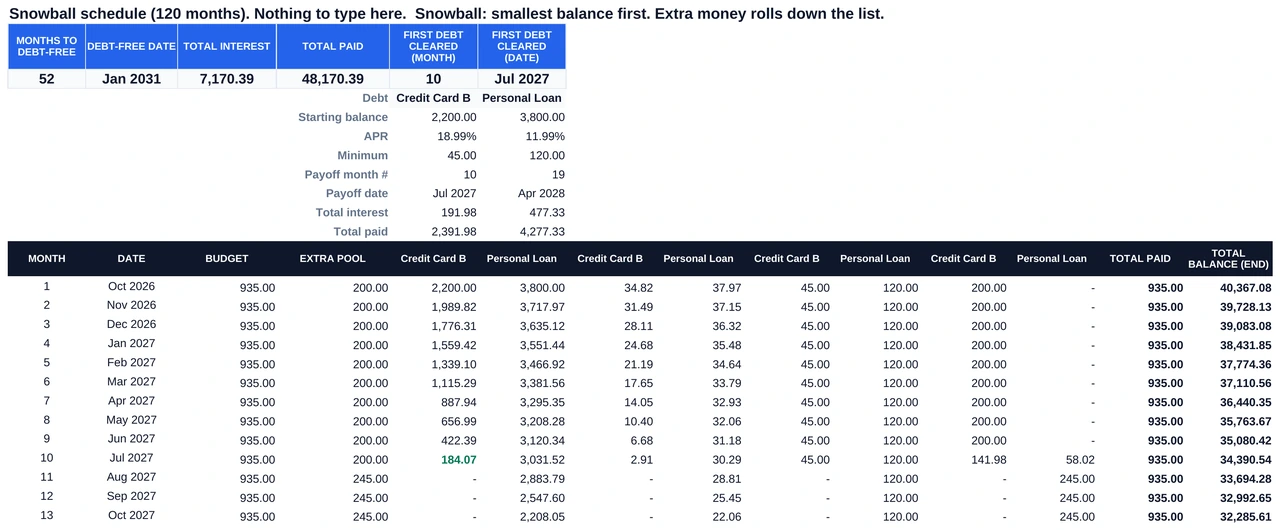
Summary boxes at the top update every time you change Setup. Update your balances each month and the tab works as a free debt snowball calculator, a debt snowball spreadsheet and a debt payoff tracker, and the file doubles as a debt tracker Google Sheets template you reopen on payday.
- Months to debt-free counts the monthly payments you still owe.
- Debt-free date is the month and year of your last payment.
- Total interest is the full interest cost over the repayment term, so the tab doubles as a total interest paid calculator.
- First debt cleared shows the month and date your first balance reaches zero.
Step 3: Your Avalanche payoff plan in this debt payoff calculator Google Sheets
The Avalanche tab of this free debt payoff calculator Google Sheets has the same layout as Snowball but sorts debts by highest APR first, which is the debt avalanche method. It works as a debt avalanche spreadsheet, and it sends your extra payment to the most expensive debt to cut the interest you pay.
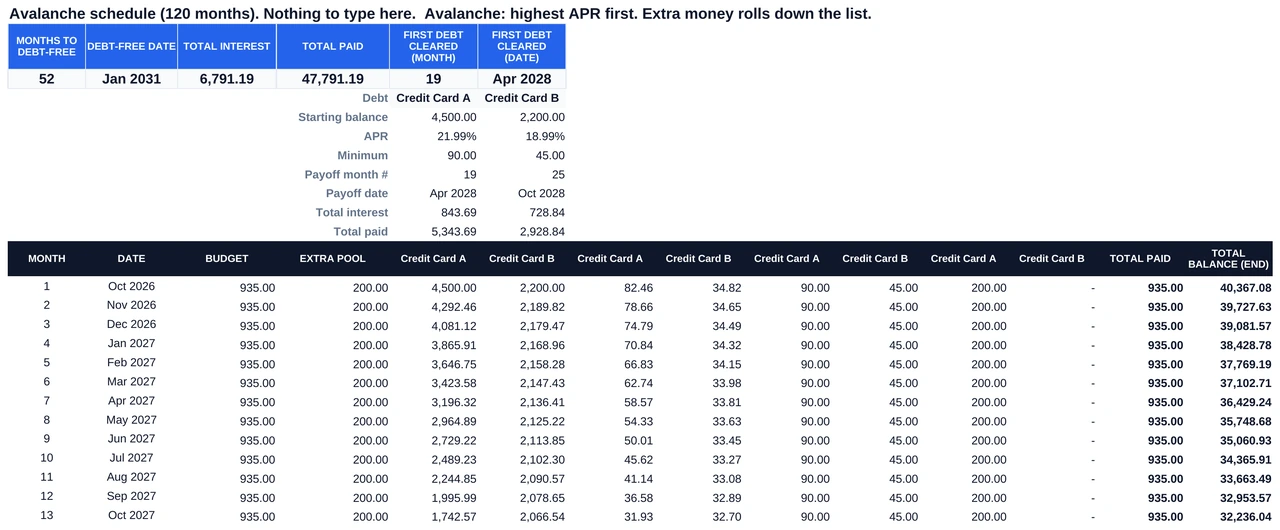
Both tabs update at once. Change a balance, rate, minimum or extra payment in Setup and both schedules in this free debt payoff calculator Google Sheets recalculate across all 120 months.
Step 4: Compare Snowball and Avalanche side by side in this debt payoff calculator Google Sheets
The Compare tab is where the template earns its keep. It pulls the headline stats from both methods, highlights the better months and interest in green, and writes a one-line verdict, so you skip the mental math. As a debt reduction calculator, it answers which method finishes first and which costs less.
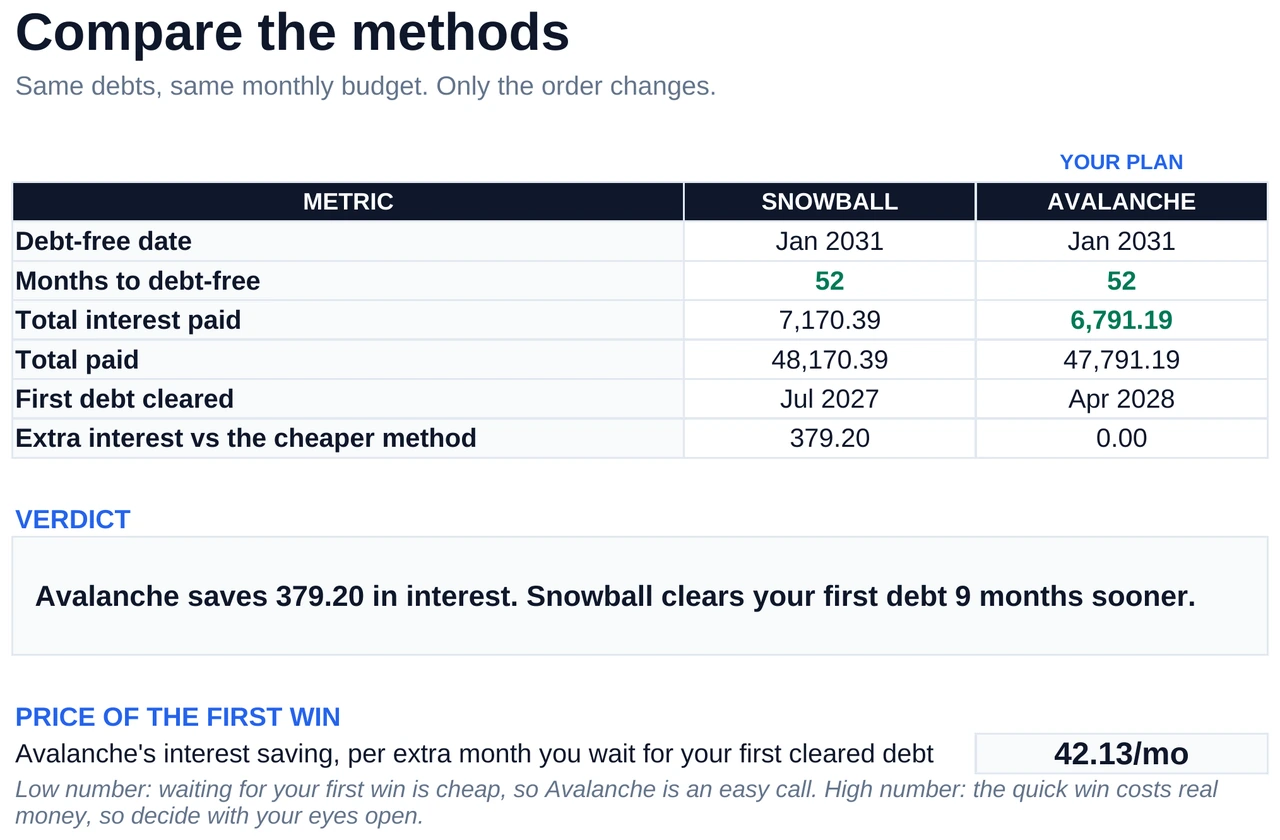
| Metric | What it tells you |
|---|---|
| Debt-free date | Which method gets you to zero first |
| Months to debt-free | Total monthly payments for each method |
| Total interest paid | Full interest cost, where lower is better |
| Total paid | Everything you pay back, interest included |
| First debt cleared | The month your first balance reaches zero |
| Extra interest vs the cheaper method | How much more the other method costs |
Read the tab with two numbers. The first is the interest gap between the methods, and the second is how many months Avalanche makes you wait for your first cleared debt. The tab divides one by the other and shows the result as the price of your first win. The verdict section below turns that number into a decision.
The extra payment field: the most powerful lever in this free debt payoff calculator Google Sheets
In Set B, the extra monthly payment moves the result more than any other input in the template. It works as a debt payoff calculator with extra payments and as an extra payment calculator, because every change reruns both schedules at once.
| Extra payment | Months to debt-free | Total interest | Months saved vs the row above |
|---|---|---|---|
| $0 (no extra) | 49 | $9,977 | n/a |
| $100 | 39 | $7,331 | 10 |
| $200 | 33 | $5,676 | 6 |
| $300 | 29 | $4,647 | 4 |
| $500 | 23 | $3,435 | 6 for the extra $200 |
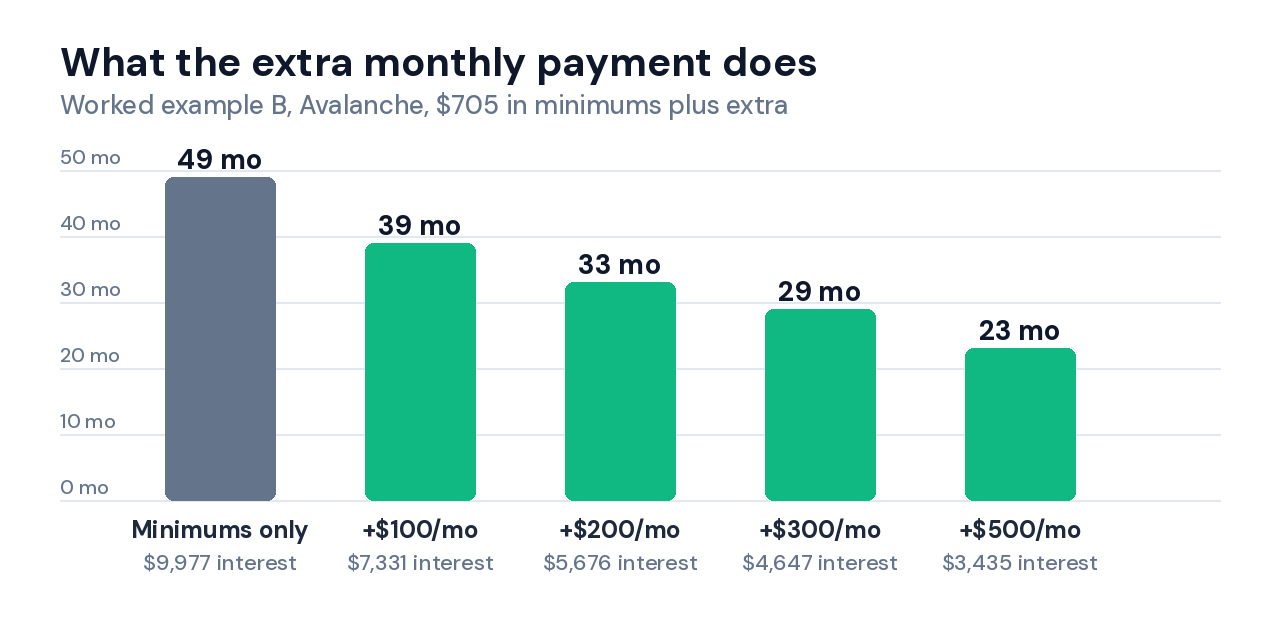
The first $100 cuts 10 months. The next $100 cuts 6, and the third cuts 4. Early extra dollars land on the 24.99% card while it is still large, so each one removes more future interest than the dollars that later land on the 9.49% and 6.99% loans.
The extra payment only targets the focus debt, the first one in the sorted order. When that debt clears, its minimum and the extra payment combine and move to the next debt. Some people search for this as a debt roll up calculator, and the arithmetic is the same.
Pick the extra payment you could hold in your tightest month. Run this free debt payoff calculator Google Sheets at three amounts, say $50, $150 and $300, and read the debt-free date each time. Then take the highest amount you could still pay in the lowest-income month of the last six, using the free budget tracker Google Sheets template for your spending totals and the expense tracker Google Sheets template to see which categories can shrink.
Why this debt payoff calculator Google Sheets shows more than 120 months for some debts
A minimum that barely covers interest is the main reason a schedule runs past 120 months in any debt payoff spreadsheet. Take $6,000 at 24.99% APR with a flat $125 payment. Month 1 interest is $124.95, so only 5 cents reduces the balance.
At that pace payoff takes 380 months, about 31 years and 8 months, and costs $41,451 in interest on a $6,000 balance. The same card with a $150 payment clears in 87 months for $7,025.
| Flat monthly payment | Months to pay off | Time | Total interest |
|---|---|---|---|
| $125 | 380 | 31 years 8 months | $41,451 |
| $150 | 87 | 7 years 3 months | $7,025 |
| $175 | 61 | 5 years 1 month | $4,629 |
| $200 | 48 | 4 years | $3,512 |
| $250 | 34 | 2 years 10 months | $2,403 |
A $25 raise cuts payoff from 380 months to 87. These figures assume you keep paying the same dollar amount every month, and your issuer may recalculate the minimum as the balance falls, so check your latest statement.
This template shows 120+ in the Months to debt-free box when a plan runs past the schedule, and the Dashboard headline tells you to raise a minimum or add extra. The Check column on Setup also turns red when a minimum fails to cover its first month of interest.
A payment that clears interest by only a few cents slips past that check. Multiply each balance by its APR and divide by 12, and if the result sits within a few dollars of the minimum, that debt is the one pushing your schedule past 120 months. Add to the extra payment field until Months to debt-free drops under 120.
Snowball vs Avalanche: the honest verdict for this debt payoff calculator Google Sheets
In the model, Avalanche wins on interest every time and finishes no later. Snowball wins on speed to a first cleared debt. The real question is whether that first win is worth the wait.
Research points both ways. A 2012 Journal of Marketing Research paper by David Gal and Blakeley McShane found that consumers who closed small accounts first were more likely to eliminate their debt balance, even after accounting for debt size. A 2011 paper in the same journal by Moty Amar, Dan Ariely and Shahar Ayal found that people favor small debts even when larger debts carry higher rates, and that focusing on the interest each debt accrues helped them cut debt faster.
That second finding is why the interest line on the Compare tab deserves a look before you choose. The tab takes the interest Avalanche saves, divides it by the extra months you wait for your first cleared debt, and shows the price of the first win.
| Set | Interest Avalanche saves | Extra months until first cleared debt | Price per month of waiting |
|---|---|---|---|
| A | $244 | 15 | $16 |
| B | $1,733 | 16 | $108 |
| C | $0 | 0 | n/a (same plan) |
At $16 a month, Snowball’s early win costs little. At $108 a month, it costs real money. Both debt payoff methods work when you keep paying, so if the two orders match you can stop comparing, and if the price is small you pick the one you will keep following.
If the price is large and you have stuck with plans before, Avalanche is the cheaper route. This is arithmetic on made-up debts and general information, not financial advice, and a nonprofit credit counselor can review your full situation.
Templates that find the extra payment for this debt payoff calculator Google Sheets
- Net worth climbs as balances fall, and the net worth tracker Google Sheets template shows that climb next to your payoff date.
- Income timing decides which months can carry the extra payment, and the cash flow forecast template lays those months out.
- Freelancers can log deductions and mileage in the freelance expense tracker Google Sheets template, then chase late payments with the freelance invoice tracker Google Sheets template so the extra payment stays steady.
- One workbook can hold budget, net worth and debt tracking in the Personal Finance OS Google Sheets template, for people who prefer one file to many.
- Monthly reviews stick when they sit in a habit list, and the free habit tracker Google Sheets template or the Notion habit tracker template turns reviewing your debt plan into a checkbox.
- Notion users can log becoming debt-free as a goal in the Notion Life OS template and budget in the Notion budget tracker template.
Debt Payoff Calculator Google Sheets Pro: 25 Debts and a Payment Log
The Pro version of this debt payoff calculator Google Sheets template tracks up to 25 debts across 240 months. It adds a payment log that shows if you’re ahead of plan, a custom payoff order, one-off extras and raises, two charts and a phone view. You pay once and get a sample copy and a blank copy.
✓ Payment log with plan vs actual
✓ Custom payoff order and minimums-only baseline
✓ One-off extras and monthly raises
✓ Two charts and a phone view
✓ Built for Google Sheets and Excel
✓ One-time payment, no subscription
Get Debt Payoff Calculator Pro →
| Feature | Free | Pro |
|---|---|---|
| Debts | 10 | 25 |
| Schedule length | 120 months | 240 months |
| Snowball and Avalanche side by side | ✅ | ✅ |
| Verdict and price of the first win | ✅ | ✅ |
| Custom payoff order and minimums-only baseline | ❌ | ✅ |
| One-off extras and monthly raises | ❌ | ✅ |
| Payment log, plan vs actual | ❌ | ✅ |
| Charts and phone view | ❌ | ✅ |
| Locked formula cells | ❌ | ✅ |
📥 Get the Free Debt Payoff Calculator Google Sheets Template
Make a copy in your Google Drive in one click. Snowball and Avalanche are pre-built and every formula is ready. This is the Google Sheets debt payoff template free to copy, with no email needed.
✓ Snowball + Avalanche
✓ Side-by-side comparison
✓ Up to 10 debts
People also ask about debt payoff calculator Google Sheets
What is the best free debt payoff calculator in Google Sheets?
The best free debt payoff calculator Google Sheets template runs Snowball and Avalanche on one fixed budget and shows the interest and months for each side by side. This one takes up to 10 debts and builds a 120-month schedule, so you see your debt-free date before you commit.
- Both methods run on the same budget, so the comparison is fair.
- A one-line verdict names the cheaper method and the months it saves.
- An extra payment field reruns the schedule as you type.
- Freed payment rollover keeps cleared minimums working on the next debt.
Is the Debt Snowball or Avalanche method better for paying off debt?
In a debt payoff calculator Google Sheets, Avalanche costs less interest and finishes no later than Snowball when your monthly budget stays fixed. Snowball clears your first debt sooner, which research links to staying with the plan, and the worked examples above put the interest gap between $0 and $1,733.
| Priority | Snowball | Avalanche |
|---|---|---|
| Interest in Sets A, B, C | $5,032, $6,380, $3,807 | $4,788, $4,647, $3,807 |
| First debt cleared in Set B | Month 4 | Month 20 |
| Best when | Several small debts and a risk of quitting | One high-rate debt dominates |
How do I calculate my debt payoff date in Google Sheets?
Enter each debt’s balance, APR and minimum payment in the Setup tab of a debt payoff calculator Google Sheets, add an optional extra payment, and the Dashboard and Compare tabs show the debt-free date. The sheet applies freed payment rollover across all 120 months, so each cleared minimum speeds up the next debt.
- Type APR with the % sign, so 19.99% goes in as 19.99%.
- Set a realistic extra payment, because even $50 moves the date.
- Watch for 120+, which means a minimum is barely beating interest.
Frequently Asked Questions
Is this debt payoff calculator Google Sheets free?
Yes, this free debt payoff calculator Google Sheets template costs nothing to copy and needs no email address. You need a standard Google account to open it in Google Drive.
How many debts can I track in this free debt payoff calculator Google Sheets?
Up to 10 debts fit in this free debt payoff calculator Google Sheets, which covers most mixes of credit cards, car loans, student loans, personal loans and medical bills. If you owe more than 10, enter the 10 with the largest balances and rerun the sheet after the first one clears, or look at the Pro version for up to 25.
What does freed payment mean in a debt payoff calculator Google Sheets?
A freed payment in a debt payoff calculator Google Sheets is the minimum you stop owing once a debt hits zero. Both methods in this template roll it onto the next debt in the same month, so each later debt clears faster than the one before.
Why does the debt payoff calculator Google Sheets show more than 120 months for some debts?
This debt payoff calculator Google Sheets covers 120 months, and a minimum payment that barely beats the monthly interest pushes payoff past that. Add to the extra payment field until the count drops under 120, and see the minimum payment example for the math.
Can I use this debt payoff calculator with Excel instead of Google Sheets?
Yes, this debt payoff calculator Google Sheets template works as a debt payoff calculator Excel users can open, because it uses standard functions (INDEX, MATCH, SUMIFS and COUNTIFS) with no macros or add-ins. Download the file and open it in Excel, or use it free in Google Sheets with no installation.
How do I enter my interest rate in the debt payoff calculator Google Sheets?
Type your APR with the % sign in the debt payoff calculator Google Sheets, so 21.99% goes in as 21.99% and a 0% promo goes in as 0%. The Check column on Setup turns red if the rate looks wrong, and your APR sits on your card statement or in your lender’s portal.
Does this debt payoff calculator Google Sheets match my card statement exactly?
No, this debt payoff calculator Google Sheets will differ from your statement by a few dollars. Many card issuers compound interest daily, according to the CFPB, while a monthly schedule treats each month as one interest period. Compare your statement’s interest line with month 1 of the sheet and adjust the balance if you want them to line up.
Does this debt payoff calculator Google Sheets work for mortgage payments?
Not well, because a 30-year mortgage runs far past the 120-month schedule in this debt payoff calculator Google Sheets, and the whole plan then shows 120+ months. Leave the mortgage out and track your shorter debts here, or run a second copy for the mortgage alone with a bigger extra payment.
Should I use a debt payoff calculator Google Sheets template or an app?
A debt payoff calculator Google Sheets template gives you every formula and costs nothing, while an app syncs your bank and sends reminders. Read why people budget in Google Sheets instead of apps for the spreadsheet side, and see FinCompareLab’s guide to the best budgeting apps for debt payoff if you want an app that supports both methods.
What other free templates work alongside this debt payoff calculator Google Sheets?
Three free templates pair with this debt payoff calculator Google Sheets. The Budget Tracker finds the extra payment by showing where your money goes, which gives you a budget and debt payoff spreadsheet pair. The Expense Tracker shows which categories can shrink, and the Net Worth Tracker shows your net worth rising as each balance clears.
I build free and Pro no-code templates for Google Sheets and Notion, so you spend less time setting up spreadsheets and more time using them. I test every template on Tools Without Code before it ships.