
Free Job Search Tracker Google Sheets: Stop 3 Mistakes
This free job search tracker Google Sheets template stops 3 mistakes that quietly wreck a search, including rows with no next action, ghost jobs inside your response rate, and resume versions you never logged. Copy it, log your roles, and see numbers you can act on in the US, UK, or Australia.

19 min read
- Why a free job search tracker Google Sheets template beats memory in 2026
- What’s inside this free job search tracker Google Sheets template
- Step 1: Set up your free job search tracker Google Sheets template
- Step 2: Log every role in the free job search tracker Google Sheets template
- Step 3: Log interview rounds
- Step 4: Read the Dashboard
- The 3 mistakes this free job search tracker Google Sheets template prevents
- How to read your free job search tracker Google Sheets numbers
- Add daily email reminders
- A 15-minute weekly review
- Free job search tracker Google Sheets vs dedicated job tracker apps
- Need more? The Pro version
- Common questions
- FAQ
Why a Free Job Search Tracker Google Sheets Template Beats Memory in 2026
Past ten or so open applications, the details blur. You forget which resume went where, who promised a callback, and which posting you already skipped. A free job search tracker Google Sheets template replaces that guesswork with one job search spreadsheet you can sort and filter.
The market makes the blur worse. A Greenhouse analysis reported by Entrepreneur in January 2025 put ghost listings at 18% to 22% of jobs posted on its platform in the second quarter of 2024. A Greenhouse survey covered by Fortune found that 61% of job seekers had been ghosted after an interview.
One figure is a platform sample and the other is a survey, so read both as direction, not as a forecast for your search. They still justify a tracker that records dates and evidence, because some of your applications will go nowhere and you can’t tell which ones in week one.
Money tightens during a long search too, so it helps to run your finances on the same footing. A free budget tracker Google Sheets template covers monthly spending, cash flow forecasting shows how many weeks of runway you have, and a debt payoff calculator Google Sheets template keeps balances from drifting while income is uncertain.
What’s Inside This Free Job Search Tracker Google Sheets Template
Many free job application tracker template downloads stop at a list of columns. Jobscan’s Google Sheets guide lists 14 columns to build yourself, then points out that Sheets has no reminders and no visual progress view. This free job search tracker Google Sheets template starts from those two gaps.
Five tabs share data, so you enter each fact once. Change a status in Applications and the Dashboard updates, and every Interviews row ties back to its application. If you’re still working out how to track job applications in a spreadsheet, this structure gives you a working answer.
| Tab | What it does | Key feature |
|---|---|---|
| ⚙️ Setup | Holds your weekly goal, salary target, and every dropdown list | Edit a list once and every dropdown follows |
| 📋 Applications | Main log for every job you apply to or bookmark | Rows turn amber when the Next Action Date passes |
| 🎯 Interviews | One row per interview round, linked to Applications | Tracks interviewer, format, thank-you status, and outcome |
| 📊 Dashboard | Live overview of your search | Response rate, interview rate, offer rate, and an overdue list |
| 📖 How to Use | Built-in guide | Ghost job signs and a follow-up timing reference |
The free version caps at 200 application rows and 200 interview rows. At 10 to 15 applications a week, 200 rows lasts 13 to 20 weeks.
Step 1: Set Up Your Free Job Search Tracker Google Sheets Template
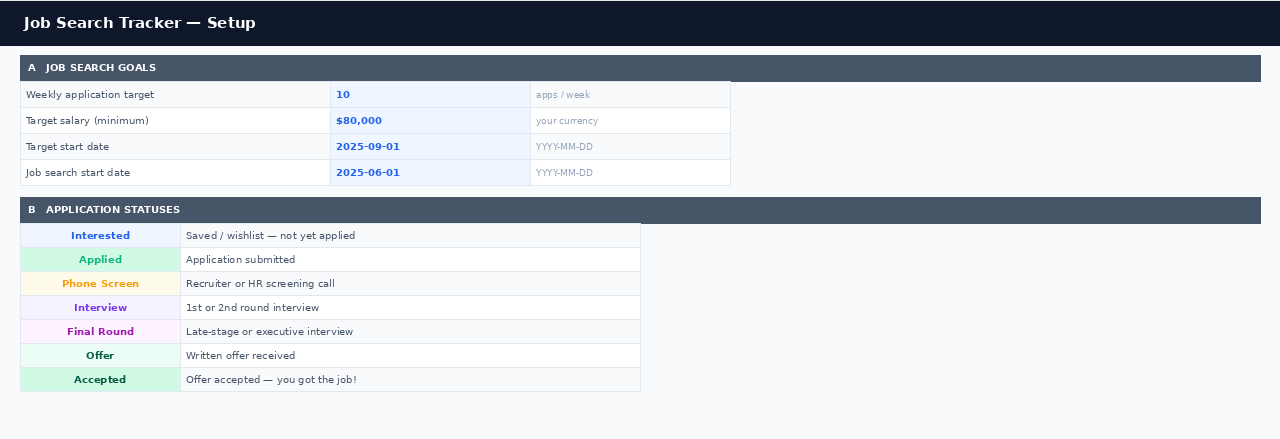
Open the free job search tracker Google Sheets template and start on the Setup tab. Rows 5 to 8 hold your weekly application target, minimum salary, and search start date. Five lists below them drive every dropdown, covering statuses, job sources, work modes, next action types, and rejection reasons.
Before you log anything, fix two settings. In Google Sheets, open File, then Settings, and set the Locale and Time zone on the General tab. A date typed as 03/04 means March 4 in the US and April 3 in the UK or Australia, and overdue highlighting compares each date with today in your sheet’s time zone.
Rename statuses now, not later. Rows you already logged keep the old text until you reselect the new status on them. In any job tracker Google Sheets file, dropdown text doesn’t rewrite itself.
Set a target you can hit. Pick a weekly number you can sustain for 4 weeks in a row, then adjust. The Dashboard shows your count against that target for the current week.
Step 2: Log Every Role in the Free Job Search Tracker Google Sheets Template
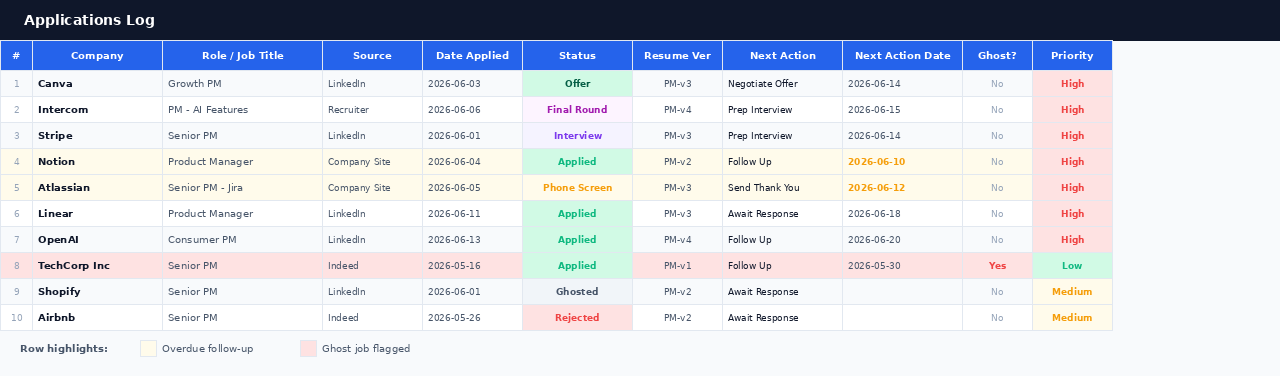
The Applications tab is the core of this free job search tracker Google Sheets template. Every role you apply to, or bookmark as Interested, gets one row. Give each role its own row even when one company has three openings, so every resume version and outcome stays separate.
The tab has 20 columns, and 7 of them drive the automation. Those 7 are what make this a working Google Sheets job application tracker instead of a plain job application tracking sheet.
| Column | Why it matters |
|---|---|
| Job URL | Postings disappear soon after they close. Save the link at once, because a recruiter may call three weeks later |
| Status | Color-coded dropdown: Interested, Applied, Phone Screen, Interview, Final Round, Offer, Rejected, Ghosted, Withdrawn |
| Resume Version | Records which resume went out, so you can compare callbacks later |
| Next Action | Follow Up, Prep for Interview, Send Thank You, or Negotiate Offer. Every open row needs one |
| Next Action Date | The whole row turns amber when this date passes on an open application |
| Ghost Job? | A Yes turns the cell red and tells you to stop chasing that role |
| Priority | High, Medium, or Low, color-coded, so you spend energy on the right rows when the pipeline fills up |
The rule that keeps the sheet alive. Every open row needs a Next Action and a Next Action Date before you close the tab. No date means a dead lead, so give it one or mark the row Withdrawn.
Status Definitions for Your Free Job Search Tracker Google Sheets Template
Statuses drive the Dashboard, so define them once and apply them the same way every week.
- Interested means you saved the posting but haven’t applied. Give it a date to decide.
- Applied means you submitted through a site, an email, or a referral.
- Phone Screen, Interview, and Final Round track the furthest stage you reached at that company.
- Ghosted means no reply after two follow-ups and about 3 weeks of silence. Change that rule in your own copy if you prefer.
- Withdrawn means you pulled out or dropped the role.
- Rejected means the employer said no, including form rejections.
Pick one rule for automatic rejection emails and stick to it. Either log them as Rejected the day they arrive, or leave the row at Applied until a person replies, because mixing the two shifts your numbers from week to week.
If a company reposts a role you already applied to, keep the original row and push its Next Action Date. A second row for the same role splits your counts, and a repost is also worth noting as a possible ghost job sign.
Step 3: Log Interview Rounds in the Free Job Search Tracker Google Sheets Template
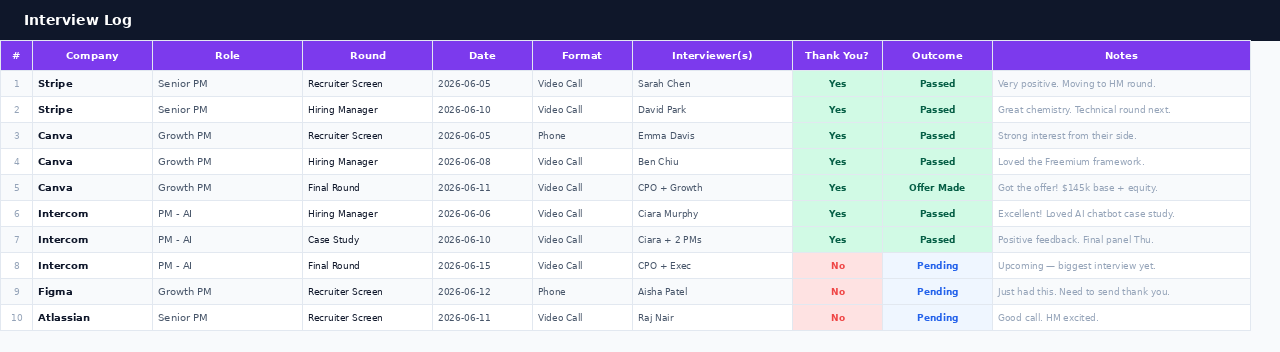
When an interview lands, log it in the Interviews tab, the interview tracker inside this workbook. Use one row per round, not per company. A recruiter screen, a hiring manager call, and a final panel at the same company make three rows.
- Key Topics to Prep holds the two or three points this interviewer will care about. Notes for a technical round look nothing like notes for a panel.
- Thank You Sent? takes Yes, No, or Pending, and turns green or red. A workable default is a note within 24 to 48 hours, so set your own default and apply it to every round.
- Outcome takes Passed, Rejected, No Feedback, Pending, or Offer Made. Use No Feedback instead of leaving it Pending, so getting ghosted after an interview shows up as its own count.
Step 4: Read the Dashboard in Your Free Job Search Tracker Google Sheets Template
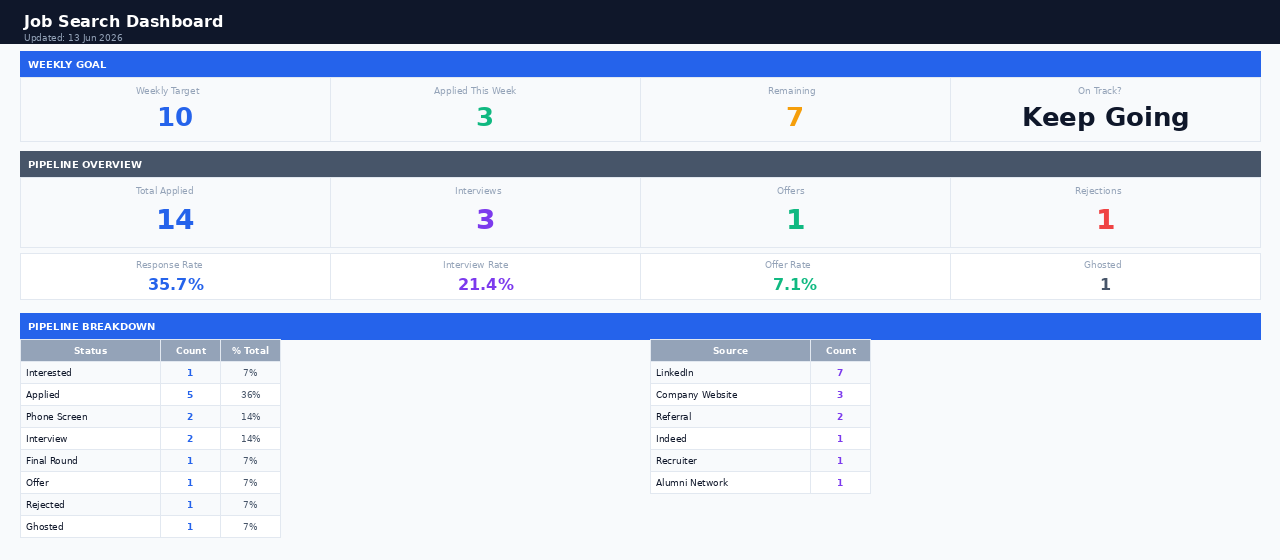
The Dashboard pulls everything together and works as a job hunt tracker for your week. Open it each morning to see if you’re on pace, where your pipeline stands, and who needs a follow-up today.
- Weekly Goal Widget shows your target against applications submitted this week, updated daily.
- Pipeline Overview shows applied, interviews, offers, and rejections as totals, plus response rate, interview rate, and offer rate.
- Pipeline Breakdown counts applications by status and by source. If one source brings most of your applications and few interviews, you know where to cut.
- Overdue Follow-Ups lists the ten most overdue applications, sorted by days overdue.
Treat the weekly goal like any other routine. A Google Sheets habit tracker uses the same target-against-actual logic if you want to log daily application time separately.
When to follow up on a job application. A workable default is 5 to 7 business days after applying and 24 to 48 hours after each interview round. Set your own numbers in Setup and keep them the same across every row.
The 3 Mistakes This Free Job Search Tracker Google Sheets Template Prevents
Every job tracker lists company, title, and status. These 3 mistakes slip past a plain job search spreadsheet, and each one maps to a column in this template.
Mistake 1: Logging Roles With No Next Action in Your Free Job Search Tracker Google Sheets Template
A row with a status and no date feels finished, and that’s the trap. Nobody follows up on a row that never asks them to. The Next Action Date column fixes this because it drives the amber highlight and feeds the Dashboard’s overdue list.
Set the date when you log the row, not later. For a fresh application, 5 to 7 business days out works as a default, and after a phone screen you set Send Thank You for the next day. If you can’t name the next action, the honest status is Withdrawn.
Mistake 2: Counting Ghost Jobs in Your Free Job Search Tracker Google Sheets Response Rate
Ghost listings sit in your denominator and drag your response rate down. Flag a posting as a ghost job and it leaves the denominator, so the rate reflects roles that were actually open.
The numbers below are made up to show the math.
| Illustrative example | Count | Calculation |
|---|---|---|
| Applications logged | 40 | |
| Flagged as ghost jobs | 10 | |
| Replies received | 6 | |
| Raw response rate | 15% | 6 / 40 |
| Corrected response rate | 20% | 6 / (40 – 10) |
Flag with evidence only. A posting live for 60 days or more, a role reposted under a new date, and a listing with no named contact are reasonable signs. Silence alone isn’t one, because flagging every unanswered application inflates your rate and hides a real resume problem.
Mistake 3: Leaving Resume Versions Out of Your Free Job Search Tracker Google Sheets Template
The Resume Version column turns your applications into a controlled test. Name versions consistently, such as Resume_Marketing_v2, and change one thing between versions so any difference has a cause.
Small samples mislead. At a 10% response rate, 20 applications produce about 2 replies, so a version that gets 3 replies isn’t beating one that got 2. Wait until each version has 30 or more applications, and even then, 3 replies against 6 can happen by chance, so run a second batch before you drop a version.
Fill the Source column on every row as well. The Pipeline Breakdown only means something when each application has a source.
How to Read Your Free Job Search Tracker Google Sheets Numbers
Read the funnel left to right and find the stage where conversion collapses. This illustrative 40-application search uses made-up numbers to show the method.
| Stage | Count | Conversion from previous stage |
|---|---|---|
| Applications logged | 40 | Not applicable |
| Ghost jobs flagged | 10 | 25% of logged |
| Live applications | 30 | 75% of logged |
| Replies | 6 | 20% of live |
| Interviews | 3 | 50% of replies |
| Offers | 1 | 33% of interviews |
- Few replies point at the resume or the roles you pick. Compare Resume Version and Source before you send more.
- Replies but few interviews point at the phone screen. Log the questions that tripped you in Key Topics to Prep.
- Interviews but no offers point at late rounds or negotiation. Read your Outcome column company by company.
- One source with high volume and low interviews means you should move that time somewhere else.
With 30 live applications, one extra reply moves your rate by more than 3 points. Read trends across weeks, not single days.
Expect uncomfortable numbers. A low response rate in a tough market says little about you personally. Use it to pick the next lever, such as the resume version, the source, or the roles you target.
Add Daily Email Reminders to Your Free Job Search Tracker Google Sheets Template
The sheet already turns overdue rows amber. If you’d rather get a digest in your inbox, Apps Script can send one without extra software, and the template itself stays unchanged. This isn’t built into your job tracker Google Sheets file, so test it on a copy first.
- In your copy, open Extensions, then Apps Script.
- Write a function that reads the Applications tab with getValues(), finds each column by its header text, and keeps rows where Next Action Date is before today and Status is not Offer, Rejected, Ghosted, or Withdrawn.
- Have the function send one email that lists those companies with MailApp.sendEmail().
- In the Apps Script editor, click Triggers, then Add Trigger, choose your function, and pick a time-driven day timer.
- Save, then approve the permissions prompt.
Finding columns by header text keeps the script working if you insert a column later. Google’s installable triggers documentation covers the trigger setup.
A daily trigger fires at a random point inside the hour you pick, so choose an hour before you start work. The trigger also runs under the account that created it, so reminders always come from your account, even if a coach edits the sheet. Apps Script emails you a failure notice if the function breaks.
Start with one condition. Get the overdue digest working first. Add ghost job flags or a weekly response-rate summary only after the first version runs reliably.
A 15-Minute Weekly Review for Your Free Job Search Tracker Google Sheets Template
A job search spreadsheet only works if you open it on a schedule. Budget about 15 minutes once a week and run the same five steps in the same order.
- Check the Weekly Goal Widget and note how far you are from your target.
- Clear the Overdue Follow-Ups list from the top down. It shows ten rows, so if you have more, go to Data, then Create a filter, and filter Applications by Next Action Date.
- Give every open row a new Next Action Date.
- Mark rows that have gone quiet for 3 weeks as Ghosted or Withdrawn.
- Save recruiter names in the Notes column of your job search log, since this free version has no contacts tab.
If the weekly review keeps slipping, build it as a habit. The habit tracker template hub covers Sheets, Notion, Excel, and printable formats.
Heavy networking needs more than a Notes column. A personal CRM Notion template tracks relationships over time, and the Notion Life OS template ties goals, tasks, and notes into one workspace. For the money side, the personal finance OS Google Sheets template keeps everything in one place.
Free Job Search Tracker Google Sheets vs Dedicated Job Tracker Apps
Dedicated apps win on capture. Jobscan’s free Job Tracker saves postings from LinkedIn, Indeed, and Glassdoor through a Chrome extension and shows each role on a drag-and-drop board, according to its own tracker guide. A spreadsheet can’t match that one-click saving.
| Factor | Free job search tracker Google Sheets | Dedicated tracker apps |
|---|---|---|
| Cost | Free to copy | Varies by app, from free tiers to subscriptions |
| Data ownership | Lives in your own Drive | Lives on the vendor’s platform |
| Saving a posting | You paste the URL yourself | Browser extension, in some apps |
| Reminders | Amber overdue rows, plus optional email reminders you build | Built in, in some apps |
| Custom columns | Add any column or tab | Limited to what the app allows |
| Offline use | Yes, with Google Docs Offline turned on in Chrome | Varies by app |
Choose the spreadsheet if you want control over your data, custom columns, and a weekly review habit. Choose an app if you apply from your phone all day and want one-click saves. The real cost of the sheet is manual entry, because you paste the link and pick the status every time.
A job application spreadsheet in your own Drive stays yours if a vendor changes pricing or shuts down. If you prefer a job application tracker Excel version, download the sheet as .xlsx through File, then Download, and keep Google Sheets as your main copy.
The same trade-off shows up in money tracking, which our Google Sheets budget tracker vs apps comparison covers in detail.
When a Free Job Search Tracker Google Sheets Template Stops Being Enough
You’ll outgrow the free version if you pass 200 applications, juggle several recruiters at one company, or want weighted offer comparisons. The next section covers what the Pro version adds for those cases.
Need More? The Pro Version of This Free Job Search Tracker Google Sheets Template
This free job search tracker Google Sheets template covers a standard search. If you’re running several tracks at once, with offers, recruiters, and heavy interview prep, the Pro version of this job search tracker template adds six tabs.
Those tabs are a Contacts CRM for recruiters and hiring managers, a 12-week Weekly Planner, a weighted job offer comparison matrix, an Interview Prep workspace, an Email Templates library, and an AI Report tab. The applications log grows to 1,000 rows, and a monthly Action Calendar lays out every upcoming next action by date.
Five AI tools run inside the sheet with your own free Gemini API key. Paste a job description to get 10 tailored interview questions with STAR scaffolds, score your resume against it for an ATS match percentage, extract structured fields from a raw posting, or draft a follow-up email based on the row’s status. If you freelance on the side during a search, a freelance invoice tracker Google Sheets template keeps that income separate.
A Job Search Tracker With AI Tools and a Contacts CRM
11 tabs, 1,000 application rows, 5 built-in Gemini AI tools, a monthly action calendar, and a weighted offer comparison. One-time purchase, no subscription.
✓ 1,000 application rows, 5 times the free version
✓ Monthly Action Calendar, color-coded by status
✓ 5 Gemini AI tools for interview prep, ATS scoring, and email drafts
✓ Weighted offer comparison with up to 10 custom criteria
✓ Works in Google Sheets and Excel 2021+
✓ One-time payment, no subscription
| Feature | Free | Pro |
|---|---|---|
| Application rows | 200 | 1,000 |
| Tabs | 5 | 11 |
| Dashboard and overdue alerts | ✅ | ✅ |
| Color-coded status and ghost job flag | ✅ | ✅ |
| Contacts CRM | ❌ | ✅ |
| Weekly Planner (12-week rolling) | ❌ | ✅ |
| Monthly Action Calendar | ❌ | ✅ |
| Weighted Offer Comparison | ❌ | ✅ |
| AI Interview Question Generator | ❌ | ✅ |
| AI Resume vs JD Scorer (ATS %) | ❌ | ✅ |
| AI Follow-Up Email Drafter | ❌ | ✅ |
| AI Search Health Report | ❌ | ✅ |
Free Job Search Tracker Google Sheets Template
Copy it to your Google Drive in one click. There’s no email sign-up and no payment, and you only need a Google account to save your copy.
✓ Color-coded status and automatic overdue alerts
✓ Dashboard with response rate and a ghost job flag
Common Questions About This Free Job Search Tracker Google Sheets Template
How Do You Track Job Applications in a Free Job Search Tracker Google Sheets Template?
To track job applications, give every role one row with a status, a Job URL, a resume version, and a next action with a date. Then open the Dashboard weekly and clear the overdue rows first.
- Log the same day you apply, while the details are fresh.
- Update the status every time an employer replies.
- Flag ghost jobs only when you have evidence.
What Should a Free Job Search Tracker Google Sheets Template Include?
At minimum, a job application tracker template needs company, role, Job URL, application date, status, next action, next action date, and notes. Add resume version, source, and a ghost job flag if you want your free job search tracker Google Sheets template to show which approaches produce replies.
- Fields to track the search are company, role, URL, date, status, and notes.
- Fields to learn from the search are resume version, source, ghost job flag, and interview outcome.
How Often Should You Follow Up When Using a Free Job Search Tracker Google Sheets Template?
A workable schedule is 5 to 7 business days after applying and 24 to 48 hours after each interview, with a new Next Action Date set each time. After two follow-ups with no reply, mark the row Ghosted and move on.
Frequently Asked Questions About This Free Job Search Tracker Google Sheets Template
Is this free job search tracker Google Sheets template really free?
Yes, this free job search tracker Google Sheets template costs nothing to copy. You need a Google account to save your copy to Drive, but there’s no sign-up with us and no payment.
Does this free job search tracker Google Sheets template work in Excel?
You can open this free job search tracker Google Sheets template in Excel by downloading it through File, Download, Microsoft Excel (.xlsx). Keep Google Sheets as your main copy, since that’s where the template is built.
Can I change the statuses in this free job search tracker Google Sheets template?
Yes, you can edit every dropdown in this free job search tracker Google Sheets template from the lists on the Setup tab. Rename statuses before you log rows, because existing rows keep their old text until you reselect.
Building free tools so you don’t have to pay for software you’ll use twice. Every template on this site is built to work without a subscription, and your data stays in your own Drive.