
Habit Tracker Template: Stop Guessing, 4 Proven Formats
A habit tracker template only works if you can log it in seconds from the place you already look every day. This guide compares Google Sheets, Notion, Excel and a monthly printable on 6 checks, then picks one for you.

18 min read
This guide compares four habit tracker template formats on six checks, with a decision flow, an Excel layout with formulas and a printable page setup.
Most people pick a habit tracker template by how it looks. They download the prettiest file, log for nine days, then stop opening it.
The format decides more than the design does. A habit tracker template you can tick from your phone in a few seconds survives a bad Tuesday. One that needs a laptop, a login and three clicks does not.
I build Google Sheets and Notion habit trackers, so I’ve watched where each one breaks. I don’t ship an Excel file or a printable, and I say so where it matters. Below you get four formats, six checks and one verdict for each kind of person.
Which Habit Tracker Template Is Best?
The best habit tracker template is the one you can log in seconds from the place you already look every day. Google Sheets fits most people who log from a phone or laptop. Notion fits daily Notion users, Excel suits offline desktop work, and a printable suits anyone who wants no screen.
A habit tracker template is a pre-built grid or database where each habit gets a row and each day gets a mark. The rest of this guide shows how I score each format, so you can see why the verdict lands where it does.
Habit Tracker Template Formats Compared on 6 Checks
Each check maps to a way trackers die. You forget the file exists, logging takes too long, totals drift, you can’t fix a missed day, the file breaks, or it costs more than it earns.
| Check | Google Sheets | Notion | Excel | Monthly printable |
|---|---|---|---|---|
| Where it lives | Phone app and browser, on any device with your Google account | Notion app and browser | One desktop file, unless you save it to OneDrive | A wall, fridge or desk |
| Logging path | Open the file, tick the habit | Open the page, tick a property or press a button | Open the file, type a mark in the column for today | Pick up a pen, mark today’s box |
| Who does the math | Formulas | Formulas and rollups | Formulas you write or copy | You, by counting |
| Backfilling a missed day | Edit that day’s row | Edit that day’s row, if the template allows past dates | Edit that day’s cell | Mark the box, if you remember |
| Where it breaks | Deleting a row a formula reads returns a #REF! error | A second owner caps a free workspace at 1,000 blocks | Sheets-only functions don’t carry over from a Sheets file | Pages get lost and leave no history |
| Cost | Free file, or Pro for a one-time $9.90 | Free plan works for solo use | Needs Excel | Paper and ink |
Check 3 splits the formats in two. Sheets, Notion and Excel calculate your totals, and paper makes you count.
The break point matters more than the feature list. A Notion tracker that hits a block cap in month three fails for a different reason than a paper tracker you lost in a drawer, and the fix is different too. You can read how that cap works in my breakdown of the Notion free plan limits.
Apps are a fifth option, and I leave them out here. A digital habit tracker, whether a habit tracker website or a phone app, saves you from building anything and puts your history on someone else’s server. The trade-offs mirror spreadsheets versus apps for budgeting.
How to Choose a Habit Tracker Template in 3 Questions
Start with the logging moment, not the feature list. Ask where you’ll be standing or sitting when you remember to log.
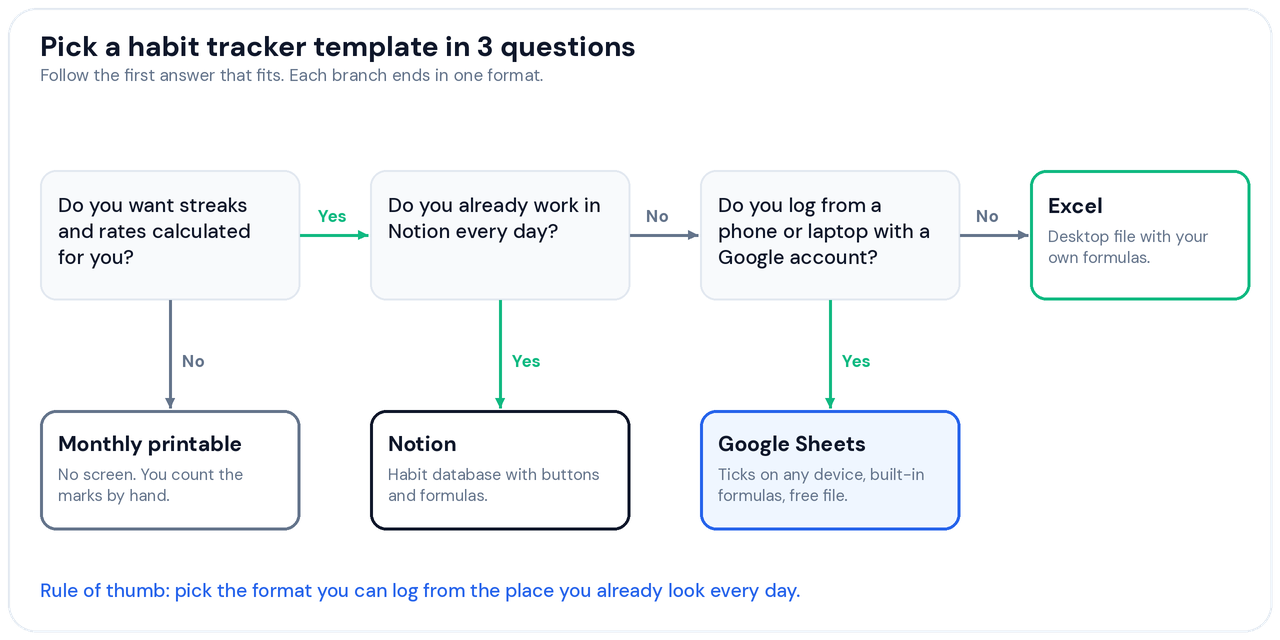
- Calculated streaks and rates point you to Sheets, Notion or Excel. Paper can’t compute them, so you count by hand.
- Daily Notion users should stay in Notion. A tracker in a second app is a tracker you open less.
- A phone and a Google account point you to Sheets. No Google account, or a desktop-only routine, points you to Excel.
If two answers fit, pick the format you would open on more days of the week. That beats any feature, because a tracker you open on five days a week out-logs a better one you open on two.
Tie the habit tracker template to a cue you already have. A page on the kitchen wall or a file pinned to your phone’s home screen removes the “where was that file” step.
Best Habit Tracker Template for Your Situation
The verdict shifts when your situation shifts. These are the five cases I get asked about most, with a pick for each.
- Phone-only logging points to Google Sheets. A tick in the Sheets app is the shortest path I know of, and nothing needs installing beyond the app.
- A shared tracker with a partner points to Sheets too. In Notion’s free plan, people you add join as owners, so a second owner triggers the 1,000-block cap.
- Daily Notion users should build the log inside their existing workspace and skip every other format.
- Privacy-first tracking points to a local Excel file or paper. Neither one sends your habit data to a hosted service unless you upload it.
- A 30-day challenge with one habit suits a paper calendar chain on the wall, because the chain is the motivation.
Google Sheets Habit Tracker Template
Google Sheets is my default recommendation because a tick takes a tap or two on a phone and the formulas run themselves. You get the logging speed of a checklist and the math of a spreadsheet.
My free Google Sheets habit tracker has tabs for setup, the daily tick, a dashboard, streaks, a monthly view and a weekly review. The full walkthrough, including how streak odds play out over 66 days, sits in the Google Sheets habit tracker guide.
Two limits matter. You need a Google account to make your own copy, and deleting a row that a formula reads returns a #REF! error. Make a copy first, type only in the input cells and leave the formula columns alone.
Habits and money share one rule, which is to log at the moment it happens. My budget tracker for Google Sheets, expense tracker and personal finance OS all follow it. A job search routine works the same way, and the free job search tracker for Google Sheets logs each application.
Notion Habit Tracker Template
Notion wins when your tasks, notes and goals already live there. The habit log sits one click from the rest of your system, so you never switch apps to record a day.
Row design matters more than the cover. I use one row per day with a select property for each habit (✅, ❌ or ➖) instead of one row per habit per day. Five habits over a year is 365 rows that way, not 1,825.
A button can create today’s log row in one click, so you never type a date. That one button is the difference between logging daily and logging when you remember.
A checkbox per habit ticks faster, but it can’t store a day you skipped on purpose. A select property with a ➖ option can, and that keeps travel days and sick days from dragging your rate down.
The catch is the free plan. A free workspace with one owner has unlimited blocks, but a second owner caps it at 1,000 blocks, and deleting pages doesn’t lower the count. Read the Notion free plan breakdown before you invite anyone.
I cover the full build in my Notion habit tracker template guide. The habit log inside the Notion Life OS template follows the same one-row-per-day design.
Habit Tracker Excel Templates: What Works and What Breaks
I don’t ship an Excel habit tracker, and I haven’t tested my Google Sheets file in Excel. This section covers how to build one and where it breaks, not a download.
Put habits down column A and days 1 to 31 across columns B to AF. Add Days done in AG and Rate so far in AH, then type an X in a cell to mark a day.
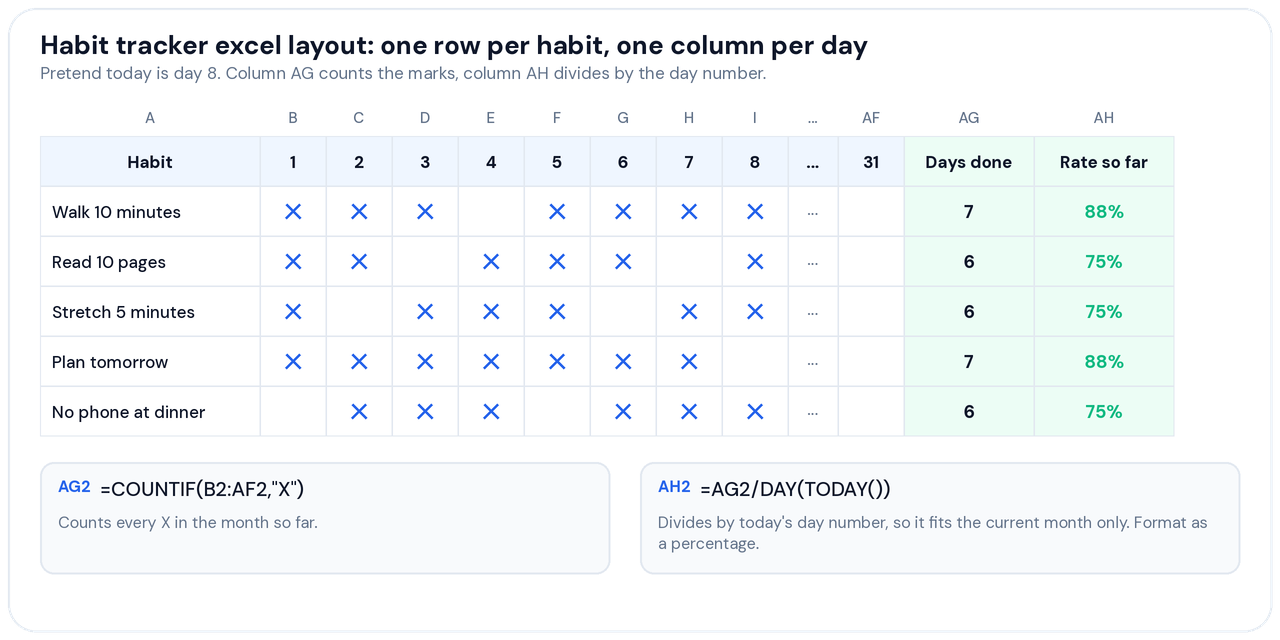
In AG2 enter =COUNTIF(B2:AF2,"X"). In AH2 enter =AG2/DAY(TODAY()) and format the cell as a percentage.
The rate formula divides by today’s day number, so it only fits the current month. For a past month, divide by the number of days in that month instead.
Add a conditional format on B2:AF6 that fills any cell equal to X, and the grid reads like a heatmap. A habit tracker chart is optional, since the fill shows the same pattern with no chart to maintain.
Habit Tracker Template Excel: Desktop, Web or Phone?
A desktop habit tracker template Excel file stays on one machine unless you save it to OneDrive. Opened on a phone, it needs the Excel app and a signed-in account.
Functions that exist only in Google Sheets, such as QUERY, don’t carry over. A Sheets tracker is a rebuild in Excel, not a save-as.
Add a data validation list that allows only X or a blank. COUNTIF ignores case, so a lowercase x counts, but an X with a trailing space does not. That single typo can shave a day off your total without any error message.
Monthly Habit Tracker Printable: When Paper Wins
Paper wins when the screen is part of the problem. A page on the fridge or bathroom mirror puts the cue where the habit happens, and nothing buzzes at you while you log.
Paper loses on math and history. You count the marks at month end, and last month’s page ends up in a drawer.
I don’t sell a printable, so here is the page setup I’d use for a monthly habit tracker printable. Print in landscape, because 31 day columns won’t fit a portrait page.
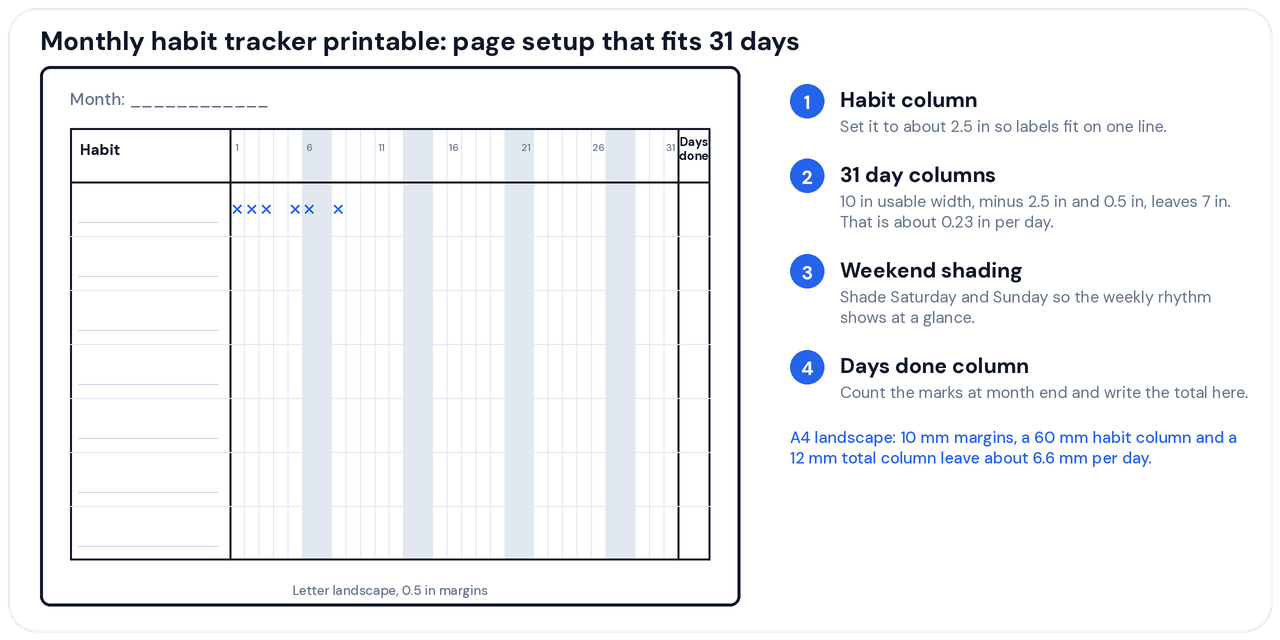
- Letter landscape with 0.5 in margins gives you 10 in of width. A 2.5 in habit column and a 0.5 in total column leave 7 in, which is about 0.23 in for each of the 31 days.
- A4 landscape with 10 mm margins, a 60 mm habit column and a 12 mm total column leaves about 6.6 mm per day.
- Print at 100% or “Actual size”. Fit to page shrinks the grid and the margins you set.
- Five to seven habit rows keep the page readable, and shading Saturday and Sunday shows the weekly rhythm.
Pick a Sunday or Monday week start before you print twelve copies, because it moves the shaded weekend columns. Photograph each finished page too. Twelve photos give you a year of history without a spreadsheet.
A daily habit tracker printable gives each day its own page and suits one to three habits. A 30 day habit tracker printable suits a single challenge month. A habit tracking journal or habit tracker notebook gives you a bound version, at the cost of redrawing the grid every month.
Cute, aesthetic and minimalist styles change the look, not the grid. Keep the 2.5 in habit column and readable day columns before you add stickers. A paper habit tracker you can read at a glance beats a cute habit tracker printable you can’t.
Habit Tracker Template Layouts: Daily, Weekly, Monthly and Calendar
Habit tracker examples online fall into four layouts. Match the layout to your habit count, not to a mood board.
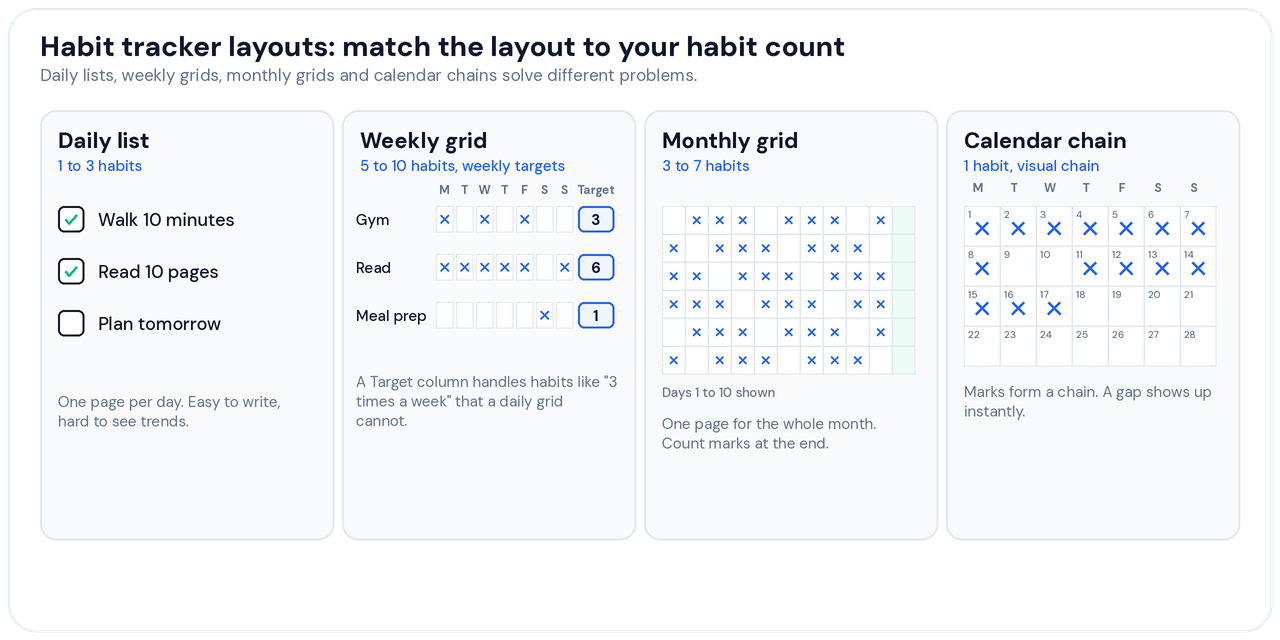
- A daily list suits one to three habits. It is easy to write and hard to read for trends.
- A weekly habit tracker template suits five to ten habits, and it is the only layout that handles targets like three times a week.
- A monthly habit tracker template suits three to seven habits and shows the whole month on one page.
- A habit tracker calendar suits one habit. Marks form a chain, so a gap shows up instantly.
Frequency habits break daily grids. A target of three gym visits a week shows four empty boxes on a daily grid and reads like failure.
Count the marks from Monday to Sunday and compare the total against the target of 3. Weekly targets also fit contact habits like messaging two people a week, which my personal CRM for Notion handles with a follow-up date.
Monthly habits break daily grids too. Updating a net worth number once a month needs a monthly checklist, which is how the net worth tracker for Google Sheets works.
A habit tracker planner puts the grid inside a diary, which keeps everything in one place until you lose the diary. A planner with a habit tracker suits paper people, and a habit calendar suits anyone chasing a single streak.
If you came for an Atomic Habits habit tracker, any of these formats works. The common idea is a visible mark each day you do the habit, and every grid here gives you one.
How Many Habits Should a Habit Tracker Template Hold?
Every extra row cuts your odds of a perfect day. Assume each habit succeeds independently with the same chance, and the odds fall fast.
| Habits tracked | Perfect day at 90% per habit | Perfect day at 95% per habit |
|---|---|---|
| 1 | 90.0% | 95.0% |
| 3 | 72.9% | 85.7% |
| 5 | 59.0% | 77.4% |
| 10 | 34.9% | 59.9% |
| 15 | 20.6% | 46.3% |
Independence is an assumption here, not field data, since real habits cluster on easy days and hard days. The direction still holds. A habit tracker template with fifteen rows will show you more red than green.
Start with three to five rows and judge yourself on completion rate, not on perfect days. The 66-day streak odds in my Google Sheets guide show how a streak behaves at each daily rate.
Why Habit Tracker Templates Fail and How to Fix Them
- Vague habits fail first. Write “walk 10 minutes” instead of “exercise”, and define a minimum you could still do on your worst day.
- Too many rows bury you in misses. Cut the template to the three to five habits you’d keep if you could only keep a few.
- Backfilling a week from memory guesses at days you can’t recall. Your totals then say more about your memory than your habits.
- A tracker out of sight gets forgotten. Put the habit tracker template where the habit happens, whether that is a home screen shortcut or a page on the fridge.
- Resetting after one miss throws away usable data. The UCL write-up of the Lally habit study reports that missing one opportunity had no significant effect on forming the habit.
Decide before you start what counts as an excused day. Travel and illness should either get a skip mark or drop out of the denominator, otherwise the rate punishes you for a flight.
That last finding is why a rate matters as much as a streak. A habit tracking template that shows only a streak punishes one miss, and a rate forgives it. Pick a template that shows both.
Log within the same day. If you miss one, mark it that evening and fix the habit tracker template the next morning, not at the end of the week.
Switching Habit Tracker Template Formats Without Losing History
You’ll probably switch formats once. Here’s how to do it without a gap in your data.
Overlap for seven days
Log in both formats for a full week before you drop the old one. The overlap week is your test.
Export the old data
Export a Notion database as CSV, download a Sheets file as .xlsx from the File menu, or photograph your paper pages.
Backfill 30 days only
Type the last 30 days into the new habit tracker template. Older months stay as exports or photos.
Check the overlap totals
Compare the overlap week across both formats. If the counts differ, a formula range in the new file is wrong.
A Paid Upgrade to the Google Sheets Habit Tracker
The Pro version of the Google Sheets habit tracker is a one-time purchase for people who outgrow the free file. The full Free versus Pro comparison sits in the Google Sheets habit tracker guide.
| Feature | Free | Pro |
|---|---|---|
| Works in Google Sheets | ✅ | ✅ |
| Price | $0 | $9.90 one time |
| Subscription required | ❌ | ❌ |
| Tab-by-tab comparison | In the guide | In the guide |
Free Habit Tracker Template for Google Sheets
Start with the free file. Make your own copy, tick your habits for a week, and see whether you need anything more.
Get the Free Habit Tracker Template →
People Also Ask About Habit Tracker Templates
What Is a Habit Tracker Template?
A habit tracker template is a pre-built grid or database where each habit gets a row and each day gets a mark, so you can see how often you did the habit. Templates exist for Google Sheets, Notion, Excel and paper.
The useful ones also calculate totals, completion rates and streaks, so you don’t count by hand.
Is a Spreadsheet or Notion Better as a Habit Tracker Template?
A spreadsheet is better for logging speed and math, and Notion is better if your tasks and notes already live there. Pick Google Sheets if you log from a phone and want simple ticks.
Pick Notion if you want the habit log beside your goals and projects, and check the free plan’s 1,000-block cap before adding a second owner.
Do Habit Tracker Templates Really Work?
A habit tracker template works as a mirror, not a motor. It shows whether you did the habit, and it can’t make you do it.
I can’t point to a study showing that trackers alone create habits. The UCL habit study linked above found that missing one opportunity had no significant effect, which is why a rate belongs next to the streak.
Habit Tracker Template FAQ
What is the best free habit tracker template?
The best free habit tracker template is the one you’ll log from where you already are. For most people that’s a Google Sheets file with a daily tick and automatic totals, like the one in my free Google Sheets habit tracker.
Is there a free habit tracker template for Google Sheets?
Yes. My free habit tracker template for Google Sheets has tabs for setup, a daily tick, a dashboard, streaks, a monthly view and a weekly review. You make your own copy in your Google account.
Can I use a habit tracker template in Excel?
Yes, and a plain grid works well. Put habits in column A, days in B to AF and use COUNTIF for totals. I haven’t tested my Google Sheets file in Excel, and Sheets-only functions such as QUERY don’t carry over.
Is there a free habit tracker template for Notion?
Yes. My Notion habit tracker template has a free version and a Pro version. The free version runs on Notion’s free plan for a solo workspace.
How many habits should I track at once?
Track three to five. At a 90% hit rate per habit, five habits give you a perfect day 59% of the time, and ten give you 34.9%.
How do I make a monthly habit tracker printable?
Use a landscape page with a habit column, 31 narrow day columns and a Days done column. On Letter with 0.5 in margins, a 2.5 in habit column and a 0.5 in total column leave about 0.23 in per day.
Should I track habits daily or weekly?
Track daily habits daily and frequency habits weekly. A habit like three gym visits a week fits a weekly habit tracker template with a Target column, while a daily grid marks four empty boxes as misses.
What is the best layout for a habit tracker template?
Match the layout to the habit count. A daily list suits one to three habits, a monthly grid suits three to seven, and a weekly grid suits five to ten habits or any weekly target.
Do I need an app for habit tracking?
No. A spreadsheet, a Notion page or a printed grid records the same data. Apps add reminders, and a phone alarm covers that for free.
What should I do if I miss a day on my habit tracker template?
Leave the box empty and log the next day. The UCL write-up of the Lally habit study reports that missing one opportunity had no significant effect, so one miss doesn’t need a reset. Watch your completion rate instead of the streak.
Alex builds free and Pro Google Sheets and Notion templates at Tools Without Code, for people who want a working system without writing code. Questions or requests? Get in touch.