
Notion Freelancer CRM Template: Reliable Payment Tracking
A Notion freelancer CRM template built for freelancers in the US, UK, and Australia who are tired of manually checking who’s paid — log a payment once, and every balance, aging status, and client total updates itself.

14 min read
- Why most Notion freelancer CRM template options have a tracking flaw
- What’s inside the Notion freelancer CRM template
- How this Notion freelancer CRM template automates reconciliation
- The Dashboard: what to act on today
- Reports: the full financial picture
- Free vs. Pro: what you get at each tier
- Setting up your Notion freelancer CRM template
- Who this template is for
- People also ask
- Frequently asked questions
Why Most Notion Freelancer CRM Template Options Have a Tracking Flaw
Most free Notion CRM templates track contacts, not cash. A basic notion freelancer crm template answers “who are my clients,” but not “who owes me money and how late are they.” That gap — invoicing treated as an afterthought instead of the core job — is the tracking flaw this template was built to close.
If you’ve searched for a notion freelancer crm template before, you’ve probably found two kinds. The first is a free contact list with a status column — good for remembering names, useless for knowing who actually owes you money.
The second is a bloated “business OS” with fifteen linked databases, an AI assistant, and a content calendar you’ll never open. Most freelancers abandon these within a month because the overhead of maintaining the system costs more time than it saves.
Both versions share the same tracking flaw: they treat invoicing as a side note instead of the core job. A freelancer’s real question isn’t “who are my contacts” — it’s “who owes me money, and how overdue are they?” Neither a plain contact list nor an overbuilt suite answers that without manual math.
This notion freelancer crm template exists to close that specific gap. It’s four databases, not fifteen — but the four it has are wired together so your invoice balances, aging status, and client totals update themselves the moment you log a payment.
If you’re comparing this notion freelancer crm template to Notion’s own Freelancer CRM template or other community options, the difference isn’t feature count — it’s whether the invoicing side actually reconciles itself or just sits there as a static number.
The Real Cost of Using a Basic Notion Invoice Tracker
Manually checking invoice status doesn’t feel expensive in the moment. You open a spreadsheet, scan a column, maybe update a cell. Five minutes, done.
The actual cost shows up differently: it’s the client you forgot to follow up with because their invoice wasn’t visually flagged as overdue. It’s the awkward moment realizing a “paid” invoice was actually only half-paid, because the balance was never updated after a partial payment came in.
A basic notion invoice tracker without reconciliation just moves this problem from a spreadsheet into Notion — same manual checking, different interface. The flaw isn’t the tool you’re using; it’s that nothing updates itself when money actually changes hands.
If your invoicing pain is less about tracking Notion pages and more about producing print-ready invoices, our [Internal Link: “Freelance Invoice Tracker” -> /freelance-invoice-tracker-google-sheets/] Google Sheets template handles that side of the job instead.
How This Notion CRM Template Compares to Other Options
Most notion crm template options on the marketplace fall into one of three categories. Here’s how this one positions against each, ranked by what actually happens after a client pays you.
| Type | What you get | What’s missing |
|---|---|---|
| Free contact-list templates | Basic client fields, simple pipeline | No invoicing, no payment tracking at all |
| Overbuilt “business OS” suites | 15+ databases, AI features, content calendars | Steep learning curve, often needs a paid Notion plan |
| This notion freelancer crm template | 4 databases, automatic invoice reconciliation | No sales pipeline automation or team features — by design |
That last row is deliberate. This notion freelancer crm template isn’t trying to be everything — it’s trying to be the one part of a freelance business (getting paid, and knowing who still owes you) that actually deserves automation.
What’s Inside the Notion Freelancer CRM Template
This notion freelancer crm template is four connected databases: Clients, Projects, Invoices, and Receipts. Each one has exactly one job — Receipts is the payment log that powers automatic reconciliation on Invoices, which is the piece most freelancer CRM templates skip entirely.
The Pro version of this template is built on those four connected databases. None of them exist just to pad out a feature list.
Next Follow-up formula calculates itself 14 days after your last logged contact, so you never have to remember to check.If you’ve used our [Internal Link: “Personal CRM Notion template” -> /personal-crm-notion/] before, the Clients database will feel familiar — the follow-up mechanic is deliberately similar, because it’s the one thing freelancers consistently praised in that template. This notion freelancer crm template just adds the invoicing layer on top.
Each database also carries a couple of quieter design decisions worth knowing about. Projects doesn’t have its own invoicing fields — it links to Invoices instead, so a single project can have multiple invoices without duplicating data. Clients doesn’t store a raw dollar figure for what’s owed; instead, Outstanding Balance is a rollup that always reflects live numbers from Invoices, so it can never silently go stale.
More Than a Notion Client Management Template
At its core, the Clients and Projects databases work like any notion client management template — names, companies, status, and follow-up dates. What makes this notion freelancer crm template different is that client management isn’t the endpoint; it’s connected directly to the invoicing layer, so a client record always shows real outstanding balance, not just contact details.
What Should Be Included in a Freelancer CRM?
A freelancer CRM needs four things at minimum: a client record, a project or scope tracker, an invoice log, and a payment log that ties back to those invoices. Most free templates stop at the first two.
- Client record — contact details, status (lead/active/past), and a follow-up trigger
- Project or scope tracker — what you’re actually delivering, and to whom
- Invoice log — what’s been billed, and what’s still owed
- Payment log — the source of truth that keeps the invoice log honest
Skip the payment log and you’re back to manually editing invoice balances by hand — which is the exact tracking flaw this template was built to eliminate.
How This Notion Freelancer CRM Template Automates Invoice Reconciliation
Log a payment in Receipts, and three fields on the linked invoice update instantly: Amount Paid, Balance Due, and Aging Bucket. No formula to write, no field to edit by hand — it’s native Notion rollups and formulas doing the math the moment you save the row.
This is the actual sales point of this template, so it’s worth walking through concretely rather than just claiming it.
A Notion CRM Example: Client to Cash, Start to Finish
Say a client owes you $900 for a project. You send the invoice, and it sits in the Invoices database with a Balance Due of $900. A few weeks later, they pay you $450 as a partial payment.
Instead of opening the invoice and manually editing the balance, you log one row in Receipts: the amount, the date, and which invoice it’s for. The moment you do, three things update on their own:
- Amount Paid on the invoice rolls up to $450, pulled directly from the Receipts entry.
- Balance Due recalculates to $450 — the invoice total minus what’s actually been paid.
- Aging Bucket updates based on how many days past the due date that remaining balance has been sitting.
Nothing about this requires a formula you have to write yourself or a plugin you have to install. It’s the default behavior of this notion freelancer crm template, built entirely with native Notion rollups and formulas. As a notion crm example, it’s a useful one precisely because every number on screen is real, not simulated.
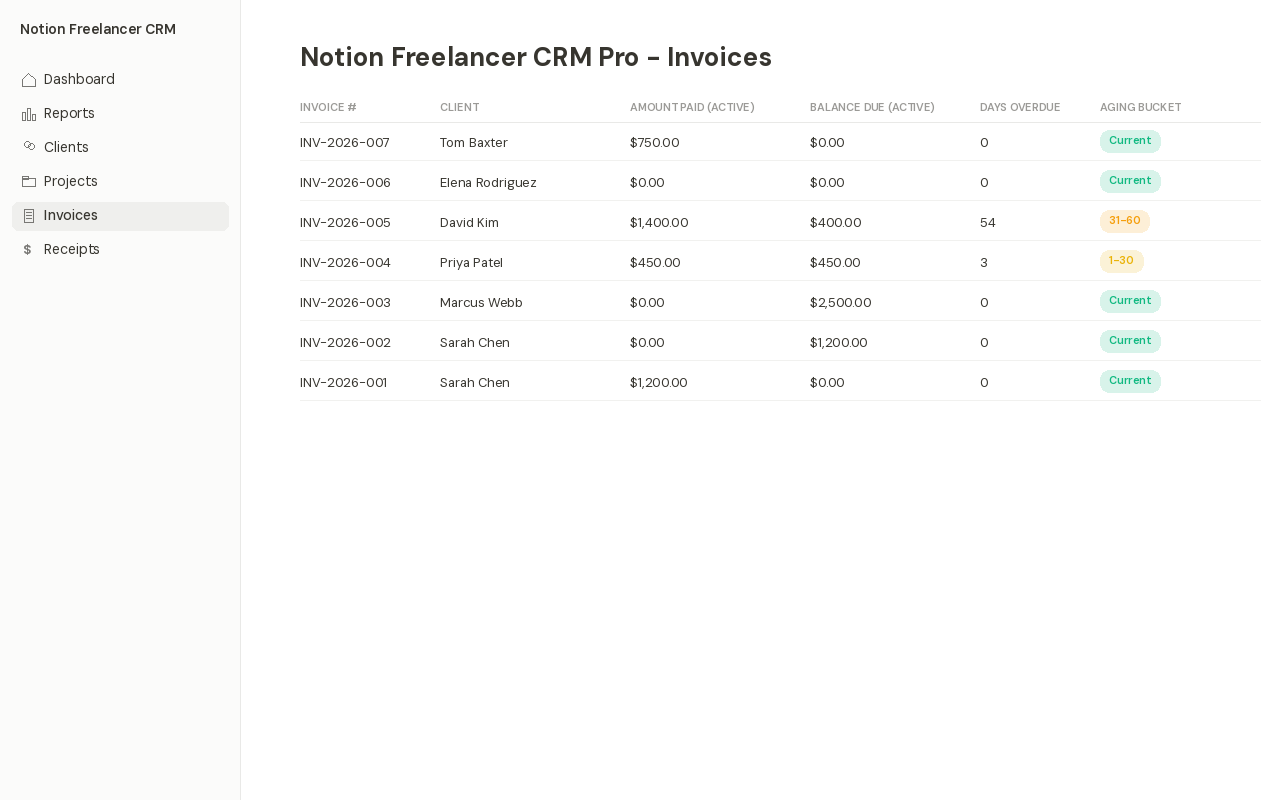
One detail worth calling out: cancelled invoices are automatically excluded from these calculations. If you cancel an invoice, it won’t inflate a client’s outstanding balance or show up as overdue — a small thing, but it’s the kind of edge case that breaks most spreadsheet-based invoice trackers.
Why This Needed a Receipts Database, Not Just a Status Field
An earlier version of this notion freelancer crm template used a single manual Status field on each invoice — Draft, Sent, Paid. It worked fine until a client paid in two installments, and there was nowhere to record that honestly.
A separate Receipts database solves this properly: each payment is its own row, with its own date and amount, linked back to the invoice it applies to. The invoice’s Balance Due is never a number you type — it’s always the total minus whatever’s actually been logged as received.
This is also why the free version doesn’t include reconciliation. Without Receipts, there’s no reliable source of truth for partial payments — so rather than fake the feature with a manual field, the free tier keeps invoice status honestly manual instead.
Tracking what actually lands in your bank account each month matters just as much as tracking what’s owed. If cash flow visibility is your bigger pain point, our [Internal Link: “Cash Flow Forecast Template” -> /cash-flow-forecast-template/] pairs well with this notion freelancer crm template — one tracks who owes you, the other projects what’s coming in over the next 13 weeks.
The Notion Freelancer CRM Template Dashboard: What to Act On Today
The Dashboard in this notion freelancer crm template shows exactly two things: clients who need a follow-up, and invoices that are overdue. Three one-click buttons — New Client, New Invoice, Log Payment — handle the daily inputs, so the page itself stays focused on what actually needs your attention today.
Every database in this template feeds into that single Dashboard page, and the Dashboard is deliberately narrow in scope. It doesn’t try to show you everything — just what needs action right now.
Below the buttons, two focused views answer two specific questions. Needs Follow-up shows any client whose follow-up date has arrived, sorted so the most overdue relationship is at the top. Overdue Invoices shows exactly who owes you money and how late they are, using the same aging buckets from the Invoices database.
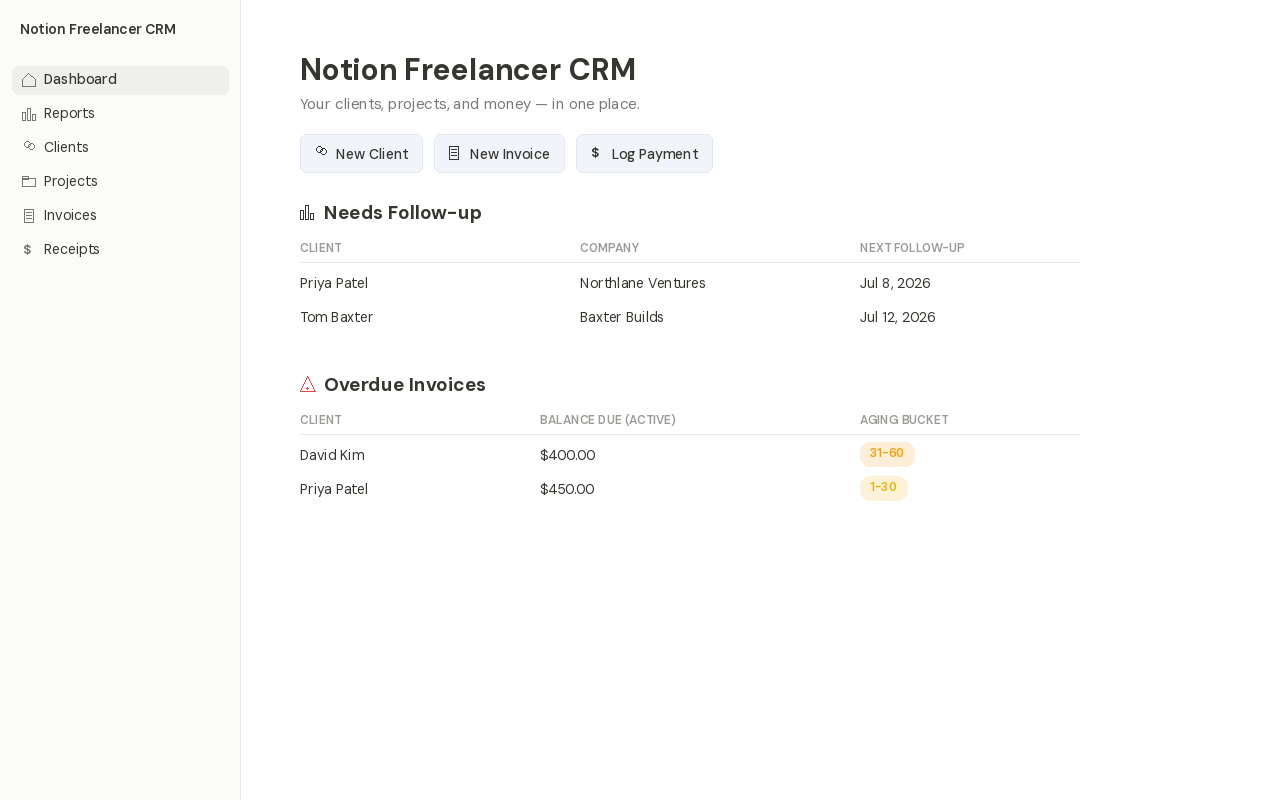
Everything else — revenue history, client pipeline, lifetime totals — deliberately lives on a separate Reports page instead of cluttering this view. A dashboard that tries to show everything ends up showing nothing clearly, which is exactly the trap most notion freelancer crm template dashboards fall into.
Freelancers who also want their daily admin routine — not just client and invoice tracking — inside Notion often pair this with our [Internal Link: “Notion Life OS template” -> /notion-life-os-template/], which handles tasks, goals, and notes alongside this notion freelancer crm template.
Notion Freelancer CRM Template Reports: The Full Financial Picture
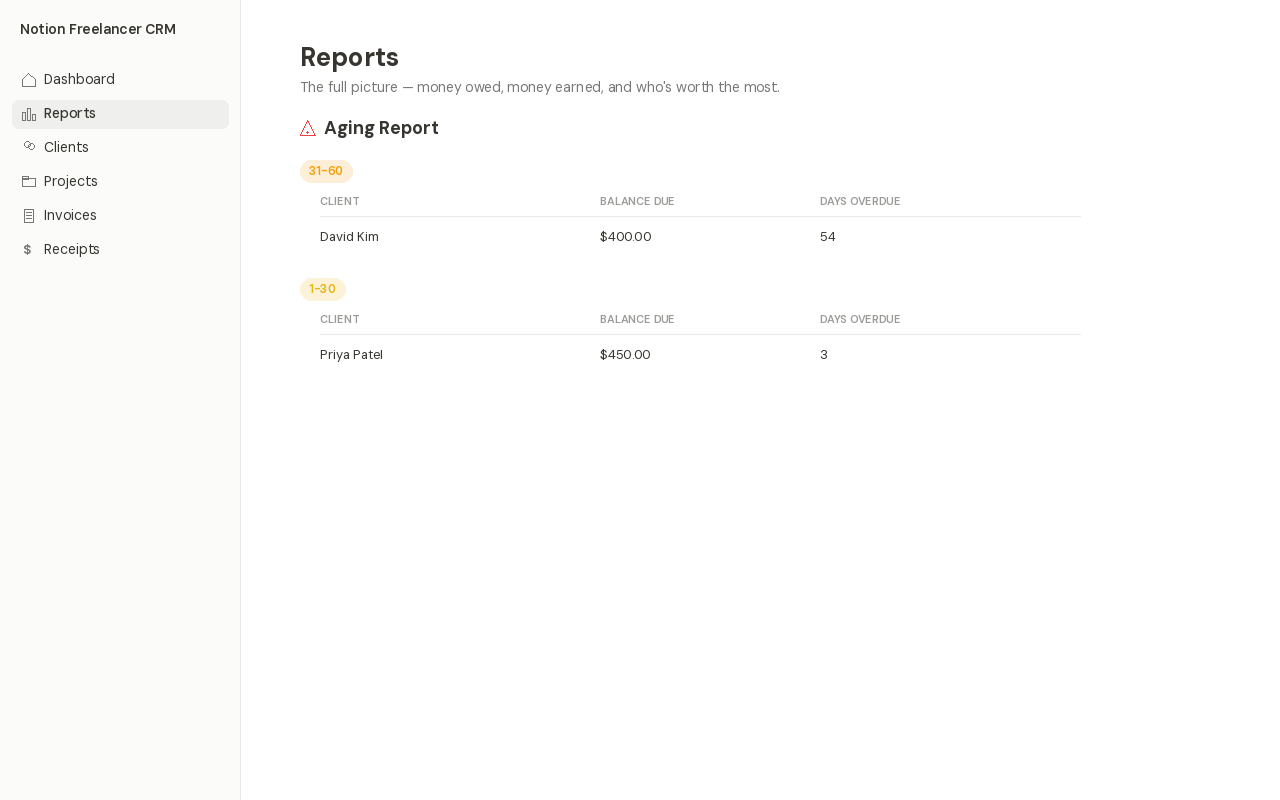
The Reports page in this notion freelancer crm template answers the slower questions: how much came in, who’s most overdue, and which clients generate the most revenue. Four linked views — Aging Report, Revenue Report, Client Pipeline, and Top Clients — pull from the same four databases already doing the invoicing work.
The Reports page is where this template answers the slower, more reflective questions — the ones you check weekly or monthly, not every time you open Notion.
| Report | What it answers |
|---|---|
| Aging Report | Which unpaid invoices are most overdue, grouped from 90+ days down to current |
| Revenue Report | How much cash actually came in this month or quarter, from logged receipts |
| Client Pipeline | Who’s a lead, who’s active, and who’s past work — at a glance |
| Top Clients by Revenue | Which relationships have generated the most lifetime income |
None of these reports required a fifth database. They’re all linked, filtered views of the same four databases already doing the invoicing work — which keeps this template from turning into the bloated fifteen-database systems we talked about earlier.
This is really the core design principle behind every part of this notion freelancer crm template: add a view before adding a database, and add a database only when a view genuinely can’t do the job. If you’d rather track revenue and expenses side by side in a spreadsheet instead of Notion, our [Internal Link: “Freelance Expense Tracker” -> /freelance-expense-tracker-google-sheets/] Google Sheets template covers that ground.
Notion Freelancer CRM Template Free vs. Pro: What You Get
Free gets you Clients, Projects, and Invoices with manual status tracking. Pro ($9.90) adds Receipts, automatic reconciliation, aging reports, and revenue tracking. The upgrade decision comes down to one question: do you need Notion to tell you who’s overdue, or are you fine checking manually?
The free notion crm template version of this system isn’t a crippled demo. It’s a genuinely usable three-database system — Clients, Projects, and Invoices — for freelancers who just want organized records without the reconciliation layer.
| Feature | Free | Pro ($9.90) |
|---|---|---|
| Clients & Projects databases | ✓ | ✓ |
| Invoices with manual status | ✓ | ✓ |
| Receipts & payment logging | — | ✓ |
| Automatic balance reconciliation | — | ✓ |
| Aging report & days overdue | — | ✓ |
| Revenue & client reports | — | ✓ |
| 14-day follow-up formula | ✓ | ✓ |
The honest way to think about it: Free tracks who you work with and what you’ve billed them. Pro tells you who owes you money, how overdue they are, and updates itself the moment you get paid. That gap is the entire upgrade decision for this notion freelancer crm template.
Need polished, printable invoices to hand off alongside this notion freelancer crm template? Notion’s native PDF export works, but it’s not built for pixel-perfect formatting. For that, our [Internal Link: “Freelance Invoice Tracker Pro” -> /freelance-invoice-tracker-google-sheets/] Google Sheets template is purpose-built for print-ready invoicing.
Setting Up Your Notion Freelancer CRM Template
Duplicate the template, open the built-in Setup Guide, add your first client and invoice, then log a test payment. That last step is the one that proves the system works — watch Balance Due and Aging Bucket recalculate the instant you save the Receipts row.
Getting started with this notion freelancer crm template takes under 10 minutes, even if you’ve never built anything in Notion before.
How Do I Set Up a CRM in Notion?
Duplicate a template into your workspace, customize the client and invoice fields to match your business, then start logging real client and payment data. Most freelancers are fully set up within 10 minutes using a purpose-built notion freelancer crm template rather than building one from scratch.
Building your own from a blank page is possible, but it usually takes a few iterations to get the rollups and formulas working correctly — which is the exact reconciliation logic this template already has built and tested.
Everything here works on Notion’s free plan. If you’re also organizing the rest of your work life, our [Internal Link: “Notion Life OS template” -> /notion-life-os-template/] and [Internal Link: “Notion Habit Tracker template” -> /notion-habit-tracker-template/] are built with the same free-plan-first approach.
Who This Notion Freelancer CRM Template Is For
Built for solo freelancers and consultants who bill clients directly — designers, writers, developers, coaches. It’s not built for sales teams running a formal pipeline, and it doesn’t replace accounting software for tax filing.
This notion freelancer crm template is built for solo freelancers and consultants who bill clients directly and want to stop manually checking who’s paid.
It’s not built for sales teams running a formal pipeline with dozens of reps, and it’s not trying to replace dedicated accounting software for tax filing. If you need multi-user permissions or payroll integration, this isn’t that tool.
Not a Notion Sales CRM Template — And That’s the Point
If you’re looking for a notion sales crm template with deal stages, win/loss forecasting, and pipeline value reporting, this isn’t it. There’s a Status field on Clients (Lead, Active, Past), but no formal sales funnel — because most freelancers land clients through referrals and repeat work, not a structured sales process.
If your business is genuinely just you, a handful of active clients, and invoices that need tracking accurately — this notion freelancer crm template was built specifically for that shape of work.
A Few Concrete Examples
A freelance designer with six ongoing clients, billing monthly retainers plus occasional one-off projects, is exactly the use case this notion freelancer crm template was designed around — enough complexity to need real tracking, not enough volume to justify dedicated accounting software.
A consultant who invoices a 50% deposit upfront and the remainder on delivery benefits directly from the Receipts database, since that split-payment pattern is precisely what a single Status field can’t represent honestly.
A newer freelancer with only one or two clients might reasonably start on the free notion crm template version — Clients, Projects, and Invoices are enough until payment tracking complexity actually shows up. Upgrading later doesn’t require starting over; it’s the same databases with Receipts and reconciliation added on top. Freelancers who also track business expenses separately often pair this with our [Internal Link: “Expense Tracker Template” -> /expense-tracker-google-sheets/] for the spending side of the ledger.
What This Template Deliberately Doesn’t Do
It’s worth being upfront about the boundaries. This notion freelancer crm template doesn’t generate polished, mail-merged PDF invoices — Notion has no native mail-merge engine, and building one requires either a fifth database or a third-party browser extension. We chose to keep the core product native and dependency-free instead.
It also doesn’t sync with accounting software, send automated payment reminders, or process payments directly. Those are real features, and real freelancers want them — but bolting them on would mean either a paid Notion plan, a recurring subscription to a syncing tool, or both. A notion freelancer crm template that requires three other paid services to function isn’t actually simple, whatever the marketing copy says.
What it does do is remove the one piece of manual work — checking and recalculating who owes what — that has no good reason to still be manual in 2026. That’s the entire promise of this notion freelancer crm template, and it’s a promise the automatic reconciliation chain actually keeps.
People Also Ask About Notion Freelancer CRM Templates
Is Notion Good for a Freelance CRM?
Yes, for solo freelancers with a handful of active clients, Notion works well as a lightweight CRM — especially with a notion freelancer crm template that includes automatic invoice reconciliation rather than manual status tracking. It’s less suited to teams needing multi-user sales pipelines.
How Do I Track Client Payments in Notion?
Use a dedicated Receipts database linked to your Invoices database, so each payment is logged as its own row instead of overwriting a single status field. This is what lets balance due and aging status recalculate automatically instead of by hand.
Can I Use Notion Instead of QuickBooks as a Freelancer?
Not fully — Notion can track client invoicing and payment status well, but it isn’t built for tax reporting, double-entry bookkeeping, or bank reconciliation. Most freelancers use a notion freelancer crm template for client-facing tracking and separate accounting software for taxes.
Get the Pro Version
Unlock Receipts, automatic reconciliation, aging reports, and revenue tracking — everything covered in this guide.
✓ Automatic balance reconciliation
✓ Free lifetime updates
| Free | Pro |
|---|---|
| 3 databases, manual tracking | 4 databases, automatic reconciliation |
Frequently Asked Questions About This Notion Freelancer CRM Template
A few questions come up often enough about this notion freelancer crm template that they’re worth answering directly, rather than leaving them for the comments.
Is the Notion Freelancer CRM template free?
Yes. A free version includes Clients, Projects, and Invoices with manual status tracking. The Pro version ($9.90) adds Receipts, automatic balance reconciliation, aging reports, and revenue tracking.
Does this notion freelancer crm template work on Notion’s free plan?
Yes, both versions are built entirely for Notion’s free plan. No paid workspace, no plugins, and no third-party automation tools are required to use any feature.
How does the automatic invoice reconciliation work?
Log a payment in the Receipts database, and it automatically updates the linked invoice’s balance due, days overdue, and aging bucket — no manual math required.
In this notion freelancer crm template, what happens if a client pays in installments?
Each installment gets its own row in Receipts. The invoice’s Amount Paid rolls up the total of every linked receipt, so Balance Due always reflects exactly what’s still outstanding — even across three or four partial payments.
Can I use this notion freelancer crm template for multiple currencies?
The template uses plain number fields rather than a locked currency format, so you can track any single currency per workspace. It isn’t built for automatic multi-currency conversion within one workspace.
In this notion freelancer crm template, does cancelling an invoice affect a client’s outstanding balance?
No. Cancelled invoices are automatically excluded from Outstanding Balance and Aging Bucket calculations, so a cancelled invoice never inflates what a client appears to owe.
Is this notion freelancer crm template suitable for a team, not just a solo freelancer?
This notion freelancer crm template is designed for solo use. Notion’s free plan supports collaborators, but there are no role-based permissions or team assignment fields — a genuine team CRM needs different structure entirely.
How is this different from Notion’s official Freelancer CRM template?
Notion’s own template focuses on leads, segmentation, and pipeline stages. This notion freelancer crm template focuses on the invoicing side — specifically, automatic balance reconciliation, which Notion’s official template doesn’t include.
Can I upgrade this notion freelancer crm template from free to Pro later without losing data?
Yes. The Pro version uses the same Clients, Projects, and Invoices structure as the free version, with Receipts added on top — so existing client and invoice records carry over without needing to be rebuilt.
Does this notion freelancer crm template send automatic payment reminders to clients?
No. Notion doesn’t support outbound email automation natively, so reminders would require a third-party integration. The Dashboard’s Overdue Invoices view is designed to make manual follow-up fast instead.
Can I generate a PDF invoice directly from this notion freelancer crm template?
Notion’s native “Export as PDF” works on any invoice page, but it isn’t a purpose-built invoice layout. For polished, print-ready invoices, our Google Sheets-based freelance invoice tracker is a better fit.
Why does the free version leave out Receipts instead of just simplifying it?
Without a payment log, there’s no reliable source of truth for partial payments. Rather than fake automatic reconciliation with an incomplete feature, the free tier keeps invoice status honestly manual until you’re ready for Pro.
I build free and Pro no-code templates for Google Sheets and Notion — no bloat, no subscriptions, just tools you’ll actually keep using. Get in touch if you have questions about this template.