
Cash Flow Forecasting Software: How to Choose (5 Steps)
Cash flow forecasting software only works when its horizon, data source and accuracy fit your business. These five steps and a 13-week back-test help you choose before the free trial ends.

20 min read
What’s in this post:
- A horizon-first way to shortlist cash flow forecasting software
- A six-criterion weighted scorecard with exact weights
- A 13-week back-test you can run during any free trial
- A break-even formula that prices a subscription against your time
- Seven options compared, including the built-in QuickBooks and Xero planners
Cash flow forecasting software at a glance
In this cash flow forecasting software guide
Cash flow forecasting software looks identical on every vendor page. Every tool promises real-time visibility, scenario planning and AI. Almost none of them show you how to test whether the forecast is right before the free trial ends.
Choosing cash flow forecasting software takes five steps. Match the forecast horizon to your risk, score each tool on weighted criteria, check where it gets its data, back-test it on your own numbers, then price it against your time. Each step below has exact parameters, and a comparison of seven options follows.
I’m Alex, and I sell a spreadsheet-based cash flow forecast tracker, so weigh my opinions with that in mind. I also built that tracker’s forecast engine, which is why I care about details vendor pages skip, like how a tool anchors your opening balance and what it does with an invoice that has no due date. I haven’t run a paid trial of every tool listed here, so tool details come from vendor pages and public comparison pages checked in October 2026.
One more thing about the pages that rank for this topic. In the results I reviewed, the roundups from Datarails, BigTime and Transformance each name their own product first or best. That doesn’t make them wrong, but it makes the selection criteria more useful than any ranking.
This guide to cash flow forecasting software is educational and isn’t financial advice. Prices and features change, so confirm them on each vendor’s site before you buy.
What Cash Flow Forecasting Software Does (and What It Can’t Fix)
Cash flow forecasting software projects your future bank balance by combining opening cash, expected customer payments and scheduled bills, week by week. The best cash flow forecasting software for a small business matches your forecast horizon, connects to your accounting data and passes a 13-week back-test before you pay for it.
Every forecast has three inputs: an opening balance, money you expect in and money you expect out. Cash flow forecasting software collects those inputs automatically and rolls them forward week by week. It can’t make a late customer pay on time, and it can’t repair an opening balance that was wrong on day one.
A budget lists planned spending, and a forecast predicts your bank balance. If you’re starting from the budget side, a budget tracker for Google Sheets covers that groundwork. A cash flow statement, like this cash flow statement example, reports the past, while forecasting looks forward.
Cash Flow Forecasting Software, Cash Forecasting Software and Cash Flow Projection Software: Same Thing?
Mostly, yes. Vendors use cash flow forecasting software, cash forecasting software and cash flow projection software for tools that project future cash, and forecast and projection mean the same thing in practice. Treasury teams use cash forecasting software for bank-level liquidity, which is a bigger job than a small business needs.
Cash Flow Forecasting Software vs Basic Cash Flow Software and Cash Flow Forecasting Tools
Cash flow software is the broadest label. It can mean invoicing, bookkeeping or reporting with no forecast at all, so check the feature list for a rolling forward view. Cash flow forecasting tools is a looser label that covers everything from planners inside accounting software to full platforms.
Do you need any of this? If you have one steady client and predictable bills, a monthly budget is probably enough. Weekly forecasting starts paying for itself once income arrives in uneven chunks or a few large invoices carry the month.
Step 1: Match Cash Flow Forecasting Software to Your Forecast Horizon
Your task is to finish one sentence: I need to see ___ weeks or months ahead because ___.
Horizon decides more than features do. A tool that looks 90 days ahead can’t warn you about an annual tax bill, and a three-year model is overkill if your question is whether payroll clears next month.
- Short horizon (7 to 90 days) suits avoiding overdrafts and timing payments. The built-in planners in accounting software live here.
- Medium horizon (13 weeks to 12 months) suits hiring decisions, seasonal dips and tax dates. Float’s 13-week planning sits in this band.
- Long horizon (1 to 3 years) suits loan applications and growth plans. Cash Flow Frog states up to 36 months.
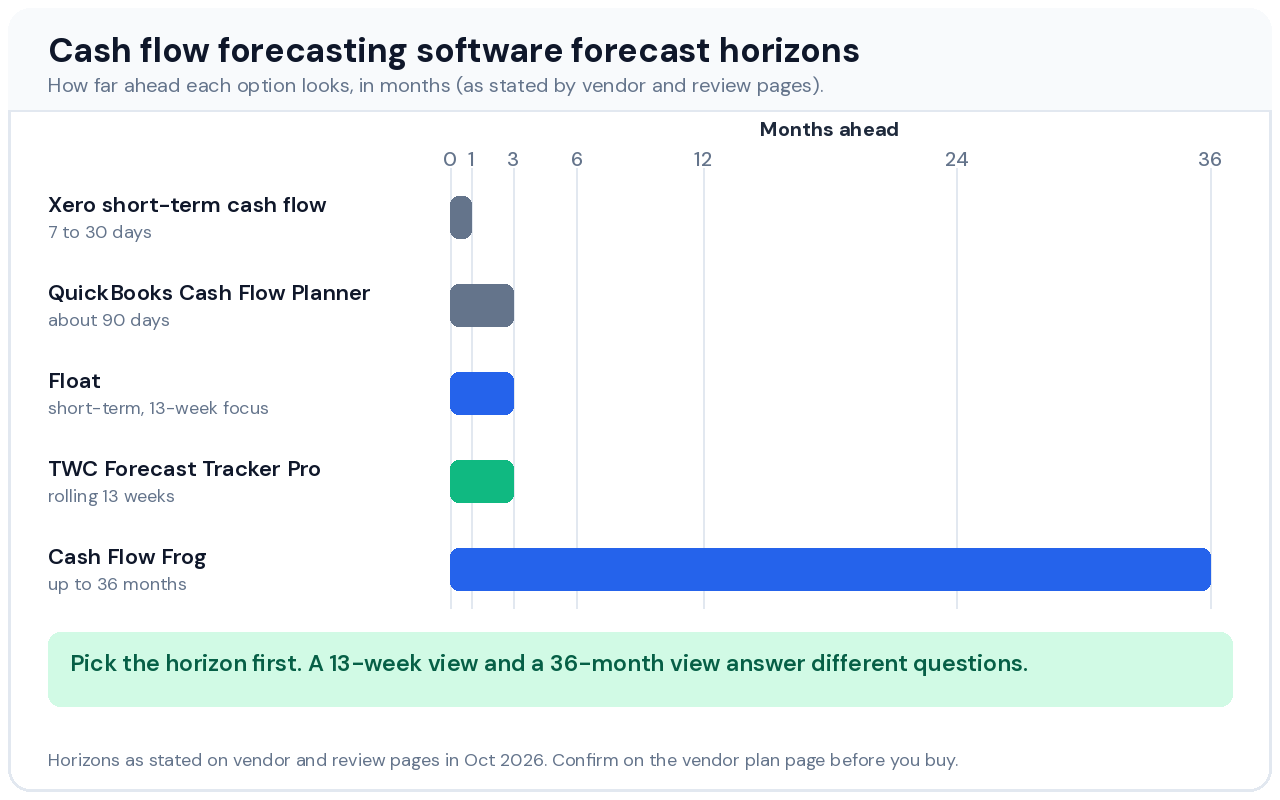
The built-in planners are shorter than most people assume. Finance MOT’s comparison puts the QuickBooks Online Cash Flow Planner at about 90 days. Xero’s short-term view runs 30 days there and 7 and 30 days in a Helm guide.
Longer isn’t automatically safer. Week 40 of a 52-week forecast is a guess, and a tool that draws it as confidently as week 2 hides that. Choose the longest horizon you’ll genuinely update, not the longest the tool supports.
Annual costs create an edge case. Insurance, software renewals or a tax payment can land in one week of a 13-week window and make that week look like a crisis. Look for a way to spread them into monthly set-asides, which is what the Sinking Funds tab in my cash flow forecast template does.
When you compare cash flow forecasting software, ask each vendor to state the horizon in weeks and months instead of vague terms like long-term.
Step 2: Score Cash Flow Forecasting Software on Six Weighted Criteria
Your task is to score every shortlisted tool from 1 to 5 on the six criteria below, then multiply each score by its weight.
Feature checklists reward whichever vendor ticks the most boxes. A weighted scorecard forces you to decide what matters before you see a demo. These weights suit a freelancer or a team of under ten people, so change them if your situation differs.
- Horizon fit (25%) asks whether the tool’s forecast range matches the sentence you wrote in step 1.
- Data connection (20%) asks how the tool gets invoices, bills and balances, which step 3 covers.
- Back-test result (20%) stays blank until step 4, then reflects how close the forecast came to actual.
- Scenario testing (15%) asks whether you can copy the base forecast, change one input and compare the two without rebuilding anything.
- Export and exit (10%) asks whether you can download your forecast and history as CSV or a spreadsheet.
- Cost versus time saved (10%) uses the break-even formula from step 5.
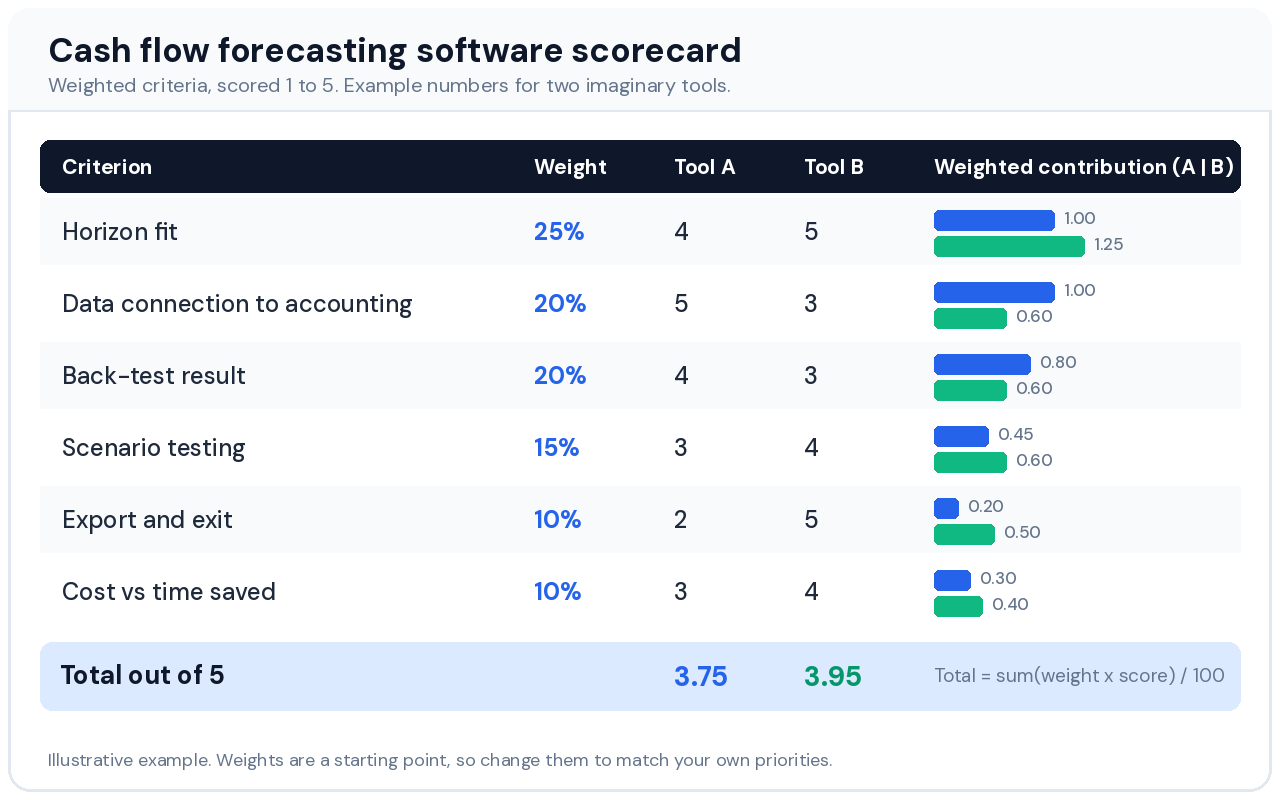
Multiply each score by its weight and divide the sum by 100. In the example above, Tool A scores 3.75 out of 5 and Tool B scores 3.95, a gap small enough that the back-test should break the tie.
I skip any tool that totals under 3.5. That cutoff is my own rule of thumb, not an industry standard.
An accountant running forecasts for thirty clients should raise data connection and export, because setup time multiplies across clients. A seasonal retailer should raise scenario testing. Treat security as pass or fail instead of a weighted score, and drop any tool whose vendor can’t say whether the connection to your accounting data is read-only.
Step 3: Check How Cash Flow Forecasting Software Gets Its Data
Your task is to find out which of three data routes each tool uses: accounting sync, bank feed or manual entry.
Cash flow forecasting software is only as reliable as the data it ingests. Float connects to Xero, QuickBooks Online and FreeAgent, and Cash Flow Frog connects to QuickBooks Online and Desktop, Xero, Sage Intacct, Zoho Books and FreshBooks, with an Excel import for everything else. QuickBooks Online is widely used by US small businesses and Xero is common in the UK and Australia, so check your own system against each list first.
The bigger question is whether a tool forecasts from transactions or from categories. Transaction-level tools place each invoice and bill on its due date, so a large invoice due in week 6 appears in week 6. Category-level tools smooth spending into monthly averages, which hides lumpy weeks.
If a few large invoices carry your month, require transaction-level data. If you process hundreds of small sales, category-level forecasting is usually fine.
Payment Lag: The Setting That Decides Cash Flow Forecasting Software Accuracy
Forecast the date money arrives, not the date you invoiced. Take your last ten paid invoices for each major client, work out the average days between due date and payment, and add that lag to every open invoice. A Net 30 client who pays on day 38 on average should land in your forecast on day 38.
Tools that assume customers pay every invoice on terms will look early by the same margin every week. That’s why I built my tracker around expected payment date instead of invoice date, and why it lets you tag uncertain income as Confirmed, Likely or Possible.
Ask any vendor whether you can override the expected payment date per invoice and whether it lets you weight uncertain income. If the answer is no, you’ll end up adjusting a side spreadsheet by hand.
A Notion freelancer CRM keeps client contact history and follow-ups in one place, so you know who to chase before an invoice goes late.
Opening Balances and Card Payments in Cash Flow Forecasting Software
Opening balances break more forecasts than any formula does. Bank-feed tools reset the balance automatically. Spreadsheet-style tools need a one-time anchor date and a clear rule for rolling it forward, and a tool that asks you to retype the balance every week gets abandoned within a few months.
I split that into two jobs in my tracker. How far forward the forecast projects rolls automatically from today’s date, while you set the opening balance once on an anchor date and the sheet carries it forward.
Credit cards add a second edge case. A card purchase today becomes cash out on the statement due date, so check whether the tool forecasts the card payment as one outflow on that date or counts each purchase when it happens. Counting purchases early makes your cash look thinner than it really is for several weeks.
Cleaner inputs help any tool. Logging invoices with due dates in a freelance invoice tracker and tagging recurring costs in an expense tracker for Google Sheets gives your forecast better data, whichever product you pick.
Step 4: Back-Test Your Cash Flow Forecasting Software on Real Numbers
Your task is to rebuild the last 13 weeks inside each trial, then compare forecast to actual.
A back-test is the fastest way to learn whether cash flow forecasting software can predict your business, and few vendors will run one for you. In the pages I reviewed, I didn’t come across published back-test results for the small-business tools. You’ll have to run your own.
- Pick a start date exactly 13 weeks ago and enter your bank balance for that day.
- Load only what you knew then, meaning invoices already issued, bills already scheduled and recurring payroll. Leave out anything created after the start date.
- Run the forecast and record the closing balance for each of the 13 weeks.
- Compare it to your bank by calculating (actual minus forecast) divided by forecast for every week.
- Count the weeks that land within 10% either way.
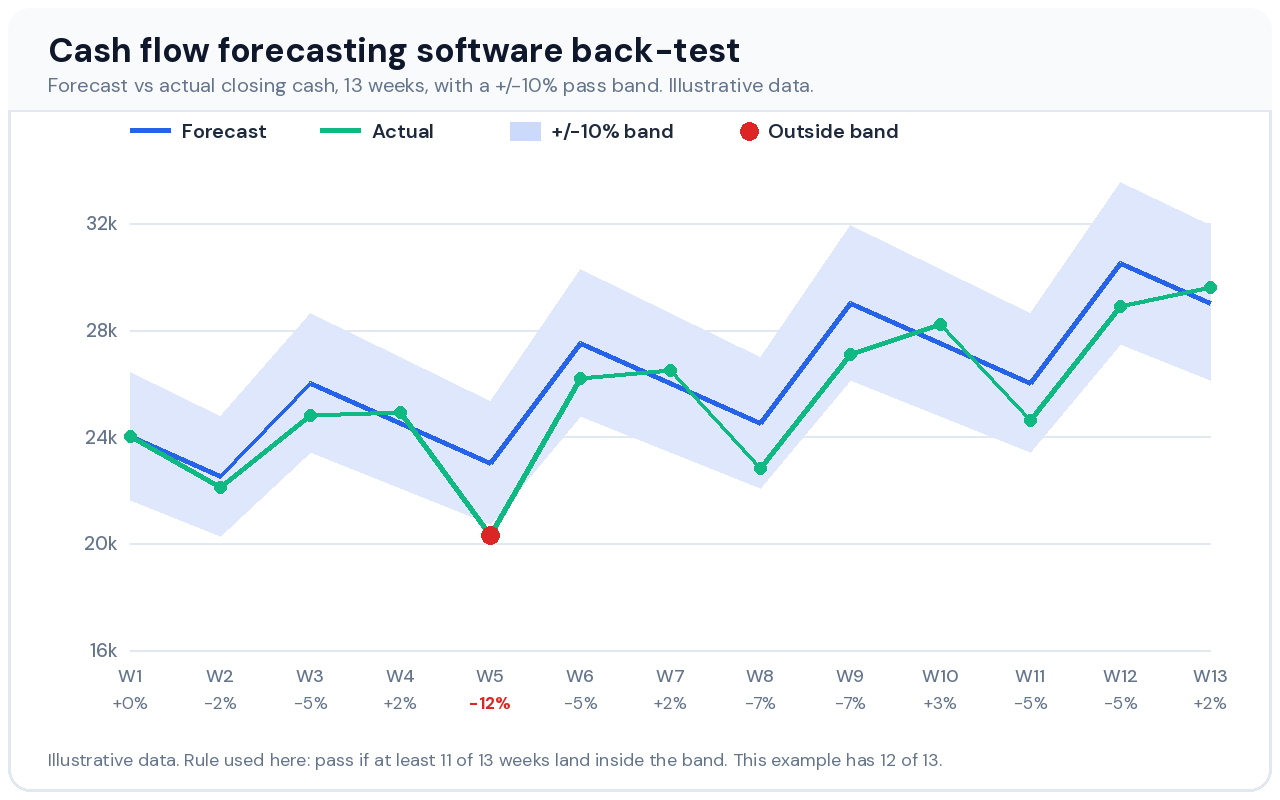
I use 11 of 13 weeks inside plus or minus 10% as the pass mark. It’s a rule of thumb, not an industry standard, so tighten it if your cash is tight and loosen it if your balances swing widely.
Read the misses before you judge the tool. One miss like week 5 in the chart usually traces to a single late invoice, which a payment-lag setting can fix. Misses scattered across many weeks point to missing data, such as bills the tool never saw.
Silent exclusions are the failure to hunt for. While building my tracker, I caught an invoice with a blank expected payment date being quietly marked overdue and dropped from every forecast week. A back-test catches that kind of bug because the weekly totals stop matching your bank.
Nav’s guide lists 14-day and 30-day free trials across tools, but it’s an older page, so confirm current lengths and start on day one. If a trial is too short for 13 weeks, back-test 8 weeks and write that down. Run the same test on a spreadsheet too, because if your own cash flow forecast template fails it, a subscription won’t fix the inputs.
Step 5: Price Cash Flow Forecasting Software Against Your Own Time
Your task is to calculate how many minutes per month the tool must save to pay for itself.
Break-even minutes equal the monthly price divided by your hourly value, multiplied by 60. A tool that G-Accon’s comparison lists at about $29 a month breaks even at roughly 44 minutes a month if your time is worth $40 an hour.
Run the same formula on a pricier tool. At $100 a month and $25 an hour, break-even is 240 minutes, or four hours of saved work every month. If you spend 20 minutes a week updating a spreadsheet, that’s about 80 minutes a month, so the pricier tool doesn’t pay for itself on time alone.
Add the costs vendor pages leave out. Setup hours count, and so do extra user seats and the price jump between plans.
A $29 monthly subscription costs $348 over a year. My Pro spreadsheet costs $9.90 once, with manual entry as the trade-off, which is why break-even minutes matter more than sticker price.
The Export and Exit Test for Cash Flow Forecasting Software
Before paying, export a forecast. If the tool locks your data inside, score it 1 on export and exit, because switching later means rebuilding your history. Check how to cancel before you enter a card.
If your income is irregular, FinCompareLab’s guide to budgeting on irregular income covers the budgeting side that feeds any cash flow forecasting software.
Cash Flow Forecasting Software Compared: Seven Options to Shortlist
This list covers options that suit solo owners, freelancers and small teams, plus the built-in planners most people already have. Enterprise platforms sit in a separate section below, because they need ERP data and implementation projects most small teams don’t have.
| Option | Best for | Connects to | Horizon (as stated) | Price note |
|---|---|---|---|---|
| QuickBooks Online Cash Flow Planner | Existing QuickBooks Online users | QuickBooks Online (built in) | About 90 days | Included with subscription |
| Xero short-term cash flow | Quick checks for Xero users | Xero (built in) | 7 to 30 days | Included with subscription |
| Float | Visual short-term forecasts | Xero, QuickBooks Online, FreeAgent | Short-term, 13-week focus | Confirm on vendor site |
| Cash Flow Frog | Automatic rolling forecasts | QuickBooks, Xero, Sage Intacct, Zoho Books, FreshBooks, Excel import | Up to 36 months | About $29 a month per G-Accon |
| Fathom | Advisors who need reporting | Xero, QuickBooks Online, MYOB | Multi-year | Tiered or quote |
| Dryrun | Agencies and consultants | Not confirmed | Not confirmed | Not confirmed |
| Spreadsheet template | Freelancers who want no subscription | Manual entry (Google Sheets, Excel) | Rolling 13 weeks | Free version, Pro $9.90 once |
Treat every figure above as a starting point. Horizons and prices come from vendor pages and review sites such as Finance MOT, Cube and G-Accon, and page dates vary, so confirm each figure.
QuickBooks Online Planner: Cash Flow Forecasting Software You May Already Own
If you already pay for QuickBooks Online, test the Cash Flow Planner before buying anything. It reads data that’s already in your books, so there’s nothing extra to connect.
- ✅ No extra cost beyond your subscription, according to Finance MOT.
- ✅ Nothing to connect because the data already lives in QuickBooks.
- ⚠️ Short horizon of about 90 days.
- ⚠️ Simple scenarios only, according to Finance MOT.
Xero Short-Term Cash Flow: Built-In Cash Flow Forecasting Software for Quick Checks
Xero’s short-term view suits a weekly sanity check, not planning. Helm’s guide describes 7-day and 30-day views while Finance MOT states 30 days, so confirm the range inside your own Xero account.
- ✅ Included with Xero and sitting next to your invoices.
- ✅ Fast to check because there’s nothing to set up.
- ⚠️ Shortest horizon on this list.
- ⚠️ Limited flexibility, according to Clockwork, a competing vendor that says the built-in views lack weekly granularity and scenario planning.
Float: Cash Flow Forecasting Software for Visual Short-Term Planning
Float draws your future balance as a timeline built from invoices and bills, which makes lumpy weeks obvious at a glance. Cube’s review describes it as strong on 13-week liquidity planning.
- ✅ Clear timeline, which G-Accon rates best for visual tracking.
- ✅ Accounting sync with Xero, QuickBooks Online and FreeAgent.
- ⚠️ Short integration list, so a Sage or Zoho user needs to check first.
- ⚠️ Cash visibility focus, since BigTime’s comparison says it suits teams that need cash visibility rather than full financial forecasting.
Cash Flow Frog: Cash Flow Forecasting Software With the Longest Horizon
Cash Flow Frog lists seven accounting integrations plus an Excel import, and it projects up to 36 months. Its own page cites ratings of 4.6 on the QuickBooks Marketplace and 4.8 on Capterra, and those are self-reported, so check the listings yourself.
- ✅ Broad connections, including an Excel import for everything else.
- ✅ Long horizon for loan applications and growth plans.
- ⚠️ Subscription cost of about $29 a month in G-Accon’s table.
- ⚠️ Soft far months, because months 13 to 36 rest on assumptions you should weight lightly.
Fathom: Cash Flow Forecasting Software for Advisors Who Need Reporting
Fathom links profit and loss, balance sheet and cash flow projections in one three-way forecast, according to Cube’s review. G-Accon positions it for reporting plus forecasting for advisors.
- ✅ Three-way forecasting that ties cash to the other statements.
- ✅ Connections to Xero, QuickBooks Online and MYOB, per G-Accon.
- ⚠️ Reporting-first design means more setup than a solo owner needs.
- ⚠️ Tiered or quote pricing, so it takes a conversation to price it.
Dryrun: Cash Flow Forecasting Software for Scenario Planning
G-Accon recommends Dryrun for agencies, consultants and project-based businesses that compare cash outcomes side by side. I couldn’t confirm its integrations or pricing from the sources I checked, so run the step 4 back-test before relying on it.
- ✅ Scenario focus suits project-based work with lumpy income.
- ⚠️ Unconfirmed details on integrations, horizon and price.
- ⚠️ Single-source recommendation, since only G-Accon’s roundup surfaced it in my research.
Spreadsheet Template: Cash Flow Forecasting Software Without a Subscription
My own cash flow forecast tracker is a Google Sheets and Excel template, not software, so it belongs here with a disclosure. It rolls a 13-week forecast forward from today’s date and weights income as Confirmed, Likely or Possible. You enter data by hand, and there’s no bank sync.
- ✅ One-time $9.90 for Pro, with a free ledger version.
- ✅ Visible formulas, so you can audit every number.
- ⚠️ Manual entry costs minutes every week, which step 5 prices.
- ⚠️ 13-week horizon only, with no multi-year view.
- ⚠️ Seller bias, since I make it, so back-test it like everything else.
Cash Flow Forecasting Software and Cash Flow Forecasting Tools Built for Enterprise Teams
Planful, Vena, Anaplan, Datarails, Cube, Kyriba and HighRadius appear in most roundups. They target finance teams with ERP data, multiple entities or treasury work, and review pages describe Kyriba as a treasury tool. For a solo owner, the implementation effort is hard to justify.
Verdict: Which Cash Flow Forecasting Software to Choose
For most readers of this site, meaning freelancers and teams under ten people, start with a spreadsheet for four weeks and buy software only if the step 5 break-even clears.
- QuickBooks Online users who need 90 days or less should use the built-in planner first, and test Cash Flow Frog if they need to see further.
- Xero users should compare Float and Cash Flow Frog against the built-in view, since its horizon is the shortest here.
- Advisors and bookkeepers serving several clients should shortlist Fathom and raise the export weight in step 2.
- Freelancers with irregular income and no need for bank sync should start with the cash flow forecast template and move to software when weekly entry costs more than the subscription.
Whichever you choose, the decision isn’t final until the tool passes the 13-week back-test.
Cash Flow Forecasting Software vs a Spreadsheet: When to Switch
A spreadsheet and cash flow forecasting software trade different benefits. The spreadsheet gives you visible formulas and no subscription, and the software gives you automatic data and less typing.
Signs You’ve Outgrown a Spreadsheet for Cash Flow Forecasting Software
- Manual entry passes break-even because weekly updates take longer than the minutes you calculated in step 5.
- More than one person edits the forecast, and version conflicts start appearing.
- Multiple entities or currencies need consolidating.
- A lender or accountant asks for forecasts on a schedule, and building them by hand eats a day each time.
How Spreadsheet Forecasts Fail Quietly, and What It Means for Cash Flow Forecasting Software
Spreadsheet forecasts rarely crash. They drift. While building my tracker, I caught a hardcoded range that would have silently stopped counting invoices after row 63, the kind of bug you only notice when the totals are wrong.
Software hides the same risk in different places. Ask what happens to an invoice with no due date, a partial payment or a refund, because a tool that drops them silently will fail your back-test the same way.
My comparison of a Google Sheets budget tracker vs budgeting apps covers the same spreadsheet-versus-app trade-off for personal budgets. Freelancers who track business costs separately can pair a forecast with a freelance expense tracker.
Your First 30 Days With Cash Flow Forecasting Software
Buying the tool is the easy part. The forecast earns its keep only if you maintain it, so schedule the first month before you subscribe.
- In week 1, enter your opening balance, run the 13-week back-test from step 4 and note whether it passed.
- In week 2, apply the average days-to-pay for your five biggest clients and re-run the forecast.
- In week 3, build three scenarios: a base case, a case where your largest client pays 30 days late and a case where that client leaves.
- In week 4, set a minimum cash balance and book 15 minutes every Monday to update actuals and compare them with the forecast.
A floor of one payroll cycle plus four weeks of fixed bills is my working rule, not a standard, and a solo freelancer may prefer a smaller buffer.
After month end, compare the forecast with a cash flow statement template built from your real transactions. The gaps show which categories the forecast keeps missing, and a debt payoff calculator for Google Sheets helps if loan repayments are among them. Once your forecast looks stable, a net worth tracker for Google Sheets shows how that cash builds over time.
A Spreadsheet Alternative to Cash Flow Forecasting Software
Cash Flow Forecast Tracker Pro rolls a 13-week forecast forward from today’s date, weights uncertain income and sets money aside for annual costs. You pay once and enter data yourself.
✓ Confidence-weighted income: Confirmed, Likely, Possible
✓ Sinking Funds for annual and irregular costs
✓ Runway warnings: OK, Low, Negative
✓ Payment-date anchoring with a one-time opening balance
✓ Works in Google Sheets and Excel
✓ One-time payment, no subscription
Get Cash Flow Forecast Tracker Pro →
| Feature | Free | Pro |
|---|---|---|
| Manual weekly cash ledger | ✅ | ✅ |
| Current balance and monthly totals | ✅ | ✅ |
| Balance trend chart | ✅ | ✅ |
| Automated rolling 13-week forecast | ❌ | ✅ |
| Confidence-weighted invoicing | ❌ | ✅ |
| Sinking Funds | ❌ | ✅ |
| Runway warnings | ❌ | ✅ |
Free Option If You’re Not Ready for Cash Flow Forecasting Software
The free Cash Flow Forecast Tracker logs what already happened each week. It tracks the past, and the automated forecast lives in Pro.
✓ Current balance and this month’s income and expenses
✓ Balance trend chart
People Also Ask About Cash Flow Forecasting Software
What Is the Best Cash Flow Forecasting Software for Small Business?
The best cash flow forecasting software for a small business is the one whose horizon, data connection and back-test result fit your numbers. QuickBooks Online users who need about 90 days should start with the built-in planner, and anyone who needs more should test Cash Flow Frog or Float.
- Under 90 days works with the built-in QuickBooks Online or Xero planner.
- 13 weeks to 3 years points to Float or Cash Flow Frog, depending on your accounting system.
- No bank sync needed points to a spreadsheet template with manual entry.
Is There Free Cash Flow Forecasting Software?
Free cash flow forecasting software exists mainly as built-in accounting tools and spreadsheets, because most dedicated tools offer trials instead of free plans. The built-in planners cost nothing extra only because you already pay for QuickBooks Online or Xero.
- Built-in planners come with your QuickBooks Online or Xero subscription.
- Spreadsheet templates cost little or nothing, and my free cash flow forecast template logs the past while forward automation sits in Pro.
- Vendor trials run out, so use them for the 13-week back-test in step 4.
Do QuickBooks and Xero Include Cash Flow Forecasting Software?
Yes, both include basic cash flow forecasting software with a subscription. QuickBooks Online’s Cash Flow Planner looks about 90 days ahead, and Xero’s short-term view covers 7 to 30 days depending on the source.
- Scenario depth stays limited, since QuickBooks supports simple scenarios and the sources I checked don’t document Xero’s.
- Horizon is the real constraint, so match it to your step 1 sentence before you commit.
More Questions About Cash Flow Forecasting Software
How accurate is cash flow forecasting software?
Cash flow forecasting software is only as accurate as the invoice dates, bills and opening balance you feed it. Use 11 of 13 weeks within 10% of your actual bank balance as a pass mark in a back-test, which is a rule of thumb and not a vendor guarantee.
How much does cash flow forecasting software cost?
Cash flow forecasting software runs from planners included with your accounting subscription to monthly plans, and G-Accon’s comparison table lists one small-business tool at about $29 a month. The same table lists Fathom with tiered or quote pricing, so confirm every price on the vendor’s site before you decide.
Can I use Excel or Google Sheets instead of cash flow forecasting software?
Yes, a spreadsheet can replace cash flow forecasting software if you’re willing to enter data by hand. It gives you visible formulas and no subscription, and you can back-test it exactly like any paid tool.
Browse the full Tools Library for more free and Pro templates, or send a question through the contact page.
Alex builds free and Pro Google Sheets and Notion templates for budgeting, habits and freelancing. This guide is educational and isn’t financial advice.