
Notion Free Plan: Stop Hitting These 5 Critical Limits
The Notion free plan stays unlimited for one person and caps your workspace at 1,000 blocks once a second owner joins. Here are the five limits to check first, with the Notion rule behind each one.

13 min read
Is Notion free? Yes, and Notion advertises the Notion free plan at $0, forever, but five limits decide whether it works for you and one changes the moment you add a second person. Every number below comes from Notion’s pricing page and help center, checked on October 15, 2026.
What the Notion Free Plan Includes
The Notion free plan costs $0 per member each month and covers one person’s pages, databases, Notion Calendar, basic forms, basic sites and a limited Notion AI trial. A solo workspace gets unlimited pages and blocks. The limits that matter are 10 guests, 5 MB uploads, 7 days of page history and 1 chart.
Notion describes the plan as built for individuals organizing personal projects and life. Older guides still call it the Notion personal plan or mention the Notion Personal Pro plan, but today’s pricing page lists four tiers: Free, Plus, Business and Enterprise. Searches for the Notion free version or the free tier point at the same $0 plan.
- Unlimited pages and blocks for a workspace with one owner.
- Databases with subtasks, dependencies and custom properties.
- Notion Calendar at no extra cost.
- Basic forms and basic sites, including one notion.site domain.
- A limited trial of Notion AI.
Notion Free Plan Limits at a Glance
Five limits do almost all the damage on the Notion free plan. The graphic below sets each one next to Plus, and the table after it covers the smaller feature gaps.
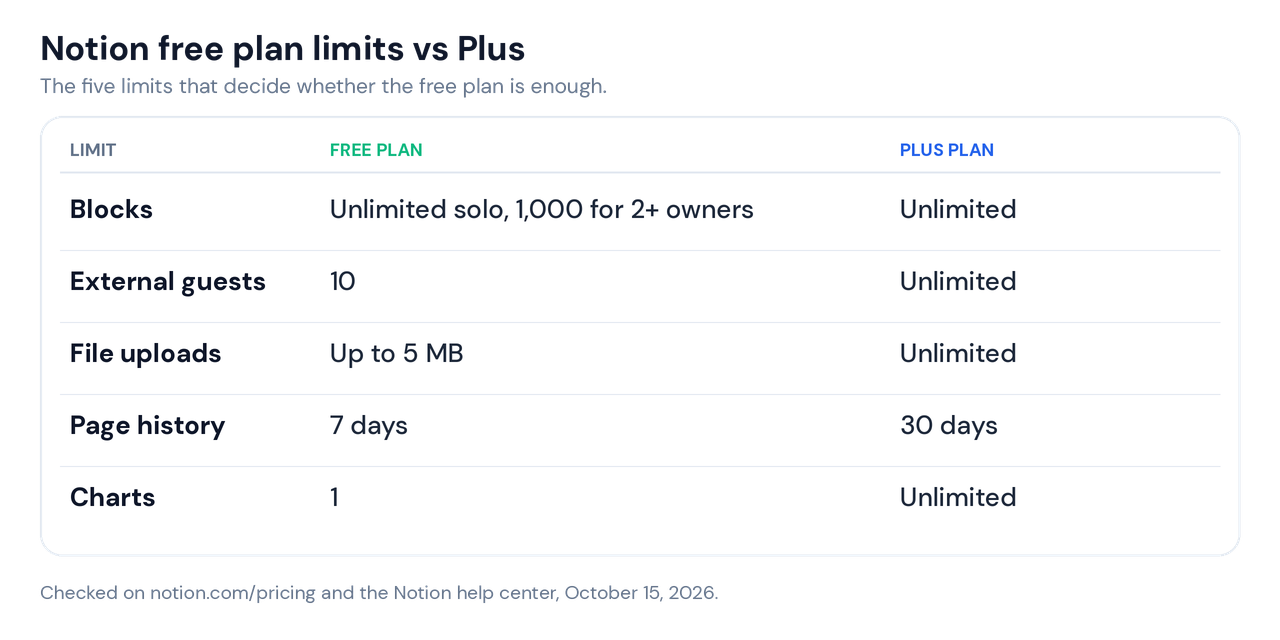
The order they hit depends on how you work. Teams reach the block cap first, people who store scans or recordings reach the 5 MB cap first, and anyone building a dashboard reaches the single chart first.
| Feature | Free plan | Plus plan |
|---|---|---|
| Forms | Basic | Custom |
| Sites | Basic sites | Custom sites |
| notion.site domains | 1 | 5 |
| Search engine indexing | Basic | Advanced |
| Automations | Basic, buttons only | Custom database automations |
| Offline | Choose pages to download | Recents and Favorites download automatically |
| Notion AI | Limited trial | Limited trial |
The Notion Free Plan Block Limit: Why a Second Owner Changes Everything
Notion counts every piece of content you add as a block, and the cap depends on owners, not on how much you write. A Free workspace with one owner has unlimited blocks. Add a second workspace owner and the whole workspace caps at 1,000 blocks.
Notion’s block usage help page adds three details that most guides skip. Deleting content does not lower the count, so cleaning up old notes buys no time. People you add to a Free workspace can only join as owners, and teamspaces don’t count as blocks.
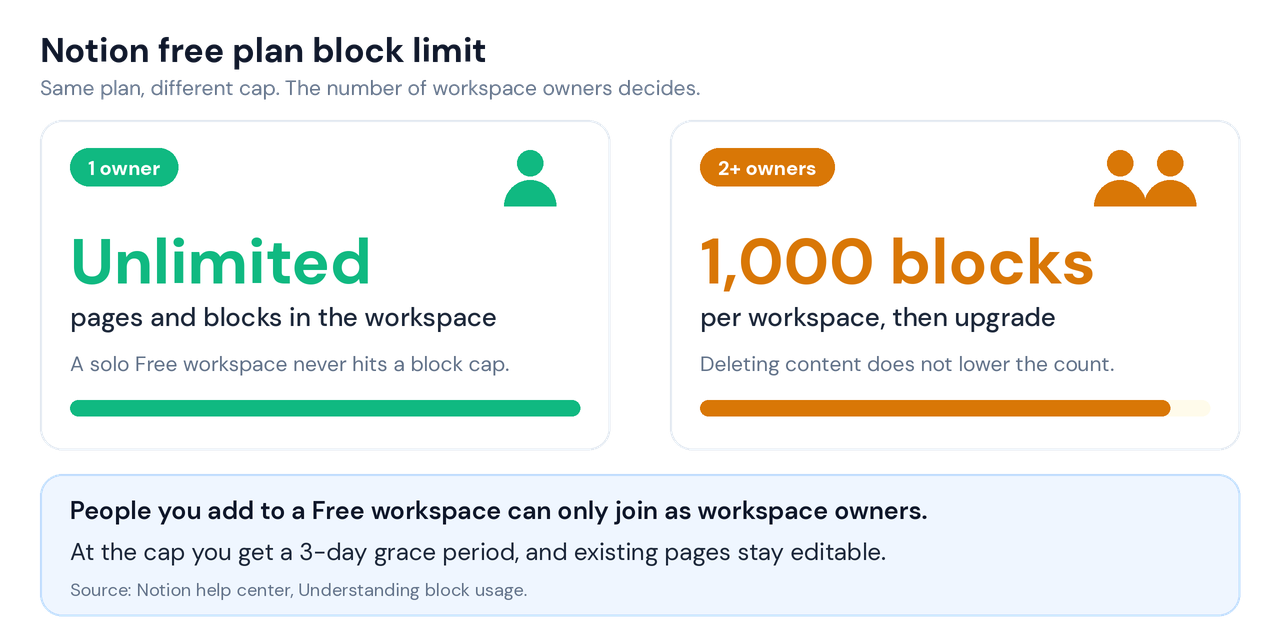
At 1,000 blocks you can still edit what exists, and Notion gives a 3-day grace period to choose your next step. New content stops until you move to a paid plan. You can check your count under Settings, then Upgrade plan.
Notion Free Plan Block Budget for a Two-Person Team
Treat 1,000 as a budget. If each heading, paragraph and bullet counts as one block, a meeting-notes page with a heading, a five-line agenda and 20 bullets lands near 25 blocks. Two people who write five of those pages a week add 125 blocks weekly, so the cap arrives in 8 weeks.
Those are my round numbers, not Notion’s. Your pages will run heavier or lighter, but the arithmetic shows why a shared Free workspace feels fine in week two and stalls in month two.
Check the count before you invite anyone. Open Settings, then Upgrade plan, and note the blocks used. If a shared workspace sits above 600, plan the upgrade or the guest route now.
Notion Free Plan Guests: The 10-Guest Route That Keeps One Owner
The pricing page allows 10 external guests on the Notion free plan. Notion says guests are free of charge, and they can only reach the individual pages you invite them to.
Notion ties the 1,000-block cap to workspace owners, and a guest is not an owner. So inviting a client or a teammate as a guest keeps the workspace at one owner, and the blocks stay unlimited. That reading comes from two Notion statements, because no line says it outright.
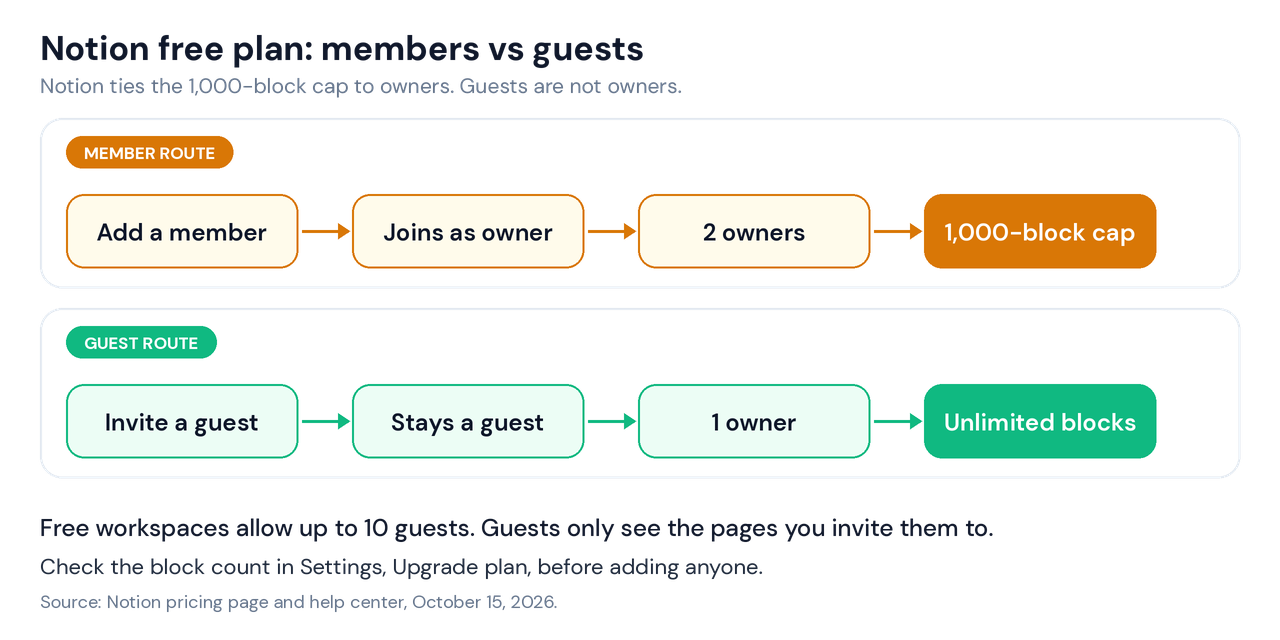
- Client review pages fit the guest route, because the client sees one page and not your workspace. Freelancers who run client work this way can pair it with the Notion freelancer CRM template.
- Shared team wikis break the guest route, because everyone needs the whole workspace.
- Anyone who builds pages across your workspace needs a member seat, and on the free plan that seat is an owner seat.
A freelancer with four active clients uses 4 of the 10 guest slots and stays at one owner. A three-person studio can’t do the same, because two of those people need member seats and the workspace caps at 1,000 blocks.
The pricing page lists the guest limit but not what a guest can edit. Invite one throwaway guest first and test it before you move a team onto this setup.
Notion Free Plan Charts, Forms, Sites and Buttons
One chart sounds tight until you plan a dashboard. Pick the chart that answers your main question, such as spending by month, and show everything else as numbers or progress percentages from formulas.
I use the same three settings in my task databases, and none of them needs a paid feature.
- Child database gets an Is Done formula:
if(prop("Status") == "Done", 1, 0). - Parent database rolls that column up with Sum and names it Done Count.
- Progress uses
if(prop("Task Count") > 0, round(prop("Done Count") / prop("Task Count") * 100), 0).
Free-plan automations stop at buttons. A button can still set a date, so dateAdd(now(), 7, "days") fills a due-next-week date in one click. Custom database automations start at Plus.
Basic forms and basic sites cover a sign-up page or a small public page. Custom forms and custom sites start at Plus, and the free plan includes one notion.site domain where Plus includes five.
Notion Free Plan File Uploads and Page History
The free plan caps uploads at 5 MB, and page history stops at 7 days. Plus removes the upload cap and extends history to 30 days, and Business reaches 90 days.
Link large files from a cloud drive instead of uploading them, and keep images in Notion small. Treat 7 days of history as a recovery window, not an archive. Duplicate a page before a big restructure, and finish the rebuild inside a week so you can still roll back.
Notion Free Plan AI: What the Trial Covers
The Notion free plan includes a limited trial of Notion AI, and Plus carries the same limited trial. Notion Agent and AI Meeting Notes appear on the Business plan. Custom Agents are free to try, then cost $10 per 1,000 monthly Notion credits.
That structure explains why Notion AI pricing guides disagree. Several third-party pages still describe a flat add-on price, while Notion’s own pricing page lists AI by plan and credits. Trust the number on notion.com/pricing and ignore any AI price Notion’s page doesn’t show.
Is Notion Free for Students? Better Than the Notion Free Plan
Yes, and the student route beats Free. Students and teachers at accredited colleges and universities can upgrade to Plus for free when they sign up with a school email address.
The Notion for education plan covers a one-member workspace and allows up to 100 guests. Personal email addresses don’t qualify, and you need to be on the Free plan before you upgrade. Student organizations at select schools can apply for free Plus with unlimited members.
A student on the Notion student plan gets Plus limits, including unlimited uploads and 30 days of page history, while the workspace stays one member. Notion ties the plan to your school email, so check what happens to your workspace when that address expires.
Notion Free vs Paid: Notion Pricing Plans in 2026
Notion pricing runs per member, and guests stay free. The table lists the four Notion plans as shown on notion.com/pricing in US dollars on October 15, 2026.
| Plan | Monthly billing | Yearly billing | Block cap | Built for |
|---|---|---|---|---|
| Free | $0 | $0 | Unlimited solo, 1,000 for 2+ owners | Individuals |
| Plus | $12 per member | $10 per member | Unlimited | Small teams and professionals |
| Business | $24 per member | $20 per member | Unlimited | Growing businesses |
| Enterprise | Custom | Custom | Unlimited | Large organizations |
Notion pricing plans carry one footnote: Plus and Enterprise may not be available for every workspace. Notion Enterprise pricing is custom and goes through sales.
The cheapest paid route past the owner cap is Plus for two people at $20 a month on yearly billing, or $24 on monthly billing. That is the real price of a second owner, so try the guest route first when it fits.
Upgrades on a Notion subscription charge immediately. Downgrades take effect at the end of your billing cycle, according to Notion’s pricing FAQ.
Downgrading to the Notion Free Plan: 4 Checks Before You Switch
A failed payment on your Notion subscription restricts the workspace to limited access for a period, then drops it to Free, per Notion’s pricing FAQ. The pricing page doesn’t say what happens to content that exceeds the free caps, so confirm that with Notion’s help center or support before you downgrade a team workspace.
Count the owners
Open your workspace member list and count owners. Two or more owners puts a Free workspace under the 1,000-block cap.
Count charts and large files
Free allows 1 chart and files up to 5 MB. List every chart view and every upload above 5 MB.
Copy out what needs history
Free keeps 7 days of page history, Plus keeps 30 and Business keeps 90. Duplicate any page where you may need to roll back older edits.
Trim the guest list
Free allows 10 external guests. Cut the list to 10 or fewer before the switch.
Free Notion Templates That Run on the Notion Free Plan
I build my Notion templates to run on the free plan, and the limits above shape several design choices. Searches for free Notion templates and the best free Notion templates return thousands of pages, and many assume a paid plan. Check any template against the five limits before you duplicate it.
- The Life OS runs six databases (Tasks, Projects, Goals, Notes, Habit Log, Daily Log) and a dashboard of five linked views. See the free Notion Life OS template.
- The habit tracker logs each day as one row with select properties. See the Notion habit tracker template.
- The personal CRM reads three properties, Last Contacted, Check-in Frequency and Birthday, to calculate follow-up dates. See the personal CRM Notion template.
- A budget tracker is where the one-chart cap bites first, because budget dashboards tempt people to add a chart per category. See the Notion budget tracker template.
Looking at Notion alternatives free to use? Google Sheets handles number-heavy trackers well. Start with the Google Sheets budget tracker, the Google Sheets expense tracker or the Google Sheets habit tracker, and use the personal finance OS for Google Sheets when you want one finance dashboard.
Notion Free Plan Verdict: Stay Free or Upgrade
Stay on the Notion free plan if you work alone, keep files under 5 MB, and can live with one chart and 7 days of history. Upgrade when a second person needs a member seat, because that single change moves you from unlimited blocks to a 1,000-block cap.
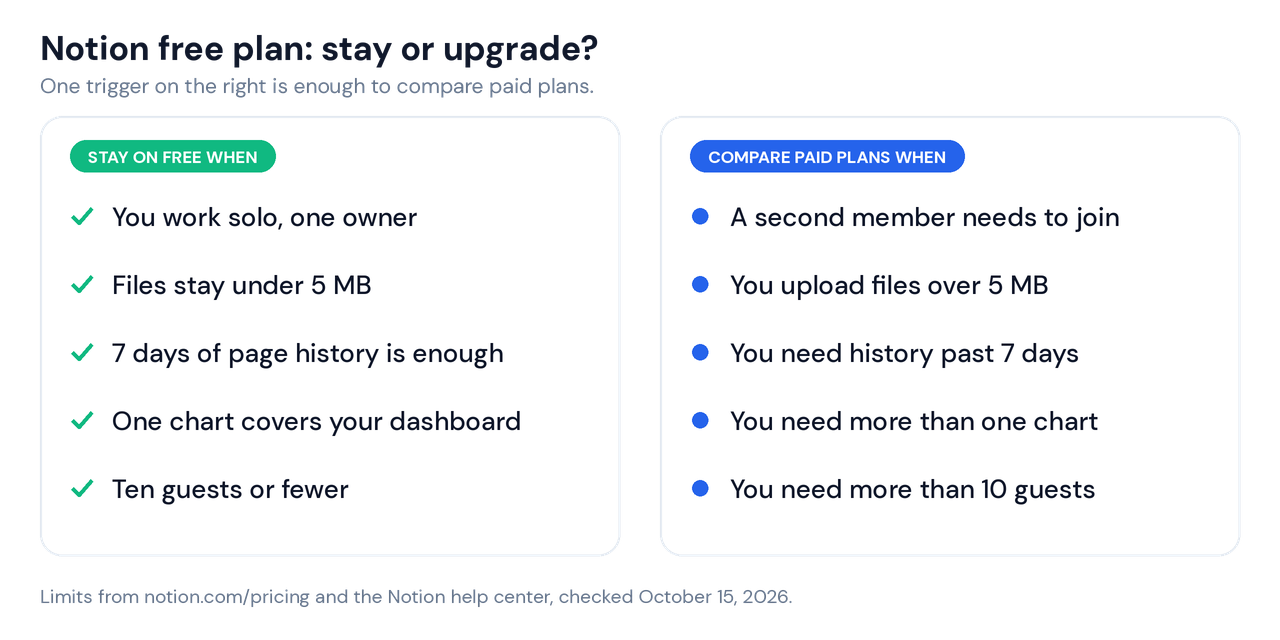
Use this order. Try the guest route first, then compare Plus. If you only need files over 5 MB or 30 days of history, one Plus seat costs $10 a month on yearly billing or $12 on monthly billing.
Threads on r/Notion keep asking the same thing: when does free turn into a bill? The owner count decides it.
Notion Free Plan Questions Answered
What are the limitations of Notion’s free version?
The Notion free version caps guests at 10, uploads at 5 MB, page history at 7 days and charts at 1, and it limits workspaces with 2+ owners to 1,000 blocks. Solo workspaces keep unlimited blocks. Plus lifts the guest, upload and chart limits and extends history to 30 days.
How long can I use Notion for free?
As long as you like, because Notion advertises personal use at $0, forever. The Free plan itself carries no trial period on the pricing page, and Notion labels only Notion AI a trial.
Is Notion free to use anymore?
Yes, Notion’s pricing page still lists the Free plan at $0 per member each month for individuals. The worry usually comes from price complaints on r/Notion, and those concern paid plans.
Notion Free Plan FAQ
Is the Notion free plan worth it?
The Notion free plan is worth it for one person who keeps files under 5 MB and needs at most one chart. It gives unlimited pages and blocks, databases, Notion Calendar and a limited Notion AI trial for $0. It stops paying off when a second owner joins and the 1,000-block cap applies.
What does the Notion free plan include?
The Notion free plan includes unlimited pages and blocks for a single owner, databases with subtasks and dependencies, Notion Calendar, basic forms, basic sites with one notion.site domain, and a limited Notion AI trial. It also allows 10 external guests and keeps 7 days of page history.
Is the Notion free plan overkill for personal use?
No, the Notion free plan fits personal use because Notion built it for individuals organizing personal projects and life. Overbuilding is the real risk. Start with one database, and add a second only after you open the first one every week.
Is Notion free for students?
Students skip the Notion free plan and get Plus for free through Notion’s education plan with a school email address. The workspace holds one member and allows up to 100 guests. Personal email addresses don’t qualify.
Notion free vs paid: when does the Notion free plan stop working?
The Notion free plan stops working when a second owner joins, a file tops 5 MB, you need more than 7 days of history, or you need more than one chart or 10 guests. Any one trigger justifies comparing Plus, which costs $10 per member each month on yearly billing or $12 on monthly billing.
What happens when the Notion free plan hits 1,000 blocks?
A Free workspace with two or more owners can’t create new content after 1,000 blocks. Notion gives a 3-day grace period and lets you keep editing existing pages. Deleting content doesn’t lower the count, and Notion’s help center points to a paid plan to keep creating.
Are there Notion alternatives free to use?
Yes, and Google Sheets is the one I’d compare first for number-heavy trackers like budgets and expenses. Notion’s own education plan also covers students. I build trackers for both Google Sheets and Notion, so those are the two I can speak to.
Does the Notion free plan include Notion Calendar?
Yes, Notion’s pricing page lists Notion Calendar in the Free column at no extra cost. It sits alongside databases, basic forms and basic sites in the Free column.
Does the Notion free plan include Notion AI?
The Notion free plan includes a limited trial of Notion AI, not full access. Notion lists Notion Agent and AI Meeting Notes on the Business plan, and Custom Agents cost $10 per 1,000 monthly Notion credits after a free try.
Can I invite people on the Notion free plan?
Yes, the Notion free plan allows up to 10 external guests, and guests reach only the pages you invite them to. Adding someone as a member makes them a workspace owner on Free, which applies the 1,000-block cap. Test one guest first to confirm what they can edit.
Alex builds free and Pro Google Sheets and Notion templates at Tools Without Code.