
Cash Flow Statement Template: 8 Critical Mistakes to Avoid
This cash flow statement template turns one transaction log into a full statement of cash flows, month by month, with built-in checks that catch the 8 filing mistakes behind most broken DIY statements. Built for US small business owners, freelancers and bookkeepers, with UK and Australian fiscal years supported.

19 min read
What’s in this guide: a free cash flow statement template for Google Sheets and Excel, the 8 transactions people file in the wrong section (and how the template catches each one), a real cash flow statement example for a small design studio, and a direct vs indirect reconciliation you can check to the cent.
Contents
- What Is a Cash Flow Statement Template?
- 8 Critical Mistakes a Cash Flow Statement Template Should Catch
- How This Cash Flow Statement Template Builds Itself
- The Statement of Cash Flows Inside the Cash Flow Statement Template
- Cash Flow Statement Template: Direct vs Indirect Method
- Why Profit Isn’t Cash in a Cash Flow Statement Template
- How to Fill In the Cash Flow Statement Template in 20 Minutes
- Using a Cash Flow Statement Template for a Bank Loan
- Cash Flow Statement Template vs Accounting Software
- Download the Cash Flow Statement Template
- People Also Ask
- Cash Flow Statement Template FAQ
What Is a Cash Flow Statement Template?
Direct answer: A cash flow statement template is a pre-built spreadsheet that sorts every dollar entering or leaving a business into three sections, operating, investing and financing, then reconciles opening cash to closing cash for each period. A well-built cash flow statement template does the sorting from a transaction log and flags misfiled entries automatically, every month, before they reach your totals.
Most templates you’ll find online are blank grids. You add up each month’s sales, type the total into a row labelled “Cash from customers,” and repeat for every line. The cash flow statement template on this page works the other way around.
You log each transaction once, pick a category, and the category decides the section. The statement, the monthly totals and the closing balance all build themselves from that log.
What is a cash flow statement, in plain terms?
What is a cash flow statement? It’s the one financial report that ignores invoices, accruals and depreciation and tracks only money that actually moved.
The income statement tells you whether you made a profit. The statement of cash flows tells you whether you can pay rent next month.
Those two answers disagree more often than people expect. A studio can post a healthy profit in March and still be short on cash in April because a client pays on 60-day terms and a new printer went on the card.
Who this cash flow statement template is for: US sole proprietors and LLC owners, freelancers who’ve outgrown a freelance expense tracker in Google Sheets, bookkeepers who prepare monthly reports for clients, and anyone a lender has asked for “a cash flow statement.”
8 Critical Mistakes a Cash Flow Statement Template Should Catch
Every one of these comes up again and again in accounting-software forums. In QuickBooks Community threads, users describe depreciation landing in the investing section with no way to reclassify it. A landlord with five rental properties found one property’s mortgage principal sitting in investing while the other four sat in financing.
If paid accounting software gets these wrong, a hand-built spreadsheet has no chance without guardrails. Each mistake below covers why it happens and how the template handles it.
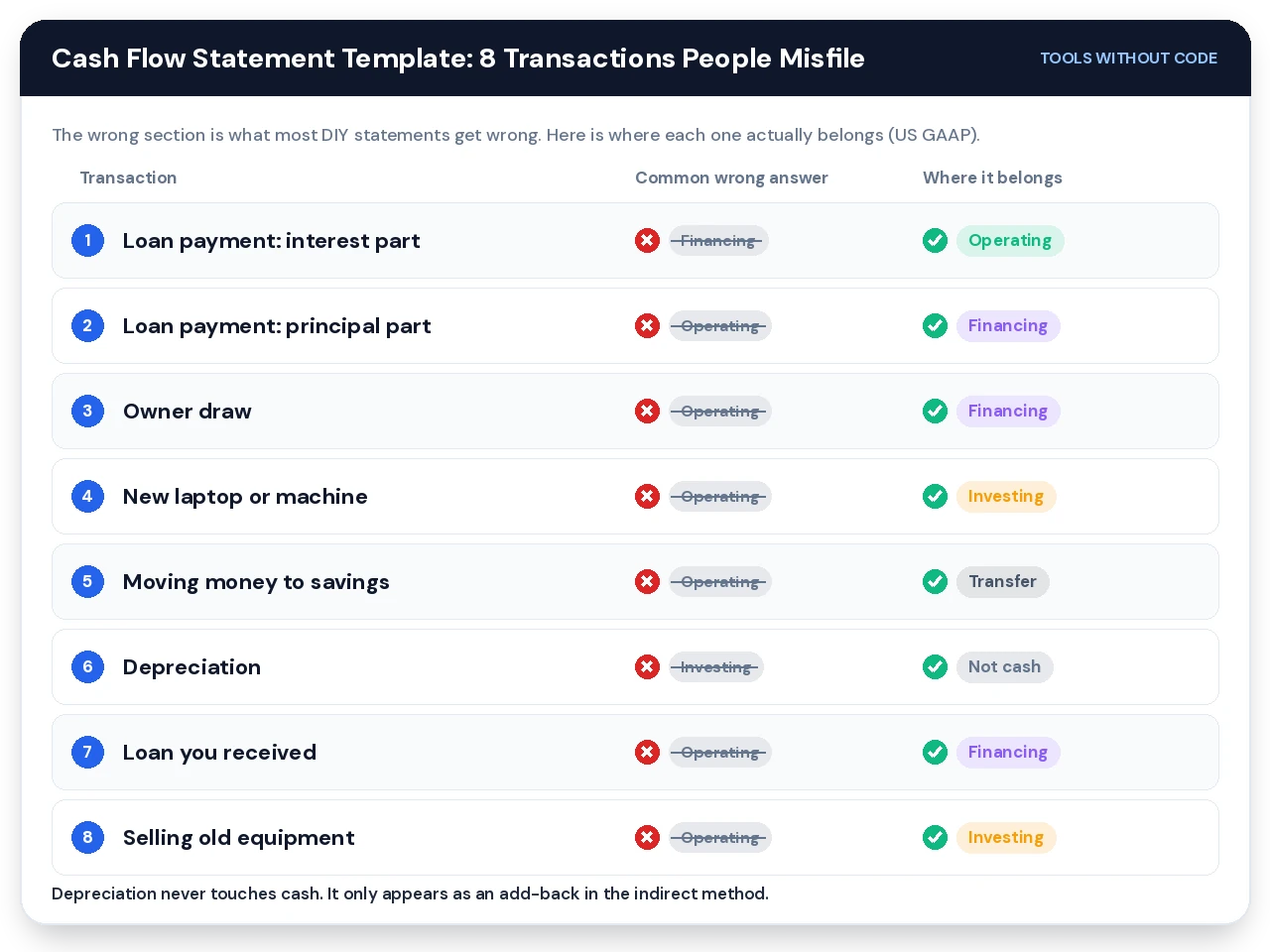
Filing the whole loan payment as one line
A $618 loan payment is usually two separate amounts. The interest part is an operating cost under US GAAP, and the principal part is a financing outflow because it pays back borrowed money.
The template ships with separate Loan Interest and Loan Principal Repayment categories. Your lender’s monthly statement shows the split, so log two rows on the same date. The debt payoff calculator in Google Sheets shows the same split for every month of a loan if you want to plan ahead.
Treating owner draws as an expense
Money you take out for yourself isn’t a business cost, so it doesn’t belong in operating. It’s a financing outflow, the mirror image of money you put in.
This matters more than it looks. File $60,000 of draws as operating and your operating cash flow drops by $60,000, which is the first number a lender reads.
Expensing a laptop or machine
A $2,400 laptop you’ll use for three years is an investing outflow. Putting it in “Office supplies” makes operating cash look worse in the month you bought it and hides your real capital spending.
The Pro version adds a CapEx? column on Setup, so free cash flow subtracts only long-life asset purchases. Buying a term deposit is also investing, but it isn’t CapEx, and the template keeps the two apart.
Counting a savings transfer as income
Moving $2,000 from checking to savings changes nothing about your business cash. One QuickBooks user found their cash flow graphic counting both the deposit and the transfer as money in.
The template has a Transfer section that sits outside operating, investing and financing. Log both sides on the same date and a check cell confirms they net to zero every month.
Putting depreciation anywhere in the direct method
Depreciation never touches your bank account. It has no place in a direct-method statement at all, and it only appears in the indirect method as an add-back to net income.
The template never asks you to log depreciation as a transaction. In Pro, it goes on the Balance Inputs tab, where the indirect method picks it up.
Calling a loan you received revenue
A $25,000 bank loan lands in your account like a big sale, and it feels like one. It’s a financing inflow, and you’ll pay it back.
File it as revenue and your statement shows a record month in operating that never happened. The Loan Received category sends it straight to financing.
Logging an equipment sale as a sale
Selling your old $1,200 printer brings in cash, but it isn’t trading revenue. It’s an investing inflow, the reverse of the original purchase.
Mixing it into sales inflates operating cash for one month and makes year-over-year comparisons misleading. The Equipment Sale category keeps it in investing.
Leaving transactions uncategorized
The quietest mistake is a blank category. A row with an amount but no category disappears from a typical statement, and the closing balance stops matching the bank.
The template marks those rows Unmapped and turns a check cell red. It also flags rows with a missing date, a date typed as text, or no amount.
IFRS readers (UK and Australia): interest and dividends have more classification choice today, and that choice narrows from 2027. Change the Section cell on Setup to match your accountant’s policy. The template follows US GAAP defaults out of the box.
How This Cash Flow Statement Template Builds Itself
The engine is a single Setup table. Each category has one Section cell set to Operating In, Operating Out, Investing, Financing or Transfer.
Change one Section cell and every past transaction in that category moves with it. That’s the fix QuickBooks Online users kept asking for when support told them the report layout couldn’t be reclassified.
The Transactions tab takes 1,000 rows, which is roughly three years of activity for a business with 25 to 30 transactions a month. Five blue columns are yours: date, description, category, money in and money out.
Grey columns work out the section, the month, the fiscal year and the net amount. You never type in them, so there’s nothing to break.
A full-year cash flow statement example: Maple Lane Studio
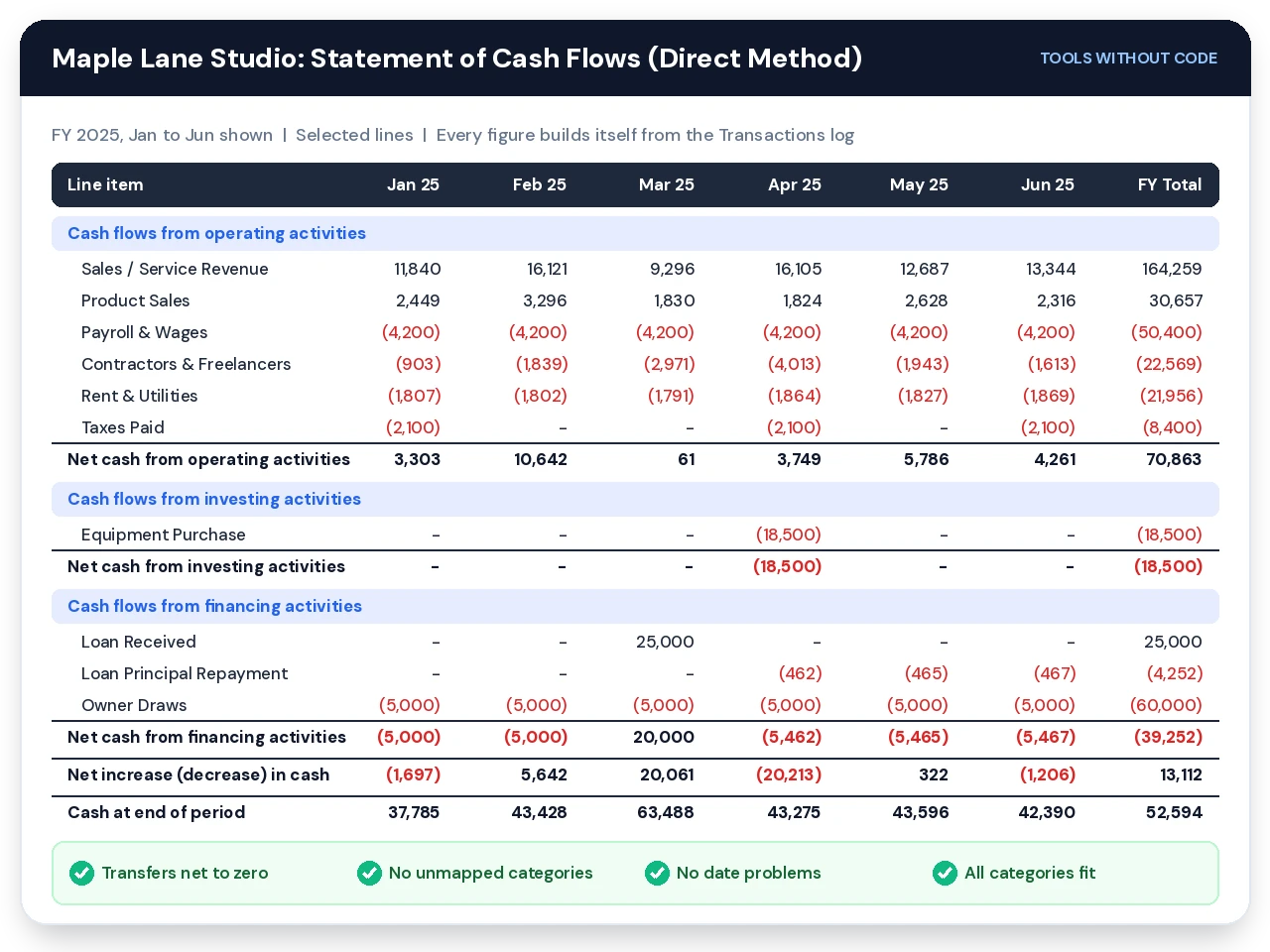
Both versions ship with a real cash flow statement example already filled in. Maple Lane Studio is a fictional two-person design studio with 504 transactions across 2024 and 2025, a $25,000 loan, an $18,500 printer purchase, owner draws and quarterly transfers to savings.
| FY 2025 line | Amount | What drove it |
|---|---|---|
| Net cash from operating activities | $70,863 | $164,259 of client revenue less payroll, contractors and rent |
| Net cash from investing activities | ($18,500) | One large-format printer in April |
| Net cash from financing activities | ($39,252) | $25,000 loan in, $60,000 of owner draws and $4,252 of principal out |
| Net increase in cash | $13,112 | Opening $39,483, closing $52,594 |
This cash flow statement example is useful for another reason. Look at April, when the printer and a tax payment hit together: net cash fell $20,213 in a single month while the business stayed profitable.
Clear the sample when you’re ready and your own numbers take its place. If you mainly want to see where monthly spending goes, the expense tracker Google Sheets template is the lighter tool for that job.
The Statement of Cash Flows Inside the Cash Flow Statement Template
A statement of cash flows always has the same three sections, in the same order. The order isn’t decoration, because operating cash flow is the section people read first.
| Section | What goes in | What it tells a reader |
|---|---|---|
| Operating | Customer receipts, supplier and payroll payments, rent, taxes, loan interest (US GAAP) | Whether the day-to-day business produces cash on its own |
| Investing | Equipment and vehicle purchases and sales, investments bought and sold | How much you’re putting into long-life assets |
| Financing | Loans in, principal out, owner contributions, owner draws, dividends | How the business is funded and what it pays back |
Below the three sections, the cash flow statement template adds net change in cash, opening cash and closing cash. Closing cash for each month equals opening cash plus the net change, and next month’s opening cash is calculated independently from the log.
When those two numbers disagree, something is unmapped. That independent calculation is why the checks can catch errors a single running total would hide.
Why the statement of cash flows needs checks, not just totals
A statement of cash flows can add up perfectly and still be wrong. If a $3,000 transfer is logged on one side only, every total still sums, and the only symptom is a closing balance that doesn’t match your bank.
This cash flow statement template runs four checks every month on the Free version and six on Pro. The transfer check tests each month on its own, so a +$3,000 error in September and a −$3,000 error in December can’t cancel each other out.
Cash Flow Statement Template: Direct vs Indirect Method
The direct method lists actual cash received and paid, line by line. It’s the easiest version to read and the natural output of a transaction log, which is why every version of the template produces it.
The indirect method starts from net income and works backward to cash. Accountants prefer it because it shows exactly why profit and cash differ.
| Question | Direct method | Indirect method |
|---|---|---|
| Starts from | Cash receipts and payments | Net income |
| Needs a balance sheet? | No | Yes: receivables, payables, inventory, accruals |
| Easiest for owners to read | Yes | Less so |
| What accountants expect | Sometimes | Usually |
| In this template | Free and Pro | Pro, reconciled to the direct method |
Cash flow statement indirect method, reconciled to the cent
The cash flow statement indirect method only works if the working-capital changes are right. Pro’s Balance Inputs tab takes month-end balances for accounts receivable, inventory, prepaid expenses, accounts payable and accrued expenses, plus depreciation and your accountant’s net income.
A blank month carries the previous balance forward, so you only enter what changed. If you track client invoices in the freelance invoice tracker for Google Sheets, its unpaid total at month end is your receivables figure.
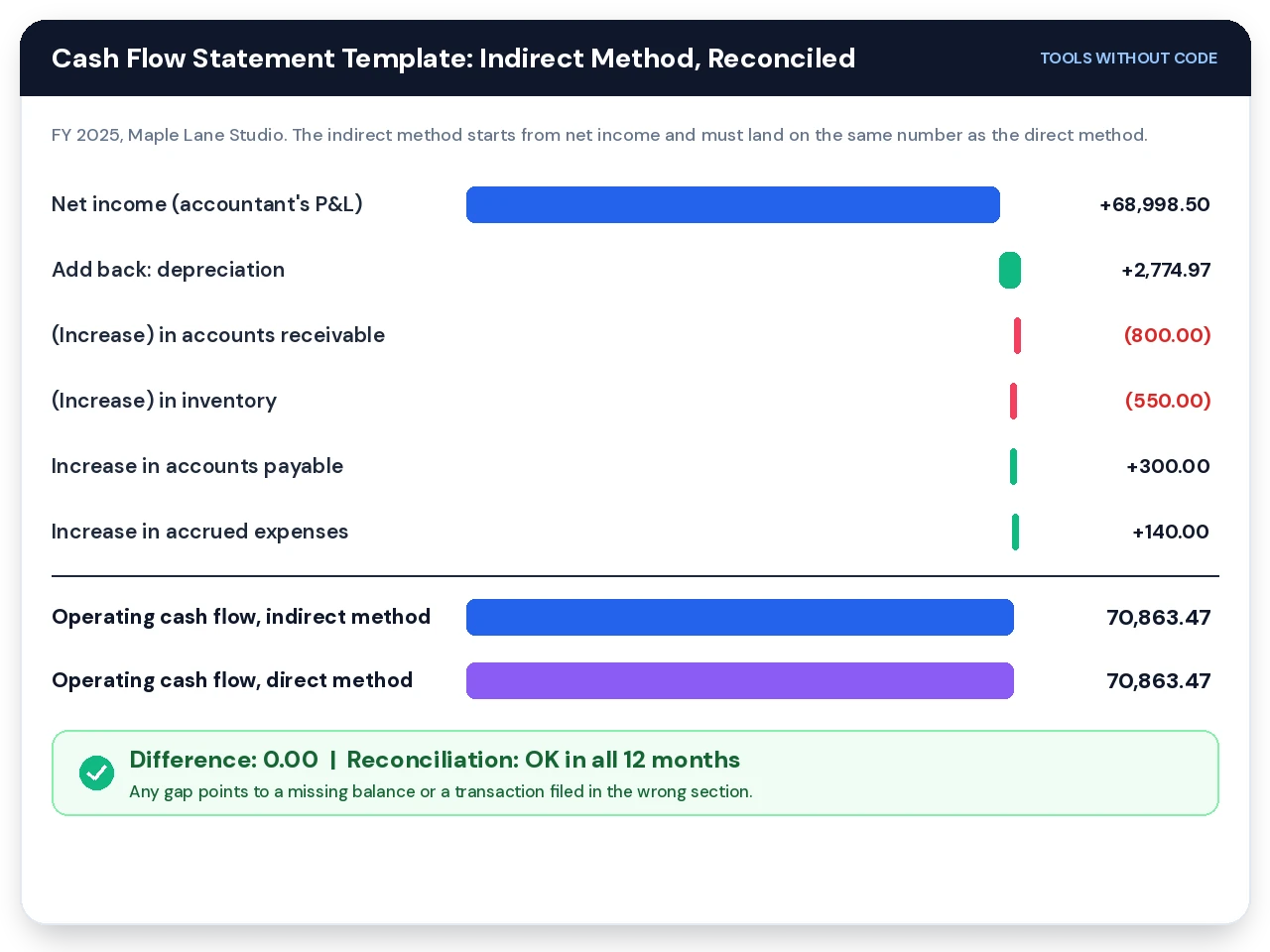
Then the template compares the two operating cash figures every month. A difference of zero means your balances and your transaction log tell the same story.
A gap of, say, $450 in one month usually means a customer payment was filed under the wrong category or a receivable balance was entered for the wrong date. That monthly reconciliation is the feature Xero users have been requesting on the vendor’s product ideas board since December 2019.
The 2027 change for IFRS reporters: IFRS 18 applies to annual periods starting on or after January 1, 2027, and it makes operating profit the single starting point for the indirect method, according to the IFRS Foundation’s IAS 7 standard page. KPMG’s summary covers the interest and dividend changes. US GAAP small businesses aren’t affected, but a cash flow statement template built for UK or Australian reporting should start the indirect method from operating profit from 2027.
Why Profit Isn’t Cash in a Cash Flow Statement Template
Maple Lane Studio’s cash-basis profit for 2025 was $70,863. Its bank balance rose by only $13,112. The Pro version’s P&L Summary tab has a bridge that explains the $57,751 gap in four lines.
| Bridge line | FY 2025 | Why it isn’t on the P&L |
|---|---|---|
| Net profit (cash basis) | $70,863 | Starting point |
| Plus: asset sales and investments cashed in | $0 | Selling an asset isn’t revenue |
| Less: equipment and investments bought | ($18,500) | A printer is an asset, not an expense |
| Plus: loans received and owner contributions | $25,000 | Borrowed money isn’t income |
| Less: principal, owner draws and dividends | ($64,252) | Paying back debt or paying yourself isn’t a cost |
| Net increase in cash | $13,112 | Matches the Statement tab |
Owners who only watch profit get blindsided by the bottom two lines. If you’re planning a big owner draw, the bridge shows in advance how much of this year’s profit is already spoken for.
For the forward-looking version of this question, the 13-week cash flow forecast template projects the next quarter. Use the statement to explain last quarter and the forecast to plan the next one.
How to Fill In the Cash Flow Statement Template in 20 Minutes
These settings match the order of the Setup tab. Getting steps 2 and 3 right saves most of the checking later.
Look around the sample first
Open the Statement tab and click through a few months before deleting anything. Two years of sample data show you what a finished statement looks like, including a month where cash fell while profit didn’t.
Set the fiscal year and opening cash
On Setup, enter the fiscal year start month (1 for January, 7 for July, 4 for an April UK tax year) and the report year. Then enter your total cash across every business account and the date it applies to.
Pick the day before your first logged transaction. Opening cash of $24,000 on December 31 plus January’s transactions gives January’s closing balance, and every later month follows from there.
Check the 30 default categories
The template ships with 30 categories already mapped: 5 cash-received, 14 cash-paid, 5 investing, 5 financing and 1 transfer. Rename any of them to match your bank’s wording, and add up to 10 more in the blank rows.
The Statement tab has room for 10 cash-received lines, 20 cash-paid lines, 8 investing and 8 financing. A fourth check turns red if you ever map more categories to a section than it can show.
Clear the sample and log your own rows
In Google Sheets with the Pro script installed, use Cash Flow Statement > Clear sample data. In Excel or the Free version, select Transactions B5:F1004 (B5:I1004 in Pro) and press Delete.
Most owners start with the last full quarter. Three months of bank rows is enough to produce a first statement you can sanity-check against your bank balance.
Let Bank Import do the typing (Pro)
Paste your bank’s CSV rows into Bank Import with dates, descriptions and signed amounts. Keyword rules on Setup suggest a category, so a description containing “GUSTO” becomes Payroll & Wages without you touching it.
If two keywords match, the lower rule wins. Put “INTEREST” high in the list and “LOAN INT” below it, and loan interest stops landing in interest income.
Read the checks before the numbers
Scroll to the bottom of the Statement tab. When every check says OK, the statement balances, and only then is it worth reading the section totals.
Freelancers who already log income elsewhere can skip some typing. The free budget tracker for Google Sheets covers personal money, and it’s worth keeping business and personal cash in separate files so owner draws show up cleanly in financing.
Using a Cash Flow Statement Template for a Bank Loan
When a lender asks for a cash flow statement, the operating section matters most. It shows whether the business generates cash without leaning on loans or asset sales.
A profitable business with negative operating cash flow raises questions, so be ready to explain it. Seasonal businesses in particular should expect the conversation.

Pro’s Print Statement tab produces one clean page for any month, quarter or full year. Lines flow around the categories you actually use, so there are no blank gaps between sections on the printed page.
A notes box sits under the totals. Use it for context a number can’t give, such as “April includes a one-off $18,500 printer purchase funded by a term loan.”
Use the template to support a loan application, alongside your accountant. Many lenders also want a profit and loss statement, a balance sheet and tax returns, and some require statements prepared or reviewed by a CPA. Ask your lender which documents they accept before you send anything.
If the lender also asks about what the business owns and owes, a net worth tracker in Google Sheets gives you a simple assets-and-liabilities view. It isn’t a formal balance sheet, but it helps you gather the numbers your accountant will need.
Cash Flow Statement Template vs Accounting Software
QuickBooks and Xero generate a statement of cash flows automatically from your bank feed. For a business already paying for them, that report is usually the right starting point.
The trouble starts with classification. Their report layouts decide where each account lands, and forum threads show owners stuck when the software files depreciation, deferred tax or mortgage principal in the wrong section.
| Criteria | This cash flow statement template | Accounting software |
|---|---|---|
| Cost | Free, or one-time Pro purchase | Monthly subscription |
| Bank feed | CSV paste (Pro) | Automatic |
| Reclassify a category | One cell, applies to all history | Depends on report layout options |
| Direct method | Yes | Often indirect only |
| Direct vs indirect check | Every month (Pro) | Rarely shown |
| Best for | Owners, freelancers, lender packs | Businesses with payroll, inventory and an accountant |
There’s a middle path if you want bank transactions to flow into a spreadsheet automatically. Tiller Money feeds bank data into Google Sheets for a subscription, and you could paste its transaction rows into this cash flow statement template.
Still weighing spreadsheets against apps in general? The Google Sheets budget tracker vs apps comparison covers the trade-offs for personal budgets, and most of them apply to business cash too.
Download the Cash Flow Statement Template
Cash Flow Statement Pro
Everything in the free cash flow statement template, plus the indirect method, the lender-ready print page and a dashboard that shows free cash flow and year-over-year change at a glance.
✓ One-page print for any month, quarter or year
✓ Bank CSV import with keyword rules
✓ Dashboard with 6 health checks
✓ Tags, FX rates and cash-basis P&L
15% off applied at checkout: $9.90 becomes $8.42, one-time. No subscription, and the file is yours to keep and edit.
| Feature | Free | Pro |
|---|---|---|
| Direct method statement, 12 months | ✓ | ✓ |
| Editable category mapping | ✓ | ✓ |
| Monthly health checks | 4 | 6 |
| Indirect method + reconciliation | – | ✓ |
| Print Statement (month, quarter, year) | – | ✓ |
| Dashboard, free cash flow, vs last year | – | ✓ |
| Bank Import, tags, foreign currency | – | ✓ |
| P&L Summary and Annual Summary | – | ✓ |
Free Cash Flow Statement Template
Four tabs, the direct method, four monthly checks and a full cash flow statement example preloaded. No email required.
✓ 1,000 transaction rows
✓ Sample data you can clear in one step
Next step: once your cash flow statement template balances, the Personal Finance OS for Google Sheets keeps household money separate from the business, and freelancers juggling clients can pair it with the Notion freelancer CRM template.
People Also Ask About the Cash Flow Statement Template
How do you make a cash flow statement?
To make a cash flow statement, list every cash receipt and payment for the period, sort each into operating, investing or financing, total each section, and add the net change to your opening cash. A cash flow statement template does the sorting and totals from a transaction log.
- Gather bank records for every business account, including savings.
- Split loan payments into interest (operating) and principal (financing).
- Check the closing figure against your actual bank balances.
What are the 3 sections of a cash flow statement?
The 3 sections of a cash flow statement are operating activities, investing activities and financing activities. Operating covers day-to-day trading, investing covers long-life assets, and financing covers loans, owner money and dividends.
| Section | Typical inflow | Typical outflow |
|---|---|---|
| Operating | Customer payments | Payroll, rent, suppliers |
| Investing | Selling equipment | Buying equipment |
| Financing | Loan received | Owner draws, principal |
Is a cash flow statement the same as a cash flow forecast?
No, a cash flow statement records cash that already moved, while a cash flow forecast projects cash you expect to receive and spend. Most small businesses use both, the statement to explain the past and the forecast to plan the next 13 weeks.
Our cash flow forecast template handles the forward-looking side, and it pairs with this cash flow statement template.
Cash Flow Statement Template FAQ
Is this cash flow statement template really free?
Yes, the free cash flow statement template is free to copy and keep, with no email sign-up. It includes the direct method, four checks and the sample data. Pro is a separate one-time purchase for the extra tabs.
Does the cash flow statement template work in Excel?
Yes, the cash flow statement template works in Excel 2016 and later as well as Google Sheets. It uses only classic functions such as SUMIFS and INDEX/MATCH. Pro’s three menu buttons (Bank Import transfer, sort and clear) need Google Sheets because they run on Apps Script.
What does a cash flow statement example for a small business look like?
A useful cash flow statement example for a small business shows all three sections with real activity, such as the Maple Lane Studio sample in this template. It includes a loan, an equipment purchase and owner draws, which are the lines owners most often misfile.
Should I use the direct or indirect method?
Use the direct method if you want a statement you can read and explain yourself. Add the indirect method when your accountant or lender asks for it, and the cash flow statement template reconciles the two so you know both are right.
Where do owner draws go on a statement of cash flows?
Owner draws go in the financing section of a statement of cash flows. They’re money the owner takes out, not a business expense, so they never reduce operating cash flow.
Where does loan interest go?
Under US GAAP, loan interest paid goes in operating activities and the principal goes in financing. The cash flow statement template ships with separate categories for each. IFRS reporters have different rules, which tighten from 2027.
How often should I update the cash flow statement template?
Update the cash flow statement template monthly, after your bank statements close. Weekly works for businesses with tight cash, and a monthly habit takes most owners 15 to 30 minutes.
Can I change the fiscal year start?
Yes, set any start month on the Setup tab, such as 7 for a July year or 4 for an April year. Every month header, total and fiscal-year label in the cash flow statement template updates automatically.
Can I use the cash flow statement template for rental properties?
Yes, the cash flow statement template works for rentals, and Pro’s tag column lets you label each row by property. Type a property’s tag into the Statement filter to see that property’s cash flow on its own.
What does “Unmapped” mean on the Transactions tab?
Unmapped means the row’s category is blank or doesn’t match any category on Setup. The amount is left out of the statement, and a check turns red until you pick a valid category.
How many transactions can the cash flow statement template hold?
The cash flow statement template holds 1,000 transaction rows, about three years for a business logging 25 to 30 rows a month. Start a new copy each fiscal year if you log more.
Is a cash flow statement template enough for my taxes?
No, a cash flow statement template helps you understand and present cash, but it isn’t a tax return or a substitute for tax advice. Your tax preparer will work from your income, expenses and asset records.
Alex @ Tools Without Code builds spreadsheet and Notion templates for small businesses and freelancers.
Every cash flow statement template on this page was tested against an independent recalculation of all 11,805 formula cells before release. Questions or a bug to report? Use the contact page.