
Free Google Sheets Budget Template 2026: The Truth vs Budgeting Apps
This free Google Sheets budget template runs 7 connected tabs from one transaction log, including debt payoff, savings goals and a 12-month annual view. Below is an honest look at where it beats paid budgeting apps, where it loses, and how to set it up in about 5 minutes.

⏱ 16 min read
This free Google Sheets budget template does one job well. You log a transaction once, and 7 tabs update on their own: dashboard, monthly budget, debt payoff, savings goals and an annual view that covers any year from 2020 to 2035. It works the same in the US, UK and Australia, because you set your own currency symbol in the Setup tab.
The harder question is whether you should budget in a spreadsheet at all. Budgeting apps sync your bank for you, and that convenience is real, but it costs money and depends on a company staying in business. Mint shut down in March 2024, and its budgets and custom categories didn’t carry over to Credit Karma.
So this guide covers two jobs. It walks through every tab of this budget tracker Google Sheets file, and it gives you a straight answer on when a paid app is the better pick. Sometimes it is.
📋 What’s Inside This Free Google Sheets Budget Template
📋 Table of Contents
- What You Get in This Free Google Sheets Budget Template
- How to Make a Budget in Google Sheets With This Free Google Sheets Budget Template
- Free Google Sheets Budget Template Dashboard and Monthly Budget Tab
- Free Google Sheets Budget Template Annual View
- Debt Payoff Inside the Free Google Sheets Budget Template
- Free Google Sheets Budget Template vs Budgeting Apps: The Truth
- 7 Rules for Keeping Your Free Google Sheets Budget Template Running
- Free Google Sheets Budget Template: People Also Ask
What You Get in This Free Google Sheets Budget Template
Quick answer: The free Google Sheets budget template is a 7-tab spreadsheet driven by one Transaction Log. You set income, category budgets and savings goals once in Setup, then log spending weekly. The Dashboard, Monthly Budget, Savings Goals, Debt Tracker and Annual View all recalculate automatically, with no formulas to write and no bank connection.
Every tab reads from a single data source. That design choice matters more than the tab count. When every report pulls from one log, there’s no copying totals between sheets and no monthly reset that breaks a reference halfway through the year.
Setup Tab
Fill it in once: name, currency, income, 15 expense category budgets and 5 savings goal targets. Every other tab pulls from here.
Dashboard Tab
4 KPI cards, budget vs actual with ✅ or ⚠️ status for every category, and savings goal progress bars. Your whole month on one screen.
Transaction Log
The engine. Category, Type and Payment Method are dropdowns, so names stay consistent and the SUMIF and SUMIFS formulas on every other tab keep matching.
Monthly Budget
Planned vs actual for income and every expense category. Net savings and savings rate calculate themselves from your logged rows.
Savings Goals
Up to 5 goals with progress bars and a contribution planner that shows the monthly amount each goal needs and whether you’re on track.
Debt Tracker
Snowball or Avalanche for up to 8 debts. The NPER formula works out the exact number of months left on each balance.
Annual View
Pick any year from 2020 to 2035 and all 12 months fill in from your Transaction Log. No manual entry and no year-end archiving.
Dropdown System
19 categories (15 expense and 4 income), an Income or Expense type and 6 payment methods, all picked from lists. Consistent names keep 595 formulas accurate.
Budgeting and expense tracking are different habits. If you only want to see where money goes without setting limits, the free expense tracker Google Sheets template is leaner and faster to start. Move to this Google Sheets budget spreadsheet once you’re ready to set category limits and measure yourself against them.
How to Make a Budget in Google Sheets With This Free Google Sheets Budget Template
Most tutorials on how to make a budget in Google Sheets start with a blank grid and a SUM formula. That works for about a month, until you want a yearly view or a debt plan.
This template skips the build. Your time goes into picking realistic numbers, and that step decides whether a budget lasts past month two.
Copy the Template to Your Google Drive
Click the free download button further down this page. The file opens in Google Sheets. Go to File → Make a copy to save your own editable version to Google Drive.
Keep the sample data for one day. The copy ships with example rows that show how each tab connects. Read the Dashboard with the sample data first, then clear the Transaction Log rows and start with your own.
Fill In the Setup Tab Once
Open ⚙️ Setup and fill in the yellow cells only. This is the only configuration step, so you never type your name, income or currency again.
| Yellow Cell | What to Enter | Example |
|---|---|---|
| Your Name | First name or nickname | Alex |
| Budget Month | Current month and year | September 2026 |
| Currency Symbol | Your local currency | $, £ or A$ |
| Monthly Income | Take-home pay after tax | $5,000 |
| Expense Categories | Rename to match your real spending | Housing, Groceries, Transport |
| Budget Amounts | Planned spend per category | $400 for Groceries |
| Savings Goals | Goal name and target amount | Emergency Fund, $10,000 |
Set Your First Budget Numbers From 90 Days of Real Spending
Pull your last 3 months of bank and card statements. Total each category, divide by 3, and enter that average as the budget. In month one, cut no more than 2 categories, and by no more than 10% each.
That restraint is deliberate. A budget built on hopeful numbers turns red in week two, and a sheet full of ⚠️ warnings feels like failure even when you’re spending less than last year. In the sample month, one hosted family weekend pushed Groceries $38 over.
A budget built on your real 90-day average stays mostly green, which keeps you logging long enough to find the categories genuinely worth cutting.
Log Transactions With Dropdowns
Open 📒 Transaction Log and click any cell in the Category column (D). A dropdown lists all 19 categories, which are your 15 expense categories plus 4 income sources. Type and Payment Method work the same way, and the Type cell turns green for income and red for expenses.
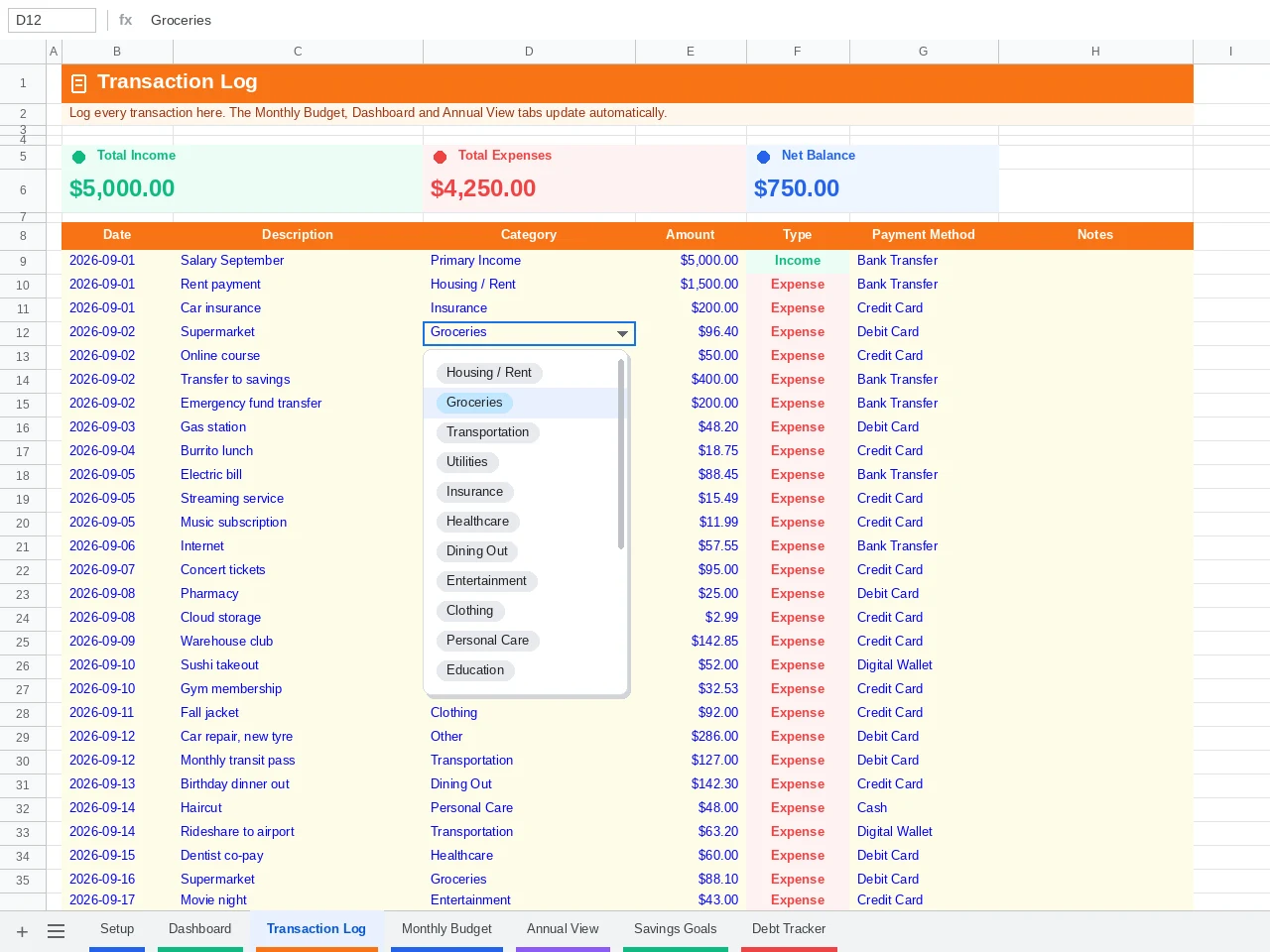
Why dropdowns matter more than they look. A SUMIF formula treats “Groceries” and “groceries ” (with a trailing space) as two different categories. Dropdowns make that typo impossible, so your Dashboard totals always match your log.
Read the Dashboard Once a Week
Open 📊 Dashboard. Total Income, Total Expenses, Net Savings and Savings Rate update the moment you log a row, and every category shows ✅ OK or ⚠️ Over. The tab opens on the current month, and the year and month dropdowns in cells E3 and F3 switch it to any earlier month.
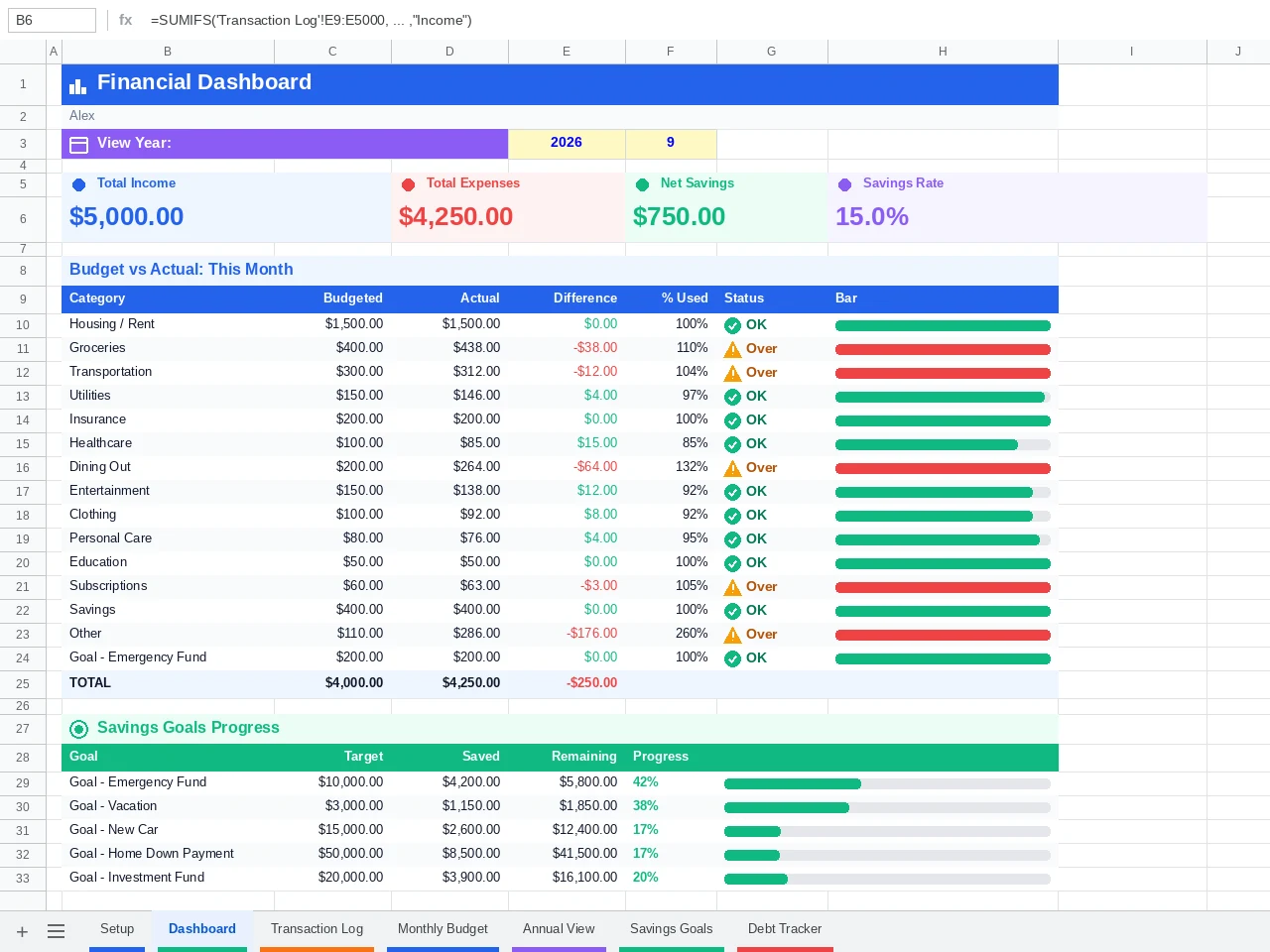
Free Google Sheets Budget Template Dashboard and Monthly Budget Tab
Check the Dashboard to see whether you’re on track this month. When a category turns red, open the Monthly Budget tab to see where that money went, and since both tabs read the same Transaction Log, their numbers always match. It’s the monthly budget template Google Sheets users usually end up building by hand after their third reset.
Why This Monthly Budget Template Google Sheets Setup Never Needs a Reset
A typical monthly budget template Google Sheets download covers one month per copy. Google’s own Monthly Budget template in the Sheets gallery works that way, with two tabs (Summary and Transactions) and no built-in way to compare months without copying the file.
After a year, your history is scattered across 12 documents. This layout filters one continuous log by date instead, so September’s tab and next March’s tab are the same tab reading different rows.
That’s also why the Google Sheets monthly budget view here never needs a copy-paste ritual on the 1st. The tab opens on the current month by itself, and the dropdowns in cells E3 and F3 pull up any earlier month from the same log.
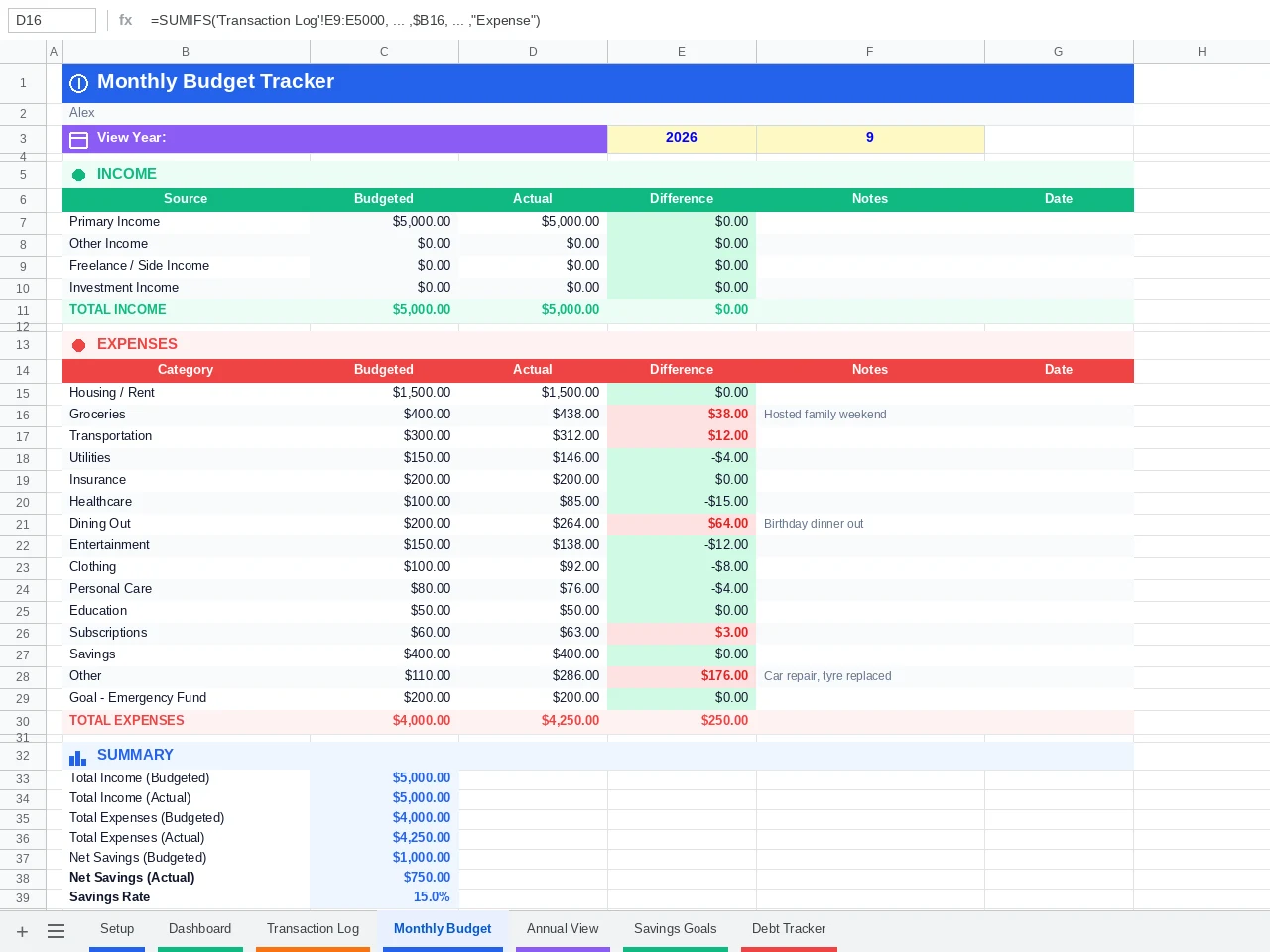
In the September sample above, take-home pay is $5,000 and logged expenses are $4,250, so net savings is $750 and the savings rate is 15%. The tab calculates it as net savings divided by total income, which means a bonus month raises the rate without you touching a formula.
| Metric | How the Tab Calculates It | Example Month |
|---|---|---|
| Total Income | Sum of Income-type rows for the month | $5,000 |
| Total Expenses | Sum of Expense-type rows for the month | $4,250 |
| Net Savings | Income minus expenses | $750 |
| Savings Rate | Net savings ÷ income | 15% |
| Category Status | Actual vs budget per category | ✅ Utilities $146 of $150 |
Free Google Sheets Budget Template Annual View: Any Year From One Cell
Most people who start a budget never look at a full year of it, and that’s where the useful patterns live. The Annual View pulls straight from your Transaction Log, filtered by the year you pick, with zero manual input.
Pick a Year in Cell E2
Open 📅 Annual View and click cell E2. Choose any year from 2020 to 2035 and all 12 months rebuild in about a second, covering 4 income sources, 15 expense categories, net savings and savings rate.
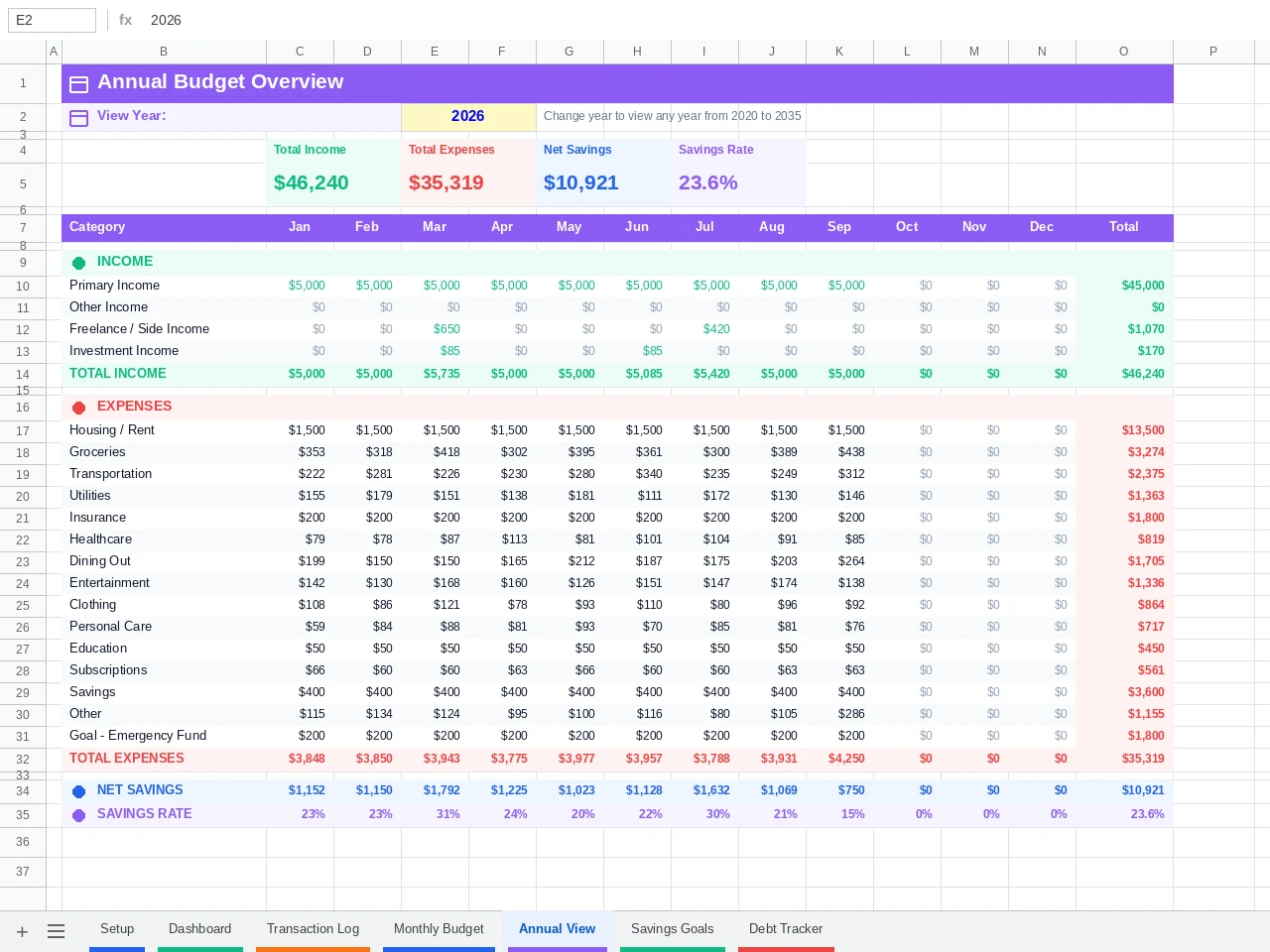
How the auto-pull works. Each cell uses SUMIFS to match the category and type and keep only dates inside that month of the year in E2, for example =SUMIFS(Amount, Date, ">="&DATE($E$2,1,1), Date, "<="&EOMONTH(DATE($E$2,1,1),0), Category, $B10, Type, "Income"). All 228 data cells in the Annual View (19 categories × 12 months) rebuild from that one E2 selector.
What to Look For in an Annual Budget Template Google Sheets View
Open the Annual View once a quarter and check two numbers. First, find your 2 highest-spend months. They’re rarely random, and they usually line up with the holidays or an annual insurance renewal.
Second, compare each category’s 12-month total against 12 times its monthly budget. A category that runs $30 over every single month looks harmless on the Dashboard and adds up to $360 a year here. That gap is the most honest signal an annual budget template Google Sheets view gives you, and a monthly screen hides it.
Spending history isn’t the same as wealth. The Annual View shows where money went, not what you own. The free net worth tracker Google Sheets template covers assets and liabilities, and the pair gives you both halves of the picture.
Debt Payoff Inside the Free Google Sheets Budget Template
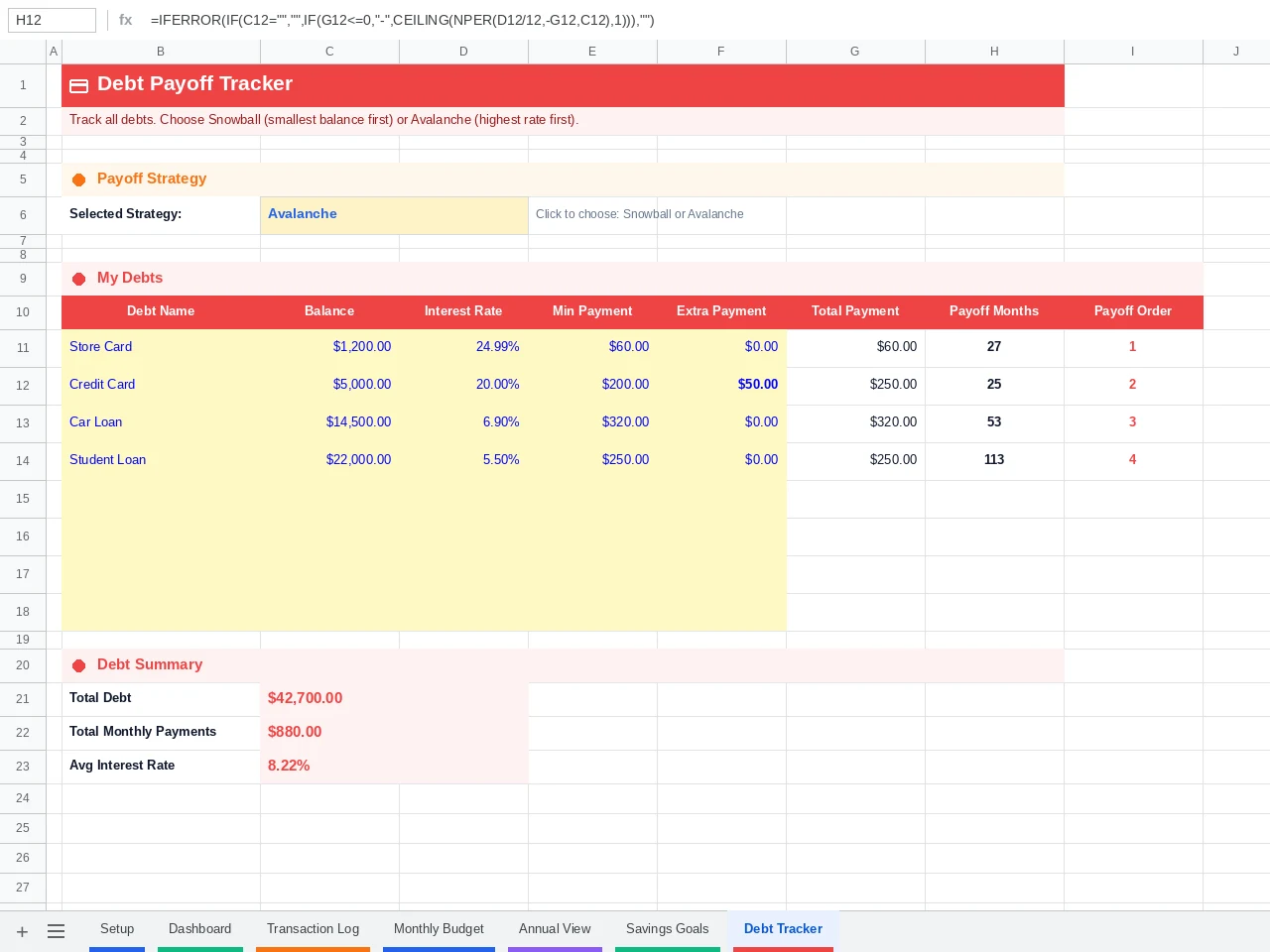
The 💳 Debt Tracker tab handles up to 8 debts. Enter each balance, APR and minimum payment, choose Snowball or Avalanche, and the NPER formula returns the months left on each one. That makes this a budget and debt tracker Google Sheets users can run in a single file.
| Strategy | Order of Attack | Best For |
|---|---|---|
| Snowball | Smallest balance first | People who need an early win to keep going |
| Avalanche | Highest APR first | People focused on paying the least total interest |
Avalanche always costs less interest on paper. Snowball clears a whole account sooner, and a closed account is easier to stay motivated by than a slightly smaller number. Pick the one you’ll still follow in month nine.
Run a single card through the tab’s NPER logic. A $5,000 balance at 20% APR paid at $200 a month takes 33 payments and about $1,520 in interest. Raise the payment to $250 and it drops to 25 payments and roughly $1,130 in interest, which saves about $390 and 8 months.
For a month-by-month schedule that models both strategies side by side, use the free debt payoff calculator Google Sheets template. It goes much deeper than the tracker tab here.
Free Google Sheets Budget Template vs Budgeting Apps: The Truth
This is the question that comes up in almost every Reddit thread about spreadsheets. Apps save you typing. That’s worth real money if you run several cards and a joint account, and close to nothing if you have one checking account and one card.
| Factor | Free Google Sheets Budget Template | Typical Paid Budgeting App |
|---|---|---|
| 3-year cost | $0 | $327 at YNAB’s $109 annual rate, or $539.64 paying $14.99 monthly |
| Transaction entry | Manual, about 10 minutes a week | Auto-imported from bank feeds, then reviewed |
| Bank credentials | Never shared | Usually connected through an aggregator such as Plaid |
| If the company shuts down | The file stays in your Drive | Depends on the provider (Mint users had to migrate in 2024) |
| Customization | Rename, restructure or add formulas freely | Limited to the app’s built-in options |
| Partner sharing | Share → Editor, free | Varies (YNAB covers up to 6 people per subscription) |
| Offline access | Download as .xlsx | Usually needs an internet connection |
App prices change. The YNAB figures above come from YNAB’s pricing page (US pricing, checked September 2026, plus tax where applicable).
Ten minutes a week is about 8.7 hours a year, and that’s the true price of a Google Sheets budget spreadsheet. For many people it’s worth paying because typing each transaction is what makes the spending visible.
When a Budget Tracker Google Sheets Setup Loses to an App
A budget tracker Google Sheets file isn’t the right tool for everyone. My rule of thumb is to pick an app if you log more than about 150 transactions a month across 4 or more accounts. At that volume, manual entry stops taking 10 minutes and starts taking an hour.
An app is also the better choice if you’ve already abandoned manual logging twice, or if two people spend from shared accounts and only one of them will ever open a spreadsheet. In both cases the sheet tends to go quiet by the third month, and an app you actually open is worth its subscription.
Everyone else, meaning most single-income households and couples with one or two cards, will likely get more from a spreadsheet. For a longer head-to-head, read the Google budgeting app comparison, which tests the trade-offs feature by feature.
Is a Google Sheets Budget Spreadsheet Safer Than a Budgeting App?
A Google Sheets budget spreadsheet still carries risk, and almost all of it sits in your Google account. You never hand bank logins to a third party, so a weak Google password becomes the main way in. Turn on 2-Step Verification for that account before you enter a single real transaction.
Sharing is the other gap. Always share the file with a specific email address as Editor, and never switch the link setting to “Anyone with the link.” With that setting on, anyone who gets hold of the URL can open your spending history.
Still weighing up apps? FinCompareLab has tested the best free budgeting apps of 2026 hands-on, including which ones are genuinely free and which are free trials that auto-renew.
7 Rules for Keeping Your Free Google Sheets Budget Template Running
Most budgets stall between week 3 and week 8, usually after a missed logging day or the first month that goes red. These rules target those moments, so your budget tracker Google Sheets file is still running at month 12.
1. Log weekly on a fixed day
Pick one slot, such as Sunday evening, and log the whole week in about 10 minutes. Daily logging sounds more disciplined but breaks the first time you travel. If you struggle to make any routine stick, the free habit tracker Google Sheets template can track the logging habit itself.
2. Use the catch-up rule after a missed fortnight
Missed two weeks? Don’t backfill every coffee. Open your bank statement, total each category for the gap, and enter one row per category with a note saying “catch-up.” Your monthly totals stay accurate, and you’re back on track in 5 minutes instead of an hour.
3. Budget irregular income against your lowest month
If your pay varies, set Monthly Income in Setup to your lowest month from the last 6. Anything above that is surplus you assign on purpose. Freelancers can track what’s owed with the free freelance invoice tracker Google Sheets template and see the months ahead with the cash flow forecast template.
4. Rename “Other” to something specific
“Other” hides your most revealing spending. Rename it in Setup to “Pet Costs,” “Kids’ Activities” or whatever actually fits your life. The new name flows to the Transaction Log dropdown, Dashboard, Monthly Budget and Annual View at once.
5. Turn annual bills into a monthly line
Car registration, insurance and yearly subscriptions wreck the month they land in. Rename a spare category to “Annual Bills” and budget 1/12 of the yearly total. If those bills add up to $1,440 a year, budget $120 a month and let the balance build.
6. Add even a small extra debt payment
Enter an extra amount in the Debt Tracker and watch the payoff months drop. The $5,000 example above shows $50 extra a month cutting 8 months and about $390 of interest. Test a few amounts before you commit, since the tab recalculates instantly.
7. Check the Annual View every quarter
Don’t wait until December. A quarterly look at the Annual View catches slow creep, such as a streaming bill that quietly doubled, while there’s still time to fix the year. Switch E2 to the new year on January 1 and your old data stays one click away.
Saving toward a big home purchase? Once your savings goals are on track, research before you spend. HomeApplianceOwl’s kitchen appliance buying guides cut through the marketing noise with honest hands-on reviews, which helps before any large purchase.
Budget sorted and ready for the full picture? The Personal Finance OS Google Sheets template combines budgeting, net worth, debt payoff and investments in one connected system. It’s the natural next step once this template has your monthly habit locked in.
⭐ Upgrade to Budget Tracker Pro
15 tabs, 1,425 formulas, AI auto-categorization and a FIRE calculator. One-time payment, yours to keep.
✓ AI Auto-Categorization (Google Gemini)
✓ Bill Payment Calendar
✓ Net Worth and Investment Tracker
✓ FIRE Calculator and Financial Health Score
✓ AI Monthly Audit Reports
15% off, applied automatically at checkout. There’s no code to enter because the discount applies when you click the button below. Effective price: $8.42.
Get Budget Tracker Pro, $9.90 →
| Feature | Free, $0 | Pro, $9.90 |
|---|---|---|
| 7-tab budget system | ✓ | ✓ |
| Dropdown categories | ✓ | ✓ |
| Transaction Log feeding every tab | ✓ | ✓ |
| Dashboard and KPI cards | ✓ | ✓ |
| Savings Goals with progress bars | ✓ | ✓ |
| Debt Tracker (Snowball / Avalanche) | ✓ | ✓ |
| Annual View for any year | ✓ | ✓ |
| Bank CSV Import | ✗ | ✓ |
| AI Auto-Categorization (Google Gemini) | ✗ | ✓ |
| Bill Payment Calendar | ✗ | ✓ |
| Net Worth Tracker | ✗ | ✓ |
| Investment Portfolio Tracker | ✗ | ✓ |
| FIRE Calculator | ✗ | ✓ |
| Spending Insights | ✗ | ✓ |
| Financial Health Score | ✗ | ✓ |
| AI Financial Audit Reports | ✗ | ✓ |
📥 Download the Free Google Sheets Budget Template
Copy it to your Google Drive in 30 seconds. No sign-up and no formulas to write.
✓ 595 auto-calculated formulas
✓ 19 dropdown categories
✓ Annual view for any year
✓ Free, no sign-up
Free Google Sheets Budget Template: People Also Ask
What is the best free Google Sheets budget template?
The best free Google Sheets budget template runs every report from one transaction log, so you log once and each tab updates. This one has 7 tabs, 595 formulas, 19 dropdown categories, Snowball and Avalanche debt payoff, and a 12-month annual view.
- One data source keeps every tab consistent with the log
- Dropdown categories prevent the typos that break SUMIF totals
- An annual view means no new file each month
- No bank connection is needed at any point
Is a Google Sheets budget better than a budgeting app?
A free Google Sheets budget template is better if you want zero cost and no bank connection, and you’ll spend about 10 minutes a week logging. An app is better if you have over roughly 150 transactions a month or won’t log manually.
| Choose the Spreadsheet If | Choose an App If |
|---|---|
| You have 1 or 2 cards and a checking account | You have 4 or more accounts with heavy activity |
| You want to avoid a yearly subscription | Automation is worth the subscription to you |
| You’d rather not share bank logins | You’re comfortable linking accounts through an aggregator |
How do I make a monthly budget in Google Sheets?
If you’re working out how to make a budget in Google Sheets month by month, copy the free Google Sheets budget template, enter income and category budgets in Setup, then log each transaction in the Transaction Log. The Monthly Budget tab compares planned vs actual automatically.
- Use a 90-day average of real spending for first budget amounts
- Log once a week on a fixed day
- Let the tab roll over on the 1st, since it opens on the current month
Do I need to pay for Google Sheets to use the free Google Sheets budget template?
No, the free Google Sheets budget template only needs a free Google account. Google Sheets itself costs nothing, and the file works on phones, tablets and desktop browsers.
Can I rename categories in the free Google Sheets budget template?
Yes, the free Google Sheets budget template lets you rename any category in the yellow cells of the Setup tab. The new name appears in the dropdown and updates the Dashboard, Monthly Budget and Annual View at the same time.
How does the free Google Sheets budget template Annual View know which year to show?
The free Google Sheets budget template Annual View reads the year from cell E2. Every data cell uses a SUMIFS formula that filters your Transaction Log by date range, category and type, so changing E2 updates all 228 cells.
Can I share the free Google Sheets budget template with my partner?
Yes, you can share the free Google Sheets budget template by clicking Share, entering your partner’s email and choosing Editor. You can both log transactions at the same time and see each other’s entries live.
Is my financial data private in the free Google Sheets budget template?
Your data in the free Google Sheets budget template stays in your own Google Drive, and nobody sees it unless you share it. Turn on 2-Step Verification for your Google account and share with specific people, never with “Anyone with the link.”
Does the free Google Sheets budget template work for freelancers?
The free Google Sheets budget template handles personal monthly budgets, including variable income. For deductible business costs and tax categories, the free freelance expense tracker Google Sheets template is the better fit, and many freelancers run both.
Does the free Google Sheets budget template work with irregular income?
Yes, the free Google Sheets budget template works with irregular income if you budget against your lowest recent month. If income ranges from $3,000 to $5,000, set Monthly Income to $3,000 and assign anything above that deliberately. If you’re between jobs, the free job search tracker Google Sheets template helps you run the search alongside a tighter budget.
Can I import bank transactions into the free Google Sheets budget template?
No, the free Google Sheets budget template uses manual entry through the dropdown-based Transaction Log, which most people finish in 5 to 10 minutes a week. Bank CSV import with AI categorization is a Budget Tracker Pro feature.
Can I download the free Google Sheets budget template as an Excel file?
Yes, you can download your copy of the free Google Sheets budget template via File → Download → Microsoft Excel (.xlsx). Formulas, dropdowns and formatting transfer, and the template uses no Sheets-only functions such as GOOGLEFINANCE.
Does the free Google Sheets budget template support the 50/30/20 rule?
Yes, the free Google Sheets budget template works as a 50 30 20 budget template Google Sheets users can set up in one step. Group your expense categories into needs (50% of take-home pay), wants (30%) and savings plus debt (20%) in Setup, then watch the savings rate card for the 20% target.
How many categories does the free Google Sheets budget template support?
The free Google Sheets budget template tracks 19 categories, made up of 15 expense categories you budget in Setup and 4 income sources (Primary, Other, Freelance / Side and Investment Income). Budget Tracker Pro keeps the same 15 expense categories and adds a contribution category for each remaining savings goal, so all 5 goals track straight from the log.
What does Pro add to the free Google Sheets budget template?
The free Google Sheets budget template covers what most households need across 7 tabs. Budget Tracker Pro ($9.90 one-time) adds bank CSV import with AI categorization, a bill calendar, net worth and investment tracking, a FIRE calculator, a Financial Health Score and AI monthly audit reports.
Prefer Notion to spreadsheets? The Notion budget tracker template follows the same log-once approach inside a Notion workspace.